
Introduction
Thank you for choosing the GAN XIN Gym Timer Clock. This multifunctional digital timer is designed to enhance your workout experience with versatile timing functions, a clear display, and user-friendly controls. This manual provides detailed instructions for setup, operation, and maintenance to ensure optimal performance and longevity of your device.
What's Included
Before you begin, please verify that all components are present in the package:
- GAN XIN Gym Timer Clock (Model GC-1.5T6RGB-100Bat)
- Remote Control
- Wired Push Button
- Power Adapter
- Mounting Screws
- User Manual (this document)
Video: What's in the box
This video demonstrates the unboxing process and shows all the components included with your GAN XIN Gym Timer Clock.
Setup
1. Powering the Device
The GAN XIN Gym Timer Clock can be powered via its included power adapter or through its internal battery (for battery-powered models). Connect the power adapter to the 'Charge port' on the side of the timer and plug it into a standard electrical outlet. Ensure the power switch is in the 'ON' position.
2. Connecting the Wired Push Button
Locate the USB port on the side of the timer. Connect the wired push button's USB cable to this port. The button is used for convenient start/stop/reset functions during workouts.
3. Mounting Options
The timer offers flexible placement options:
- Wall-Mounted: Use the provided screws to securely mount the timer on a wall. Ensure the mounting surface is stable.
- Tabletop Placement: The timer can also be placed on any flat, stable surface.

Image: Wall-mounted Timer
This image shows the GAN XIN Gym Timer Clock securely mounted on a wall, highlighting its compact design.
Video: How to install
This video provides a visual guide on how to install the GAN XIN Gym Timer Clock, including wall mounting and connecting the button.
Operating Instructions
1. Basic Functions Overview
The timer supports various modes accessible via the remote control:
- Time Clock (12/24H): Displays current time, switchable between 12-hour and 24-hour formats.
- Count Up/Down (HH:MM:SS): Standard stopwatch or countdown timer in hours, minutes, and seconds.
- Count Up/Down (MM:SS.ss): Stopwatch or countdown timer in minutes, seconds, and hundredths of a second, ideal for precise timing.
- Interval Timing Mode (P0-P9): Programmable modes for various workout types like EMOM, Tabata, HIIT, and FGB cycles.

Image: Multi-Function Digital Timer
This image illustrates the different display modes available on the timer, including time clock, count up/down, and interval timing.
Video: Gym Timer Function Overview
This video provides a comprehensive overview of the various functions and modes of the gym timer.
2. Using the Remote Control
The remote control is the primary interface for setting up and controlling the timer. Refer to the remote's button layout for specific functions:
- MODE: Cycles through different timing modes (Clock, Count Up, Count Down, Interval).
- SET: Enters setting mode for the current function.
- START/STOP: Initiates or pauses the timer.
- RESET: Resets the timer to its initial value.
- +/-: Adjusts values during setting mode.
- RGB: Cycles through 7 different display colors.
- BRIGHTNESS: Adjusts the display brightness (5 levels).

Image: Bright Large Display and Remote Control
This image highlights the timer's bright display and the remote control, showing its effective range of 30ft and visual distance of 40ft.
3. Using the Wired Push Button
The wired push button provides a convenient way to start, stop, and reset the timer without needing the remote control. This is particularly useful during active workouts.
- Single Press: Starts or pauses the timer.
- Long Press: Resets the timer to its initial value (functionality may vary by mode, refer to remote for full reset control).

Image: Wired Push Button
This image shows the wired push button connected to the timer, indicating its 200-inch cable length for flexible placement.
Video: Puzzle Challenge with Count up Timer
This video demonstrates the count-up timer function in a practical scenario, showcasing its responsiveness with the wired button.
4. Customizing Display Colors and Brightness
The timer features 7 RGB color options and 5 levels of brightness. Use the dedicated buttons on the remote control to adjust these settings to your preference for optimal visibility in any environment.
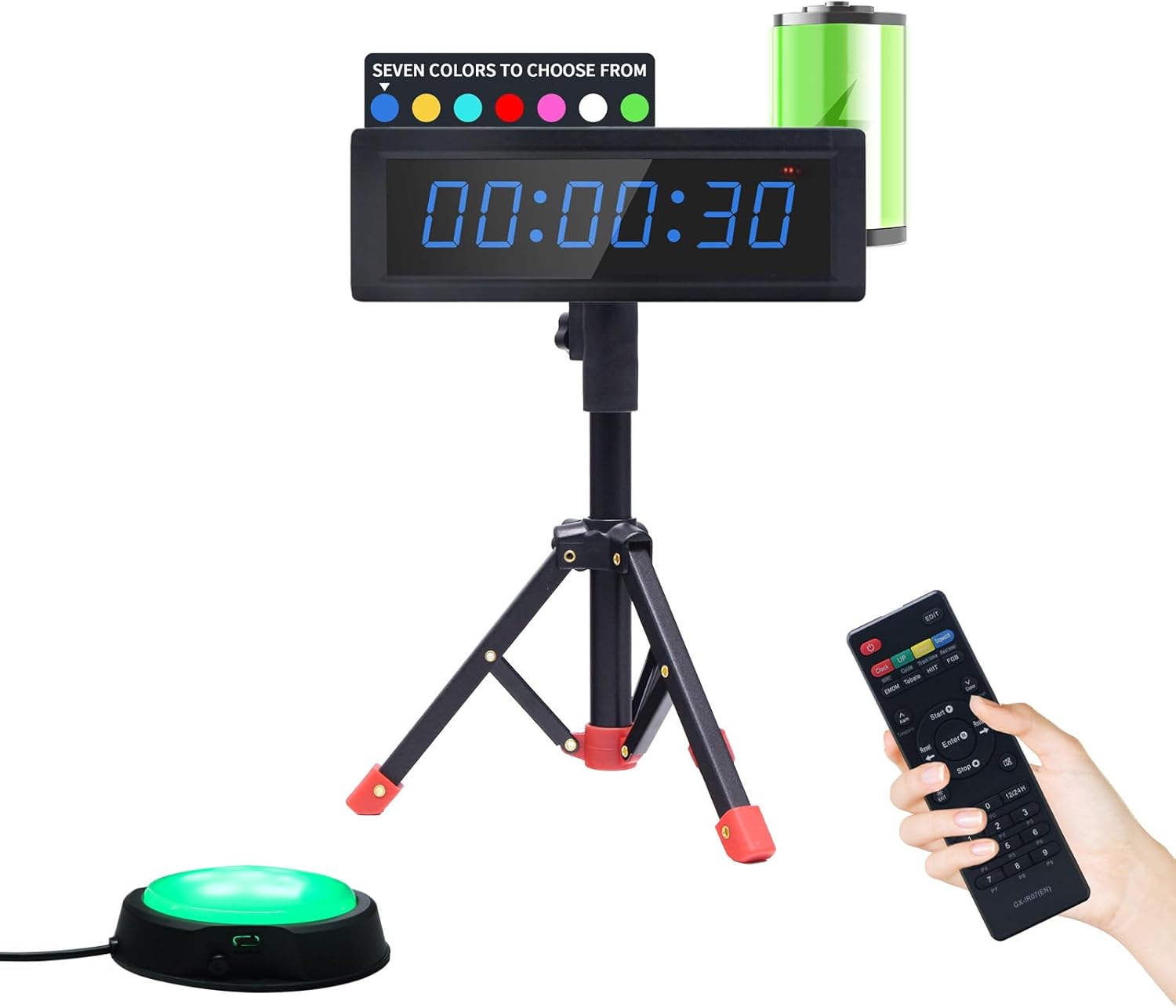
Image: 7 RGB Color Options
This image displays the timer in various RGB colors, illustrating the customization options available.
Maintenance
To ensure the longevity and proper functioning of your GAN XIN Gym Timer Clock, follow these maintenance guidelines:
- Cleaning: Wipe the timer's surface with a soft, dry cloth. Avoid using abrasive cleaners or solvents, as they may damage the display or casing.
- Storage: When not in use for extended periods, store the timer in a cool, dry place away from direct sunlight and extreme temperatures.
- Battery Care (if applicable): For battery-powered models, ensure the battery is charged regularly to maintain its health. If storing for a long time, charge it to about 50% capacity.
- Cable Inspection: Periodically check the power adapter and wired button cables for any signs of wear or damage. Replace if necessary.
Troubleshooting
If you encounter any issues with your GAN XIN Gym Timer Clock, please refer to the following common troubleshooting steps:
- Timer Not Powering On:
- Ensure the power adapter is securely connected to both the timer and a working electrical outlet.
- Check if the power switch on the side of the timer is in the 'ON' position.
- If using a battery-powered model, ensure the battery is charged.
- Remote Control Not Responding:
- Verify that the remote control has working batteries and they are inserted correctly.
- Ensure there are no obstructions between the remote control and the timer's infrared receiver.
- Try operating the remote closer to the timer.
- Display Issues (e.g., dim, flickering):
- Adjust the brightness setting using the remote control.
- Ensure the timer is not exposed to extreme temperatures.
- Wired Push Button Not Working:
- Ensure the USB cable of the push button is firmly connected to the timer's USB port.
- Check the cable for any visible damage.
If these steps do not resolve the issue, please contact GAN XIN customer support for further assistance.
Specifications
| Feature | Specification |
|---|---|
| Brand | GAN XIN |
| Model Number | GC-1.5T6RGB-100Bat |
| Color | RGB (7 selectable colors) |
| Material | Aluminum |
| Product Dimensions | 1"D x 10.4"W x 3.5"H |
| Item Weight | 2.18 pounds (0.99 Kilograms) |
| Screen Size | 11.6 Inches |
| Power Source | 1 Nonstandard Battery (included) / Plug-in (adapter included) |
| Display Brightness | 5 adjustable levels |
| Remote Control Range | Up to 30ft |
| Wired Button Cable Length | 200 inches |
Warranty and Support
For warranty information or technical support, please refer to the contact details provided with your purchase or visit the official GAN XIN website. Keep your purchase receipt as proof of purchase for any warranty claims.