Introduction
This manual provides detailed instructions for the installation, operation, and maintenance of your EZVALO 12-inch Rechargeable Motion Sensor Under Cabinet Lights. Designed for convenience and efficiency, these lights feature smart motion sensing, adjustable color temperatures, and dimming capabilities, making them ideal for various indoor spaces such as kitchens, closets, and hallways.
What's in the Box
- 6 x EZVALO 12-inch Under Cabinet Lights
- 12 x Adhesive Iron Sheets
- 2 x USB-C Charging Cables
- 1 x Instruction Manual
Key Features
- Smart Motion Sensor: Detects motion within a 120° angle and up to 10 feet, automatically turning off after 20 seconds of no motion.
- Rechargeable Battery: Equipped with a 2500mAh battery, offering up to 7.5 hours in Always-On Mode or 10-30 days in Auto Mode. Features a 4-level LED battery indicator for easy power monitoring.
- Adjustable Color Temperatures: Choose from Warm White (3000K), Natural White (4500K), and Cool White (6500K).
- Stepless Dimming: Adjust brightness from 10% to 100% to suit your needs.
- Four Lighting Modes: Includes Always-On, All-Day Motion, Night Motion, and Always-Off modes.
- Easy Magnetic Installation: No wiring or drilling required. Lights can be adsorbed directly onto iron surfaces or attached to non-metal surfaces using the included adhesive iron plates.
Setup and Installation
The EZVALO under cabinet lights are designed for quick and easy installation without the need for tools or complex wiring.
Installation Methods
- For Iron Surfaces: The lights have built-in magnets and can be directly attached to any iron surface.
- For Non-Metal Surfaces:

Image: A diagram illustrating the three steps for installing the lights on non-metal surfaces using adhesive iron plates. Step 1: Remove the adhesive film from the iron plate. Step 2: Place the iron sheet on the desired position. Step 3: Place the light on the iron sheet.
- Clean the desired installation area thoroughly to ensure it is dry and free of dust.
- Remove the protective film from one side of an adhesive iron sheet.
- Firmly press the adhesive side of the iron sheet onto the clean surface.
- Align the magnetic back of the light with the installed iron sheet and attach it.
Installation Tips
- Maintain a distance of more than 20 inches (50 cm) between individual lights to prevent interference with motion sensors.
- Avoid placing lights too close to the edge of a surface (e.g., less than 4 inches) to ensure optimal motion detection and light distribution.
- Do not install lights facing each other directly, as this can cause sensor interference.

Image: A diagram illustrating recommended distances and placements for multiple under cabinet lights to ensure proper motion sensor functionality.
Operating Instructions
Your EZVALO light features a toggle switch for mode selection and a physical button for color temperature and brightness adjustments.
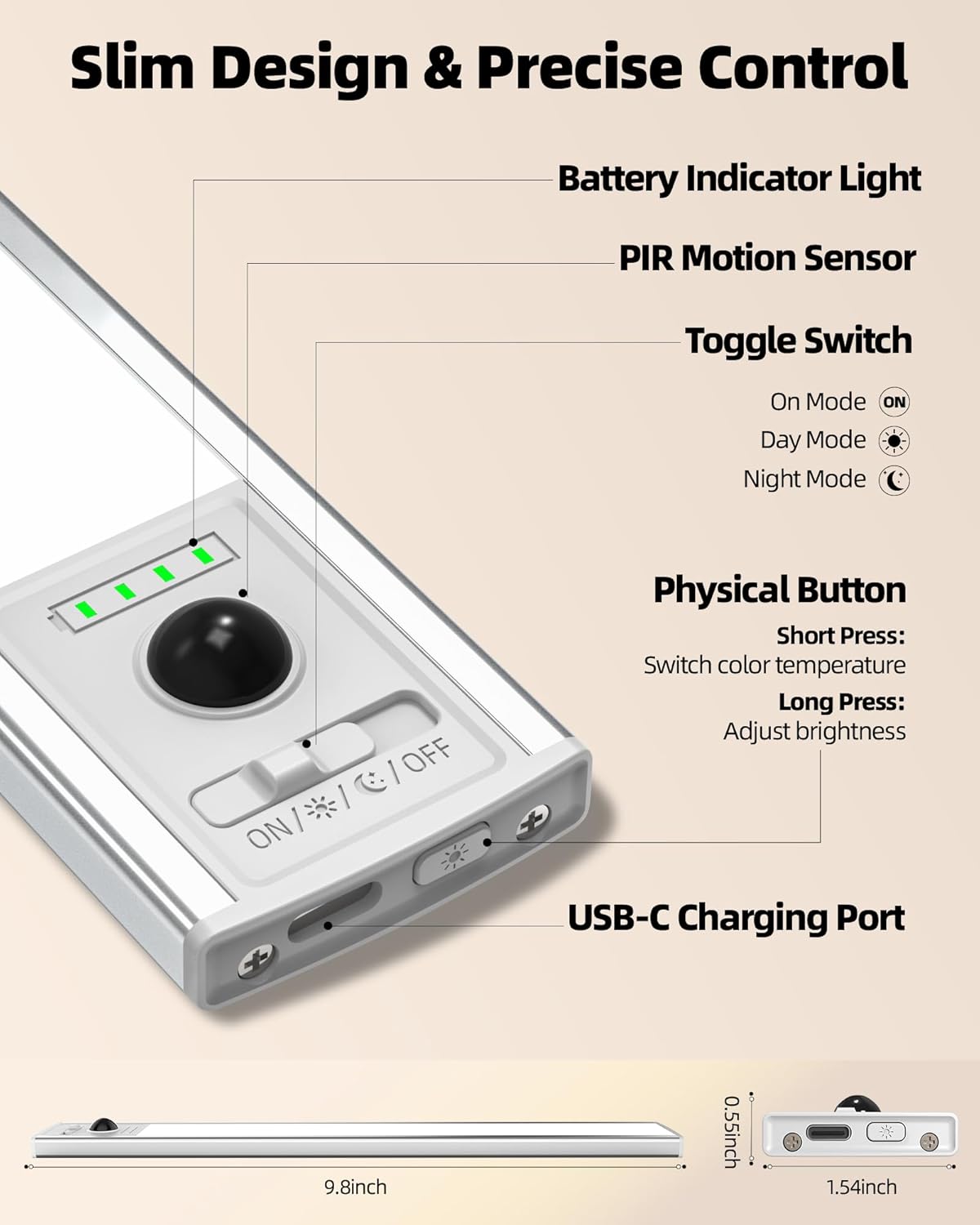
Image: A detailed view of the light's control panel, highlighting the battery indicator, PIR motion sensor, toggle switch (ON/DAY/NIGHT/OFF), physical button for color/brightness, and USB-C charging port.
Mode Selection (Toggle Switch)
- Always-On Mode (ON): The light provides continuous illumination until manually turned off or the battery runs out.
- All-Day Motion Mode (DAY): The light activates automatically whenever motion is detected, regardless of ambient light conditions.
- Night Motion Mode (NIGHT): The light activates automatically only when motion is detected in a dark environment.
- Always-Off Mode (OFF): The light remains off.

Image: Visual representation of the three main operating modes: Always On (continuous light), Day Mode (motion-activated anytime), and Night Mode (motion-activated in darkness).
Color Temperature & Brightness Adjustment (Physical Button)
- Change Color Temperature: Short press the physical button to cycle through Warm White (3000K), Natural White (4500K), and Cool White (6500K).
- Adjust Brightness: Long press the physical button to activate stepless dimming. The brightness will cycle between 10% and 100%. Release the button when the desired brightness is reached.

Image: Demonstrates the three adjustable color temperatures (3000K, 4500K, 6500K) and the stepless dimming range from 10% to 100% brightness.
Charging
The EZVALO lights are equipped with a 2500mAh rechargeable battery. Use the provided USB-C charging cables to recharge the lights.
- Connect the USB-C end of the charging cable to the light's charging port.
- Connect the USB-A end to a compatible USB power adapter (not included).
- The 4-level LED indicator will show the charging progress. Each light represents approximately 25% of the battery capacity.
- All four indicator lights will turn solid green when fully charged.
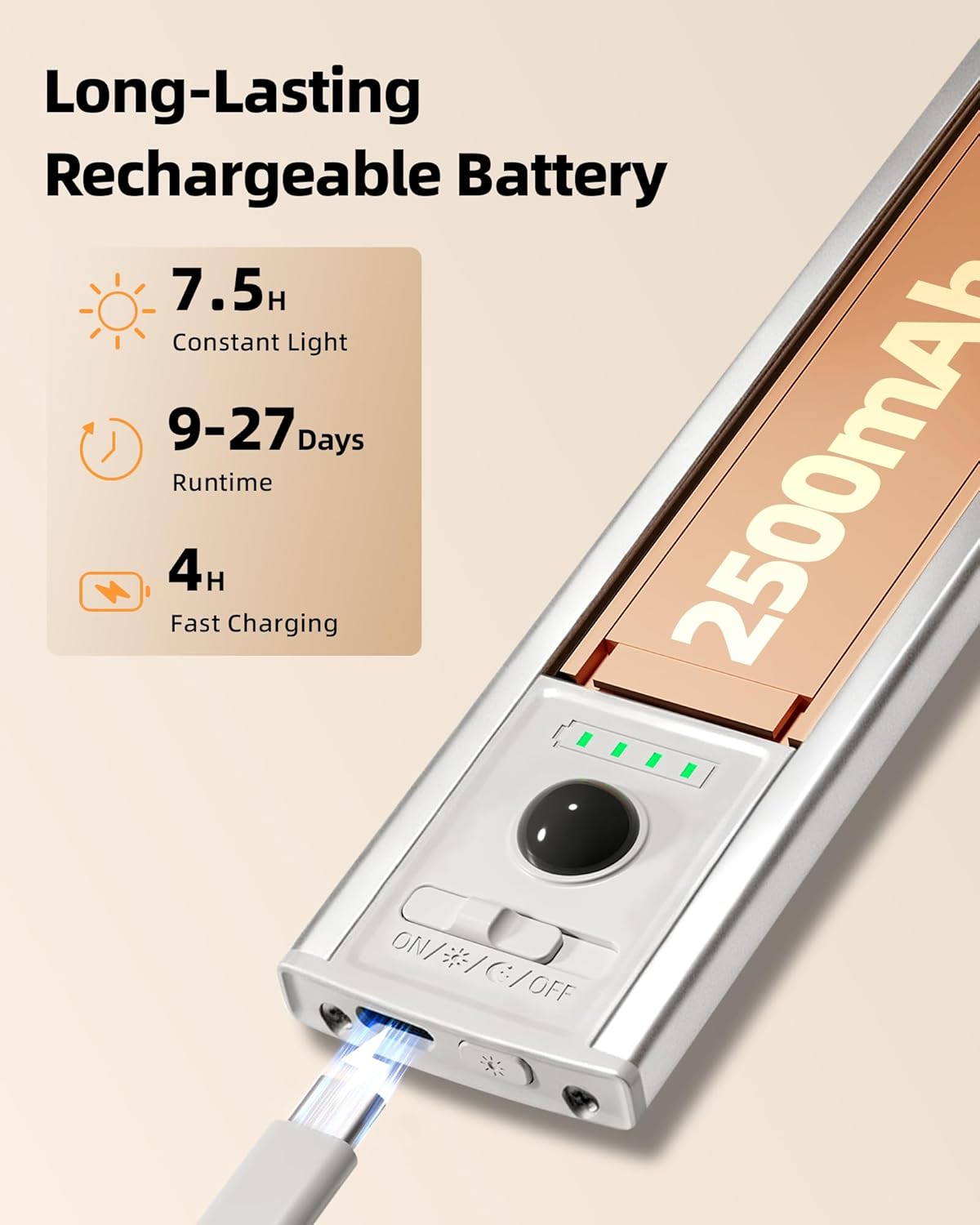
Image: A close-up of the EZVALO light showing the USB-C charging port in use and the battery indicator lights.

Image: Several EZVALO lights laid out and connected to USB-C charging cables, demonstrating simultaneous charging.
Maintenance
- To clean the light, gently wipe it with a soft, dry cloth. Do not use abrasive cleaners or solvents.
- Ensure the charging port is free of dust and debris before charging.
- Store the lights in a cool, dry place when not in use for extended periods.
Troubleshooting
- Light not turning on: Ensure the light is fully charged. Check the mode switch to confirm it's not in 'OFF' mode.
- Motion sensor not working: Verify the light is in 'DAY' or 'NIGHT' motion mode. Ensure there are no obstructions blocking the sensor. Check that the lights are not placed too close to each other or to the edge of a surface, which can interfere with detection.
- Battery draining quickly: In 'Always-On' mode, battery life is shorter. Consider using 'DAY' or 'NIGHT' motion modes for extended battery life. Ensure the light is fully charged before use.
- Light flickering: This may indicate a low battery. Recharge the light.
Specifications
| Feature | Detail |
|---|---|
| Brand | EZVALO |
| Model Name | EZL2432A |
| Size | 12 inch |
| Material | Acrylonitrile Butadiene Styrene, Aluminum |
| Power Source | Battery Powered |
| Battery Capacity | 2500mAh |
| Light Source Type | LED |
| Brightness | 120 Lumen |
| Color Temperatures | Warm White (3000K), Natural White (4500K), Cool White (6500K) |
| Special Features | Adjustable Color Temperature, Battery Indicator, Dimmable, Motion Sensor, Portable |
| Installation Type | Magnetic |
| Indoor/Outdoor Usage | Indoor |
| Product Dimensions | 11.8"L x 1.54"W x 0.55"H |
| Item Weight | 5.3 ounces |
Warranty & Support
EZVALO offers a Lifetime Warranty on its Flagship Under Cabinet Lights. For any support needs or warranty claims, please refer to the contact information provided in your product packaging or visit the official EZVALO website.
Official Product Videos
EZVALO Indoor Rechargeable Motion Sensor Light Overview
Video: This video provides a concise overview of the EZVALO Indoor Rechargeable Motion Sensor Light, demonstrating its key features and functionality in various settings. It highlights the motion sensor, different lighting modes, and ease of installation.
EZVALO Under Cabinet Lights with Battery Indicator
Video: This video focuses on the battery indicator feature of the EZVALO Under Cabinet Lights, showing how the 4-level LED display provides real-time battery status and charging progress.


