
Introduction
This manual provides comprehensive instructions for the assembly, operation, and maintenance of your MULEJYBO HBN896A1 Large Record Player Stand. Please read this manual thoroughly before assembly and use to ensure proper setup and safe operation.

Image: The MULEJYBO HBN896A1 Large Record Player Stand, showcasing its design and storage capabilities for a record player and vinyl albums.
Safety Information
- Ensure all components are securely fastened before use.
- Do not overload the stand beyond its recommended weight capacity.
- Keep small parts away from children during assembly.
- Place the stand on a stable, level surface to prevent tipping.
- Avoid exposing the stand to excessive moisture or direct sunlight.
- Use only the provided hardware for assembly.
Package Contents
Please verify that all parts are present and undamaged before beginning assembly. Refer to the included parts list for detailed identification.
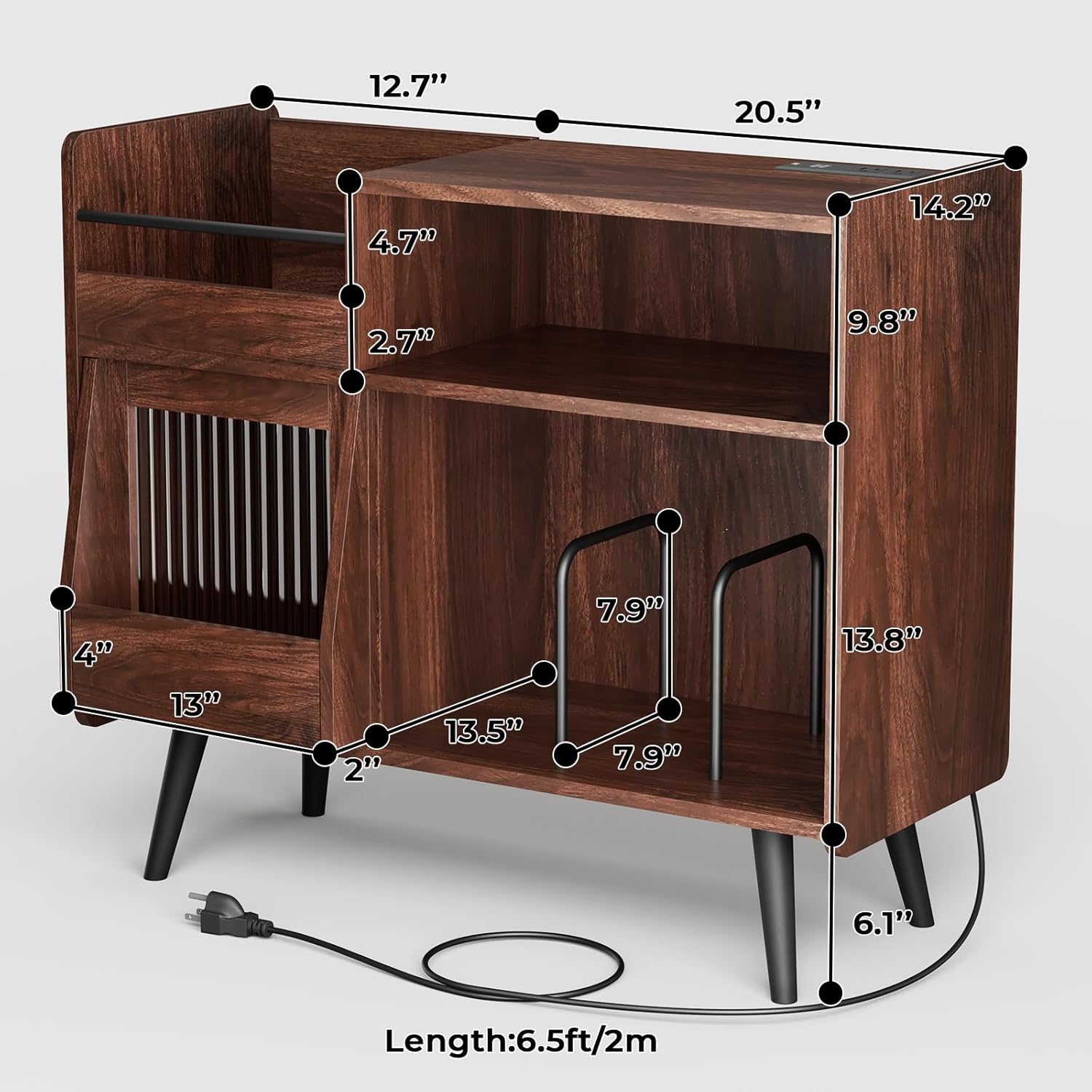
Image: An exploded diagram illustrating all individual components and their respective dimensions for the record player stand.
Assembly Instructions
Follow these step-by-step instructions carefully. It is recommended to have a second person assist with assembly for stability and ease.
Video Guide: Record Player Stand Installation
Video: A detailed video guide demonstrating the assembly process for the record player stand. This video covers all steps from unpacking to final setup.
Alternative Video Guide: Record Player Stand Installation
Video: An additional video guide providing visual instructions for assembling the record player stand, offering another perspective on the installation process.
General Assembly Tips:
- Identify all parts and hardware before starting.
- Use a soft cloth or carpeted area to prevent scratching the wood surfaces during assembly.
- Do not overtighten screws to avoid damaging the wood.
- If any parts are missing or damaged, please contact customer support.
Operating Instructions
Power Outlet and USB Ports
The stand features 2 standard plug outlets and 2 USB ports (10W total output) for convenient power access. These are ideal for powering your record player, charging mobile devices, or connecting other small electronics.

Image: A detailed view of the integrated power outlets and USB charging ports located on the stand's surface.
LED Ambient Lighting
The integrated LED lighting offers 16 color options to enhance your listening experience. Control the lighting via the included remote or a compatible mobile application (if applicable, refer to product packaging for app details).

Image: The record player stand with its LED lights activated, showcasing the ambient lighting effect within the storage compartments.
Sliding Door Storage
The stand includes a sliding door for additional, discreet storage. This compartment is suitable for storing records, books, or other accessories, keeping them organized and out of sight.

Image: A close-up view of the sliding door mechanism, highlighting the extra storage space it provides for various items.
Vinyl Record Storage
The stand is designed to hold up to 350 vinyl albums across its various compartments. The internal partitions can be adjusted to accommodate different sizes of media or to create custom storage layouts.

Image: The record player stand filled with vinyl records and other items, demonstrating its large storage capacity and organizational features.
Maintenance
- Wipe surfaces with a soft, dry cloth.
- Avoid using harsh chemicals or abrasive cleaners.
- Periodically check all screws and connections to ensure they remain tight.
- Keep the stand away from direct heat sources and excessive humidity.
Troubleshooting
Assembly Difficulties
If you encounter issues during assembly, such as misaligned holes or difficulty fitting parts, double-check the instruction manual and video guides. Ensure you are using the correct hardware for each step. If problems persist, contact customer support.
LED Lights Not Working
Verify that the power cord is securely plugged into a working outlet and that the LED strip is properly connected to its power source. Check the remote control battery if using the remote.
Power Outlets/USB Ports Not Functioning
Ensure the main power cord for the stand is plugged into a live wall outlet. Test the outlets with a different device to confirm functionality. If issues persist, discontinue use and contact customer support.
Specifications
| Feature | Detail |
|---|---|
| Brand | MULEJYBO |
| Model Number | HBN896A1 |
| Material | Engineered Wood |
| Color | Brown |
| Item Weight | 22 kg |
| Parcel Dimensions | 98 x 43 x 16 cm |
| Special Features | Sliding Door, Power Outlet (2), USB Ports (2 x 10W), 16-Color LED Lighting |
| Vinyl Capacity | Up to 350 albums |
Warranty and Support
For warranty information, product support, or to report missing/damaged parts, please refer to the contact information provided with your purchase or visit the official MULEJYBO website. Our customer service team is available to assist you with any inquiries.