
WLIVE ACJ604
WLIVE ACJ604 Elevating Coffee Table User Manual
Model: ACJ604
1. Introduction
Thank you for choosing the WLIVE ACJ604 Elevating Coffee Table. This manual provides essential information for the safe assembly, operation, and maintenance of your new coffee table. Please read these instructions carefully before use and retain them for future reference.
The WLIVE ACJ604 is designed to enhance your living space with its adjustable height tabletop, integrated power outlets, and versatile storage solutions, offering both functionality and style.
2. Safety Information
- Ensure all components are securely fastened before use.
- Do not exceed the maximum load capacities specified in the 'Specifications' section.
- Keep hands and fingers clear of the elevating mechanism during adjustment to prevent pinching.
- Avoid placing hot items directly on the tabletop without protective coasters.
- Do not allow children to play on or around the table, especially with the elevating mechanism.
- Ensure the power cord for the integrated outlets is properly routed and not pinched or damaged.
3. Package Contents
Before beginning assembly, please verify that all parts are present and undamaged. Refer to the included assembly guide for a detailed list of components.
- WLIVE ACJ604 Coffee Table components
- Assembly Guide
- Assembly Tool (Wrench)
4. Setup and Assembly
Assembly of the WLIVE ACJ604 coffee table is required. Please follow the step-by-step instructions provided in the separate Assembly Guide included with your product. For optimal assembly, an electric screwdriver is recommended.

Figure 4.1: Product Dimensions and Load Capacities. This diagram illustrates the overall dimensions of the coffee table and indicates the maximum load capacity for the elevated tabletop (10 kg) and the main tabletop (30 kg).
The lifting mechanism utilizes cold-rolled steel plates for durability and a high-quality gas spring for smooth, quiet operation. Ensure all screws are tightened firmly to ensure stability.
5. Operating Instructions
5.1 Elevating Tabletop
The tabletop can be easily adjusted to a higher position for comfortable working or dining. To elevate, gently lift the front edge of the tabletop. The gas spring mechanism will assist in a smooth ascent. To lower, apply gentle downward pressure on the tabletop. The mechanism will automatically lock into position when released within 2-3 cm of the desired height.

Figure 5.1: Elevating Tabletop in Use. This image highlights the ergonomic benefits of the adjustable height feature, allowing users to maintain proper posture while working or dining.
5.2 Integrated Power Outlets
The coffee table is equipped with dual AC outlets and one USB charging port, supporting up to 1500W output. These are located on the side of the table for convenient access.

Figure 5.2: Integrated Power Outlets. This image displays the convenient charging options available on the side of the table, suitable for laptops, smartphones, and other electronic devices.
To use, simply plug your devices into the available AC outlets or USB port. Ensure the table is connected to a wall power source. A sliding dust cover protects the outlets when not in use.
5.3 Storage Features
The WLIVE ACJ604 offers a two-way storage design:
- Hidden Storage: A spacious compartment is located directly under the elevating tabletop (dimensions: 25.2 x 19.7 x 8.7 inches / 64 x 50 x 22 cm). This area is ideal for storing laptops, magazines, remote controls, and other items to keep your living space tidy.
- Open Shelves: Additional open shelves are provided for easy access to frequently used items or decorative displays. These shelves include removable dividers for flexible organization.
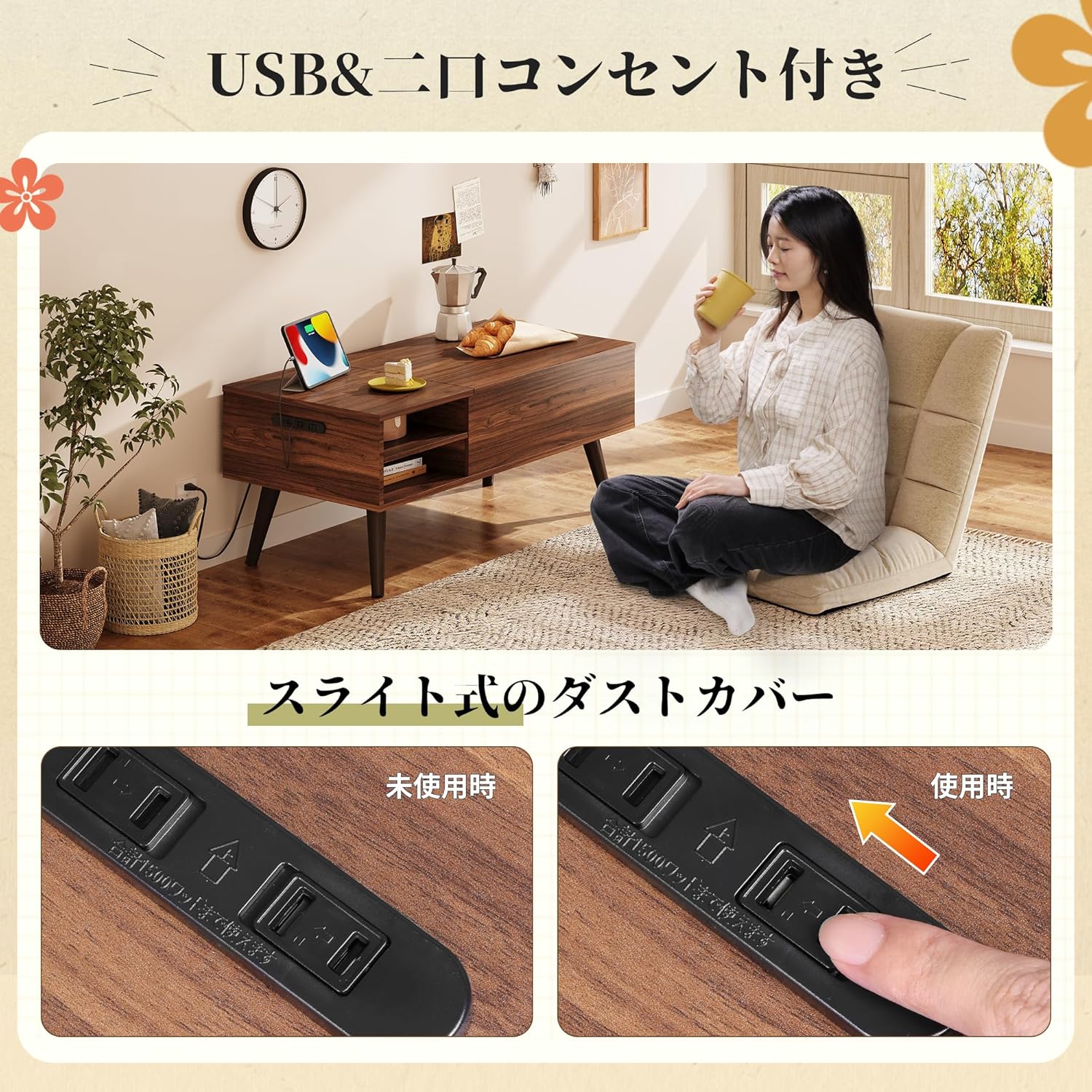
Figure 5.3: Two-Way Storage Design. This image illustrates the hidden storage space beneath the elevated tabletop and the accessible open shelves, demonstrating the table's organizational capabilities.
6. Maintenance
The tabletop is constructed from melamine material, which is resistant to water, abrasion, and scratches. To clean:
- Wipe spills immediately with a soft, damp cloth.
- For general cleaning, use a mild soap solution and a soft cloth. Avoid harsh chemicals or abrasive cleaners.
- Ensure the surface is dry after cleaning.
- Periodically check all fasteners and tighten if necessary to maintain stability.
7. Troubleshooting
- Tabletop not elevating smoothly: Check for any obstructions in the lifting mechanism. Ensure the gas spring is functioning correctly. If issues persist, contact customer support.
- Power outlets not working: Verify that the table's power cord is securely plugged into a functional wall outlet. Check for any tripped circuit breakers.
- Table feels wobbly: Re-tighten all assembly screws. Ensure the table is placed on a flat, even surface.
8. Specifications
| Feature | Detail |
|---|---|
| Model Number | ACJ604 |
| Brand | WLIVE |
| Product Dimensions (D x W x H) | 19.69" x 39.37" x 16.93" (50 x 100 x 43 cm) |
| Main Unit Weight | 32.0 lbs (18.44 kg) |
| Top Board Load Capacity (Static) | 66.2 lbs (30 kg) |
| Elevated Top Load Capacity | 22.0 lbs (10 kg) |
| Material Type | Melamine (Top Plate), Cold-rolled Steel Plate (Lifting Mechanism) |
| Power Outlets | 2 AC Outlets, 1 USB Port |
| Max Power Output | 1500W |
| Color | Braun |
9. Warranty and Support
For warranty information or technical support, please refer to the contact details provided with your purchase documentation or visit the official WLIVE website. Please have your model number (ACJ604) and purchase date available when contacting support.
Related documentsACJ604


Ask a question about this manual
Ask about setup, troubleshooting, compatibility, parts, safety, or missing instructions. Manuals+ will review the question and use this page’s manual context to help answer it.