1. Introduction
This manual provides comprehensive instructions for the safe and efficient operation, installation, and maintenance of your THINKKEEN Socket Fan Light with Remote. This innovative product combines a ceiling fan and a dimmable LED light bulb, designed for easy installation into standard light sockets without the need for complex wiring or tools. It features adjustable light color temperatures (3000K-6500K), three wind speeds, and convenient remote control operation with timing functions.
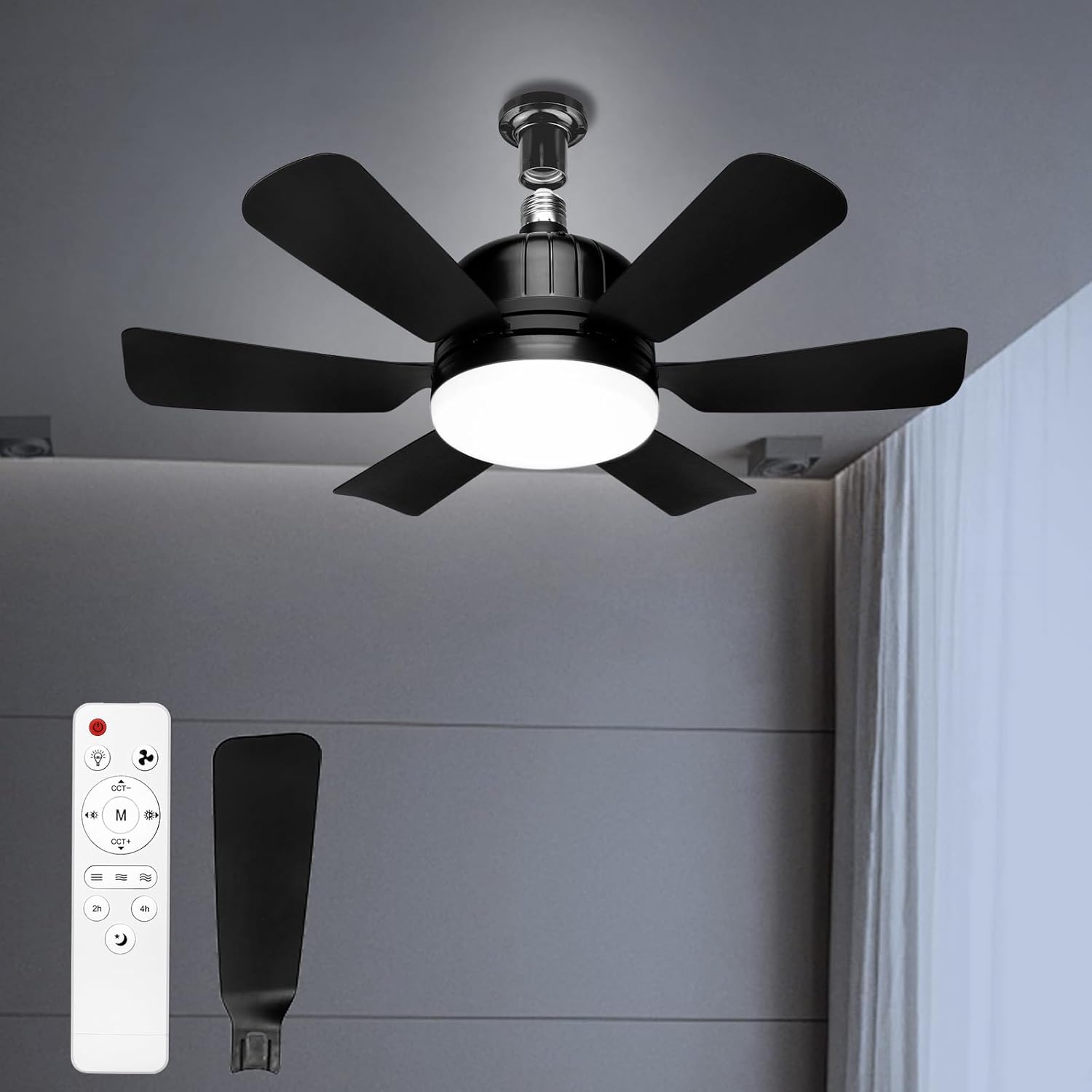
Figure 1.1: THINKKEEN Socket Fan Light with Remote.

Figure 1.2: Versatile application of the Socket Fan Light in different environments.
2. Safety Information
Please read all safety warnings and instructions carefully before installing or operating this product. Failure to follow these instructions may result in electric shock, fire, or serious injury.
- Ensure the power is turned off at the circuit breaker before installation or maintenance.
- This product is designed for indoor use only. Do not expose to water or high humidity.
- Do not insert fingers or any objects into the fan blades while the fan is operating.
- Ensure the light socket is rated for the product's power requirements.
- Do not attempt to disassemble or modify the product. Contact qualified personnel for repairs.
- Keep the remote control away from water and extreme temperatures.
3. Package Contents
Verify that all components are present and undamaged upon opening the package. If any parts are missing or damaged, please contact customer support.
- Socket Fan Light Unit (1)
- Remote Control (1)
- User Manual (1)
4. Setup and Installation
The THINKKEEN Socket Fan Light is designed for simple, tool-free installation into any standard E26/E27 light socket. No complex wiring is required.
- Turn off Power: Before installation, ensure the power to the light fixture is completely turned off at the circuit breaker to prevent electric shock.
- Screw into Socket: Carefully screw the Socket Fan Light unit into an existing E26/E27 light socket until it is securely fastened. Do not overtighten.
- Restore Power: Once the unit is securely installed, restore power at the circuit breaker.
- Insert Remote Batteries: Open the battery compartment of the remote control and insert the required batteries (not included, typically AAA).
- Test Functionality: Use the remote control to turn on the light and fan to ensure proper operation.

Figure 4.1: Easy Installation and Product Dimensions.
The fan measures approximately 18.11 inches in width and 6.29 inches in height from the socket base. The fan blades extend 7.5 inches from the center.
5. Operating Instructions
Your Socket Fan Light is controlled via the included remote. Familiarize yourself with the remote's functions for optimal use.
5.1 Remote Control Functions

Figure 5.1: Remote Control Layout and Functions.
- Power Button: Turns the entire unit (fan and light) on or off.
- Light On/Off Button: Controls the light independently.
- Fan Speed Buttons: Adjusts fan speed (Low, Medium, High). The fan offers 3 distinct wind speeds.
- Light Color Temperature (CCT) Buttons: Cycles through 3 color temperatures: 3000K (Warm Light), 4500K (Neutral Light), and 6500K (White Light).
- Dimming Buttons: Adjusts the brightness of the light from 10% to 100%. The light is smoothly dimmable up to 1200 lumens.
- Night Light Button: Activates a low-brightness night light mode.
- Timer Buttons (2h/4h): Sets the fan and/or light to automatically turn off after 2 or 4 hours.
5.2 Light Adjustment
The integrated LED light offers versatile illumination options to suit various needs and moods.

Figure 5.2: Adjustable Light Features.
- Color Temperature: Use the CCT buttons on the remote to switch between 3000K (warm, cozy light), 4500K (neutral, balanced light), and 6500K (cool, bright white light).
- Brightness Dimming: Use the dimming buttons to smoothly adjust the light intensity from 10% to 100%. The maximum brightness is 1200 lumens.
5.3 Fan Operation
The fan provides effective air circulation with quiet operation.

Figure 5.3: Quiet Operation and Timer Function.
- Speed Control: Select from 3 fan speeds (Low, Medium, High) using the dedicated buttons on the remote.
- Quiet Motor: The fan is designed for quiet operation, ensuring minimal disturbance, even during sleep. Noise levels are typically very low, ranging from 10db to 50db depending on speed.
- Timer Function: Utilize the 2-hour or 4-hour timer settings to automatically turn off the fan and/or light, conserving energy and providing convenience for sleep or departure.
6. Maintenance
Regular maintenance ensures the longevity and optimal performance of your Socket Fan Light.
- Cleaning: Before cleaning, ensure the power is turned off at the circuit breaker. Use a soft, dry cloth to wipe down the fan blades and light housing. Do not use abrasive cleaners or solvents.
- Dust Removal: Periodically remove dust accumulation from the fan blades and vents to maintain efficient airflow.
- Bulb Replacement: The LED light source is integrated and not user-replaceable. If the light fails, the entire unit may need replacement.
7. Troubleshooting
If you encounter issues with your Socket Fan Light, refer to the following common problems and solutions:
| Problem | Possible Cause | Solution |
|---|---|---|
| Fan or Light does not turn on. | No power to the socket; Remote batteries are dead or incorrectly inserted; Unit not screwed in properly. | Check circuit breaker; Replace remote batteries; Ensure unit is securely screwed into the socket. |
| Remote control not responding. | Remote batteries are dead; Obstruction between remote and unit; Remote out of range. | Replace remote batteries; Remove obstructions; Ensure remote is within effective range. |
| Fan is noisy or wobbles. | Unit not securely installed; Debris in fan blades. | Ensure unit is tightly screwed into the socket; Turn off power and carefully remove any debris from blades. |
| Light flickers or is dim. | Power fluctuation; Unit not receiving sufficient power. | Check power supply; Ensure socket is rated for the product. |
If the problem persists after attempting these solutions, please contact THINKKEEN customer support.
8. Specifications
Detailed technical specifications for the THINKKEEN Socket Fan Light.
- Model Number: ZYJ-520FSD01
- Product Dimensions: 18.11 x 4.72 x 6.29 inches
- Item Weight: 1.41 pounds
- Brand: THINKKEEN
- Electric Fan Design: Ceiling Fan
- Mounting Type: Ceiling Mount (Socket)
- Light Color Temperature: 3000K-6500K (Adjustable)
- Light Brightness: Dimmable, up to 1200 Lumens
- Fan Speeds: 3 (Low, Medium, High)
- Timer Settings: 2 hours, 4 hours
9. Warranty and Support
THINKKEEN is committed to providing high-quality products and excellent customer service. For any questions, concerns, or technical support, please contact our customer service team.

Figure 9.1: THINKKEEN 24-Hour Customer Service.
Please refer to your purchase documentation or the official THINKKEEN website for specific warranty terms and contact information. Our team is available to assist you with product inquiries, troubleshooting, and any other support needs.