1. Introduction
This manual provides essential information for the safe and efficient installation, operation, and maintenance of the Eaton PowerXL DG1 Main Fan Kit FR2, model DXG-SPR-FR2FAN. Please read this manual thoroughly before attempting any procedures with the product.
The Eaton PowerXL DG1 series is designed for demanding commercial and industrial applications, offering high efficiency, safety, and reliability.
2. Safety Information
WARNING: Risk of electric shock. Ensure power is disconnected before installation or servicing.
Always follow local and national electrical codes. Only qualified personnel should perform installation and maintenance. Failure to comply with these instructions may result in serious injury or death.
- Disconnect all power before working on the unit.
- Ensure proper grounding.
- Do not operate the unit with damaged components.
- Wear appropriate personal protective equipment (PPE).
3. Product Overview
The DXG-SPR-FR2FAN is a main fan kit designed for integration with Eaton PowerXL DG1 variable frequency drives. It ensures optimal cooling for the drive, contributing to its longevity and stable operation in various industrial environments.
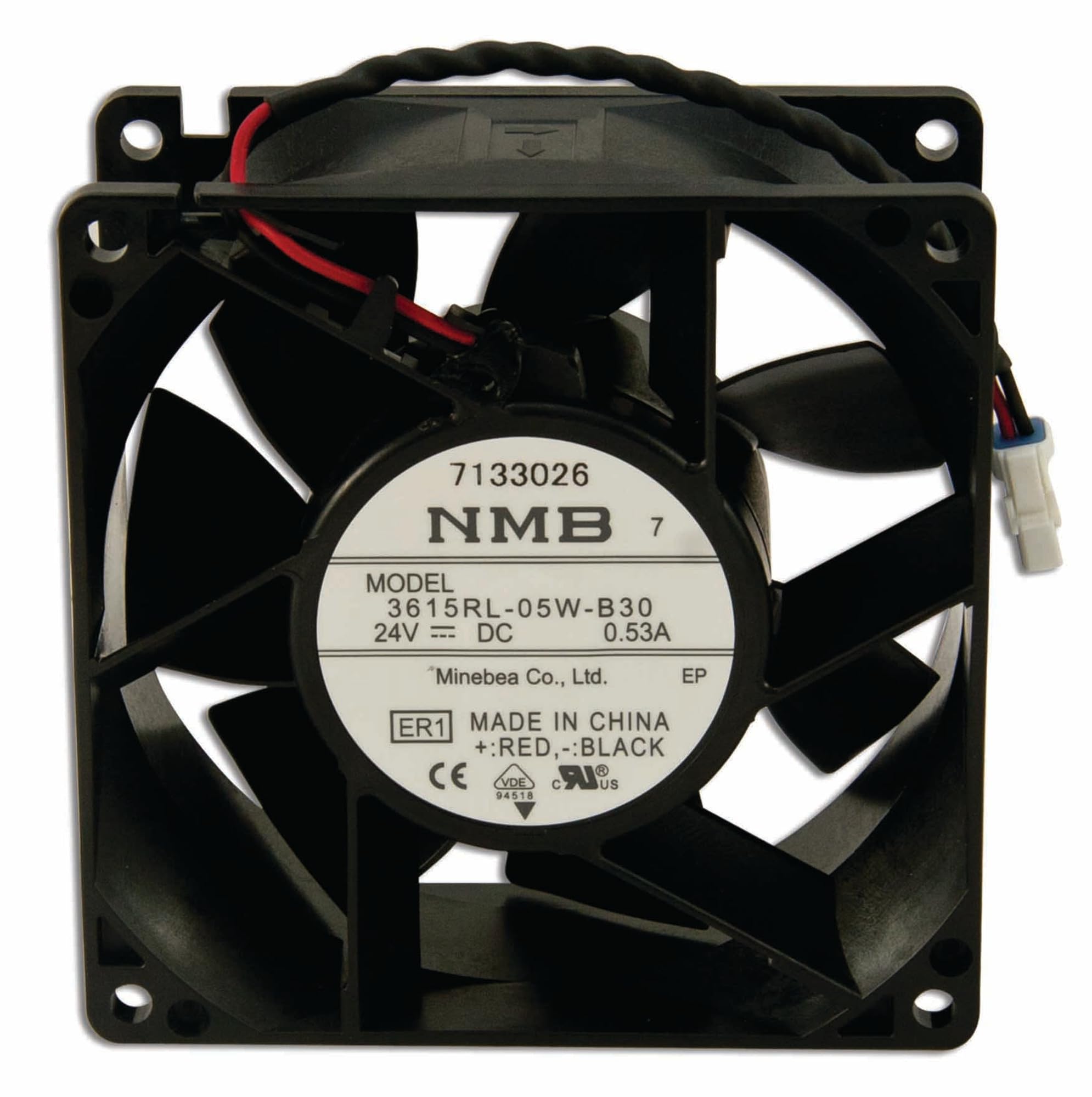
Figure 1: Eaton PowerXL DG1 Main Fan Kit FR2. This image shows the main fan kit component, typically used for cooling within the PowerXL DG1 variable frequency drive system.
3.1 Components
The kit typically includes:
- Main cooling fan
- Mounting hardware
- Connection cables/harness (if applicable)
4. Setup and Installation
Before beginning installation, ensure all necessary tools and safety equipment are available. Refer to the main PowerXL DG1 drive manual for specific enclosure access procedures.
4.1 Pre-Installation Checks
- Verify that the fan kit model (DXG-SPR-FR2FAN) matches the requirements of your PowerXL DG1 drive.
- Inspect the fan kit for any physical damage.
- Ensure the power to the DG1 drive is completely disconnected and locked out.
4.2 Installation Steps
- Access the fan compartment of the PowerXL DG1 drive as per its specific manual.
- Carefully remove any existing fan or blanking plate.
- Position the new DXG-SPR-FR2FAN kit into the designated slot, ensuring correct orientation.
- Secure the fan kit using the provided mounting hardware. Do not overtighten.
- Connect the fan's power cable to the appropriate connector on the DG1 drive's control board. Refer to the DG1 wiring diagram for exact connection points.
- Close and secure the drive's enclosure.
5. Operating Instructions
The main fan kit operates automatically in conjunction with the PowerXL DG1 drive's thermal management system. No direct user intervention is typically required for its operation once installed correctly.
5.1 Initial Power-Up
- After installation, restore power to the PowerXL DG1 drive.
- Observe the fan operation. It should start and run smoothly, indicating proper installation.
- Monitor the drive's temperature readings (if available via the drive's display or control interface) to ensure effective cooling.
If the fan does not operate or if unusual noises are heard, immediately disconnect power and refer to the Troubleshooting section.
6. Maintenance
Regular maintenance ensures the longevity and optimal performance of the fan kit and the PowerXL DG1 drive.
6.1 Cleaning
- Frequency: Periodically, or as environmental conditions dictate (e.g., dusty environments).
- Procedure:
- Disconnect power to the DG1 drive.
- Access the fan compartment.
- Use compressed air or a soft brush to gently remove dust and debris from the fan blades and grille. Avoid direct contact with fan bearings.
- Ensure no foreign objects are lodged in the fan assembly.
- Close the enclosure and restore power.
6.2 Inspection
- Check for any signs of wear, such as unusual noise or vibration during operation.
- Inspect fan blades for damage or obstruction.
- Verify that all connections are secure.
7. Troubleshooting
This section provides solutions to common issues encountered with the fan kit. For complex issues, contact Eaton technical support.
| Problem | Possible Cause | Solution |
|---|---|---|
| Fan does not run |
|
|
| Unusual noise or vibration |
|
|
| Overheating warnings from DG1 drive |
|
|
8. Specifications
Key technical specifications for the Eaton PowerXL DG1 Main Fan Kit FR2 (DXG-SPR-FR2FAN).
- Model Number: DXG-SPR-FR2FAN
- Brand: Eaton
- Compatibility: Eaton PowerXL DG1 Variable Frequency Drives (FR2 frame size)
- Function: Main cooling fan kit
- UPC: 786685888101
- Manufacturer: Eaton Electrical
9. Warranty and Support
For warranty information, please refer to the official Eaton warranty statement provided with your PowerXL DG1 drive or visit the Eaton website. Technical support can be reached through your local Eaton representative or via the contact information available on the Eaton website.
When contacting support, please have your product model number (DXG-SPR-FR2FAN) and serial number (if applicable) ready.


