
1. Introduction
The ETURBEV DT-8920 is a high-precision differential pressure gauge designed for accurate measurement of differential pressure, wind speed, air volume, and wind temperature. This instrument is ideal for HVAC system diagnostics, cleanroom monitoring, environmental testing, and other applications requiring precise air flow and pressure measurements. It features a clear digital display, intuitive controls, and robust construction for reliable performance.
2. Safety Information
Please read and understand all safety instructions before operating the DT-8920 differential pressure gauge. Failure to follow these instructions may result in injury or damage to the instrument.
- Do not attempt to open or modify the instrument. Refer all servicing to qualified personnel.
- Avoid exposing the device to extreme temperatures, humidity, or direct sunlight.
- Ensure the pitot tube is securely connected before taking measurements.
- Do not apply pressure exceeding the maximum specified range of the instrument.
- Keep the instrument away from strong electromagnetic fields.
- Dispose of batteries according to local regulations.
3. Product Overview
Familiarize yourself with the components and controls of your DT-8920 differential pressure gauge.
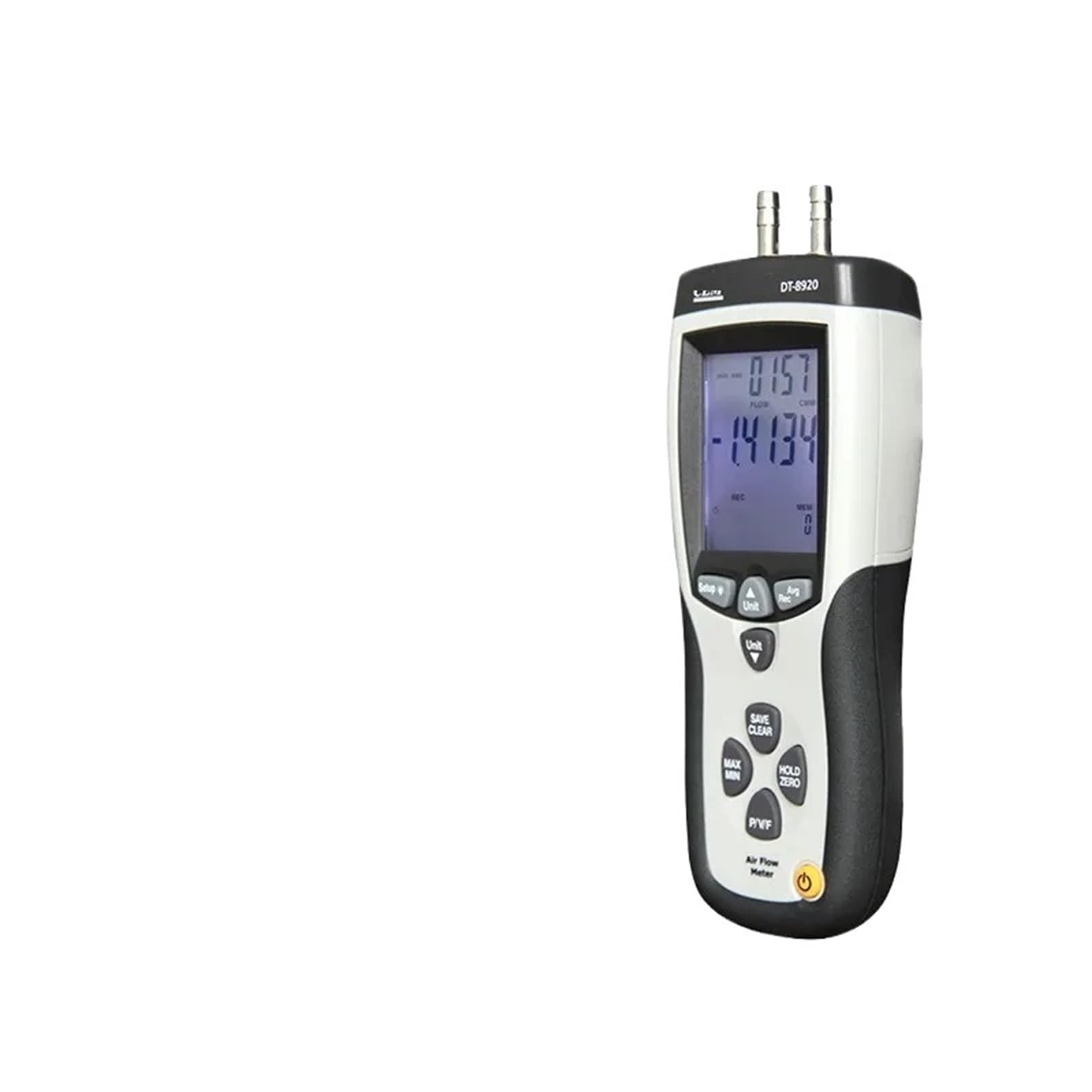
Figure 1: Front view of the ETURBEV DT-8920 Differential Pressure Gauge. The image displays the main LCD screen showing measurement values, along with control buttons such as 'Setup', 'Unit', 'Avg/Rec', 'Save/Clear', 'Max/Min', 'Hold/Zero', 'P/V/F', and the power button. Two pressure ports are visible at the top of the device for connecting the pitot tube.
3.1 Key Components
- LCD Display: Shows measurement readings, units, and various indicators.
- Pressure Ports: Two ports at the top for connecting the pitot tube or pressure hoses.
- Control Buttons:
- Power Button (⏻): Turns the device On/Off.
- Setup: Accesses system settings.
- Unit: Cycles through measurement units.
- Avg/Rec: Activates average measurement or data recording.
- Save/Clear: Saves current data or clears recorded data.
- Max/Min: Displays maximum or minimum recorded values.
- Hold/Zero: Freezes the current reading or performs zero adjustment.
- P/V/F: Selects between Pressure, Velocity (Wind Speed), or Flow (Air Volume) modes.
- Battery Compartment: Located at the rear for battery installation.
4. Setup
4.1 Battery Installation
- Locate the battery compartment cover on the back of the instrument.
- Slide or unclip the cover to open.
- Insert the required batteries (typically 9V or AA, refer to the compartment label) observing the correct polarity (+/-).
- Replace the battery compartment cover securely.
4.2 Connecting the Pitot Tube
- Identify the two pressure ports at the top of the DT-8920.
- Connect the static pressure tube from the pitot tube to one port and the total pressure tube to the other port. Ensure a snug fit to prevent leaks.
- For differential pressure measurements without a pitot tube, connect the high-pressure source to the '+' port and the low-pressure source to the '-' port (or as indicated on the device).
5. Operating Instructions
5.1 Power On/Off
- To power on, press and hold the Power button until the display illuminates.
- To power off, press and hold the Power button until the display turns off.
5.2 Zero Adjustment
Before taking accurate differential pressure measurements, it is crucial to perform a zero adjustment.
- Ensure both pressure ports are open to the atmosphere (not connected to any pressure source or pitot tube).
- Press and hold the Hold/Zero button until "ZERO" appears on the display, indicating successful calibration.
5.3 Selecting Measurement Mode (P/V/F)
Press the P/V/F button to cycle through the available measurement modes:
- P (Pressure): For differential pressure measurements.
- V (Velocity): For wind speed measurements (requires pitot tube connection).
- F (Flow): For air volume measurements (requires pitot tube and duct area input in setup).
5.4 Unit Selection
Press the Unit button to cycle through different measurement units for the selected mode (e.g., psi, kPa, mmHg for pressure; m/s, ft/min, mph for velocity).
5.5 Data Hold
Press the Hold/Zero button briefly (after zero adjustment) to freeze the current reading on the display. Press again to release.
5.6 Max/Min Recording
Press the Max/Min button to display the maximum or minimum value recorded since the feature was activated. Press repeatedly to cycle between MAX, MIN, and current reading. Hold to clear recorded Max/Min values.
5.7 Data Recording and Saving
The DT-8920 allows for data recording and storage.
- Press the Avg/Rec button to initiate data recording. The "REC" indicator will appear.
- To save a specific reading during recording, press the Save/Clear button. The "MEM" indicator will show the number of saved points.
- To stop recording, press Avg/Rec again.
- To recall saved data, use the Setup button to navigate to the memory recall function.
- To clear all saved data, press and hold the Save/Clear button.
5.8 Setup Menu
Press the Setup button to enter the configuration menu. Here you can adjust settings such as:
- Duct Area (for air volume calculations).
- Backlight settings.
- Auto Power Off duration.
- Temperature unit (°C/°F).
- Data logging interval.
Use the Unit and Avg/Rec buttons to navigate and adjust values within the setup menu. Press Setup again to exit.
6. Maintenance
6.1 Cleaning
- Wipe the instrument casing with a soft, damp cloth. Do not use abrasive cleaners or solvents.
- Ensure no moisture enters the pressure ports or other openings.
6.2 Battery Replacement
When the low battery indicator appears on the display, replace the batteries as described in Section 4.1.
6.3 Storage
- Store the DT-8920 in a cool, dry place, away from direct sunlight and extreme temperatures.
- If storing for extended periods, remove the batteries to prevent leakage.
7. Troubleshooting
| Problem | Possible Cause | Solution |
|---|---|---|
| Device does not power on. | Dead or incorrectly installed batteries. | Check battery polarity; replace batteries. |
| Inaccurate readings. | No zero adjustment performed; clogged pitot tube; pressure leaks. | Perform zero adjustment; check pitot tube for obstructions; ensure secure connections. |
| Display shows "OL" or "OVER". | Measurement exceeds the instrument's range. | Reduce the applied pressure or measure within the specified range. |
| Cannot save data. | Memory full. | Clear existing data using the Save/Clear button. |
8. Specifications
The following are the general specifications for the ETURBEV DT-8920 Differential Pressure Gauge. Specifications are subject to change without notice.
| Parameter | Value |
|---|---|
| Model Number | DT-8920 |
| Measurement Functions | Differential Pressure, Wind Speed, Air Volume, Wind Temperature |
| Pressure Range | (Specific range not provided, typical range for such devices is +/- 5000 Pa or +/- 2 psi) |
| Accuracy | (Specific accuracy not provided, typically +/- 0.3% F.S.) |
| Units | psi, kPa, mmHg, inH2O, mbar, Pa, m/s, ft/min, mph, km/h, knots, CFM, CMM, °C, °F |
| Display | LCD with backlight |
| Data Storage | Yes, with recall function |
| Power Supply | (Typically 9V battery or 4x AA batteries) |
| Auto Power Off | Yes, adjustable |
| Operating Temperature | (Typically 0°C to 50°C / 32°F to 122°F) |
| Storage Temperature | (Typically -10°C to 60°C / 14°F to 140°F) |
| Dimensions | 1.18 x 0.79 x 0.39 inches |
| Weight | 1.76 ounces / 50 Grams |
Note: Some specifications like pressure range, accuracy, and power supply are typical values for similar devices as they were not explicitly provided in the product data. The listed dimensions are likely package dimensions.
9. Warranty and Support
ETURBEV products are manufactured to high quality standards. This product is covered by a standard manufacturer's warranty against defects in materials and workmanship. For specific warranty terms, duration, and to obtain technical support or service, please refer to the warranty card included with your product or contact your point of purchase. Please retain your proof of purchase for warranty claims.
For further assistance, please visit the ETURBEV official website or contact customer service.