
1. Introduction
Thank you for purchasing the Aramox 2-in-1 Air Purifier with Humidifier. This device is designed to improve your indoor air quality by simultaneously purifying the air and maintaining optimal humidity levels. Please read this manual thoroughly before use to ensure proper operation, maintenance, and safety.
2. Safety Instructions
- Always place the unit on a firm, level surface away from direct sunlight or heat sources.
- Do not immerse the unit, power cord, or plug in water or other liquids.
- Unplug the unit before cleaning, refilling, or when not in use.
- Keep out of reach of children and pets.
- Use only clean, cool tap water in the water tank. Do not add essential oils or other chemicals directly into the water tank, as this may damage the unit.
- Do not block the air inlet or outlet vents.
- Do not attempt to repair or disassemble the unit yourself. Contact customer support for assistance.
3. Package Contents
Verify that all items are present in the package:
- 1 x Aramox 2-in-1 Air Purifier with Humidifier
- 1 x USB Data Cable
- 1 x User Manual (this document)
4. Product Overview
Familiarize yourself with the components of your device.

Figure 4.1: The Aramox 2-in-1 Air Purifier with Humidifier, shown with its included USB data cable. This image displays the overall design of the cylindrical unit with its top control panel and air vents.

Figure 4.2: A detailed view of the top control panel, highlighting the touch-sensitive buttons for power, fan speed, and humidifier functions. The icons are clearly visible for easy operation.
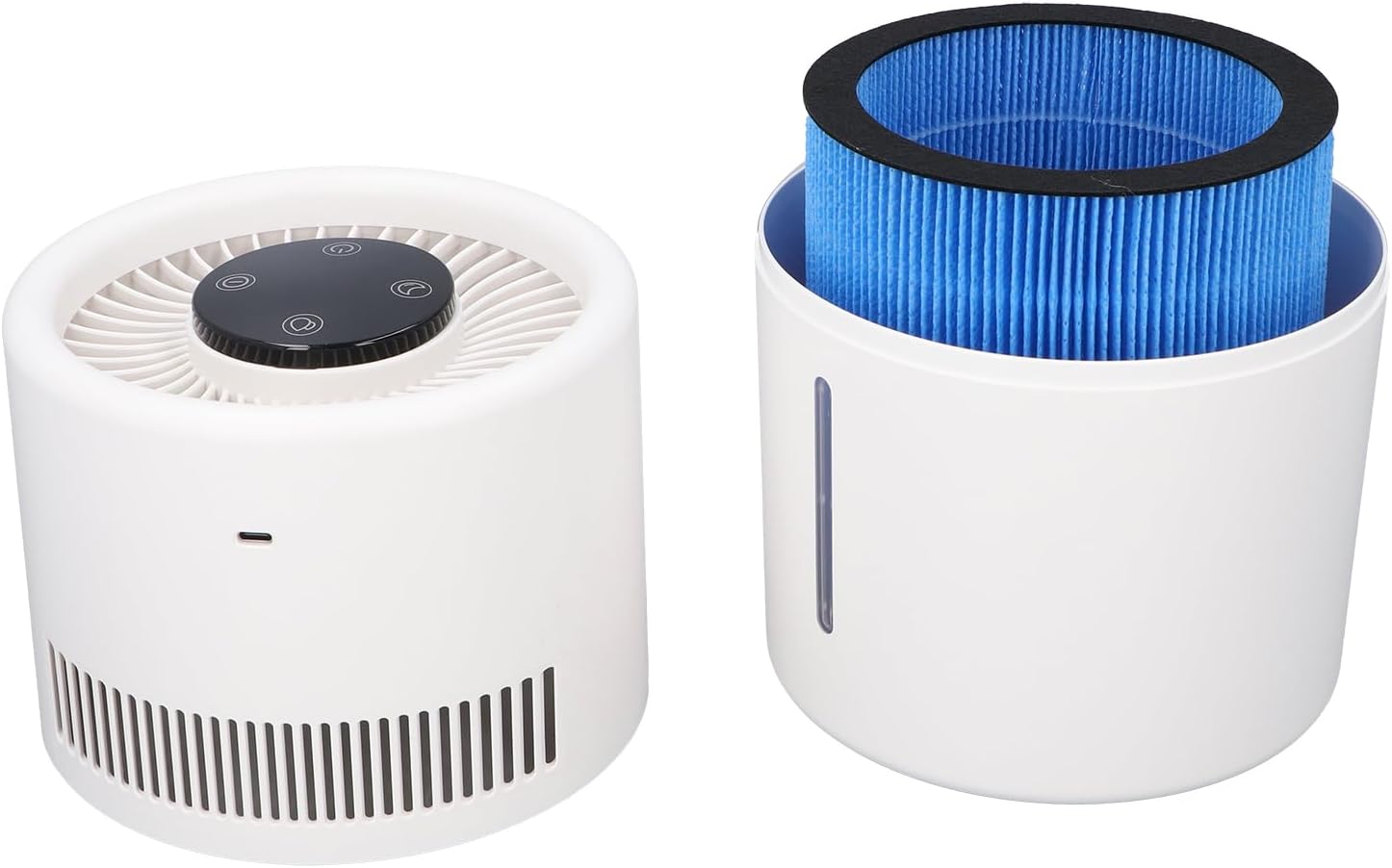
Figure 4.3: The unit separated into its two main components: the top air purification section and the bottom water tank with the air filter visible inside. This illustrates the modular design for easy maintenance.

Figure 4.4: A diagram showing the approximate dimensions of the unit: 17.6 cm (6.93 inches) in diameter and 27.2 cm (10.71 inches) in height. This provides a clear understanding of its physical size.
5. Setup
Follow these steps to set up your Aramox 2-in-1 Air Purifier with Humidifier:
- Unpack: Carefully remove all components from the packaging.
- Place the Unit: Position the unit on a stable, flat surface. Ensure there is adequate space around the unit for proper airflow.
- Separate the Unit: Gently twist the top section counter-clockwise and lift to separate it from the water tank.
- Install Filter: Ensure the air filter is correctly seated in the designated compartment within the top section. If it came wrapped in plastic, remove the plastic before installation.
- Fill Water Tank: Fill the 4L water tank with clean, cool tap water. Do not exceed the maximum fill line.
- Reassemble: Place the top section back onto the water tank, aligning the arrows, and twist clockwise until it locks securely.
- Connect Power: Connect the USB data cable to the unit's power port and plug the other end into a compatible 5V 1A USB power adapter (not included) or a USB port on a device like a laptop.

Figure 5.1: The unit connected to a laptop via its USB cable, demonstrating a typical power connection setup. Ensure the power source provides 5V 1A for optimal performance.
6. Operation
The control panel on top of the unit allows you to manage its functions.

Figure 6.1: The unit actively purifying air and emitting mist, illustrating its dual functionality. The blue light indicates operation.
- Power On/Off: Press the Power Button (usually indicated by a circle with a vertical line) once to turn the unit on. Press it again to turn it off.
- Adjust Fan Speed (Air Purifier): After powering on, press the Fan Speed Button (often depicted as a fan icon) to cycle through different fan speeds (e.g., Low, Medium, High).
- Activate Humidifier: Press the Humidifier Button (often depicted as a mist or water droplet icon) to activate the humidification function. You may be able to adjust mist output levels by pressing this button multiple times.
- Indicator Lights: Observe the indicator lights on the control panel for current operating status, such as power, fan speed, and humidifier activity.

Figure 6.2: The unit operating quietly in a bedroom environment, demonstrating its suitability for personal spaces. The subtle blue light indicates its active state.
7. Maintenance
Regular maintenance ensures optimal performance and extends the lifespan of your unit.
7.1. Cleaning the Water Tank
- Unplug the unit from the power source.
- Separate the top section from the water tank.
- Empty any remaining water from the tank.
- Wipe the inside of the water tank with a soft, damp cloth. For mineral buildup, use a solution of white vinegar and water, then rinse thoroughly.
- Allow the tank to air dry completely before reassembling.
7.2. Air Filter Replacement
The air filter should be checked regularly and replaced every 3-6 months, or more frequently depending on air quality and usage.
- Unplug the unit.
- Separate the top section from the water tank.
- Remove the old filter from its compartment.
- Insert a new, genuine Aramox replacement filter, ensuring it is seated correctly.
- Reassemble the unit.

Figure 7.1: An inverted view of the top section, revealing the fan and the compartment where the air filter is housed. This shows how to access the filter for replacement.
8. Troubleshooting
If you encounter issues, refer to the following table:
| Problem | Possible Cause | Solution |
|---|---|---|
| Unit does not turn on | No power connection; Faulty power adapter/cable | Ensure USB cable is securely connected. Try a different USB port or power adapter (5V 1A). |
| No mist/humidification | Water tank empty; Humidifier function not activated; Mineral buildup on transducer | Refill water tank. Press the Humidifier button. Clean the transducer with a soft brush and vinegar solution. |
| Weak airflow/purification | Air filter clogged; Air inlets/outlets blocked | Check and replace the air filter if dirty. Ensure vents are clear of obstructions. |
| Unusual noise | Unit not on a level surface; Foreign object in fan; Loose component | Place on a stable surface. Unplug and check for obstructions. If noise persists, contact support. |
9. Specifications
- Model: Aramoxek37pvgfyo
- Material: PP (Polypropylene)
- Water Tank Capacity: 4 Liters
- Power: 5W
- Voltage: 5V 1A
- Weight: Approximately 1.18 kg (42.33 oz)
- Product Dimensions: 31 cm (H) x 19 cm (W) x 19 cm (D) / 12.2 in (H) x 7.5 in (W) x 7.5 in (D)
10. Warranty and Support
This product comes with a standard manufacturer's warranty. For detailed warranty information, please refer to the documentation provided at the time of purchase or contact Aramox customer support. If you require technical assistance or have questions not covered in this manual, please reach out to your retailer or the manufacturer's support channels.