1. Introduction
Welcome to the user manual for your new DEXIN DX-817 Electronic Calculator. This guide provides comprehensive instructions to help you understand and operate your calculator effectively. Please read this manual thoroughly before using the device to ensure proper function and longevity.
2. Product Overview
The DEXIN DX-817 is a compact and efficient electronic calculator designed for everyday use. It features a clear display and a user-friendly keypad for various mathematical operations.
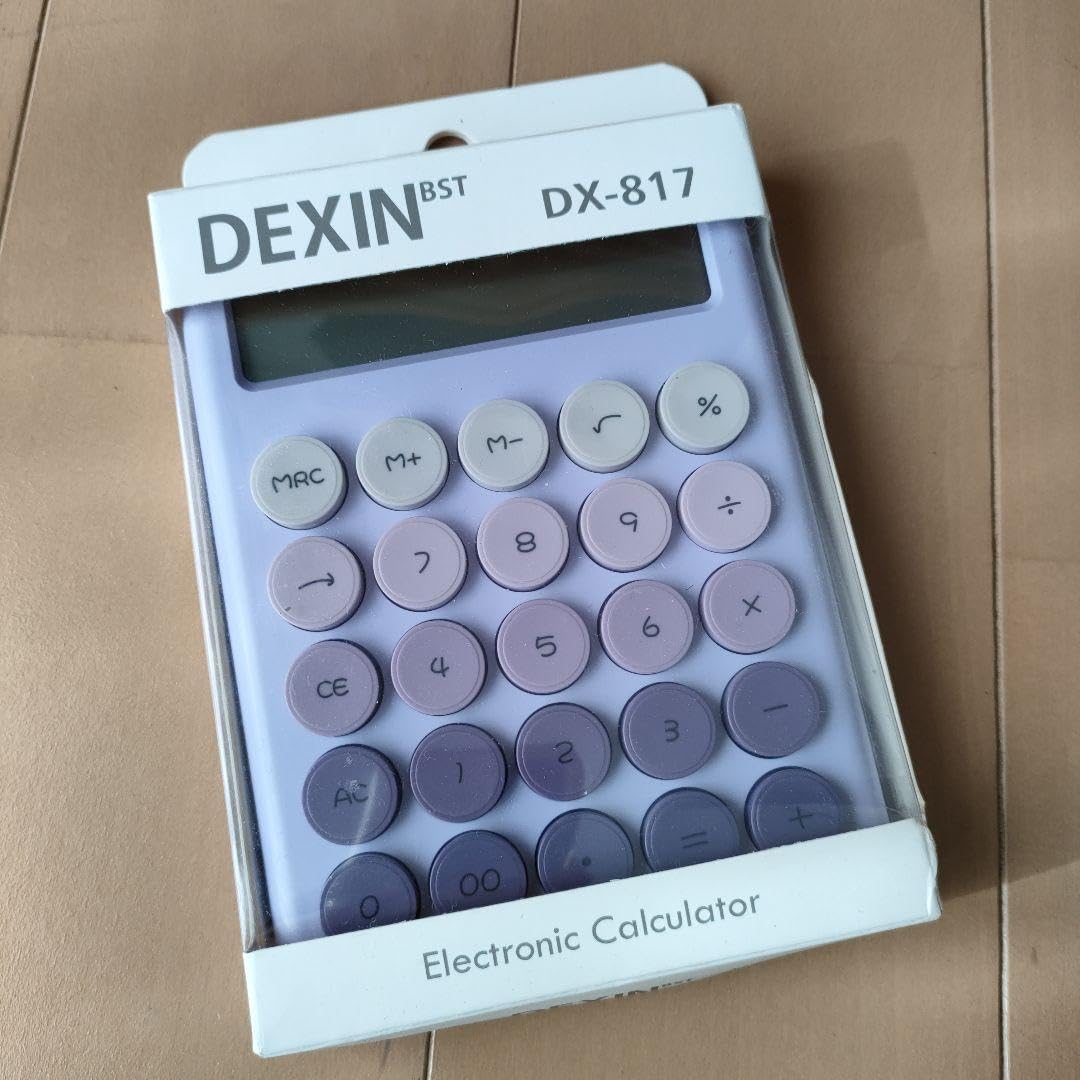
Figure 1: DEXIN DX-817 Electronic Calculator (packaging view). This image displays the calculator's layout, including the display and key functions, as well as product information on its packaging.
2.1 Components
- Display: Shows numbers, symbols, and calculation results.
- Keypad: Numeric keys (0-9), operation keys (+, -, ×, ÷), and function keys.
- Power Source: Operates on DC 1.5V (battery).
3. Setup
3.1 Battery Installation
The DEXIN DX-817 calculator requires a DC 1.5V battery for operation. The specific battery type is not detailed on the packaging, but most calculators of this size typically use a button cell battery (e.g., LR44) or AAA batteries.
- Locate the battery compartment cover on the back of the calculator.
- Use a small screwdriver (if necessary) to open the cover.
- Insert the new battery, ensuring the correct polarity (+ and -) is observed.
- Replace the battery compartment cover securely.
4. Basic Operations
4.1 Power On/Off
- To turn on the calculator, press the [ON/AC] or [CE/C] key once (depending on model variation, usually [CE] or [AC]).
- The calculator typically has an auto-power-off feature to conserve battery life. To manually turn off, if an [OFF] key is present, press it. Otherwise, it will power off automatically after a period of inactivity.
4.2 Basic Arithmetic
Perform standard calculations using the numeric keys and operation keys.
- Addition (+): Enter first number, press [+], enter second number, press [=].
- Subtraction (-): Enter first number, press [-], enter second number, press [=].
- Multiplication (×): Enter first number, press [×], enter second number, press [=].
- Division (÷): Enter first number, press [÷], enter second number, press [=].
4.3 Clear Functions
- Clear Entry ([CE]): Clears the last entered number or calculation, allowing you to correct mistakes without clearing the entire operation.
- Clear All ([C] or [AC]): Clears all entries and calculations, resetting the calculator to its initial state.
5. Advanced Functions
5.1 Memory Functions
The calculator includes memory functions to store and recall values.
- Memory Plus ([M+]): Adds the displayed value to the memory.
- Memory Minus ([M-]): Subtracts the displayed value from the memory.
- Memory Recall/Clear ([MRC]): Press once to recall the value stored in memory. Press twice to clear the memory.
5.2 Percentage ([%])
To calculate percentages:
- Example: Calculate 10% of 200. Enter 200 [×] 10 [%]. The result will be 20.
- Example: Add 10% to 200. Enter 200 [+] 10 [%]. The result will be 220.
5.3 Square Root ([√])
To calculate the square root of a number:
- Enter the number, then press the [√] key.
5.4 Grand Total ([GT])
The Grand Total function accumulates the results of multiple calculations. After each calculation ending with [=], the result is added to the Grand Total memory. Press [GT] to display the accumulated total.
6. Maintenance
6.1 Cleaning
- Wipe the calculator with a soft, dry cloth.
- Do not use abrasive cleaners, solvents, or spray directly onto the device.
6.2 Storage
- Store the calculator in a cool, dry place away from direct sunlight and extreme temperatures.
- If storing for an extended period, it is advisable to remove the battery to prevent leakage.
7. Troubleshooting
7.1 Common Issues
- Display is blank: Check if the battery is correctly installed or needs replacement.
- Incorrect calculations: Ensure all previous calculations are cleared using [AC] or [C] before starting a new one. Verify correct key presses.
7.2 Error Messages
- "MINUS MEMORY ERROR GT": This message indicates an issue related to the Grand Total or memory function, possibly due to an attempt to subtract from an empty memory or an overflow. Clear memory and Grand Total using [MRC] (twice) and [AC].
8. Specifications
| Feature | Detail |
|---|---|
| Model | DX-817 |
| Color | Violet |
| Size | 10.8 × 17 × 2.4 cm |
| Rated Voltage | DC 1.5V |
| Battery Type | Not specified (typically button cell or AAA) |
| Manufacturer | YIWU DEXIN ELECTRONICS Co., LTD |
| Manufacturing Address | Suxi Town, Yiwu City, Jinhua City, Zhejiang Province, China |
| Made In | China |
9. Safety Information
WARNING: To avoid danger of suffocation, keep the plastic bag packaging away from babies and children. Do not use in cribs, beds, carriages, or playpens. This bag is not a toy.
10. Compliance Information
10.1 FCC Compliance
This device complies with part 15 of the FCC Rules. Operation is subject to the following two conditions:
- This device may not cause harmful interference, and
- This device must accept any interference received, including interference that may cause undesired operation.
10.2 Authorized Representatives
- UK REP: BUSINESS MANAGEMENT AND LEADERSHIP BUSINESS SCHOOL LTD, 14 Kings Court Beddington Gardens, Wellington, Surrey, England, SM6 0HR, United Kingdom.
- EC REP: BUSINESS DEVELOPMENT & MANAGEMENT, 33 Rue de la République, 69002 Lyon, Auvergne-Rhone-Alps, France.
11. Warranty and Support
For warranty information or technical support, please refer to the retailer where the product was purchased or contact the manufacturer directly using the provided contact information. Keep your purchase receipt as proof of purchase.


