
1. Introduction
This manual provides detailed instructions for the installation, operation, and maintenance of your CAMCAMP 4MP POE Dual Lens Security Camera System with 8-Channel NVR and 500GB HDD, Model SC52. Please read this manual thoroughly before using the product to ensure proper setup and functionality. This system is designed to provide reliable surveillance for your property with advanced features and ease of use.

Image 1.1: Overview of the CAMCAMP 4MP POE Dual Lens Security Camera System components.
2. Package Contents
Verify that all items listed below are included in your package. If any items are missing or damaged, please contact customer support.
- 1x 8-Channel POE NVR (Max. 4K decoding)
- 4x 4MP PTZ Dual Lens Cameras
- 1x 500GB Hard Disk Drive (pre-installed)
- 1x Power Adapter for NVR (including AC line)
- 1x 3ft Network Cable
- 1x USB Mouse
- 1x HDMI Cable
- 2x 65ft POE Network Cables
- 2x 100ft POE Network Cables
- 4x Screw Packs for Camera Installation
- 1x Hard Disk Screw Package
- 1x User Manual
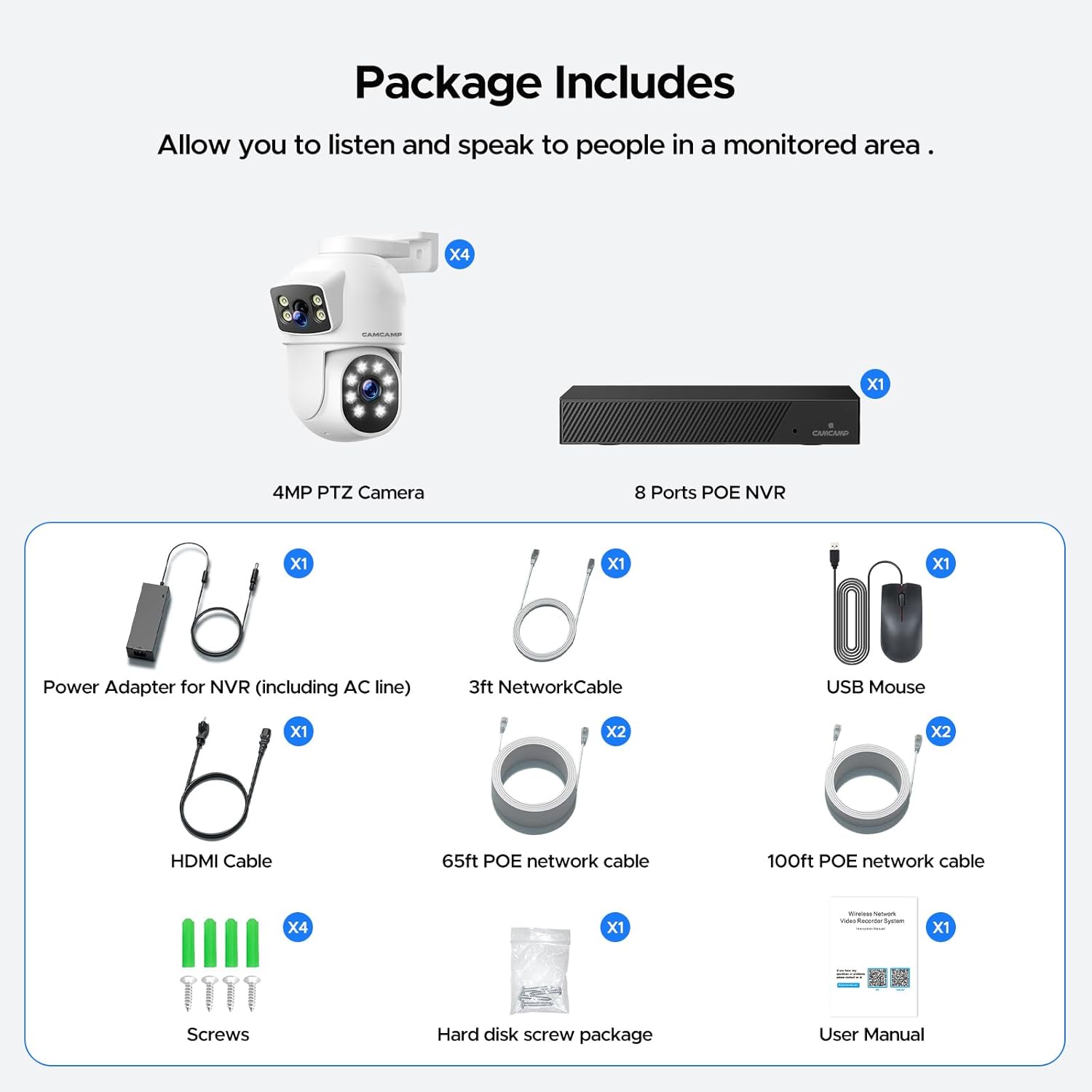
Image 2.1: Visual representation of the package contents.
3. Setup
Follow these steps to set up your CAMCAMP security system.
- POE Camera Connection: Connect each POE camera to an available POE port on the NVR using the provided Ethernet cables. The POE (Power over Ethernet) technology transmits both power and video signals through a single cable, simplifying installation.
- NVR to Display Connection: Connect the NVR to a monitor or TV using the HDMI cable (for high-definition display) or a VGA cable (not included). This allows you to view the camera feeds directly.
- Network Connection: For remote access and app functionality, connect the NVR's LAN port to your internet router using the 3ft network cable.
- Power On: Connect the NVR power adapter to the NVR and then to a power outlet. The system will power on automatically.
- App Setup (Optional): Download the recommended mobile application (e.g., CloudEye 365, if applicable) from your device's app store. Follow the in-app instructions to add your NVR for remote viewing and control.

Image 3.1: Basic system connection diagram showing POE camera, NVR, router, monitor, and mobile app.

Image 3.2: NVR rear panel connections.
4. Operating Instructions
This section details how to operate your CAMCAMP security system.
4.1 PTZ Control
The PTZ (Pan-Tilt-Zoom) cameras allow for flexible monitoring. Use the NVR interface with the USB mouse or the mobile application to control camera movement.
- Pan: Rotate the camera horizontally up to 355°.
- Tilt: Adjust the camera vertically up to 90°.
- Zoom: Digitally zoom in on specific areas of interest.

Image 4.1: Dual lens camera with fixed and PTZ viewing capabilities.

Image 4.2: Humanoid tracking and Pan/Tilt/Zoom functionality.
4.2 Motion Detection & Auto Tracking
The system features smart PIR motion detection and automatic tracking of human figures.
- Configuration: Access the NVR settings or mobile app to define specific motion detection zones and adjust sensitivity levels for each camera. This helps minimize false alarms.
- Alerts: Upon detecting human motion, the system can automatically track the subject, send instant email alerts with snapshots, push notifications to your app, and activate a siren alarm.

Image 4.3: Smart PIR Motion Detection and Instant Alert features.
4.3 Two-Way Audio
Each camera is equipped with a built-in microphone and speaker, enabling two-way communication.
- Usage: Speak through the mobile app or NVR interface to communicate with individuals in the camera's vicinity. Listen to audio from the monitored area.

Image 4.4: Two-Way Audio feature in action.
4.4 Night Vision Modes
The cameras offer multiple night vision options to suit different lighting conditions.
- Infrared Night Vision: Provides clear black and white images in complete darkness.
- Color Night Vision: Utilizes built-in spotlights to capture full-color video even at night.
- Smart Night Vision: Automatically switches between infrared and color night vision based on detected motion or specific settings.

Image 4.5: Multiple Night Modes available.
4.5 Recording & Playback
The pre-installed 500GB HDD allows for continuous video recording.
- Continuous Recording: The system records 24/7, automatically overwriting the oldest footage when the hard drive is full.
- Playback: Access recorded footage directly from the NVR or remotely via the mobile application.
5. Features Overview
Explore the key features that enhance the performance and usability of your security system.
- POE Connectivity: Enjoy simplified installation with Power over Ethernet (POE) technology, transmitting both power and video signals through a single Ethernet cable (CAT5/CAT6 up to 330ft). This eliminates the need for separate power outlets for each camera.
- Dual Lens & PTZ: Each camera features a fixed wide-angle lens (110°) for general overview and a PTZ (Pan-Tilt-Zoom) dome lens (355° pan, 90° tilt) for detailed monitoring and automatic tracking of subjects. This provides comprehensive coverage without blind spots.
- 24/7 Continuous Recording & H.265+: The system includes a pre-installed 500GB HDD for continuous 24/7 video recording. Advanced H.265+ video encoding technology optimizes storage space, allowing for up to 30 days of continuous recording while maintaining video quality. No monthly fees are required for local storage.
- Smart Motion Detection & Auto Tracking: The system accurately detects human movement, automatically tracks the subject, and sends instant alerts via email with snapshots, app push notifications, and an audible siren. Customizable detection zones and sensitivity settings help reduce false alarms from environmental factors.
- Expandable 8-Channel NVR & HDMI Output: The 2K NVR supports up to 8 wired POE cameras, allowing for future expansion of your surveillance system. It offers HDMI and VGA output ports for direct connection to a monitor or smart TV, enabling live viewing without an internet connection.
- Two-Way Audio & IP66 Weatherproof: Built-in microphones and speakers on each camera facilitate real-time two-way communication. The cameras are IP66-rated, ensuring robust performance and durability in various outdoor weather conditions, from -10°C to 50°C.
- 4MP HD Resolution & Color Night Vision: Equipped with 2MP+2MP dual lenses, the cameras deliver clear 4MP HD images and videos. Advanced night vision capabilities include infrared, full-color, and smart modes, providing visibility up to 100 feet even in low-light conditions.
- Digital Signal Transmission: Unlike analog systems, this wired POE system ensures stable and powerful digital signal transmission via Ethernet cables, maintaining true 4MP high-definition image quality without degradation over distances up to 330 feet.

Image 5.1: IP66 Weatherproof design for all conditions.
6. Maintenance
Regular maintenance ensures optimal performance and longevity of your security system.
- Cleaning: Periodically clean camera lenses and housings with a soft, damp cloth to remove dust, dirt, or smudges. Ensure no obstructions block the camera's field of view. Avoid using harsh chemicals.
- Firmware Updates: Check the manufacturer's official website or the mobile application for available firmware updates. Keeping your system's firmware up-to-date ensures access to the latest features, performance improvements, and security patches.
- Hard Drive Management: The 500GB HDD automatically manages storage by overwriting the oldest footage. If you have important recordings, back them up to an external device or cloud storage before they are overwritten.
- Cable Inspection: Regularly inspect all Ethernet and power cables for any signs of wear, damage, or loose connections, especially for outdoor installations. Damaged cables can affect video quality and system reliability.
7. Troubleshooting
This section addresses common issues you might encounter and provides solutions.
7.1 No Video Display
- Check Power: Ensure the NVR's power adapter is securely connected to both the NVR and a working power outlet.
- Monitor Connection: Verify that the HDMI or VGA cable connecting the NVR to your monitor/TV is securely plugged in at both ends. Try a different cable or monitor if possible.
- Camera Connections: Confirm that all POE cameras are properly connected to the NVR's POE ports using functional Ethernet cables.
7.2 No Remote Access
- Network Connection: Ensure the NVR is connected to your internet router via an Ethernet cable and that your router has an active internet connection.
- App Configuration: Double-check that the mobile application is correctly configured with your NVR's device ID and password. Ensure the app is updated to the latest version.
- Firewall/Router Settings: If issues persist, check your router's firewall settings to ensure they are not blocking the NVR's access to the internet.
7.3 False Motion Alerts
- Adjust Sensitivity: Reduce the motion detection sensitivity in the NVR settings or mobile app.
- Define Zones: Configure specific motion detection zones to exclude areas prone to non-human movement, such as swaying trees, busy roads, or reflections.
7.4 Poor Night Vision
- Clean Lens: Ensure the camera lenses are clean and free from dirt, dust, or spiderwebs.
- Obstructions: Remove any objects that might be blocking the camera's infrared or spotlight illuminators.
- Light Interference: Avoid placing cameras where strong light sources (e.g., streetlights, car headlights) directly shine into the lens at night, as this can cause glare and reduce night vision effectiveness.
8. Specifications
Detailed technical specifications for the CAMCAMP 4MP POE Dual Lens Security Camera System.
| Feature | Specification |
|---|---|
| Brand | Camcamp |
| Model Name | SC52 |
| Connectivity Technology | Wired (POE) |
| Power Source | Corded Electric |
| Video Capture Resolution | 1080p (System supports 4MP cameras) |
| Number of Items | 4 (Cameras) |
| Number of Channels | 8 (NVR) |
| Viewing Angle | 360 Degrees (PTZ capability) |
| Night Vision Range | 98 Feet (30 meters) |
| Frame Rate | 30 fps |
| Item Dimensions (LxWxH) | 10.2 x 7.6 x 12.7 cm (for camera) |
| Product Dimensions | 10.16 x 7.62 x 12.7 cm; 6.01 kg (total package) |
| Special Features | 4MP HD Color Night Vision, 360° Pan/Tilt/Zoom, POE Plug and Play, 24/7 Video Recording, 500GB Local Disk Space, No Monthly Fees, Motion Detection, Auto Tracking, 2-Way Audio, Email/App Alarm, Remote App Access, IP66 Weatherproof |
| Batteries Included? | No |
| Batteries Required? | No |
| Item Weight | 6.01 Kilograms |
| Recommended Uses | Outdoor Security |
9. Warranty and Support
This product comes with a standard manufacturer's warranty. For warranty claims, technical support, or service inquiries, please refer to the contact information provided in the included user manual or visit the official Camcamp support website. Please retain your proof of purchase for warranty purposes.
