
Boytond YYK-S19
Boytond Ultra Open-Ear Earbuds User Manual
Model: YYK-S19 | Brand: Boytond
1. Introduction
Welcome to the user manual for your new Boytond Ultra Open-Ear Earbuds. These innovative wireless headphones are designed to provide immersive audio while keeping you connected to your surroundings. Featuring an ergonomic clip-on design, they offer exceptional comfort for extended wear, making them ideal for sports, fitness, work, and travel.

Image: Boytond Ultra Open-Ear Earbuds in their charging case.
Video: Official Boytond video showcasing the open-ear earbuds and their ability to keep you connected to your environment.
2. What's in the Box
Your Boytond Ultra Open-Ear Earbuds package includes the following components:
- Boytond True Wireless Earbuds (x2)
- Boytond Charging Case (x1)
- Fast Charging USB-C Cable (x1)
- Quick Start User Guide (x1)

Image: All components included in the Boytond Ultra Open-Ear Earbuds package.
3. Setup
3.1. Charging the Earbuds and Case
Before first use, ensure both the earbuds and the charging case are fully charged. The charging case features a digital display indicating the battery percentage. Use the provided USB-C cable to charge the case.

Image: The charging case displaying battery level and earbuds charging.
3.2. Pairing with Your Device
The earbuds utilize advanced Bluetooth 5.3 technology for fast and stable connections. They feature intelligent auto-on and connect features.
- Open the charging case. The earbuds will automatically power on and enter pairing mode.
- On your device (smartphone, tablet, laptop), enable Bluetooth.
- Search for "YYK-S19" in the list of available Bluetooth devices.
- Select "YYK-S19" to connect. Once connected, you will hear an audio prompt.
The earbuds will automatically reconnect to the last paired device when taken out of the case, provided Bluetooth is enabled on your device.

Image: Earbuds seamlessly connected to multiple devices via Bluetooth 5.3.
4. Operating the Earbuds
The Boytond Ultra Open-Ear Earbuds feature intuitive touch controls for easy management of your audio and calls.
4.1. Basic Controls
- Play/Pause: Tap either earbud once.
- Next Song: Tap either earbud twice.
- Previous Song: Tap either earbud three times.
- Answer Call: Tap either earbud once.
- End Call: Tap either earbud once during a call.
- Reject Call: Press and hold either earbud for 2 seconds.
- Activate Voice Assistant: Press and hold either earbud for 3 seconds.

Image: Visual guide to the touch controls on the earbuds.
Video: Demonstration of the earbuds staying securely in place during active movement.
5. Comfort and Design
The Boytond Ultra Open-Ear Earbuds are engineered for maximum comfort and awareness, setting them apart from traditional in-ear headphones.
5.1. Open-Ear Design
Unlike conventional earbuds that seal the ear canal, these open-ear headphones rest gently on your ear, enhancing ventilation and reducing sweat buildup. This design allows you to hear your music clearly while remaining fully aware of your surroundings, crucial for outdoor activities or in busy environments.

Image: Comparison of the comfortable earclip design versus traditional in-ear earphones.
5.2. Lightweight and Secure Fit
Weighing only 5 grams, these earbuds are incredibly lightweight, making them almost imperceptible during use. The flexible silicone material and clip-on design ensure a secure fit that stays in place during intense workouts, running, or daily activities without causing discomfort or falling off.

Image: Highlighting the lightweight design of the earbuds.
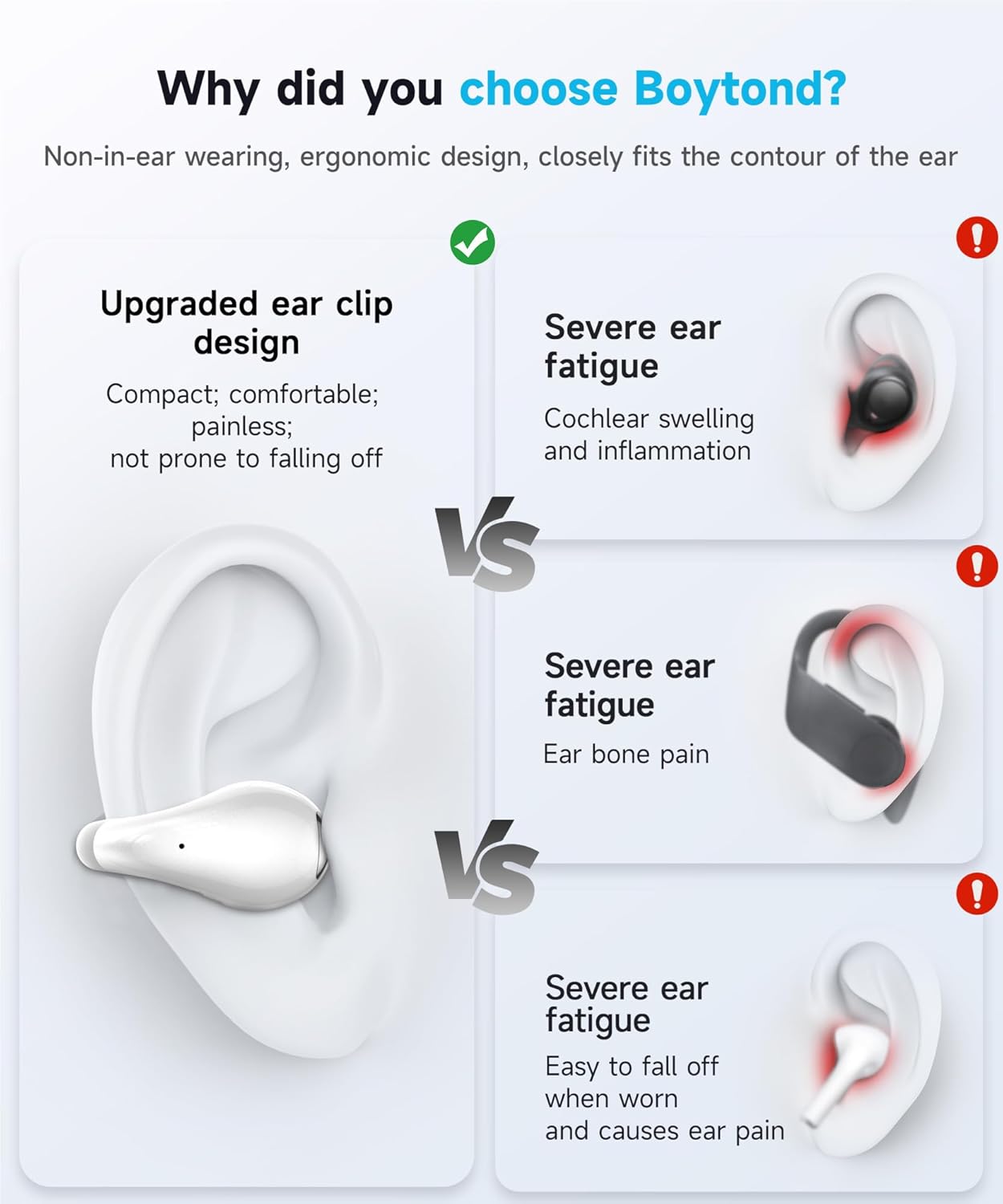
Image: Demonstrating the benefits of the clip-on design over traditional earbuds for comfort and stability.
Video: Official Boytond video highlighting the minimalist design and maximum comfort of the earbuds.
Video: Official Boytond video emphasizing all-day comfort and full awareness provided by the open-ear design.
6. Sound Quality
Experience superior audio performance with your Boytond Ultra Open-Ear Earbuds.
6.1. Immersive Stereo Sound
Equipped with 16.3mm dynamic drivers, these earbuds deliver rich, immersive stereo sound. Enjoy crystal-clear highs, deep bass, and flawless reproduction of instruments and vocals, bringing your music to life.

Image: Detailed view of the 16.3mm dynamic drivers for high-fidelity audio.
6.2. Clear Calls
The advanced drivers ensure crystal-clear communication, enabling seamless, uninterrupted conversations. With precise sound capture, these earbuds create a face-to-face communication experience, even in noisy environments.
7. Battery Life
Your Boytond Ultra Open-Ear Earbuds are designed for extended use, powered by high-density lithium batteries and advanced energy-locking technology.
- Earbud Playback: Up to 10 hours of continuous playback on a single charge.
- Total Playtime with Charging Case: Enjoy an additional 40 hours of playback, totaling up to 50 hours.
- Fast Charging: Just 5 minutes of charging provides 1 hour of playback.
8. Connectivity
Stay connected with cutting-edge Bluetooth technology.
- Bluetooth Version: 5.3 for fast data transmission and stable connections.
- Range: Reliable connection within a 33-foot range.
- Compatibility: Compatible with Smartphones, Tablets, Laptops, Desktops, and all Bluetooth-enabled Devices.
9. Water Resistance
The Boytond Ultra Open-Ear Earbuds feature a waterproof design, making them resistant to sweat and light rain. This ensures durability and reliable performance during workouts and outdoor activities.
10. Maintenance
To ensure the longevity and optimal performance of your earbuds, follow these maintenance guidelines:
- Cleaning: Gently wipe the earbuds and charging case with a soft, dry cloth. Avoid using harsh chemicals or abrasive materials.
- Storage: Store the earbuds in their charging case when not in use to protect them from dust and damage. Keep them in a cool, dry place away from extreme temperatures.
- Charging: Always use the provided USB-C cable for charging to prevent potential damage.
11. Troubleshooting
If you encounter any issues with your Boytond Ultra Open-Ear Earbuds, refer to the following common solutions:
- Earbuds not pairing: Ensure both earbuds are in the charging case and fully charged. Turn off and on your device's Bluetooth, then try pairing again.
- No sound from one earbud: Place both earbuds back into the charging case, close the lid, wait a few seconds, then take them out again. This often re-syncs them.
- Charging issues: Check the USB-C cable and charging port for any damage. Ensure the power source is working correctly.
- Low volume/poor sound quality: Ensure the earbuds are clean and properly positioned on your ears. Adjust the volume on your connected device.
- Intermittent connection: Ensure your device is within the 33-foot Bluetooth range and there are no major obstructions. Avoid strong electromagnetic interference.
If the issue persists, please contact customer support for further assistance.
12. Specifications
| Feature | Detail |
|---|---|
| Model Name | YYK-S19 |
| Connectivity Technology | Wireless |
| Wireless Communication Technology | Bluetooth |
| Bluetooth Version | 5.3 |
| Bluetooth Range | 33 Feet |
| Ear Placement | Open Ear |
| Form Factor | Open Ear |
| Audio Driver Type | Dynamic Driver |
| Audio Driver Size | 16.3 Millimeters |
| Battery Life | 50 Hours (Total with Case) |
| Charging Time | 5 minutes for 1 hour playback |
| Water Resistance Level | Waterproof |
| Control Method | Touch |
| Item Weight | 5.3 Ounces |
| Manufacturer | Boytond |
13. Warranty and Support
Boytond products are manufactured to the highest quality standards. For information regarding warranty coverage or technical support, please refer to the contact details provided in your Quick Start User Guide or visit the official Boytond website.
Ask a question about this manual
Ask about setup, troubleshooting, compatibility, parts, safety, or missing instructions. Manuals+ will review the question and use this page’s manual context to help answer it.