
1. Introduction
The GODOX V100S is a high-performance, round-head TTL flash designed for Sony cameras. It offers advanced features for professional and enthusiast photographers, including a powerful 100Ws output, a full-color HD touchscreen, 2.4G wireless X-system compatibility, and global shutter flash sync up to 1/80,000s.
This manual provides detailed instructions on how to set up, operate, and maintain your GODOX V100S flash to ensure optimal performance and longevity.

Figure 1.1: GODOX V100S Flash unit with various accessories.
2. What's in the Box
Please check that all the following items are included in your package:
- Flash Body x1
- Storage Bag x1
- Lithium Battery x1
- Charger x1
- USB-C Charging Cable x1
- Mini Stand x1
- Detachable Sub Flash SU-1 x1
- White Diffuser x1 (accessories for V100 will be sent randomly)
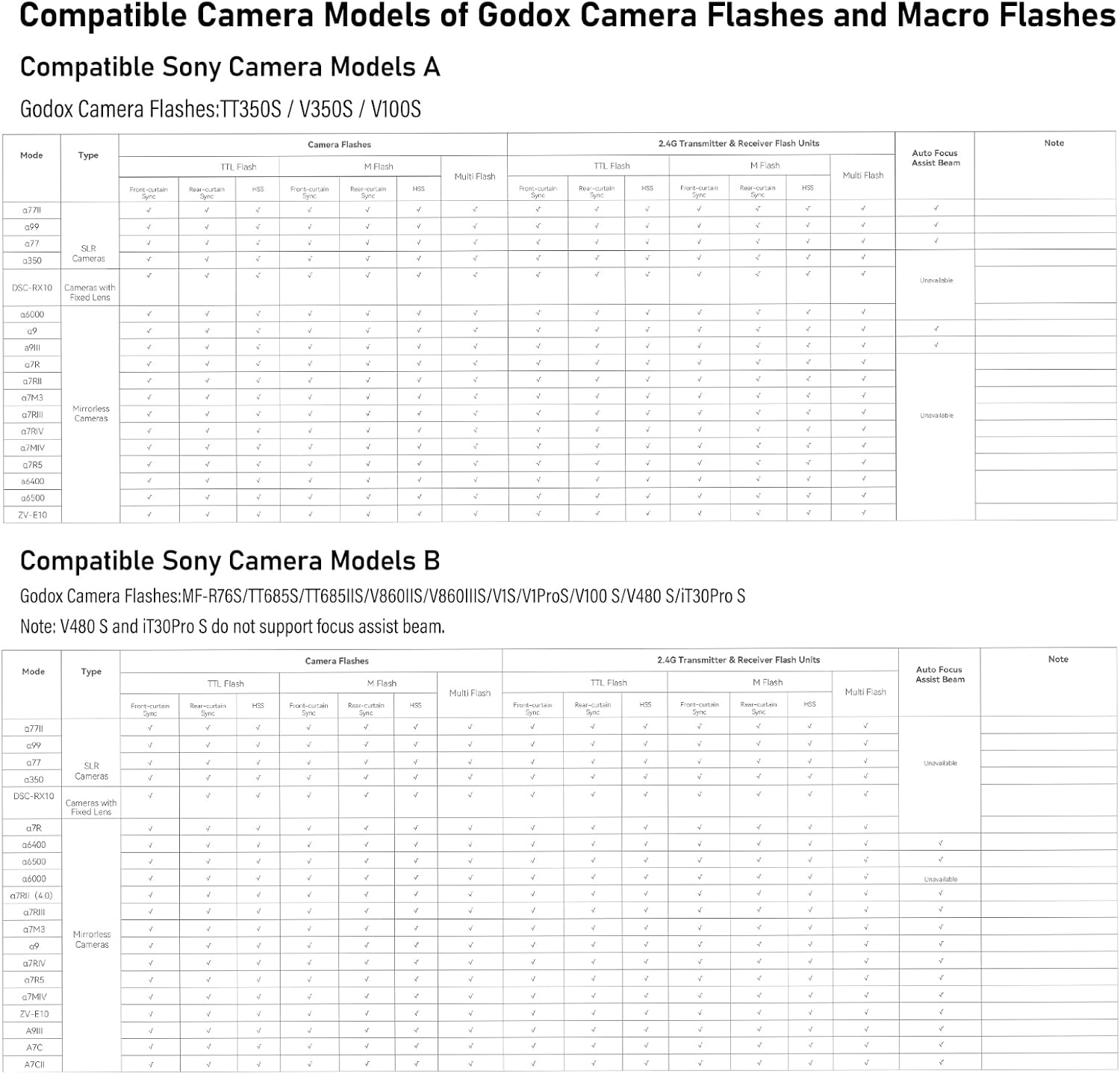
Figure 2.1: All items included in the GODOX V100S package.
3. Setup
3.1 Battery Installation
Insert the lithium battery into the battery compartment located on the side of the flash unit. Ensure it clicks into place, following the indicated direction.
Video 3.1: Demonstrates battery installation and other operational steps for the Godox V100 flash.
3.2 Flash Mounting
Press the hot shoe lock button on the flash unit. Insert the flash into your camera's hot shoe and rotate to the right to lock it securely in place.
3.3 Detachable Sub Flash SU-1 Installation
Align the detachable sub flash SU-1 with the designated slot on the main flash unit and press until it clicks into place. This versatile feature enables dual-light setups with a single flash, offering creative lighting solutions for portrait photography.

Figure 3.1: Installation of the detachable sub flash SU-1.
4. Operating the Flash
4.1 Power On/Off
Press the power button until the icon appears on the screen, then rotate the dial clockwise to turn on the flash. To turn off, press and hold the power button.
4.2 Touchscreen Navigation
The GODOX V100S features a 2.3-inch full-color HD touchscreen for intuitive control. Swipe right for mode selection and left to return. Swipe down for additional functions and up to return.

Figure 4.1: Intuitive touchscreen for quick adjustments.
4.3 Manual Mode (M)
In Manual Mode, you can precisely adjust the flash power from 1/1 to 1/256. Use the '+' or '-' icons on the touchscreen, pull the progress bar, or rotate the dial for quick adjustment. Tap [Mode] to switch between TTL and Manual Modes.
4.4 TTL Mode
In TTL (Through-The-Lens) Mode, the flash automatically adjusts its output for correct exposure. You can fine-tune the Flash Exposure Compensation (FEC) by pulling the progress bar on the touchscreen.
4.5 Manual Zoom
Tap the [Zoom] icon on the touchscreen to enter the flash focal length settings. Rotate and press the dial to select the desired flash focal length (e.g., 28mm, 35mm, 50mm, 70mm, 80mm, 105mm).
4.6 Auto Zoom
The flash zoom will automatically adjust based on the lens focal length when mounted on a compatible camera.
4.7 Wireless Synchronization (2.4G Wireless X-System)
The GODOX V100S has a built-in 2.4G wireless X-system, allowing it to function as both a master (sender) unit or a receiver unit. It can be seamlessly connected to X3 triggers or other GODOX wireless flash units.
- Sender Mode: Easily pair with other GODOX flash devices that support wireless sync. Long press the Group button to switch between Manual flash, TTL auto flash, or OFF. Tap the '+' or '-' buttons or pull the progress bar to adjust flash power or FEC.
- Receiver Mode: Wireless sync with an X3 Trigger. Tap to switch modes and select focal length. Tap to enter group settings and select the group.

Figure 4.2: Wireless Sync setup with GODOX X-System.
Video 4.1: Detailed operational tutorial for the Godox V100 flash, covering various modes and settings.
4.8 Modeling Lamp
The flash features a built-in 2W LED modeling lamp with 10 adjustable levels. It supports continuous mode (light stays on continuously) or interrupt mode (light turns off automatically when flash fires).
4.9 Screen Brightness
The screen brightness is adjustable without steps via the menu settings.
4.10 Optical Control (S1/S2)
Available in Manual (M) flash mode:
- S1: The flash will fire synchronously when the main flash fires.
- S2: The flash will only fire in response to the second actual flash from the main flash.
4.11 Sync Modes
The flash supports various sync modes including Front Curtain Sync, High-Speed Sync (HSS) up to 1/80,000s, and Rear Curtain Sync.

Figure 4.3: Global Shutter Flash Sync at 1/16000s.
4.12 AF Assist Beam
The AF assist beam helps the camera focus in low-light conditions.
4.13 Beeper
The beeper provides audible feedback for flash readiness and other operations.
4.14 Multi Flash
Multi Flash mode allows for multiple flashes within a single exposure, useful for capturing motion sequences.
4.15 Screen Lock
Press and hold the lock icon for 2 seconds to lock or unlock the touchscreen, preventing accidental changes to settings.
5. Power Management
The GODOX V100S is powered by a high-performance 2980mAH lithium battery, ensuring uninterrupted shooting. It features a Type-C charging port and is compatible with the VX26T multi-battery charger for convenient and fast recharging.

Figure 5.1: Battery charging and external power options.
The advanced cooling system allows for 70 to 100 consecutive 100Ws flashes without compromising performance. For extended shooting sessions, the V100S includes a port for the PB960 Lithium-ion Flash Power Pack, reducing full-power recycling time to as fast as 0.8 seconds.

Figure 5.2: Continuous flashes at 100Ws before overheat protection activates.
6. Compatible Camera Models
The GODOX V100S is suitable for Sony cameras, including but not limited to:
- Sony a771, a99, a77, a350
- DSC-RX10, a7R, a6400, a6500, a6000
- a7RII (4.0), a7RI, a7M3, a9
- a7RIV, a7R5, a7MIV, ZV-E10, A9I, A7C, A7CI
7. Accessories
The V100S is compatible with a broad range of GODOX accessories, including the AK-R1 Accessory Kit for Round Flash Heads, AK-R21 Projection Attachment, AK-R22 Collapsible Diffusion Dome, and the S2 Speedlite Bracket for Bowens, among others.

Figure 7.1: Comprehensive GODOX Accessory Ecosystem.
8. Specifications
- Package Dimensions: 9.29 x 7.64 x 3.86 inches
- Item Weight: 2.57 pounds
- Item Model Number: V100S (USA)
- Flash Sync Speed: 1/80000s
- Camera Flash Type: Studio
- Manufacturer: GODOX
9. Troubleshooting
If you encounter any issues with your GODOX V100S flash, please refer to the following common troubleshooting steps:
- Flash not firing: Ensure the battery is fully charged and correctly inserted. Check if the flash is securely mounted on the camera's hot shoe or properly synced in wireless mode. Verify camera and flash settings (e.g., TTL, Manual, Sync Speed).
- Inconsistent flash output: Check battery level. Ensure flash head is clean. Verify flash mode and power settings. If using wireless, ensure proper channel and ID settings.
- Overheating: The flash has an advanced cooling system. If it overheats, it may temporarily reduce output or stop firing to protect components. Allow it to cool down.
- Touchscreen unresponsive: Try locking and unlocking the screen. If the issue persists, power cycle the device.
10. Maintenance
To ensure the longevity and optimal performance of your GODOX V100S flash, follow these maintenance guidelines:
- Cleaning: Use a soft, dry cloth to clean the flash body and screen. For the flash tube, use a lint-free cloth. Avoid using harsh chemicals or abrasive materials.
- Storage: Store the flash in a cool, dry place away from direct sunlight and extreme temperatures. Remove the battery if storing for extended periods.
- Handling: Handle the flash with care to avoid drops or impacts. Do not expose the flash to water or high humidity, as it is not weather-sealed.
11. Warranty and Support
For warranty information, technical support, or service inquiries, please refer to the warranty card included in your product packaging or visit the official GODOX website. Keep your proof of purchase for warranty claims.
You can also visit the GODOX Store on Amazon for additional product information and support resources.