
1. Introduction and Overview
The TOUR BOX Elite Plus is a programmable creative console designed to enhance workflow efficiency for digital artists, photographers, and video editors. It offers intuitive control over various software applications across multiple operating systems, providing a seamless and precise creative experience.
2. What's in the Box
Upon unboxing your TOUR BOX Elite Plus, please ensure all the following items are present:
- TourBox Elite Plus Device
- 2 AA Batteries
- Quick Start Guide
3. Setup
3.1 Initial Device Setup
1. Open the battery compartment on the underside of the TourBox Elite Plus.
2. Insert the two provided AA batteries, ensuring correct polarity.
3. Close the battery compartment securely.
4. Locate the Bluetooth switch on the back of the device and slide it to the 'ON' position.
3.2 Software Installation
To fully utilize your TourBox Elite Plus, you need to install the TourBox Console software.
- For macOS/Windows: Visit the official TourBox website and download the latest TourBox Console application for your operating system. Follow the on-screen instructions to complete the installation.
- For iPadOS: Search for "TourBox Console" in the Apple App Store and install the application.
3.3 Device Pairing (Bluetooth)
1. Ensure your TourBox Elite Plus is powered on and in pairing mode (indicated by a blinking LED).
2. On your computer (macOS/Windows) or iPad, navigate to your device's Bluetooth settings.
3. Select "TourBox Elite Plus" from the list of available devices to pair.
4. Once connected, the LED indicator on the TourBox Elite Plus will show a solid light, confirming successful pairing.
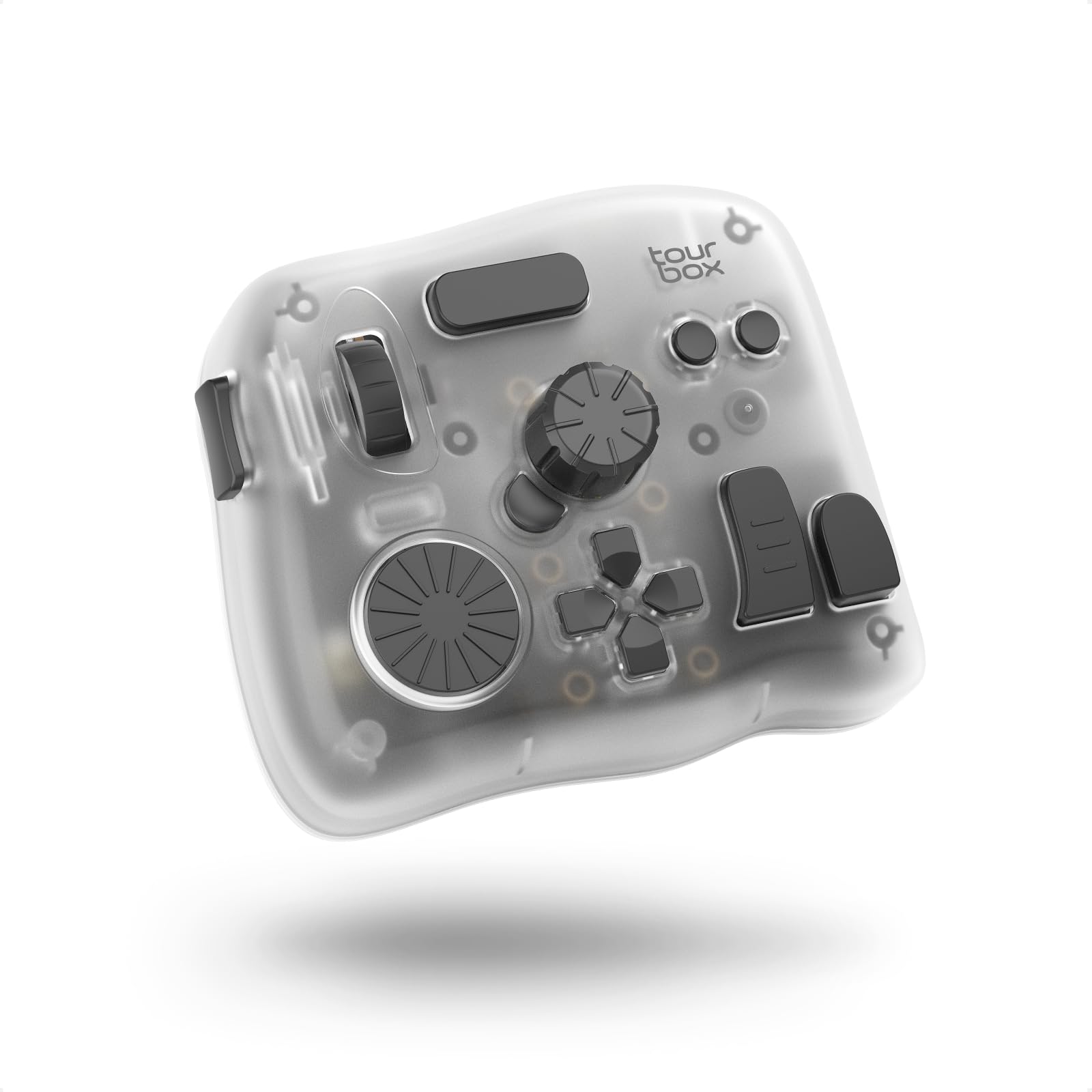
Image: The TourBox Elite Plus device shown on a wooden desk, ready for use with an iPad.
Video: Demonstrates the TourBox Elite Plus's compatibility with iPadOS, showing how to connect and use it for creative tasks.
4. Operating the TourBox Elite Plus
4.1 Basic Functions and Customization
The TourBox Elite Plus features 14 programmable buttons and dials, allowing for extensive customization. Through the TourBox Console software, you can assign various functions, macros, and shortcuts to each control, tailoring the device to your specific workflow and software preferences.
- Knobs and Dials: Use for precise adjustments like brush size, zoom, timeline scrubbing, or color grading parameters.
- Buttons: Assign single-click, double-click, or combination actions for frequently used commands (e.g., Undo, Redo, Tool Switch).
- Macros: Create complex sequences of actions with a single press, automating repetitive tasks.
- Haptic Feedback: Adjust the intensity of the haptic feedback to provide tactile confirmation for each adjustment.
4.2 Software Integration
The TourBox Elite Plus offers deep integration with a wide range of creative software, including:
- Adobe Photoshop, Lightroom, Premiere Pro, After Effects, Illustrator
- DaVinci Resolve, Final Cut Pro, LumaFusion
- Procreate, Clip Studio Paint, PaintTool SAI, Capture One, Affinity Photo
- OBS, Corel Painter, Aseprite, ToonSquid, CapCut, PowerDirector
The TourBox Console provides preloaded official presets for major software, allowing for immediate use. You can also create and share custom presets.

Image: A user drawing on an iPad with a stylus, while their other hand operates the TourBox Elite Plus for quick tool access.
Video: Demonstrates the capabilities of TourBox in DaVinci Resolve, highlighting features like HoverAdjust for color wheels and curves, Shuttle Browse, and Shuttle Playback.
Video: Showcases the TourBox Elite Plus's efficiency in video editing, emphasizing faster, smoother, and more precise control over timelines and effects.
Video: Highlights the TourBox Elite Plus's capabilities for digital drawing on iPad, enabling creative work on the go.
5. Compatibility
The TourBox Elite Plus is designed for broad compatibility across various platforms:
- Operating Systems: iPadOS 13 or later, macOS 10.13 or later, Windows 7 or later (64-bit).
- Connectivity: Dual-channel Bluetooth 5.0 for seamless switching between connected devices.
- Devices: Laptop, Desktop, Mac, PC, Windows Tablet, iPad.

Image: The TourBox Elite Plus connected to both a MacBook and an iPad, showcasing its dual-channel Bluetooth capability.
6. Product Features
The TourBox Elite Plus is engineered with advanced features to optimize your creative workflow:
- 14 Programmable Controls: Includes various buttons, a scroll wheel, and multiple dials for comprehensive command access.
- Dual-Channel Bluetooth 5.0: Allows connection to two devices simultaneously with quick switching.
- Adjustable Haptic Feedback: Two levels of vibration intensity (Low/Strong) provide tactile response for precise adjustments.
- Power-Efficient Micro Switches: Ensures durability and responsive clicks for all buttons.
- Ergonomic Design: Comfortable for both left- and right-handed users, reducing hand movement and fatigue.

Image: An illustration detailing the two levels of haptic feedback and Bluetooth HID feature of the TourBox Elite Plus.
7. Maintenance
To ensure the longevity and optimal performance of your TourBox Elite Plus, follow these maintenance guidelines:
- Cleaning: Use a soft, dry cloth to wipe the device. Avoid abrasive cleaners or solvents.
- Battery Replacement: When the battery indicator light signals low power, replace both AA batteries with new ones.
- Storage: Store the device in a cool, dry place away from direct sunlight and extreme temperatures.
8. Troubleshooting
If you encounter issues with your TourBox Elite Plus, try the following steps:
- Device Not Responding: Ensure the device is powered on and batteries are not depleted. Try replacing the batteries.
- Bluetooth Connectivity Issues: Turn the device off and on again. Remove the device from your computer/iPad's Bluetooth settings and re-pair it. Ensure no other devices are interfering with the Bluetooth signal.
- Software Not Recognizing Device: Ensure the TourBox Console software is running and up to date. Restart the software and your creative application.
- Incorrect Functionality: Check your custom preset settings in the TourBox Console. Ensure the correct preset is active for the application you are using.
9. Specifications
| Feature | Detail |
|---|---|
| Brand | TOUR BOX |
| Model Name | TourBox Elite Plus |
| Compatible Devices | Laptop, Desktop, Mac, PC, Win tablet, iPad |
| Controller Type | Button Control |
| Connectivity Technology | Bluetooth |
| Button Quantity | 14 |
| Hardware Platform | Tablet |
| Power Source | Battery Powered (2 AA batteries) |
| Item Dimensions | 4.57 x 3.98 x 0.04 inches |
| Color | Ice Translucent |
10. Warranty and Support
TOUR BOX is committed to providing high-quality products and customer satisfaction.
- Warranty: The TourBox Elite Plus comes with a 1-Year Manufacturer Warranty.
- Returns/Replacements: A 30-day Refund/Replacement policy is available from the point of purchase.
- Technical Support: Lifetime Technical Support is provided for all TourBox Elite Plus users.
For further assistance, please visit the official TOUR BOX website or contact their customer support.