
1. Product Overview
The Bewinner Portable Bluetooth Speaker is designed for high-quality audio output in a compact, portable form factor. Featuring a transparent PC material shell, it showcases its internal components. The speaker includes a high-performance sound processor for optimized audio across various frequencies, delivering deep bass, clear mids, and rich highs. It also incorporates colorful lighting effects for an enhanced user experience.
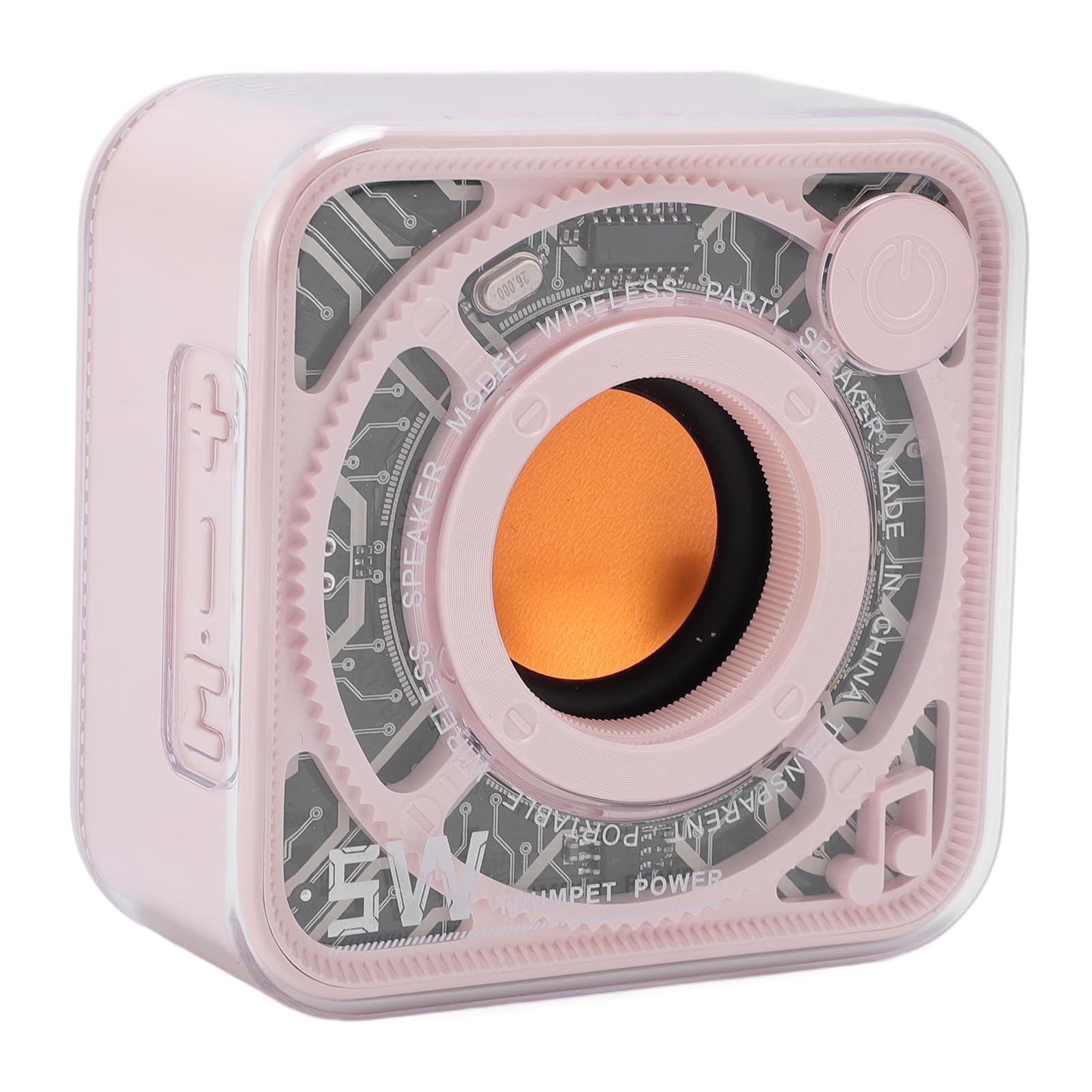
Figure 1.1: Bewinner Portable Bluetooth Speaker (Roseate)
Key Features:
- Transparent Design: High-transparency PC material shell revealing internal components.
- Innovative Sound Processing: High-performance sound processor for expanded frequency response, deep bass, and clear audio.
- Aesthetic and Portable: Compact design with colorful lighting effects, easy to carry.
- Bluetooth Connectivity: Cordless Bluetooth 5.0 for quick pairing with various devices.
2. Package Contents
Please check the package for the following items:
- 1 x Bewinner Portable Bluetooth Speaker
- 1 x USB Type-C Charging Cable
- 1 x Lanyard
- 1 x User Manual (this document)

Figure 2.1: Speaker and Included Accessories
3. Setup Guide
3.1 Charging the Speaker
Before first use, fully charge the speaker. Use the provided USB Type-C charging cable to connect the speaker to a compatible USB power source (e.g., computer USB port, USB wall adapter).
- Connect the Type-C end of the cable to the charging port on the speaker.
- Connect the USB-A end to a power source.
- The charging indicator light will illuminate during charging and turn off when fully charged.

Figure 3.1: Charging Port Location
3.2 Powering On/Off
- To Power On: Press and hold the power button located on the top right side of the speaker until you hear an audible prompt or see the indicator lights activate.
- To Power Off: Press and hold the power button again until the speaker powers down.
3.3 Bluetooth Pairing
To connect your speaker to a Bluetooth-enabled device:
- Ensure the speaker is powered on and in pairing mode (indicator light may flash).
- On your device (smartphone, tablet, etc.), go to the Bluetooth settings.
- Search for available devices and select "Bewinner Speaker" (or similar name) from the list.
- Once connected, the speaker will provide an audible confirmation, and the indicator light will change.
4. Operating Instructions
4.1 Basic Playback Controls
While playing audio via Bluetooth:
- Play/Pause: Short press the power button.
- Volume Up: Short press the '+' button.
- Volume Down: Short press the '-' button.
- Next Track: Long press the '+' button.
- Previous Track: Long press the '-' button.
4.2 Lighting Effects
The speaker features colorful lighting effects. To cycle through different lighting modes or turn them off, locate the dedicated light mode button (if present) or refer to the specific button functions on your speaker model. (Note: Specific button for light control is not detailed in provided data, typically integrated with other controls or a dedicated button.)

Figure 4.1: Speaker with Internal Lighting
4.3 Cordless Stereo Pairing (TWS Function)
If you have two Bewinner Portable Bluetooth Speakers, you can pair them together for a true wireless stereo experience:
- Ensure both speakers are powered on and not connected to any other Bluetooth device.
- On one speaker (this will be the primary speaker), double-press the power button (or a dedicated TWS button if available). It will enter TWS pairing mode.
- The two speakers will automatically search for and connect to each other. You will hear a confirmation tone once connected.
- Once TWS paired, connect your device to the primary speaker via Bluetooth as described in Section 3.3. Audio will now play through both speakers.
5. Maintenance and Care
To ensure the longevity and optimal performance of your speaker, follow these guidelines:
- Cleaning: Use a soft, dry, lint-free cloth to clean the speaker's exterior. Do not use abrasive cleaners, solvents, or strong chemicals.
- Water Exposure: This speaker is not waterproof. Avoid exposing it to water, rain, or excessive moisture.
- Temperature: Store and operate the speaker in moderate temperatures. Avoid extreme heat or cold.
- Battery Care: For optimal battery life, avoid fully discharging the battery frequently. Charge the speaker regularly, even if not in use for extended periods.
- Storage: When not in use, store the speaker in a cool, dry place away from direct sunlight.
6. Troubleshooting
If you encounter issues with your speaker, refer to the following common problems and solutions:
| Problem | Possible Cause | Solution |
|---|---|---|
| Speaker does not power on. | Low battery. | Charge the speaker fully using the provided Type-C cable. |
| No sound from speaker. | Volume too low; Not connected via Bluetooth; Device volume too low. | Increase speaker and device volume. Ensure Bluetooth is connected. |
| Cannot pair via Bluetooth. | Speaker not in pairing mode; Device Bluetooth off; Interference. | Ensure speaker is in pairing mode. Turn device Bluetooth off/on. Move closer to speaker. Restart both devices. |
| TWS pairing fails. | Speakers already connected to other devices; Incorrect pairing procedure. | Disconnect both speakers from any devices. Follow TWS pairing steps carefully. |
7. Technical Specifications
Detailed specifications for the Bewinner Portable Bluetooth Speaker:
- Model: Bewinnerg2xefyodgw-13
- Bluetooth Version: V5.0
- Output Power: 5W
- Frequency Range: 100Hz-18KHz
- Battery Type: Built-in 400mAh Lithium Battery
- Charging Method: USB Type-C
- Product Dimensions: Approximately 3.03 x 3.03 x 1.55 inches (77 x 77 x 39.5 mm)
- Item Weight: 6.9 ounces (approx. 195g)
- Material: ABS, High Transparency PC
- Manufacturer: Bewinner

Figure 7.1: Product Dimensions
8. Warranty and Support
For warranty information and customer support, please refer to the documentation included with your purchase or visit the official Bewinner website. Keep your proof of purchase for any warranty claims.