
1. Product Overview
The ENDYSHOW 6PC LED Pinspot Stage Light Bar (Model PL-30X) is a versatile lighting fixture designed for various applications, including stage performances, exhibit lighting, and event illumination. It features six independent LED pinspots with manual zoom capabilities, allowing for adjustable beam angles from 15 to 60 degrees. The unit supports multiple control modes, including DMX512, Auto, Master-Slave, and Sound Control, providing flexibility for different lighting needs.

Image 1.1: The ENDYSHOW 6PC LED Pinspot Stage Light Bar with its six adjustable pinspots.
2. Safety Instructions
- Always ensure the product is connected to a grounded power source.
- Do not open the housing; there are no user-serviceable parts inside. Refer servicing to qualified personnel.
- Avoid direct eye exposure to the light source, as it can cause eye damage.
- Keep the unit away from water, moisture, and extreme temperatures.
- Ensure proper ventilation to prevent overheating. Do not block ventilation openings.
- Use only the power cord and accessories provided by the manufacturer.
3. What's in the Box
Upon unpacking, verify that all items listed below are present and in good condition:
- Pinspot Light Bar x 1
- Power Cord x 1
- Mounting Brackets x 2
- User Manual x 1

Image 3.1: Included components: light bar, power cord, mounting brackets, and user manual.
4. Setup
4.1 Mounting Options
The light bar offers flexible mounting options:
- Floor Placement: The unit is equipped with rubber feet for stable placement on a flat surface, allowing it to project light upwards.
- Truss/Wall Mounting: Use the included mounting brackets to securely attach the light bar to trusses, walls, or ceilings. Ensure the mounting surface can support the weight of the fixture.

Image 4.1: The light bar showing its base and included mounting brackets.
4.2 Power Connection
Connect the provided power cord to the 'POWER' input on the back of the unit and then to a compatible AC110-220V, 50/60Hz power outlet.

Image 4.2: Rear panel showing power input and DMX ports.
5. Operating Modes
The PL-30X offers several operating modes, selectable via the onboard LED display and buttons (MENU, UP, DOWN, ENTER) or through DMX control.
5.1 Manual Zoom (15-60 Degrees)
Each of the six pinspots features a manual zoom function. By twisting the front part of each light head, you can adjust the beam angle from a narrow 15-degree spot to a wider 60-degree wash. This allows for precise control over the light projection.

Image 5.1: Manual zoom mechanism on each pinspot head.
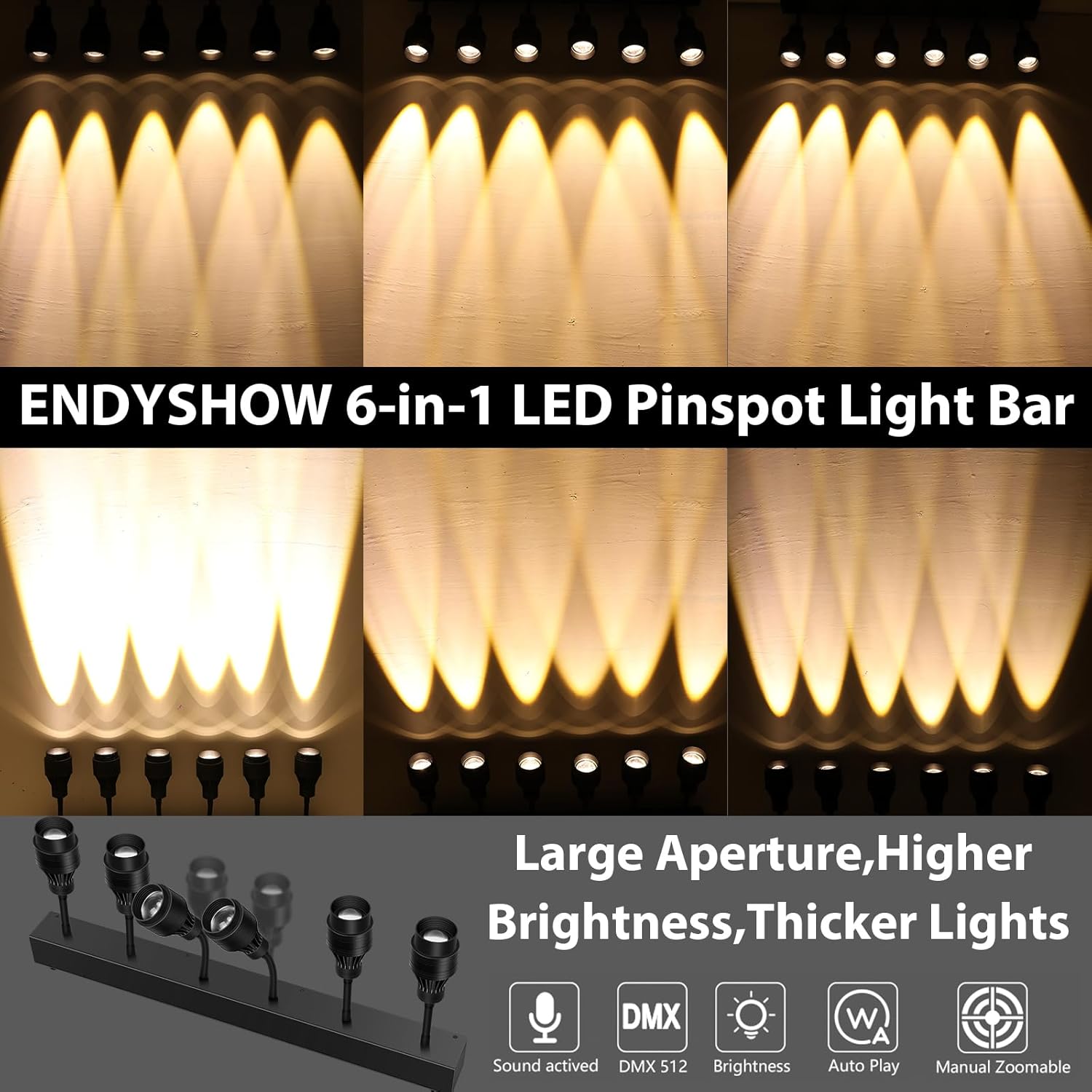
Image 5.2: Visual representation of different beam angles (15°, 30°, 60°).
5.2 DMX512 Mode (6/10CH)
For professional lighting control, connect a DMX controller to the DMX IN port. The unit supports 6-channel or 10-channel DMX modes, allowing for individual control of brightness, strobe, and other effects for each pinspot. Use the DMX OUT port to daisy-chain multiple units.
5.3 Auto Mode
The Auto Mode cycles through various pre-programmed lighting sequences and effects automatically. This mode is ideal for quick setup and dynamic lighting without external control.
5.4 Master-Slave Mode
In Master-Slave mode, one unit acts as the master, controlling other connected slave units. Connect the DMX OUT of the master unit to the DMX IN of the first slave unit, and continue daisy-chaining for synchronized effects across multiple light bars.
5.5 Sound Control Mode
The Sound Control Mode activates lighting effects in response to ambient sound or music. The built-in microphone detects audio, and the lights will react dynamically to the beat and volume.
5.6 Video Demonstrations
The following videos demonstrate the product's features and operation:
Video 5.3: Demonstration of the ENDYSHOW 6PC LED Pinspot Lights with manual zoom capabilities (15-60 Degree).
Video 5.4: Overview of the ENDYSHOW Pinspot Light Bar's manual zoom feature (15-60 Degree).
Video 5.5: Detailed demonstration of the ENDYSHOW 6PC LED Pinspot Light Bar's features and effects.
6. Maintenance
- Cleaning: Regularly clean the exterior of the unit with a soft, dry cloth. Do not use harsh chemicals or abrasive cleaners.
- Lens Care: Gently wipe the lenses with a soft, lint-free cloth to maintain optimal light output.
- Storage: When not in use, store the light bar in a cool, dry place, away from direct sunlight and extreme temperatures.
7. Troubleshooting
- No Power: Check the power cord connection to both the unit and the outlet. Ensure the outlet is functional.
- Lights Not Responding: Verify the selected operating mode. If using DMX, check DMX cable connections and controller settings.
- Inconsistent Light Output: Ensure all pinspot heads are securely attached and lenses are clean.
- Overheating: Confirm that ventilation openings are not blocked and the unit is operating within recommended temperature ranges.
8. Specifications
| Feature | Specification |
|---|---|
| Brand | ENDYSHOW |
| Model Name | PL-30X |
| Light Type | LED |
| Special Feature | Manual Zoom (15-60 degrees) |
| Wattage | 160 watts |
| Light Color | Warm White |
| Color Temperature | 3200 Kelvin |
| Brightness | 500 lumens |
| Voltage | 120 Volts (AC) |
| Accepted Voltage Frequency | 100 to 240 Volts and 50 Hertz to 60 Hertz |
| Material | Aluminum, Metal |
| Average Life | 80,000 Hours |
| Product Dimensions | 25.5 x 4.2 x 10.23 inches |
| Item Weight | 9.08 pounds |
| Indoor/Outdoor Usage | Indoor |
9. Warranty and Support
For warranty information and technical support, please refer to the contact details provided with your purchase or visit the official ENDYSHOW website. Keep your purchase receipt as proof of purchase.