Introduction
Thank you for choosing the CAYNEL Portable Air Conditioner. This versatile 4-in-1 unit functions as a fan, humidifier, and air cooler, providing customizable comfort for your indoor and outdoor spaces. Designed for ease of use and portability, it offers efficient cooling without the need for complex installation. Please read this manual thoroughly before operation to ensure proper use and maintenance.

Figure 1: CAYNEL Portable Air Conditioner, Remote, and Ice Packs

Figure 2: Energy-Saving Operation (80W)
Package Contents
Ensure all items are present and in good condition upon unpacking:
- Portable Air Conditioner (1)
- Ice Pack (4)
- Swivel Wheel (4)
- User Manual (1)
- Remote Control (1)
Setup
1. Attaching the Wheels
The unit comes with four swivel wheels for easy mobility. Simply insert each wheel into the designated slots on the bottom of the unit until they click securely into place.

Figure 3: Attaching Swivel Wheels and Using the Portable Handle
2. Filling the Water Tank and Adding Ice Packs
For optimal cooling, fill the 1.85-gallon water tank with clean water. You can easily add water from the top of the unit. Place the included ice packs (pre-frozen) into the water tank to enhance the cooling effect. Ensure the water level does not exceed the "MAX" line indicated on the unit.

Figure 4: Top Refill and Water Tank with Ice Packs
3. Positioning the Unit
Place the air cooler on a flat, stable surface. This unit is windowless, meaning it does not require an exhaust hose to be vented out of a window, offering flexible placement options in any room.

Figure 5: Windowless Air Cooler Placement
Operating Instructions
The CAYNEL Portable Air Conditioner can be operated using the touch control panel on top of the unit or the included remote control.

Figure 6: Control Panel and Remote Control
1. Power On/Off
- Press the ON/OFF button (power symbol) to turn the unit on or off.
2. Adjusting Fan Speeds
- Press the Speed button (fan symbol) to cycle through 3 wind speeds: Low, Medium, and High.
3. Selecting Modes
- The unit features 4 modes: Normal, Natural, Cool, and Sleep. Use the corresponding buttons on the control panel or remote to select your desired mode.
- Normal Mode: Provides a steady airflow.
- Natural Mode: Simulates a natural breeze with varying fan speeds.
- Cool Mode: Activates the evaporative cooling function, utilizing water and ice packs for cooler air.
- Sleep Mode: Operates at a lower noise level (40dB) and adjusts fan speed for comfortable sleep.
4. Using the Timer
- Press the Timer button (clock symbol) to set an auto-off timer from 0 to 7 hours.
5. Activating Swing Function
- Press the Swing button (arrow symbol) to enable the 40° oscillating fan, distributing cool air more widely.

Figure 7: High Efficient Cooling Airflow
Maintenance
1. Cleaning the Removable Filter and Cooling Pad
Regular cleaning of the filter and cooling pad ensures optimal performance and air quality. The filter and cooling pad are removable for easy washing.
- To remove, locate the access panel on the back of the unit.
- Unscrew any retaining screws and unclip the panel.
- Carefully slide out the filter and cooling pad.
- Wash with mild soap and water, rinse thoroughly, and allow to air dry completely before reinserting.
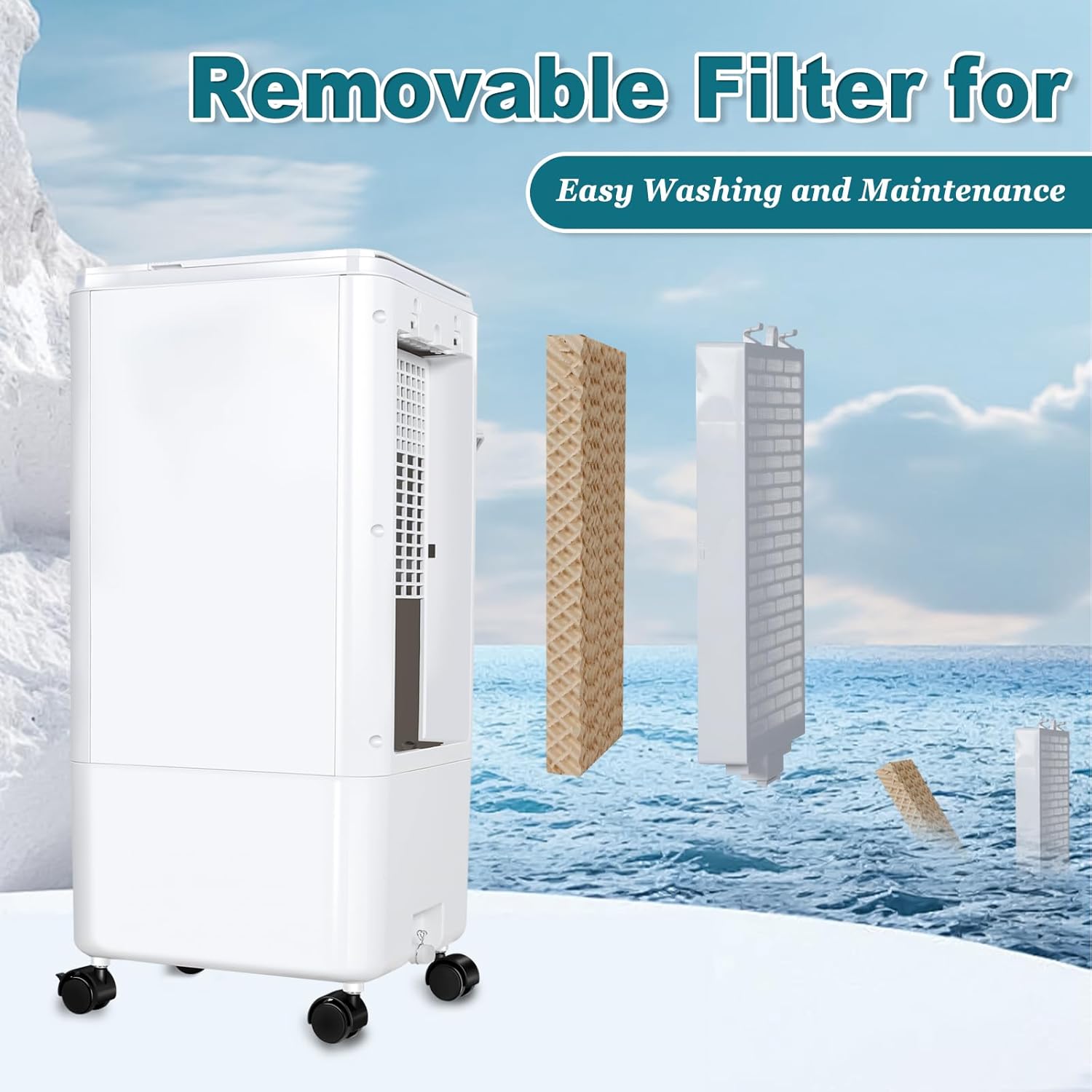
Figure 8: Removable Filter for Easy Maintenance
2. Draining the Water Tank
Periodically drain any remaining water from the tank, especially before long periods of storage, to prevent mold or mildew buildup. Locate the drain plug at the bottom of the unit, remove it, and allow the water to empty. Replace the plug securely after draining.
Troubleshooting
If your CAYNEL Portable Air Conditioner is not performing as expected, please refer to the following common issues and solutions:
- Unit not cooling effectively:
- Ensure the water tank is filled to the "MAX" line.
- Verify that the ice packs are frozen and placed in the tank.
- Clean the air filter and cooling pad if they appear dirty or clogged.
- Confirm the unit is in "Cool Mode".
- Evaporative coolers are most effective in dry climates. In high humidity, their cooling capacity may be reduced.
- No airflow or weak airflow:
- Check if the unit is powered on and plugged in securely.
- Ensure the horizontal blades are open and not obstructed.
- Increase the fan speed setting.
- Unusual noise:
- Ensure the unit is placed on a flat, stable surface to prevent vibrations.
- Check for any foreign objects inside the unit or around the fan blades.
Specifications
| Feature | Detail |
|---|---|
| Brand | CAYNEL |
| Model Name | portable air conditioner |
| Item Model Number | AZ46205 |
| Mounting Type | Freestanding |
| Color | White |
| Product Dimensions | 22.3"D x 9.2"W x 10.2"H |
| Item Weight | 7.9 pounds |
| Air Flow Capacity | 450 Cubic Feet Per Minute |
| Noise Level | 40 dB |
| Voltage | 120 Volts |
| Power Source | Corded Electric |
| Controls Type | Remote |
| Special Features | Fast Cooling, 3 Adjustable Speed, 40° Oscillating fan, 40dB silent Operation, Removable Washable filter, 0-7H Timer, Portable (4x360° Wheels) & Lightweight for Mobility, Built-In Handle, Removable Cooling Pad & Detachable Water Tank for Easy Cleaning |
Warranty & Support
The CAYNEL Portable Air Conditioner comes with a 1-Year Warranty from the manufacturer. For any product inquiries, technical support, or warranty claims, please contact CAYNEL customer service through their official channels or the retailer where the product was purchased.
Manufacturer: CAYNEL
