Introduction
Thank you for choosing the ANBIUX 4K 8MP Dual-Lens Outdoor Security Camera, Model A22YQ. This manual provides essential information for the proper installation, operation, and maintenance of your security camera. Please read this manual thoroughly before use and retain it for future reference.
Package Contents
Please check the package contents upon receipt. If any items are missing or damaged, contact customer support.
- 1 x ANBIUX 4K 8MP Dual-Lens Outdoor Security Camera (Model A22YQ)
- 1 x Power Cable (3 meters)
- 1 x Installation Kit (screws, wall plugs)
- 1 x User Manual
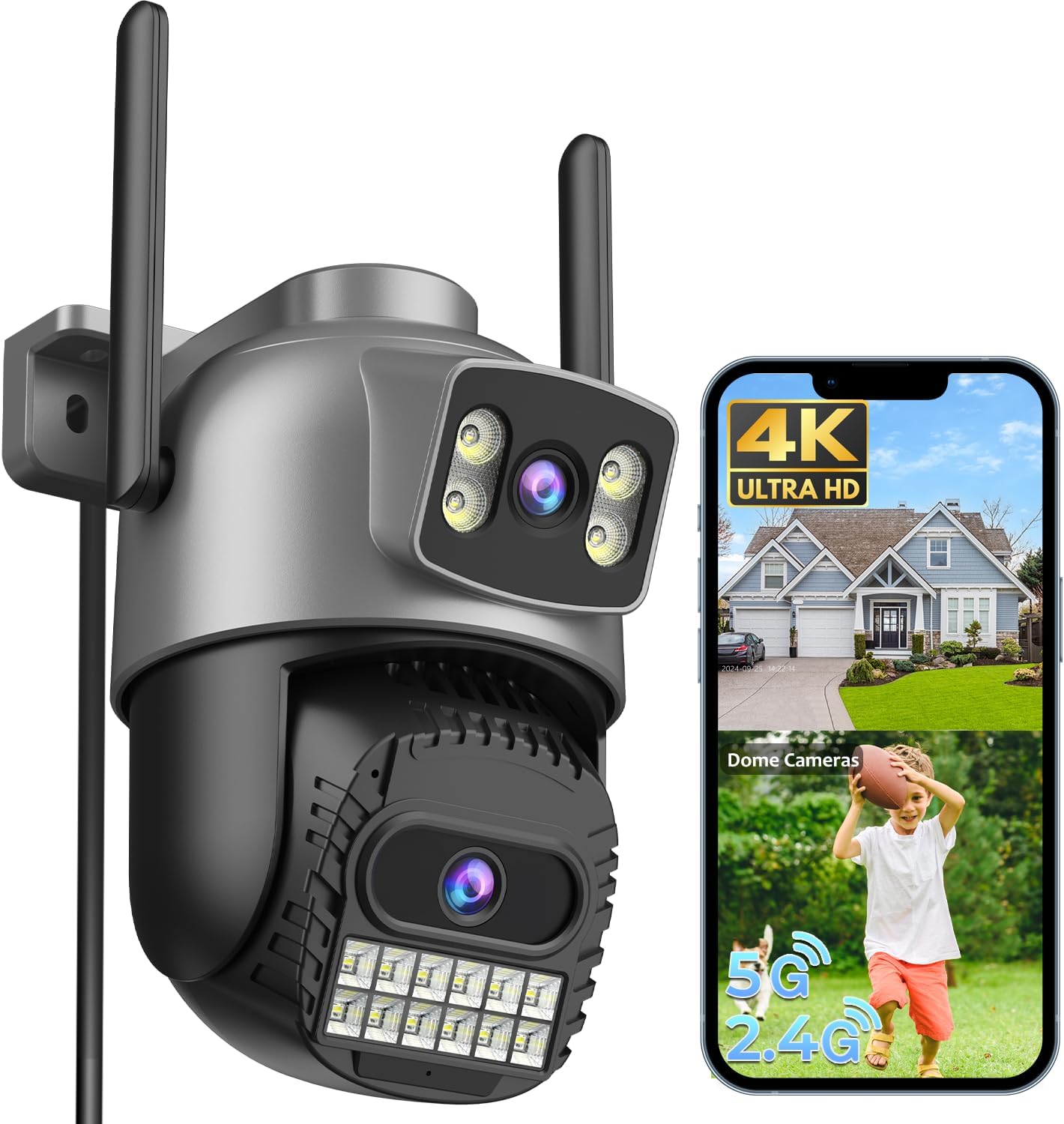
Image: The ANBIUX 4K 8MP Dual-Lens Outdoor Security Camera, showing its dual lenses, antennas, and a smartphone displaying the camera's live feed and 4K resolution.
Product Features
The ANBIUX A22YQ camera is designed with advanced features for comprehensive outdoor surveillance:
- Dual-Lens System: Features a fixed lens and a rotatable PTZ lens (3MP + 3MP) for 360° coverage and dual-screen monitoring.
- 4K UHD Resolution: Delivers clear and detailed images and video.
- Advanced Night Vision: Equipped with 16 white LEDs and 16 infrared LEDs, offering three modes: infrared, full-color, and dual-light alarm, with a color night vision range of up to 30 meters.
- Smart Motion Detection: Utilizes advanced technology for precise human detection, sending real-time notifications within 0.2 seconds. Adjustable sensitivity helps reduce false alarms.
- Two-Way Audio: Built-in microphone and speaker allow for remote communication with visitors or deterrence of intruders.
- Dual-Band WiFi Connectivity: Supports both 2.4G and 5G WiFi for stable and fast real-time video transmission.
- Flexible Storage Options: Supports local storage via Micro SD card (up to 128GB, not included) and cloud storage services.
- Weatherproof Design: IP66 rated for outdoor use, ensuring reliable operation in various weather conditions.
- Multi-User Access: Allows multiple users to monitor the camera simultaneously.
- Smart Home Integration: Compatible with Alexa for voice control and viewing.

Image: Overview of the ANBIUX 8MP Dual-Objective Camera, highlighting its dual-lens design for comprehensive home protection.

Image: Illustration of the camera's dual-lens system, showing a fixed "bullet" lens and a movable "dome" lens, providing a wider and more flexible viewing area.
Setup Guide
1. Preparation
- Ensure your WiFi network is available (2.4GHz or 5GHz).
- Have your smartphone ready to download the control application.
- Choose a suitable mounting location with a clear view and access to a power outlet.
2. App Installation
Download the O-KAM Pro app from your smartphone's app store (Apple App Store or Google Play Store).

Image: Icons for downloading the companion app from the Apple App Store and Google Play Store.
3. Camera Connection
- Power on the camera using the provided power cable.
- Open the O-KAM Pro app and create an account or log in.
- Follow the in-app instructions to add a new device. The camera supports quick connection via Bluetooth and dual-band WiFi (2.4G/5G).
- Ensure the camera is within range of your WiFi router for optimal performance.

Image: A visual representation of the camera connecting to a smartphone via dual-band 2.4GHz and 5GHz WiFi, indicating a quick and stable connection process.
4. Mounting the Camera
The camera is designed for outdoor installation. Use the included installation kit to securely mount the camera to a wall or ceiling. Ensure the mounting surface is stable and can support the camera's weight.
- Mark the drilling points using the camera's base as a template.
- Drill holes and insert wall plugs if necessary.
- Secure the camera with screws.
- Adjust the camera's angle for optimal viewing coverage.

Image: The ANBIUX camera mounted on an exterior wall, illustrating its 355° pan and 90° tilt capabilities, along with 4x digital zoom controlled via a smartphone.
Operating Instructions
1. Live View and Playback
- Open the O-KAM Pro app to view live footage from your camera.
- Use the app interface to pan, tilt, and zoom (digital zoom) the camera.
- Access recorded footage from the Micro SD card or cloud storage for playback.

Image: Various devices (smartphone, tablet, desktop monitor) simultaneously displaying live feeds from multiple ANBIUX cameras, demonstrating multi-device viewing capability.
2. Night Vision Modes
The camera offers three night vision modes, configurable via the app:
- Infrared Mode: Black and white vision using IR LEDs.
- Full-Color Mode: Activates white LEDs for color vision in low light.
- Dual-Light Alarm Mode: Uses IR for general monitoring, but switches to white light and activates an alarm upon motion detection.

Image: Visual comparison of the three night vision modes: infrared (black and white), full-color (illuminated by white LEDs), and dual-light alarm (white light and siren activated upon detection).
3. Motion Detection and Alerts
- Configure motion detection zones and sensitivity levels within the app to minimize false alarms.
- Enable push notifications to receive instant alerts on your smartphone when motion is detected.
- The camera supports automatic tracking of detected subjects.

Image: A child running in a yard, with the camera automatically tracking their movement and a smartphone displaying a real-time alarm notification.

Image: A house with customizable warning zones (Zone 1, Zone 2, Zone 3) highlighted, demonstrating how users can define specific areas for motion detection within the app.

Image: A family standing in front of their house, with a slider indicating adjustable motion detection sensitivity levels (Normal, Sensible) to fine-tune alerts.
4. Two-Way Audio
Use the microphone and speaker functions in the app to communicate with individuals near the camera. This feature is useful for greeting visitors or warning unwanted guests.

Image: A delivery person at a door, and a smartphone displaying the camera feed with an overlay indicating two-way audio communication, allowing the user to speak remotely.
5. Alexa Integration
Connect your ANBIUX camera to Alexa-enabled devices for convenient voice control. For example, say "Alexa, show me the front door" to view the camera feed on a compatible smart display.

Image: A person using an Alexa-enabled smart display to view the camera feed, demonstrating seamless integration with smart home systems.
Maintenance
- Cleaning: Periodically clean the camera lenses with a soft, dry cloth to ensure clear image quality. Do not use harsh chemicals.
- Firmware Updates: Check the O-KAM Pro app regularly for firmware updates to ensure optimal performance and security.
- Power Supply: Ensure the power cable is securely connected and free from damage.
- Storage Management: Regularly review and manage your recorded footage. If using a Micro SD card, consider formatting it periodically to maintain performance.

Image: The camera operating reliably in rainy conditions, highlighting its IP66 water resistance and continuous 24/7 recording capability, with options for cloud storage and Micro SD card (up to 128GB).
Troubleshooting
| Problem | Possible Cause | Solution |
|---|---|---|
| Camera not connecting to WiFi | Incorrect WiFi password; Camera too far from router; Router not supporting 2.4G/5G. | Verify WiFi password. Move camera closer to router. Ensure router supports both 2.4G and 5G, or connect to the correct band. |
| No image/video in app | Camera offline; Power issue; App malfunction. | Check camera power and network connection. Restart the camera and app. Re-add the device if necessary. |
| Frequent false alarms | High motion sensitivity; Environmental factors (e.g., trees, insects). | Adjust motion detection sensitivity in the app. Define specific detection zones to exclude irrelevant areas. |
| Poor night vision quality | Dirty lens; Obstruction; Insufficient ambient light for color mode. | Clean the camera lens. Ensure no objects are blocking the view or IR/white LEDs. Switch to infrared mode if full-color is too dark. |
| Micro SD card not recording | Card full; Card not formatted; Faulty card. | Check card capacity. Format the Micro SD card via the app. Replace the card if it's faulty. Ensure recording settings are enabled. |
Specifications
| Model Number | A22YQ |
| Resolution | 4K (8MP total, 3MP + 3MP dual lens) |
| Night Vision Range | Up to 30 meters (color night vision) |
| Pan/Tilt Angle | Pan 355°, Tilt 90° |
| Connectivity | 2.4G/5G WiFi, Bluetooth, Ethernet, ONVIF, RTSP |
| Storage | Micro SD card (up to 128GB), Cloud Storage |
| Weather Resistance | IP66 |
| Two-Way Audio | Yes |
| Smart Home Compatibility | Alexa |
| Power Input | 3 Volts, 12 Watts (via included power cable) |
| Material | Acrylonitrile Butadiene Styrene (ABS) |
| Dimensions (L x W x H) | 12.7 x 10.1 x 15.2 cm (approx. 5 x 4 x 6 inches) |
| Weight | 570 g |
Warranty and Support
ANBIUX products come with a standard warranty. Please refer to the warranty card included in your package or visit the official ANBIUX website for detailed warranty terms and conditions.
Customer Support
For technical assistance, troubleshooting, or any product-related inquiries, please contact ANBIUX customer support. Our team is available to assist you.
- Online Chat Support: Available 24/7 via the O-KAM Pro app or ANBIUX website.
- Email Support: Refer to the contact information on the ANBIUX website.

Image: A smartphone displaying a live chat interface, representing 24/7 online customer support for product assistance.

