
Tronsmart Mirtune H1, Mirtune S100
Tronsmart Mirtune H1 & S100 Portable Bluetooth Speakers User Manual
Model: Mirtune H1, Mirtune S100
Brand: Tronsmart
1. Introduction
Thank you for choosing the Tronsmart Mirtune H1 and Mirtune S100 Portable Bluetooth Speakers. This manual provides essential information for setting up, operating, and maintaining your speakers to ensure optimal performance and longevity. Please read this manual thoroughly before use.
Package Contents
- 1 x Tronsmart Mirtune H1 Portable Bluetooth Speaker
- 1 x Tronsmart Mirtune S100 Portable Bluetooth Speaker
- 1 x USB-C Charging Cable
- 1 x User Manual
2. Product Overview
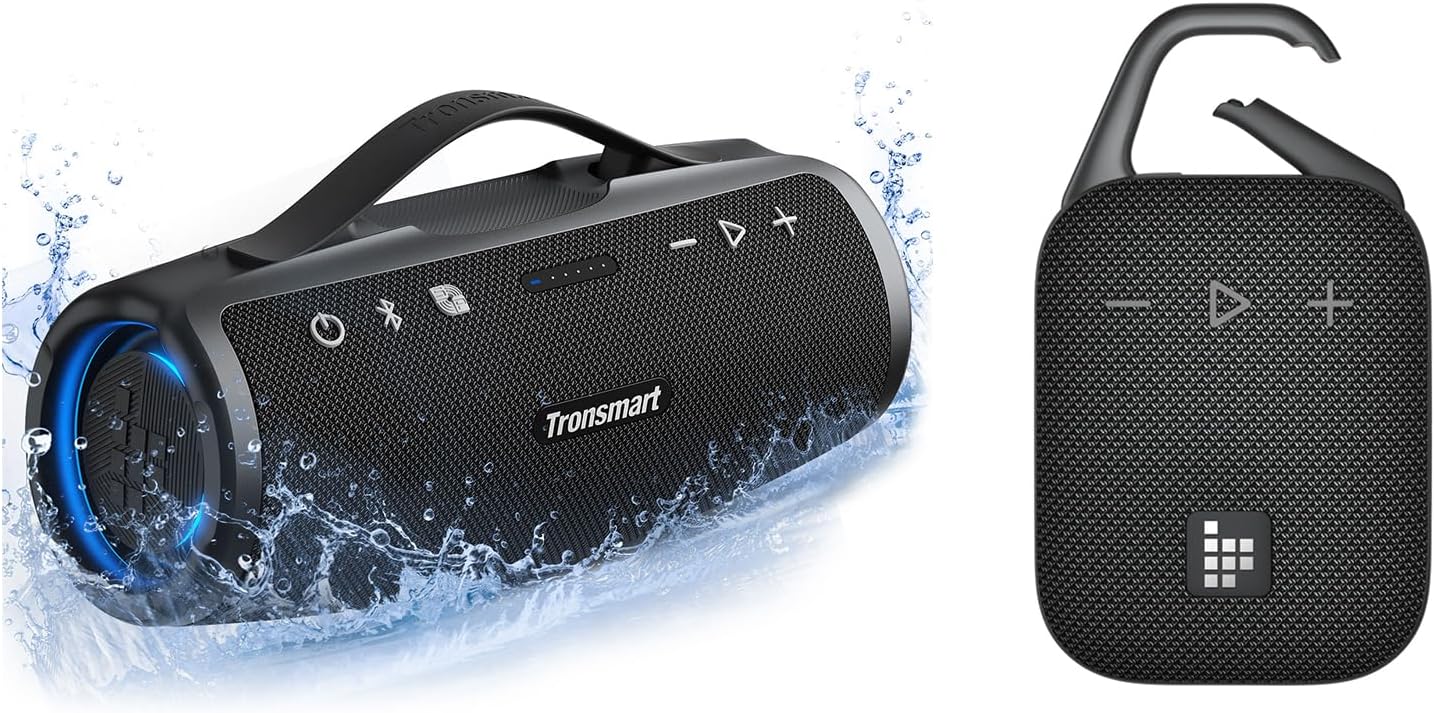
Figure 2.0: Tronsmart Mirtune H1 and S100 Portable Bluetooth Speakers. This image displays both the Mirtune H1 (right) and Mirtune S100 (left) speakers, with the S100 shown in water to highlight its waterproof feature.
The Tronsmart Mirtune H1 and S100 are designed for robust outdoor use, featuring IPX7 waterproofing and powerful audio capabilities. While both offer excellent sound, they have distinct designs and features.
Mirtune H1 Features
- Integrated Carabiner: For easy portability and attachment to backpacks or belt loops.
- Big Sound with Punchy Bass: Engineered with dual passive radiators for enhanced bass.
- IPX7 Waterproof: Fully submersible up to 1 meter for 30 minutes.
- Up to 20 Hours Playtime: Powered by an internal 2000mAh rechargeable Li-ion battery.
- Bluetooth 5.3: For fast pairing and stable connection.

Figure 2.1: Tronsmart Mirtune H1 Portable Bluetooth Speaker. This image shows the front view of the Mirtune H1 speaker, highlighting its compact design and control buttons.

Figure 2.2: Mirtune H1 Integrated Carabiner. This image illustrates the built-in metal carabiner, demonstrating how it can be opened to attach the speaker for on-the-go audio.

Figure 2.3: Mirtune H1 Bass Technology. This image shows an internal view of the Mirtune H1, highlighting its dual passive radiators and full-range driver for enhanced bass output.

Figure 2.4: Mirtune H1 20 Hours Playtime. This image visually represents the Mirtune H1's capability to provide up to 20 hours of continuous music playback on a single charge, suitable for all-day use.
Mirtune S100 Features
- 50W Punchy Bass & Crisp Treble: Delivers powerful stereo sound with a built-in subwoofer.
- Portable Retractable Handle: Designed for easy carrying.
- IPX7 Waterproof: Ready for pool parties, showers, and beach picnics.
- Customizable EQ via Tronsmart APP: Adjust sound profiles to your preference.
- Up to 20 Hours Playtime: Listen all day on a single charge.
- Bluetooth 5.3: Ensures fast pairing and a stable connection.
- Built-in Microphone: For hands-free calls.

Figure 2.5: Tronsmart Mirtune S100 Portable Bluetooth Speaker. This image depicts the Mirtune S100 speaker partially submerged in water, demonstrating its IPX7 waterproof capability.

Figure 2.6: Mirtune S100 50W Stereo Sound. This image provides an exploded view of the Mirtune S100, illustrating its internal components including two 32mm tweeters and a 70x93mm woofer, contributing to its 50W output.

Figure 2.7: Mirtune S100 20 Hours Playtime. This image visually represents the Mirtune S100's capability to provide up to 20 hours of continuous music playback on a single charge, suitable for all-day use.

Figure 2.8: Mirtune S100 IPX7 Fully Waterproof. This image shows the Mirtune S100 speaker near a pool, emphasizing its IPX7 waterproof rating for worry-free listening in wet environments. A note reminds users to seal the rubber cover for ports.
3. Setup
3.1 Charging Your Speaker
Before first use, fully charge your speaker. Use the provided USB-C charging cable to connect the speaker to a USB power adapter (not included) or a computer's USB port. The charging indicator light will show the charging status and turn off when fully charged.
- Charging Time: Approximately 3-4 hours for a full charge.
- Battery Indicator: Refer to the LED indicators on the speaker for battery level.
3.2 Powering On/Off
- Power On: Press and hold the Power button for 2-3 seconds until you hear an audible prompt and the LED indicator lights up.
- Power Off: Press and hold the Power button for 2-3 seconds until you hear an audible prompt and the LED indicator turns off.
3.3 Bluetooth Pairing
- Ensure the speaker is powered on and in Bluetooth pairing mode (the Bluetooth indicator will flash).
- On your device (smartphone, tablet, laptop), enable Bluetooth.
- Search for "Tronsmart Mirtune H1" or "Tronsmart Mirtune S100" in your device's Bluetooth list.
- Select the corresponding speaker to connect. Once connected, you will hear an audible prompt, and the Bluetooth indicator will turn solid.
Note: The speakers will automatically attempt to reconnect to the last paired device when powered on.
4. Operating Instructions
4.1 Basic Controls
| Button/Function | Action | Description |
|---|---|---|
| Power Button | Press and Hold (2-3s) | Power On/Off |
| Play/Pause Button | Short Press | Play/Pause music; Answer/End call |
| Volume Up (+) | Short Press | Increase Volume |
| Volume Down (-) | Short Press | Decrease Volume |
| Next Track (via +) | Press and Hold (+) | Skip to next track |
| Previous Track (via -) | Press and Hold (-) | Go to previous track |
| Bluetooth Button (Mirtune S100) | Short Press | Disconnect current Bluetooth device |
| SoundPulse Button (Mirtune S100) | Short Press | Activate/Deactivate SoundPulse mode for enhanced bass |
4.2 Tronsmart App & Customizable EQ (Mirtune S100)
The Mirtune S100 speaker supports the Tronsmart App, allowing you to customize the Equalizer (EQ) settings for a personalized audio experience. Download the Tronsmart App from your device's app store (iOS App Store or Google Play Store).
- Download and install the Tronsmart App.
- Ensure your Mirtune S100 is connected to your device via Bluetooth.
- Open the Tronsmart App and select your connected speaker.
- Navigate to the EQ settings to adjust bass, treble, and other audio parameters.
4.3 Wireless Stereo Pairing (TWS)
You can pair two identical Tronsmart Mirtune H1 speakers or two identical Tronsmart Mirtune S100 speakers together for a true wireless stereo (TWS) experience. Note: Different models of Bluetooth speakers (e.g., Mirtune H1 and Mirtune S100) cannot be paired together for TWS.
- Ensure both speakers are powered on and disconnected from any Bluetooth device.
- On one speaker (this will be the primary speaker), press the TWS button (if available) or the Bluetooth button (for S100, press and hold for 3 seconds) to enter TWS pairing mode. The indicator light will flash.
- The two speakers will automatically connect to each other. Once connected, you will hear an audible prompt, and the indicator lights on both speakers will change to indicate a successful TWS connection.
- Now, connect your device to the primary speaker via Bluetooth as described in Section 3.3. Audio will play through both speakers in stereo.
5. Maintenance
5.1 Cleaning
- Wipe the speaker with a soft, damp cloth. Do not use harsh chemicals or abrasive cleaners.
- Ensure the charging port and other openings are dry before charging.
5.2 Storage
- Store the speaker in a cool, dry place away from direct sunlight and extreme temperatures.
- If storing for an extended period, charge the battery to approximately 50% every three months to preserve battery life.
5.3 Waterproofing (IPX7)
Both Mirtune H1 and S100 speakers are IPX7 waterproof, meaning they can be submerged in water up to 1 meter (3.3 feet) for up to 30 minutes. To maintain waterproofing:
- Ensure the rubber cover for the charging port and any other ports is securely sealed before exposing the speaker to water.
- Do not expose the speaker to saltwater or other corrosive liquids. If exposed, rinse with fresh water and dry thoroughly.
- Do not charge the speaker if it is wet.
6. Troubleshooting
| Problem | Possible Cause | Solution |
|---|---|---|
| Speaker does not power on. | Low battery. | Charge the speaker fully. |
| Cannot pair with Bluetooth device. | Speaker not in pairing mode; Device Bluetooth off; Too far from speaker. | Ensure speaker is in pairing mode; Turn on device Bluetooth; Move device closer (within 10m/33ft); Forget speaker from device's Bluetooth list and re-pair. |
| No sound or low volume. | Volume too low on speaker or device; Speaker not connected. | Increase volume on both speaker and device; Reconnect Bluetooth. |
| Cannot achieve TWS pairing. | Attempting to pair different models; Speakers too far apart. | Ensure both speakers are the same model (e.g., two H1s or two S100s); Place speakers close to each other during pairing. |
| Sound distortion. | Volume too high; Low battery. | Reduce volume; Charge the speaker. |
7. Specifications
Common Specifications (Mirtune H1 & S100)
- Bluetooth Version: 5.3
- Waterproof Rating: IPX7
- Power Source: Battery Powered
- Connectivity: Bluetooth
- Material: Plastic, Metal
- Recommended Uses: Outdoor Use, Parties, Travel, Calls
- Compatible Devices: Smartphones, Tablets, Laptops, MP3 Players, Desktops
Mirtune H1 Specific Specifications
- Mounting Type: Carabiner Mount
- Playtime: Up to 20 hours (at 50% volume)
- Battery Capacity: 2000mAh (internal Li-ion)
Mirtune S100 Specific Specifications
- Speaker Maximum Output Power: 50W
- Audio Output Mode: Stereo
- Audio Driver Type: Dynamic Driver (2 x 32mm Tweeters, 1 x 70x93mm Woofer)
- Number of Microphones: 1 (built-in)
- Controller Type: Smartphone App (Tronsmart App)
- Playtime: Up to 20 hours (at 50% volume)
8. Warranty and Support
Tronsmart products are built to the highest quality standards. This product is covered by a limited warranty from the date of purchase. For detailed warranty information, please refer to the warranty card included with your product or visit the official Tronsmart website.
For technical support, troubleshooting, or customer service inquiries, please contact Tronsmart customer support through their official website or the contact information provided in your product packaging.
Website: www.tronsmart.com
Related documentsMirtune H1, Mirtune S100


Ask a question about this manual
Ask about setup, troubleshooting, compatibility, parts, safety, or missing instructions. Manuals+ will review the question and use this page’s manual context to help answer it.