
1. Product Overview
The GOLDCHAMP GC-9000A is a professional 4-in-1 gas detector designed for monitoring Hydrogen Sulfide (H2S), Oxygen (O2), Carbon Monoxide (CO), and Combustible Gas (LEL). It features a 2.8-inch LCD display for clear readings and multiple alarm modes to ensure safety in various environments.

Figure 1: Front view of the GOLDCHAMP GC-9000A Gas Detector, showing the display and control buttons.
Key Features:
- 4-in-1 Gas Detection: Monitors H2S, O2, CO, and LEL simultaneously.
- Multiple Alarm Modes: Provides vibration, audible, and visual alarms.
- 2.8-inch LCD Display: Offers clear, real-time data readings including gas concentrations, time, and battery status.
- Rechargeable Battery: Equipped with a 2500mAh lithium battery for over 10 hours of continuous operation.
- Durable Design: Features a convenient back clip for portability and use in demanding environments.
2. Safety Information
Read all safety warnings and instructions carefully before using this device. Failure to follow these instructions may result in electric shock, fire, serious injury, or property damage.
General Safety Precautions:
- Do not attempt to open or modify the device. Internal components are not user-serviceable.
- Ensure the device is fully charged before use to prevent unexpected power loss during critical monitoring.
- Avoid exposing the device to extreme temperatures, direct sunlight, or corrosive substances.
- Regularly check the device for any signs of damage. Do not use if damaged.
- This device is a monitoring tool and should not replace proper safety protocols and personal protective equipment.
- Calibration should be performed regularly by qualified personnel to ensure accuracy.
3. Setup
3.1 Package Contents
Verify that all items are present in the package:
- GOLDCHAMP GC-9000A Gas Detector x 1
- USB Charging Cable x 1
- Instruction Manual x 1
- Storage Bag x 1

Figure 2: Contents of the GC-9000A package, including the detector, USB cable, manual, and storage bag.
3.2 Device Layout
Familiarize yourself with the main components of the GC-9000A Gas Detector:
- LCD Display: Shows gas readings, battery level, time, and alarm status.
- Control Buttons: ESC/▲ (Escape/Up), ▲/OK (Power/OK), ENT/▼ (Enter/Down).
- Gas Sensors: Located at the bottom of the device, responsible for detecting gases.
- Alarm Indicators: LED lights for visual alarms, internal buzzer for audible alarms, and vibration motor.
- Charging Port: USB port for recharging the device.
- Back Clip: For attaching the device to clothing or equipment.

Figure 3: Detailed view of the GC-9000A, highlighting its dimensions, multifunctional back clip, and sensor areas.
3.3 Charging the Device
Before first use, fully charge the GC-9000A. Connect the provided USB charging cable to the device's charging port and a compatible USB power adapter (not included). The battery indicator on the LCD display will show charging status. A full charge typically provides over 10 hours of standby time.

Figure 4: The USB charging port on the side of the GC-9000A detector.
4. Operating Instructions
4.1 Power On/Off
- Power On: Press and hold the ▲/OK button for approximately 3 seconds until the device powers on and the display illuminates.
- Power Off: Press and hold the ▲/OK button for approximately 3 seconds. A confirmation prompt will appear; select 'Yes' to power off.
4.2 Display Information
The 2.8-inch LCD display provides real-time information:
- Gas Readings: Displays current concentrations for H2S, O2, CO, and LEL.
- Time: Current date and time.
- Battery Status: Indicates remaining battery life.
- Alarm Status: Icons or indicators for active alarms.
4.3 Alarm Modes
The GC-9000A utilizes three distinct alarm modes to alert users to potential hazards:
- Audible Alarm: A loud beeping sound.
- Vibration Alarm: The device vibrates.
- Visual Alarm: LED warning lights flash.
These alarms activate when gas concentrations exceed preset high or low alarm values. The device will continue to alarm until the gas levels return to a safe range or the alarm is acknowledged/silenced (refer to advanced settings in the full manual for silencing options).
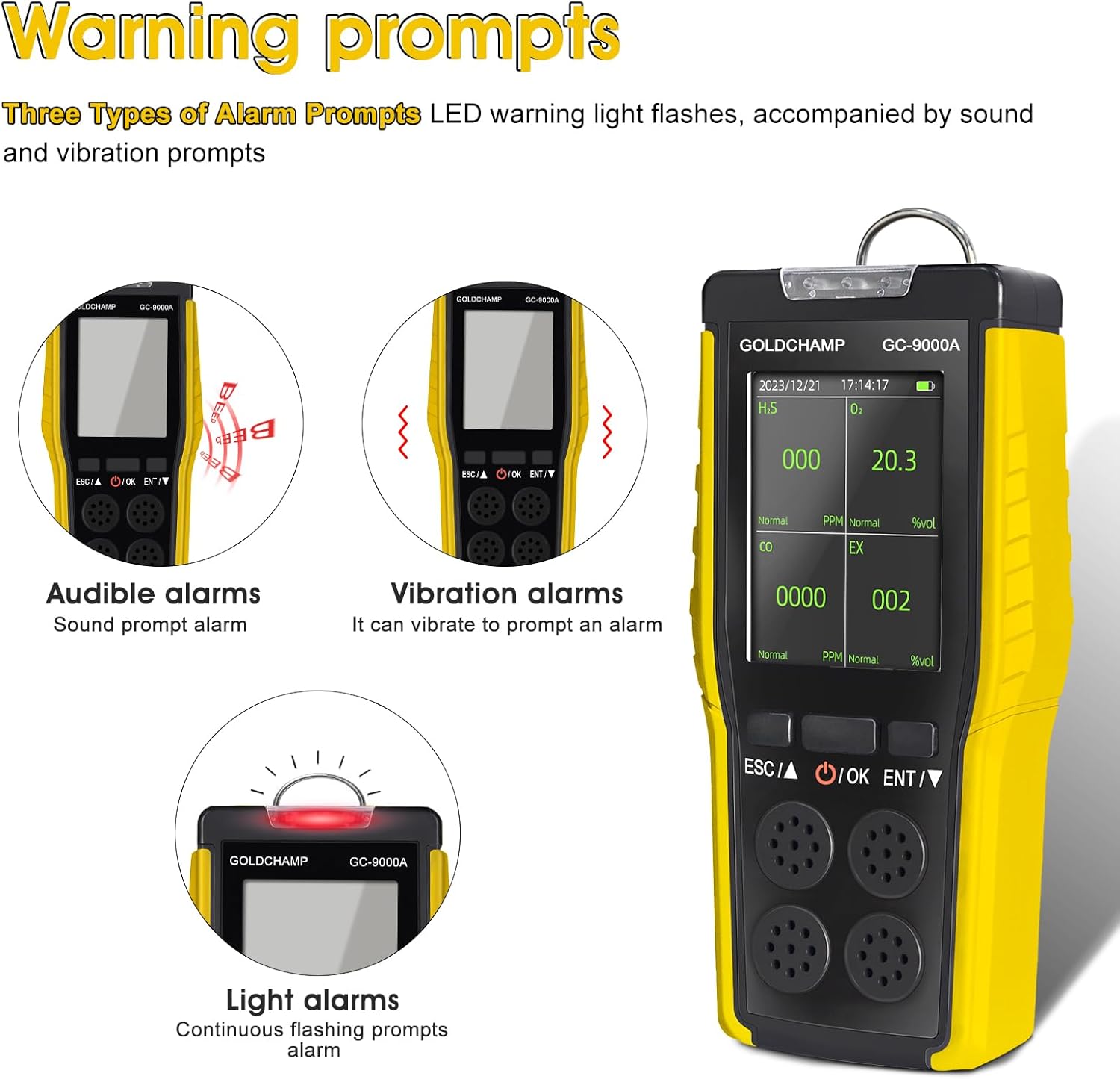
Figure 5: The three alarm modes (audible, vibration, and light) demonstrated on the GC-9000A.
4.4 Setting Alarm Values
The device allows for customization of high and low alarm thresholds for each gas. Refer to the detailed menu navigation section in the complete manual for step-by-step instructions on accessing and adjusting these settings.
5. Maintenance
5.1 Cleaning
- Wipe the exterior of the device with a soft, damp cloth.
- Do not use abrasive cleaners, solvents, or immerse the device in water.
- Ensure the sensor openings are clear of dust and debris.
5.2 Calibration
Gas detectors require periodic calibration to maintain accuracy. Calibration should be performed by trained professionals using certified calibration gases. The frequency of calibration depends on usage, environmental conditions, and local regulations. Consult the full manual or contact GOLDCHAMP support for calibration service recommendations.
5.3 Storage
- Store the device in a cool, dry place away from direct sunlight and extreme temperatures.
- If storing for an extended period, ensure the battery is partially charged (around 50%) and recharge it every few months to prevent deep discharge.
- Keep the device in its protective storage bag when not in use.
6. Troubleshooting
This section addresses common issues you might encounter with your GC-9000A Gas Detector.
| Problem | Possible Cause | Solution |
|---|---|---|
| Device does not power on. | Low battery or device malfunction. | Charge the device fully. If the issue persists, contact support. |
| No alarm when gas is detected. | Alarm settings are off, or gas concentration is below threshold. | Check alarm settings in the menu. Ensure gas levels exceed the set alarm points. |
| Inaccurate gas readings. | Sensors are dirty, or calibration is required. | Clean sensor openings. Perform or arrange for professional calibration. |
| Battery drains quickly. | Aging battery or frequent alarm activations. | Ensure the device is fully charged. If battery life significantly degrades, contact support for battery replacement options. |
7. Specifications
Detailed technical specifications for the GOLDCHAMP GC-9000A Gas Detector:
| Feature | Specification |
|---|---|
| Model Number | GCUS-9000A |
| Gases Detected | Hydrogen Sulfide (H2S), Oxygen (O2), Carbon Monoxide (CO), Combustible Gas (LEL) |
| H2S Range | 0-100 PPM |
| O2 Range | 0-30% VOL |
| CO Range | 0-1000 PPM |
| LEL Range | 0-100% LEL |
| Display | 2.8-inch LCD |
| Alarm Modes | Vibration, Audible, Visual |
| Power Source | Battery Powered (3.7V 2500mAh Lithium Battery) |
| Battery Life | Greater than 10 hours (standby) |
| Product Dimensions (D x W x H) | 3" x 4" x 3" |
| Item Weight | 9.6 ounces |
| Manufacturer | GOLDCHAMP |
8. Warranty and Support
Warranty Information:
Please refer to the warranty card included with your product or visit the official GOLDCHAMP website for detailed warranty terms and conditions. The warranty typically covers manufacturing defects for a specified period from the date of purchase.
Customer Support:
For technical assistance, troubleshooting not covered in this manual, or warranty claims, please contact GOLDCHAMP customer support. Contact information can usually be found on the product packaging, the official GOLDCHAMP website, or through your retailer.
Website: Visit the GOLDCHAMP Store on Amazon