
Introduction
Experience the power of smart, connected training with the NordicTrack T Series 9 treadmill. This manual provides essential information for the setup, operation, maintenance, and troubleshooting of your equipment. Designed for premium performance and comfort, the T Series 9 offers a comprehensive workout experience for your home.

Image: NordicTrack T Series 9 Treadmill in a home setting.
Safety Information
Before operating the NordicTrack T Series 9 treadmill, please read and understand all instructions and warnings in this manual. Keep children and pets away from the treadmill during operation. Always ensure the safety key is properly placed before starting any workout.
WARNING: To reduce risk of serious injury, stand on foot rails before starting treadmill. Read and understand the user's manual, all instructions, and the warnings before use. Keep children away. IMPORTANT: Incline must be set at zero before folding treadmill into storage position.
The treadmill includes a Safety Key, which is a critical component for safe operation. Always attach the safety key to your clothing before beginning a workout. If the safety key is removed, the treadmill will stop immediately.
Setup & Assembly
The NordicTrack T Series 9 Treadmill requires assembly. Please follow the detailed instructions provided in the separate assembly guide that came with your product. Ensure all screws are securely tightened before use. It is recommended to have at least two people for assembly.
Product Features
- Tilting 10" Touchscreen: The tilting 10” touchscreen allows for optimal viewing, whether you’re running or following off-treadmill classes like yoga and strength. With the iFIT Pro Membership, stream your favorite shows and movies.
- Speed Control (0-12 MPH): Run, jog, or walk with speeds up to 12 MPH. Perfect for home workouts, cardio training, and endurance building.
- Incline Adjustment (0-12%): Boost calorie burn and target more muscle groups with a 0–12% incline range.
- SelectFlex Cushioning: Adjust cushioning from soft to firm to match your comfort level. SelectFlex absorbs impact to support your joints whether you’re walking, jogging, or running.
- Foldable & Compact Design: The folding frame makes this treadmill ideal for small spaces. When you're done, fold it and roll it away. Press the foot bar for smooth, assisted lowering.
- iFIT Pro Membership Integration: An iFIT Pro Membership is required to access all iFIT content and connected features (including top streaming services) on your NordicTrack equipment for your entire household.
- ActivePulse: ActivePulse uses your Bluetooth-enabled HR monitor (sold separately) to keep you in the ideal heart rate zone, automatically adjusting speed and incline for better results. (Pro Membership Required)
- SmartAdjust: iFIT’s SmartAdjust automatically adapts your treadmill’s speed and incline in real time based on your workout history and performance. The more you train, the more your workouts evolve. (Pro Membership Required)
- Personalized AI Coach: Interact with iFIT AI Coach via SMS for personalized guidance and insights to help you achieve your fitness goals. AI Coach can create workout plans and have your next workout loaded to your equipment home screen, offer tips for recovery, and more! (Pro Membership Required)
- AutoBreeze Fan: The AutoBreeze fan automatically adjusts with the intensity of your workout to keep you cool.
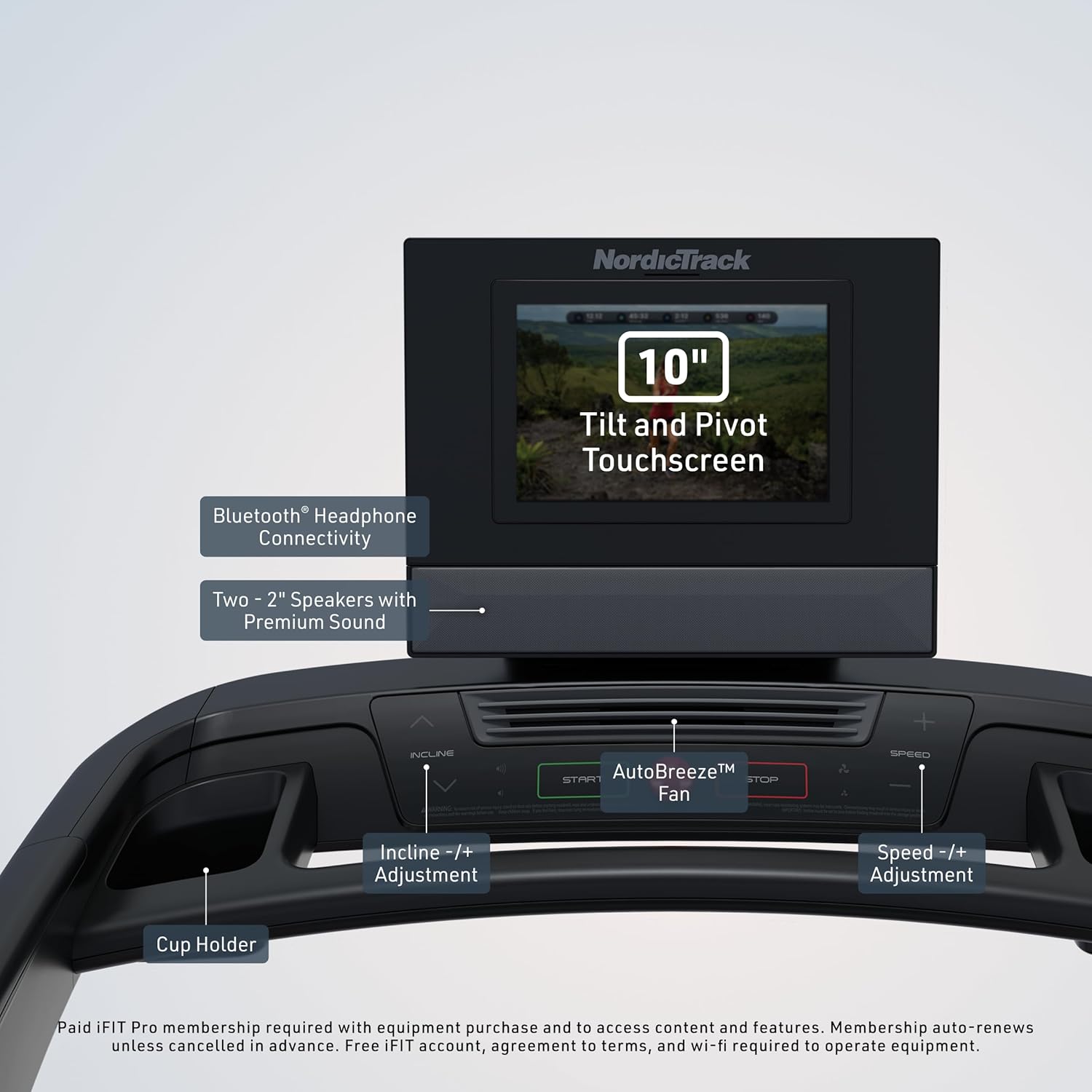
Image: Close-up of the NordicTrack T Series 9 console, highlighting the 10-inch tilting touchscreen, Bluetooth connectivity, speakers, and control buttons.

Image: A person running on the NordicTrack T Series 9 Treadmill, illustrating the 12 MPH speed capability and automatic speed response with iFIT.

Image: A person running on the NordicTrack T Series 9 Treadmill, demonstrating the 12% incline feature for terrain matching with iFIT.

Image: A close-up view of the treadmill deck, highlighting the SelectFlex cushioning system designed to absorb impact and balance comfort.

Image: The NordicTrack T Series 9 Treadmill shown in its folded, compact position, with dimensions indicating its reduced footprint.

Image: A graphic illustrating the benefits of iFIT Pro Membership, including trainer-led workouts, SmartAdjust, and Heart Rate Controlled Workouts.

Image: A man running on a treadmill with a heart rate monitor, illustrating the ActivePulse feature that adjusts intensity to maintain the target heart rate zone.

Image: A close-up of the treadmill's incline mechanism, with text explaining the SmartAdjust feature that intelligently adjusts incline, decline, and speed based on user adjustments.

Image: A man looking at a treadmill screen, with a text message notification bubble showing a message from 'AI Coach' about a workout plan.

Image: A close-up of the treadmill console showing the AutoBreeze fan control with a fan icon and airflow graphic.
Operating Instructions
To begin your workout, ensure the treadmill is plugged in and the safety key is attached. Press the 'Start' button on the console. The treadmill will begin moving at a low speed. Use the speed and incline controls to adjust your workout intensity.
Adjusting Speed: Use the '+' and '-' buttons on the console to increase or decrease the treadmill's speed. You can also use the quick-speed buttons (e.g., 2, 4, 6, 8 MPH) for instant adjustments.
Adjusting Incline: Use the 'Incline +' and 'Incline -' buttons to raise or lower the incline of the treadmill deck. Quick-incline buttons (e.g., 3, 6, 9, 12%) are also available for rapid changes.
Using iFIT Workouts: With an active iFIT Pro Membership, select a workout from the touchscreen display. The treadmill will automatically adjust speed and incline according to the chosen program or trainer's instructions.
Stopping the Treadmill: To stop your workout, press the 'Stop' button. The treadmill will gradually slow down and come to a complete stop. In case of an emergency, pull the safety key to immediately stop the machine.

Image: A person running on the NordicTrack T Series 9 Treadmill, demonstrating active use of the equipment.
Maintenance
Regular maintenance ensures the longevity and optimal performance of your NordicTrack T Series 9 treadmill. Always unplug the treadmill before performing any maintenance.
- Cleaning: Regularly wipe down the console and other surfaces with a damp cloth to remove dust and sweat. Avoid abrasive cleaners.
- Belt Lubrication: Refer to your assembly guide for specific instructions on when and how to lubricate the walking belt.
- Belt Alignment: Periodically check the walking belt for proper alignment and adjust if necessary, following the instructions in your user manual.
Troubleshooting
If you encounter any issues with your treadmill, refer to the following common troubleshooting tips:
- Treadmill Not Starting: Ensure the power cord is securely plugged into a grounded outlet. Check that the power switch is in the 'ON' position. Verify the safety key is correctly inserted into the console.
- Belt Not Moving Smoothly: Check for proper belt tension and alignment. Lubricate the belt if recommended by the manual.
- Console Display Issues: If the display is blank or showing errors, try unplugging the treadmill for a few minutes and then plugging it back in.
For persistent issues, please contact Customer Support.
Specifications
Below are the key specifications for the NordicTrack T Series 9 Treadmill:

Image: The NordicTrack T Series 9 Treadmill with key dimensions labeled, including length, width, height, and step-up height.
| Feature | Detail |
|---|---|
| Brand | Nordictrack |
| Model Number | NTL15725CW |
| Product Dimensions | 75.1"D x 34.3"W x 54.8"H |
| Item Weight | 210 Pounds |
| Material | Alloy Steel |
| Maximum Speed | 12 Miles per Hour |
| Maximum Incline Percentage | 12.0% |
| Display Size | 10 Inches (Tilting Touchscreen) |
| Maximum Weight Recommendation | 325 Pounds |
| Assembly Required | Yes |
| Included Components | Safety Key |
Warranty & Support
Your NordicTrack T Series 9 Treadmill comes with the following warranty:
- Frame: 10 Years
- Parts: 2 Years
- Tablet and Labor: 1 Year
For any questions, technical assistance, or warranty claims, please contact NordicTrack Customer Support. Refer to your product packaging or the official NordicTrack website for contact details.


