
Introduction
Thank you for choosing the eKids Wicked Karaoke Microphone. This device is designed to provide an engaging and interactive singing experience for children, featuring Bluetooth connectivity for streaming music, a built-in song, echo effects, and a dynamic light show. This manual provides essential information for proper setup, operation, and maintenance of your microphone.

Figure 1: eKids Wicked Karaoke Microphone, showcasing its vibrant design and controls.
Setup
1. Battery Installation
The microphone requires 3 AA batteries (included). Follow these steps for installation:
- Locate the battery compartment on the back of the microphone.
- Use a Phillips head screwdriver to open the battery compartment cover.
- Insert 3 fresh AA batteries, ensuring correct polarity (+/-) as indicated inside the compartment.
- Replace the battery compartment cover and tighten the screw.
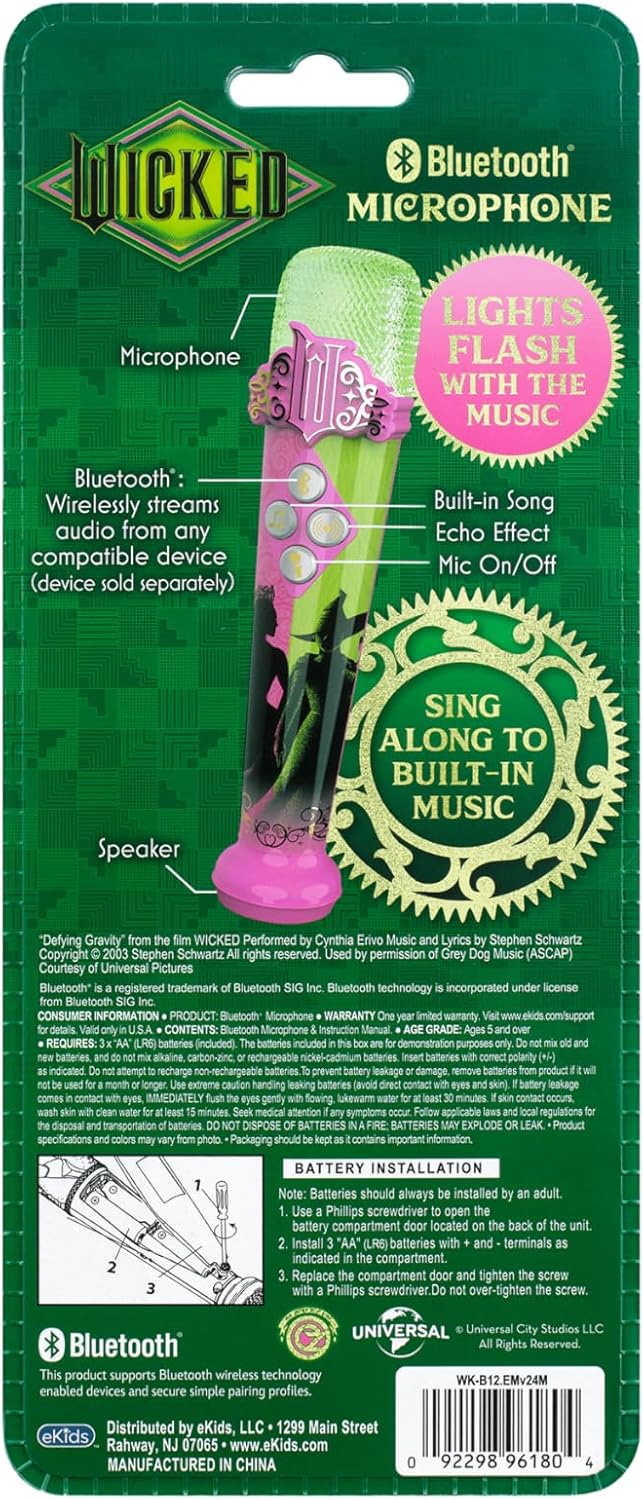
Figure 2: Back of the microphone packaging with a diagram illustrating battery installation.
2. Initial Power On & Demo Mode
Upon first use or after battery replacement, the microphone may be in demo mode. To exit demo mode and enable full functionality:
- Locate the ON/OFF switch on the side of the microphone.
- Slide the switch to the OFF position, then back to the ON position. This will activate the microphone's full features.
3. Bluetooth Pairing
To wirelessly stream audio from a compatible device (smartphone, tablet, laptop):
- Ensure the microphone is powered on.
- Press the Bluetooth button (Bluetooth icon) on the microphone. The microphone will enter pairing mode, indicated by a flashing light.
- On your device, enable Bluetooth and search for available devices.
- Select "eKids Wicked Mic" (or similar) from the list of devices to pair.
- Once paired, you can stream music from your device through the microphone's speaker.
Operating Instructions

Figure 3: Close-up of the microphone's control panel with labeled buttons.
1. Power On/Off
- Slide the ON/OFF switch on the side of the microphone to turn it on or off.
2. Microphone Function
- Press and hold the Microphone button (microphone icon) to amplify your voice. Release the button to stop amplification.
3. Echo Effect
- Press the Echo button (sound waves icon) to toggle the echo effect for your voice. Press once for on, press again for off.
4. Built-in Music
- Press the Song button (music note icon) to play an extended clip of the song 'Defying Gravity'. Press again to stop.
5. Light Show
- The microphone features a built-in light show that flashes along with the music, enhancing your performance. This feature activates automatically when music is played or when you sing into the microphone.
6. Product Demonstration Videos
Video 1: Unboxing, Testing, and Usage of the eKids Wicked Bluetooth Karaoke Microphone. This video demonstrates the initial setup and basic functions of the microphone.
Video 2: Detailed Look at the Functions and Options of the eKids Wicked Karaoke Microphone. This video provides a closer look at each button and its corresponding feature.
Maintenance
1. Cleaning
- Wipe the microphone with a soft, dry cloth. Do not use abrasive cleaners or solvents.
- Avoid exposing the microphone to excessive moisture.
2. Battery Care
- Always use fresh AA batteries. Do not mix old and new batteries, or different types of batteries.
- Remove batteries if the device will not be used for an extended period to prevent leakage.
- Dispose of used batteries responsibly according to local regulations.
3. Storage
- Store the microphone in a cool, dry place away from direct sunlight and extreme temperatures.
Troubleshooting
| Problem | Solution |
|---|---|
| No sound from microphone/speaker. | Ensure the microphone is powered on. Check battery levels and replace if necessary. Verify Bluetooth connection if streaming. |
| Bluetooth not connecting. | Ensure the microphone is in pairing mode (Bluetooth button pressed). Make sure your device's Bluetooth is enabled and within range (approx. 30 feet). Try restarting both devices. |
| Echo effect not working. | Press the Echo button to ensure the effect is activated. |
| Built-in music not playing. | Press the Song button. Ensure the microphone is not in demo mode. |
Specifications
- Brand:
- eKids
- Model Name:
- WK-B12
- Connectivity Technology:
- Bluetooth
- Connector Type:
- Wireless
- Special Feature:
- Echo Control
- Compatible Devices:
- Laptop, Smartphone, Tablet
- Color:
- Wicked 1
- Included Components:
- 3 AA batteries
- Power Source:
- Battery Powered
- Number of Batteries:
- 3 AA batteries required (included)
- Enclosure Material:
- Plastic
- Manufacturer:
- KIDdesigns
- UPC:
- 092298961804
- Mfr Part Number:
- WK-B12
Video 3: Full Measurements, Height, Width, and Depth of the Wicked Bluetooth Karaoke Microphone. This video provides detailed dimensions of the product.
Warranty & Support
Warranty Information
This eKids Wicked Karaoke Microphone comes with a 1-year limited warranty. Please retain your proof of purchase for warranty claims.
Customer Support
For further assistance, troubleshooting, or to explore more eKids products, please visit the official eKids Brand Store.


