
Alesis Nitro Max
Contents
Alesis Nitro Max Kit and Amp
User Manual
Model: Nitro Max | Brand: Alesis
Introduction
This manual provides essential information for the setup, operation, and maintenance of your Alesis Nitro Max Kit and Amp. The Alesis Nitro Max Kit is a 10-piece electronic drum set designed for drummers of all skill levels, featuring ultra-quiet mesh heads, an advanced drum module with Bluetooth connectivity, and a dedicated drum amplifier for personal monitoring.
Please read this manual thoroughly before using the product to ensure proper assembly and optimal performance.
Package Contents
Verify that all components listed below are included in your package:
- Nitro Max Drum Module
- 10" Dual-Zone Mesh Snare Pad
- (4) 8" Mesh Tom Pads
- Kick Drum Tower with Pedal
- (4) 10" Cymbals: Ride, Hi-Hat with Foot Controller, (2) Crashes with Choke
- Rack-Mountable 70W Drum Amplifier
- Pre-assembled 4-post Aluminum Rack
- Cable Snake
- Cable Wraps
- Drum Sticks
- Drum Key
- Power Supply
- User Guide (this document)
- Safety & Warranty Manual
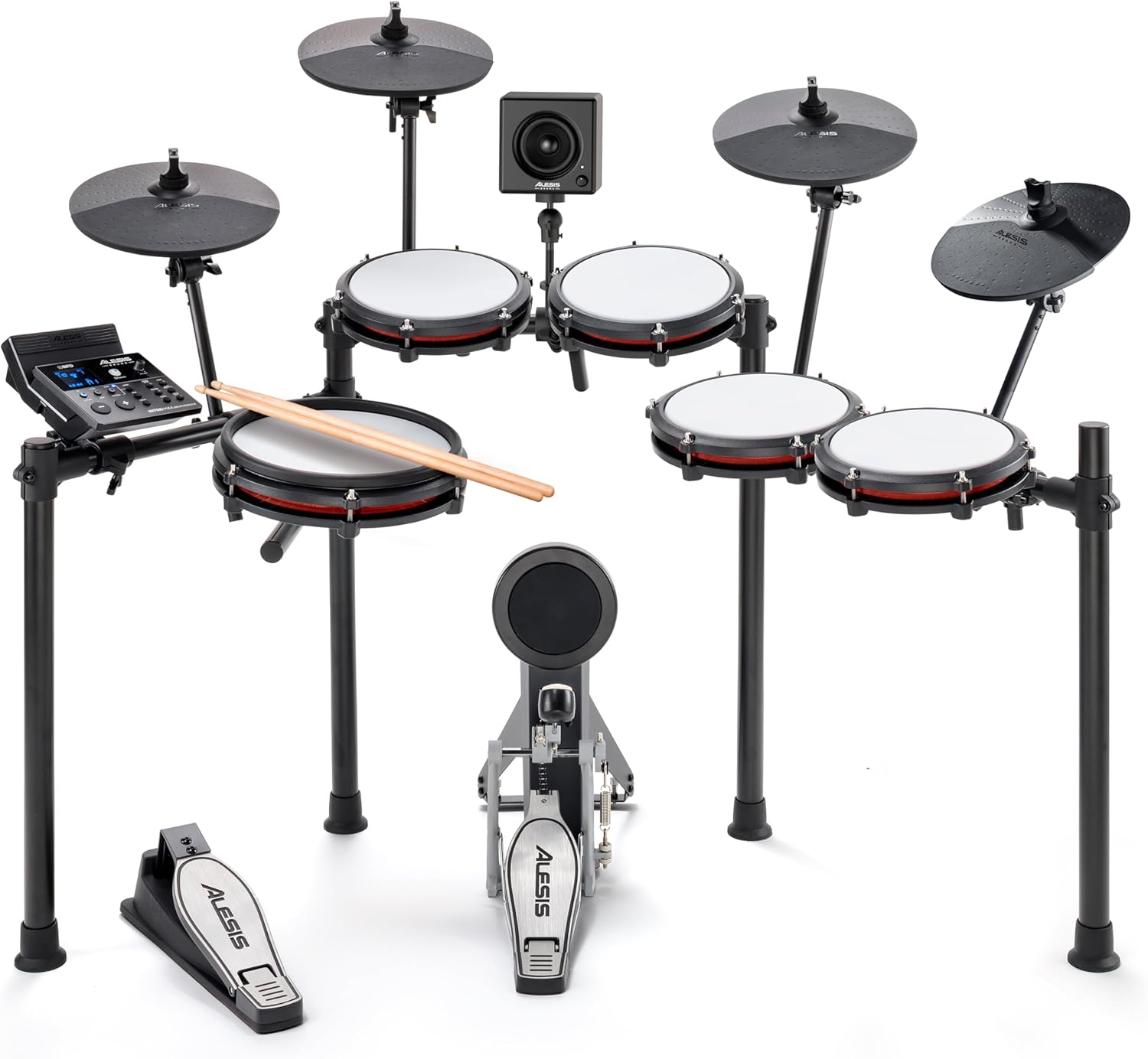
Image: The complete Alesis Nitro Max Kit and Amp setup, showing all drum pads, cymbals, drum module, kick pedal, hi-hat pedal, and the rack-mounted amplifier.
Setup Guide
Follow these steps to assemble your Alesis Nitro Max Kit and Amp.
1. Assembling the Rack
The 4-post aluminum rack comes pre-assembled. Unfold the rack carefully and ensure all joints are securely locked. Adjust the height and position of the vertical posts as needed for comfortable playing.
2. Attaching Drum Pads and Cymbals
- Attach the 10" dual-zone mesh snare pad to the designated clamp on the rack. Ensure it is positioned comfortably for your dominant hand.
- Mount the four 8" mesh tom pads to the rack using the provided clamps. Arrange them in a natural playing arc.
- Secure the 10" ride, hi-hat, and two crash cymbals to their respective cymbal arms on the rack. The crash cymbals support choke functionality.
- Place the kick drum tower in front of the rack and attach the kick pedal.
- Position the hi-hat foot controller on the floor near the hi-hat cymbal.

Image: An assembled Alesis Nitro Max Kit, highlighting the arrangement of drum pads and cymbals on the foldable rack, demonstrating how the kit expands for a full drumming experience.
3. Connecting the Drum Module
Mount the Nitro Max Drum Module to the rack using its dedicated clamp. Use the included cable snake to connect each drum pad and cymbal to the corresponding input on the drum module. Refer to the labels on the cable snake and module for correct connections.

Image: A close-up view of the Alesis Nitro Max Drum Module, showing its display, control buttons, and connectivity options, including the Bluetooth button and various sound parameters.
4. Connecting the Drum Amplifier
The 70W rack-mountable drum amplifier can be attached directly to the drum rack. Connect the audio output from the Nitro Max Drum Module to the input of the amplifier using a 1/4" TRS balanced/unbalanced cable. Ensure the amplifier is securely mounted and positioned for optimal sound projection towards the player.

Image: A drummer playing the Alesis Nitro Max Kit, with a clear view of the compact, rack-mounted 70W powered monitor positioned above the drum module, illustrating its integration into the setup.

Image: A detailed view of the Alesis Nitro Max Drum Amplifier, showcasing its 3" full-range composite driver, 70W peak power Class-D amplifier, and the 1/4" TRS balanced/unbalanced input jack.
5. Power Connection
Connect the included power supply to the drum module's power input, then plug it into a standard electrical outlet. Power on the drum module and amplifier.
Operating Instructions
1. Basic Operation
- Power On/Off: Press the Power button on the drum module to turn the unit on or off.
- Volume Control: Adjust the main volume knob on the drum module to control the overall output level.
- Kit Selection: Use the KIT buttons to browse through the 32 pre-set drum kits or your 16 user-made kits.
- Voice Selection: Use the VOICE buttons to select individual drum or cymbal sounds within a kit.
- Tempo Adjustment: Use the TEMPO buttons to adjust the speed of the metronome or play-along tracks.
2. Using the Drum Module Features
- BFD Drum Sounds: The module includes over 440 drum, cymbal, and percussion sounds from the BFD library. These sounds offer multi-velocity samples for realistic acoustic drum feel.
- Custom Kits: Create and save up to 16 of your own custom drum kits by assigning different voices to each pad.
- Play-Along Tracks: Utilize the 60 built-in play-along tracks for practice and performance.
- Coach Mode: Engage Coach Mode for guided practice sessions to improve timing and rhythm.
- Recording: The module allows for basic recording of your performances. Refer to the full manual for detailed recording instructions.
3. Bluetooth Connectivity
The Nitro Max Drum Module features Bluetooth streaming. To connect a Bluetooth device:
- Ensure Bluetooth is enabled on your external device (smartphone, tablet, etc.).
- Press the Bluetooth button on the drum module. The Bluetooth indicator will flash.
- Select "Alesis Nitro Max" from the list of available devices on your external device.
- Once connected, the Bluetooth indicator on the module will glow solid. You can now stream audio from your device through the drum module and amplifier.

Image: A drummer using the Alesis Nitro Max Kit, illustrating the integration of the upgraded drum module with Bluetooth streaming, allowing for expanded learning solutions and access to professionally recorded sounds.
4. USB MIDI Connectivity
Connect the drum module to your PC or Mac via the USB Type B port. This allows you to use the Nitro Max Kit as a MIDI controller for virtual instruments and recording software (DAW). You can also unlock BFD Player to expand your sound library and access new drum kits for practice or recording.
Maintenance
- Cleaning: Use a soft, dry cloth to clean the drum module, pads, and cymbals. Do not use abrasive cleaners or solvents.
- Mesh Head Care: The mesh heads are durable but can be damaged by excessive force or sharp objects. Avoid striking them with anything other than drum sticks.
- Cable Management: Keep cables organized using the provided cable wraps to prevent tangling and damage.
- Storage: When not in use, the kit can be folded for compact storage. Store in a dry environment away from extreme temperatures.
Troubleshooting
| Problem | Possible Cause | Solution |
|---|---|---|
| No sound from pads/cymbals. | Cables not connected properly; Module volume too low; Amplifier off or volume too low. | Ensure all cables are securely connected to the correct inputs. Increase module and amplifier volume. Check amplifier power. |
| Pad/Cymbal not triggering. | Loose cable connection; Pad/Cymbal sensitivity setting too low. | Check cable connection for the specific pad/cymbal. Adjust sensitivity settings in the drum module. |
| Bluetooth device not connecting. | Bluetooth not enabled on module or device; Device out of range; Interference. | Ensure Bluetooth is active on both devices. Move device closer to the module. Reduce other wireless interference. |
| Distorted sound from amplifier. | Module output or amplifier input level too high. | Lower the volume on the drum module or the amplifier. |
If you encounter issues not covered here, please refer to the Alesis support website or contact customer service.
Specifications
| Feature | Detail |
|---|---|
| Model Name | Nitro Max |
| Included Components | Drum Module, Mesh Heads, Pedals, Cymbals, Drum Amplifier |
| Snare Pad | 10" Dual-Zone Mesh Snare |
| Tom Pads | (4) 8" Mesh Toms |
| Cymbals | (4) 10" Cymbals (Ride, Hi-Hat, 2x Crash with Choke) |
| Drum Module Sounds | 440+ BFD drum, cymbal, and percussion sounds |
| Drum Kits | 32 Ready-to-Play Kits, 16 User-Made Kits |
| Connectivity | Bluetooth, USB MIDI (Type B) |
| Amplifier Power | 70W Peak Power Class-D Amplifier |
| Amplifier Driver | 3" Full-Range Composite Driver |
| Material Type | Plastic |
| Manufacturer | InMusic Brands Inc. |
Warranty and Support
For warranty information and technical support, please refer to the Safety & Warranty Manual included with your product or visit the official Alesis website. You can find detailed FAQs, software downloads, and contact information for customer service there.
Alesis Official Website: www.alesis.com
Documents and downloads
Ask a question about this manual
Ask about setup, troubleshooting, compatibility, parts, safety, or missing instructions. Manuals+ will review the question and use this page’s manual context to help answer it.