
Introduction
The LunchEAZE XL is a revolutionary cordless heated and electric lunch box designed to provide hot meals anywhere, anytime. Featuring a powerful 14000 mAh rechargeable battery, a generous 6-cup capacity, and automatic scheduled heating, it ensures your food is perfectly warmed and ready when you are. This manual provides detailed instructions for setting up, operating, maintaining, and troubleshooting your LunchEAZE XL to ensure optimal performance and longevity.

Image: The LunchEAZE XL unit with its accompanying insulated carrying bag.
Product Features
- Cordless Freedom: Integrated 14000 mAh rechargeable battery for heating without an outlet.
- Scheduled Heating: Program your mealtime for automatic heating.
- Large Capacity: 6-cup (1.4L) food-grade 304 stainless steel container.
- Smart On-Screen Controls: Intuitive display for temperature adjustment, scheduling, language, and personalization.
- Insulated Bag: Dual-chamber bag for the lunchbox, drinks, and snacks.
- Leak-Proof Container: Sealed design for worry-free transport.
- Safety Certified: UL Safety Certified with advanced battery protections.

Image: Visual representation of key product features including cordless operation, scheduled heating, and safety certifications.
Setup
- Unpacking: Carefully remove all components from the packaging: the LunchEAZE XL unit, stainless steel container with lid, insulated carrying bag, and charger.
- Initial Charge: Before first use, fully charge your LunchEAZE XL. Connect the charger to the unit and plug it into a standard wall outlet. The display will indicate charging status. A full charge typically takes several hours.
- Container Preparation: Wash the stainless steel container and its lid with warm, soapy water before first use. Ensure they are completely dry before placing food inside.
- Assembly: Place the clean, dry stainless steel container into the heating base of the LunchEAZE XL unit. Ensure it sits securely.
Operating Instructions
1. Packing Your Meal
- Prepare your meal and place it into the 6-cup stainless steel container. The container is suitable for fresh or frozen foods.
- Securely close the lid on the stainless steel container, ensuring the double-latching system is engaged to prevent leaks.
- Place the filled and sealed container into the LunchEAZE XL heating unit.
- For transport, place the entire LunchEAZE XL unit into the bottom chamber of the insulated carrying bag. Use the top chamber for snacks, drinks, or other items that do not require heating.

Image: Steps illustrating how to pack your meal, set a mealtime, and the automatic heating process.
2. Scheduled Heating (Set it and Forget It)
The primary feature of the LunchEAZE XL is its ability to automatically heat your meal to perfection by a set time.
- Turn on the LunchEAZE XL unit using the power button.
- Navigate the on-screen menu using the directional buttons (up, down, left, right) and the OK button.
- Select "Meal Time" and set the desired time you want your food to be hot and ready. The device will calculate when to begin heating based on the current temperature of your food and the target temperature.
- Confirm your selection. The display will show the estimated time remaining until your meal is ready.
- The unit will automatically begin heating at the appropriate time. You can leave it in the insulated bag during heating.
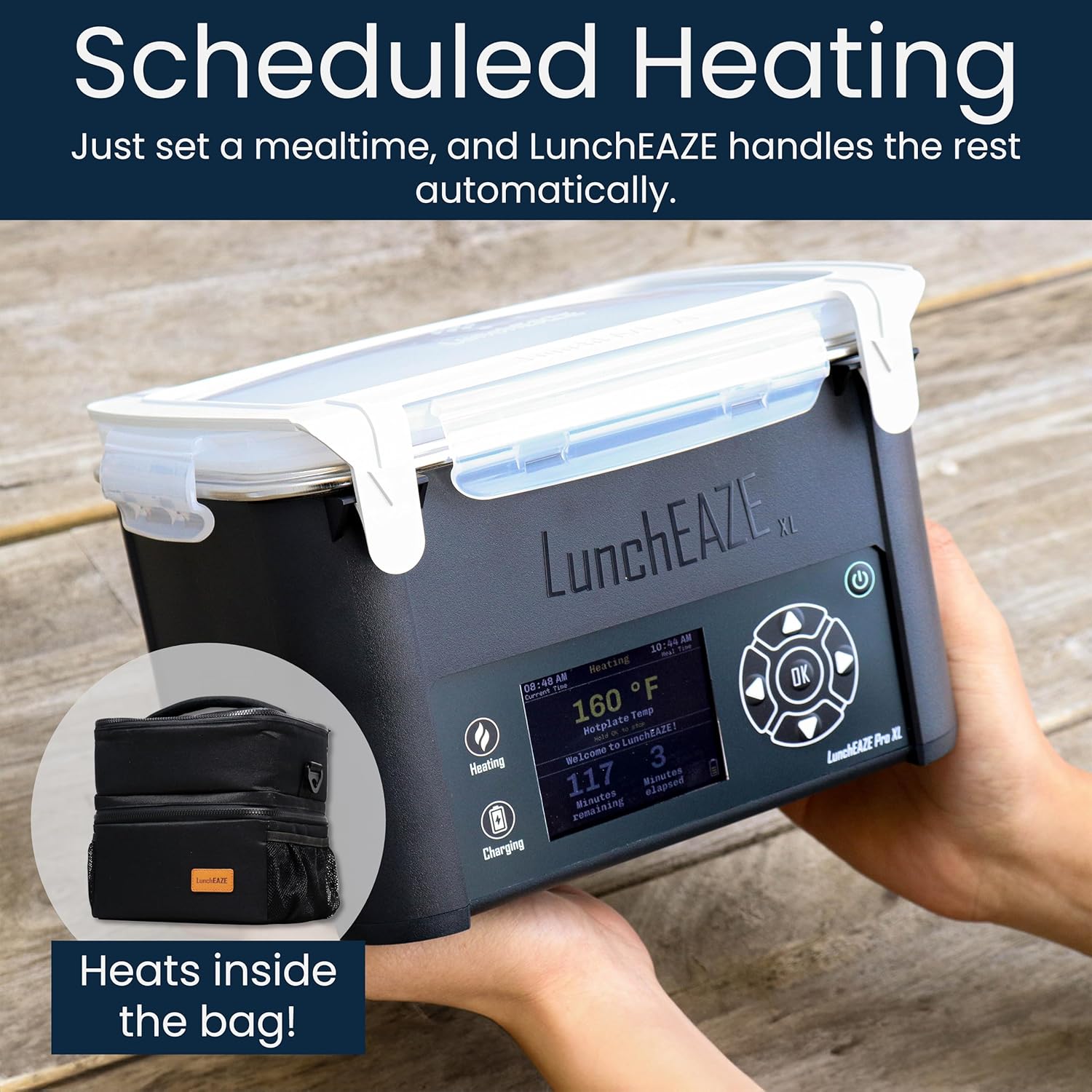
Image: The LunchEAZE XL display showing scheduled heating information, emphasizing that it heats inside the bag.
3. Manual Heating
For immediate heating, you can use the manual heating option.
- Turn on the LunchEAZE XL unit.
- Navigate to "Manual Heating" on the display.
- Select "Start Heating". The unit will begin heating immediately until it reaches the maximum temperature or is manually stopped.
4. On-Screen Controls and Personalization
The intuitive display allows for full control and customization.
- Adjust Temperature: Set your preferred maximum heating temperature (up to 220°F).
- Language: Switch between English and Spanish.
- Color Themes: Personalize the display with various color themes.
- Custom Messages: Set a personal message to appear on the display.
- Settings Menu: Access additional settings like heat duration, auto-off, and troubleshooting.
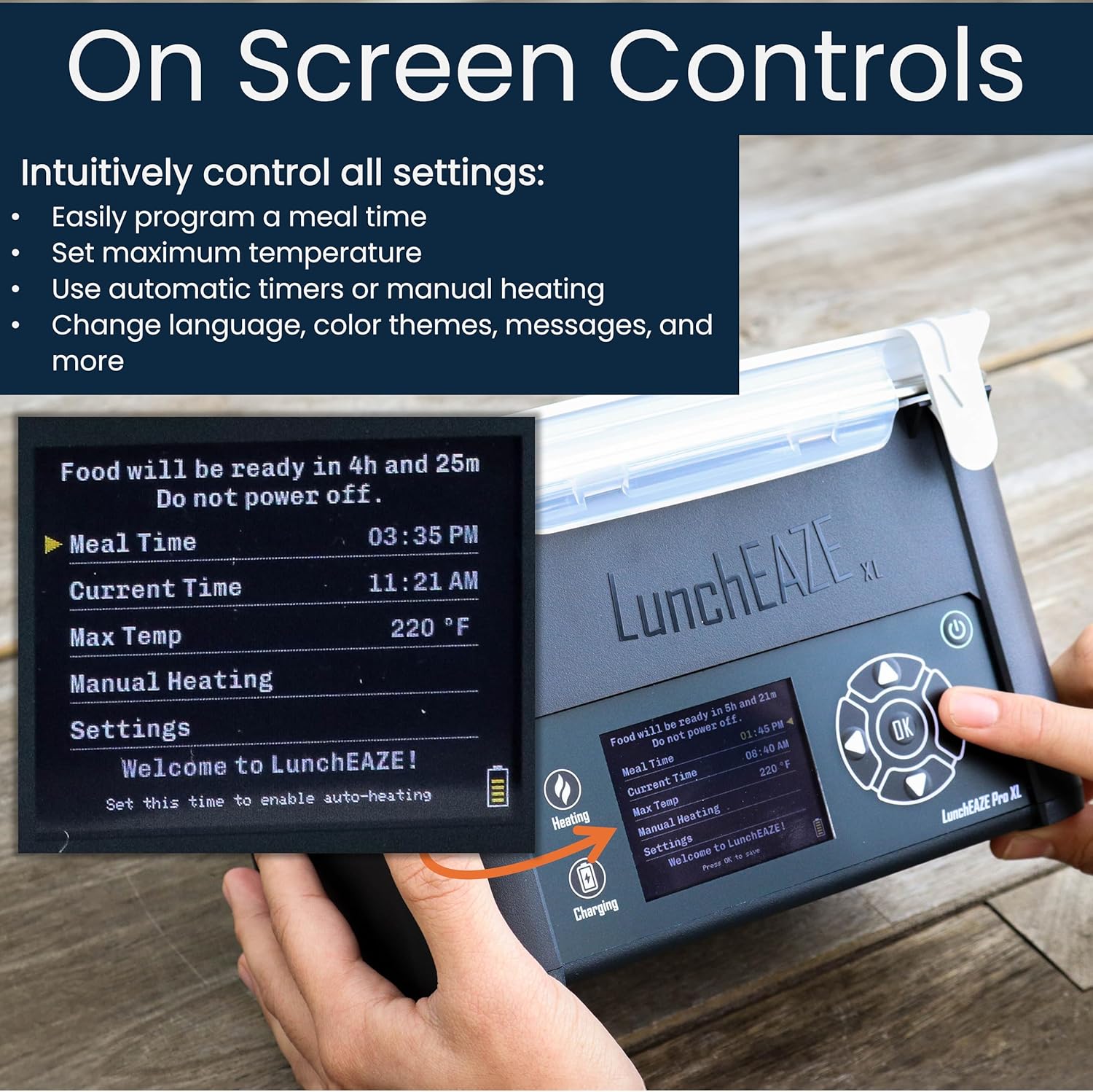
Image: Detailed view of the LunchEAZE XL's on-screen controls, highlighting various settings.

Image: The LunchEAZE XL display demonstrating custom color themes and the option to switch to Spanish.
Maintenance
- Cleaning the Container: The stainless steel container and its lid are dishwasher safe. For best results and to prolong life, hand wash with mild soap and water. Ensure the container is completely dry before storing or reusing.
- Cleaning the Unit: Wipe the exterior of the LunchEAZE XL heating unit with a damp cloth. Do not submerge the unit in water or use abrasive cleaners.
- Battery Care: For optimal battery life, charge the unit regularly. Avoid completely draining the battery frequently. Store in a cool, dry place when not in use for extended periods.
- Storage: Store the LunchEAZE XL unit and container in a clean, dry place.

Image: The removable, leak-proof stainless steel container being taken out of the LunchEAZE XL unit.
Troubleshooting
If you encounter issues with your LunchEAZE XL, please refer to the following common solutions:
- Unit Not Turning On: Ensure the battery is charged. Connect the charger and allow it to charge for at least 30 minutes before attempting to power on again.
- Food Not Heating:
- Check if a meal time has been set or if manual heating is activated.
- Ensure the stainless steel container is properly seated in the heating base.
- Verify the battery has sufficient charge.
- Inaccurate Temperature Reading: Ensure the unit is on a stable, flat surface. If issues persist, consult the "Troubleshoot" option in the device's settings menu.
- Short Battery Life: Ensure the unit is fully charged before each use. Battery performance can vary based on food temperature, ambient temperature, and heating duration.
- Leaks: Ensure the lid of the stainless steel container is securely latched on all four sides.
For further assistance, please refer to the official user guide PDF or contact LunchEAZE customer support.
Specifications
| Attribute | Detail |
|---|---|
| Model Number | LunchEAZE_XL |
| Capacity | 6 Cups (approx. 1.4 Liters) |
| Material | Stainless Steel (container), BPA-free plastics |
| Color | Midnight Gray |
| Product Dimensions (L x W x H) | 8.75" x 7" x 5.5" |
| Item Weight | 3.5 Pounds |
| Battery | 14000 mAh Lithium Ion (included) |
| Max Temperature | Up to 220°F |
| Included Components | LunchEAZE XL Battery, LunchEAZE XL Charger, LunchEAZE XL Insulated Bag, LunchEAZE XL Cordless Electric Heated Lunchbox |

Image: Visual representation of the LunchEAZE XL's dimensions and weight, highlighting its 6-cup capacity.
Safety Information
- Ensure the unit is placed on a stable, heat-resistant surface during operation.
- Do not immerse the main heating unit in water or any other liquid.
- Always ensure the stainless steel container lid is securely fastened to prevent spills and maintain heating efficiency.
- Exercise caution when handling the heated container as contents will be hot.
- Keep out of reach of children when in operation.
- Use only the provided charger with the LunchEAZE XL unit.
- The product is UL Safety Certified, ensuring adherence to safety standards.

Image: The LunchEAZE XL highlighting its 14000 mAh battery for completely cordless operation.
Warranty and Support
LunchEAZE stands behind the quality of its products. If you experience any issues or have questions regarding your LunchEAZE XL, please do not hesitate to contact our customer support team. We are committed to providing assistance and ensuring your satisfaction.
For a more detailed guide and additional information, you can download the official User Guide PDF: Download User Guide (PDF)


