
Retekess T130U
Retekess T130U (4th Gen T130) Wireless Tour Guide System Instruction Manual
Model: T130U
Brand: Retekess
1. Introduction
This manual provides detailed instructions for the setup, operation, maintenance, and troubleshooting of your Retekess T130U (4th Gen T130) Wireless Tour Guide System. This system is designed for clear and reliable communication in various group settings, such as guided tours, conferences, and simultaneous interpretation.
Key Features:
- U-Band Digital Transmission: Ensures strong penetration, stable signal, and minimal interference for multiple users.
- Extended Working Range: Up to 200 meters (unobstructed distance) for broad coverage.
- Long Battery Life: Transmitter lasts up to 10 hours, receivers up to 40 hours.
- One-Key Operation: Simplified controls for mute, pairing, and power for ease of use.
- High-Capacity Charging Solution: Includes a 60-slot charging case for efficient simultaneous charging.
- Clear Audio: High-fidelity audio codec with noise reduction for immersive and clear listening.
- Wireless Connectivity: Supports AUX and Bluetooth audio input for versatile use.
- Lightweight and Portable: Designed for comfortable carrying without heavy equipment burden.
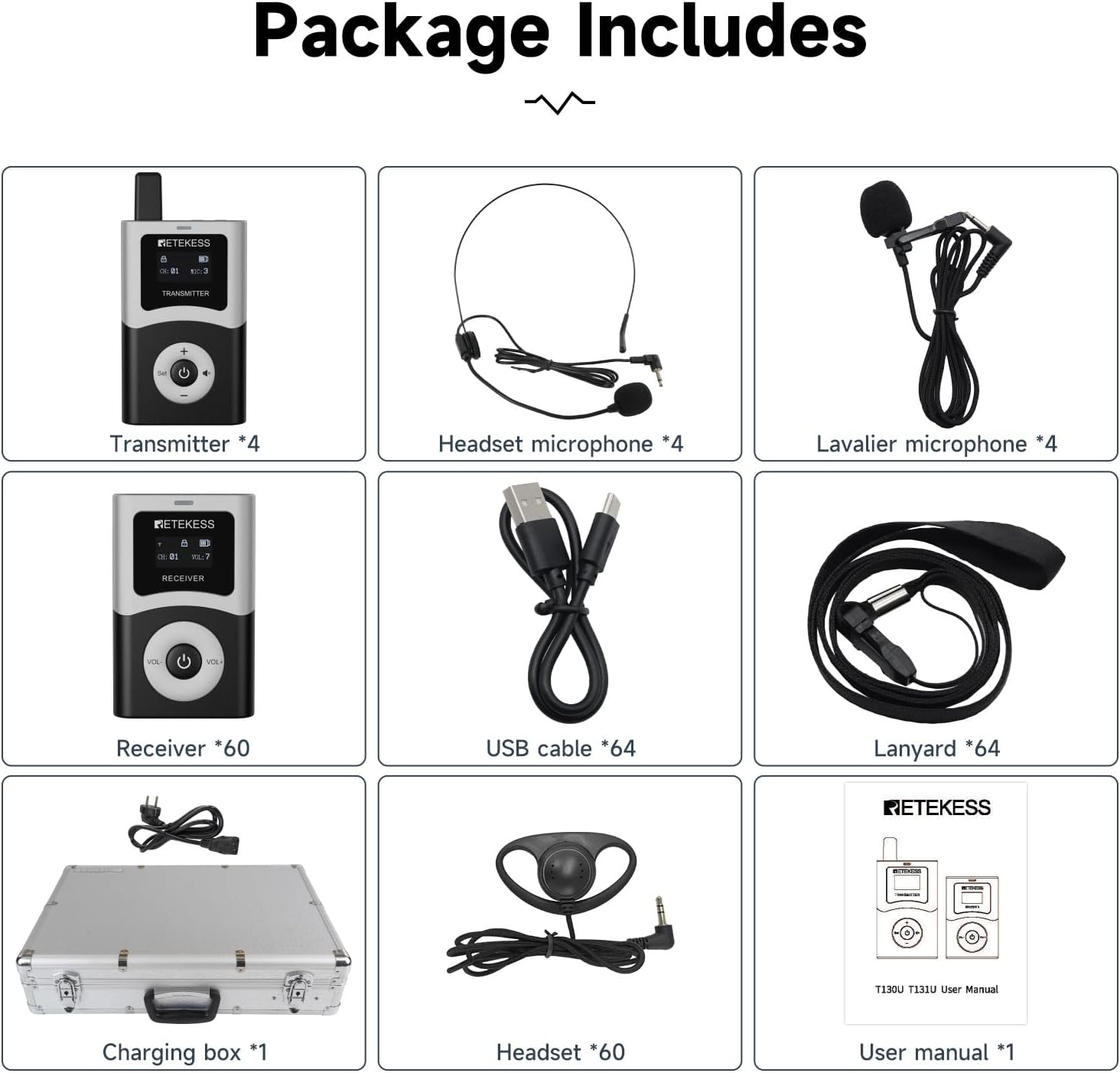
2. What's in the Box
Verify that all components are present in your package:
- Owner's Manual (1)
- Tour Guide Transmitter (4)
- Tour Guide Receiver (60)
- Lavalier Microphone (4)
- Headset Microphone (4)
- Tour Guide System Lanyard (64)
- 60-Slot Charging Box (1)
- D-shaped Two-Way Tour Guide Headsets (60)
3. Setup
3.1 Charging the Devices
Before initial use, ensure all transmitters and receivers are fully charged using the provided 60-slot charging box.
- Connect the charging box to a power source.
- Place the transmitters and receivers into their respective slots in the charging box.
- The charging indicator on each device will illuminate to show charging status.

3.2 Power On/Off
The system features a simplified one-key operation for powering devices.
- To Power On: Press and hold the power button (center button) on the transmitter or receiver until the screen illuminates.
- To Power Off: Press and hold the power button until the screen turns off.

3.3 One-Key Pairing
The T130U system allows for quick pairing of transmitters and receivers.
- Ensure both the transmitter and receiver are powered on.
- On the transmitter, press the 'Set' button (left of power button) to initiate pairing. The channel number will flash.
- On the receiver, press the 'Set' button (left of power button) to confirm pairing. The devices will automatically connect to the same channel.

3.4 Channel Switching (USA/EU)
To switch between USA and European frequency bands:
- With the transmitter off, press the middle area next to the 'Set' button and the volume up button simultaneously.
- Then, press the power button. The screen will display 'USA_BAND' or 'EU_BAND'.
- Repeat the process for the receiver: with the receiver off, press the middle area between the volume down button and up button, then press the power button. The screen will display 'USA_BAND' or 'EU_BAND'.
Video 3.1: How to switch to European and American channels on T130U. This video demonstrates the steps to change the frequency band on both the transmitter and receiver.
4. Operating Instructions
4.1 Transmitter Usage
- Microphone Connection: Connect either the lavalier microphone or the headset microphone to the 'MIC' port on the transmitter.
- AUX/Bluetooth Input: For external audio sources, connect a device via the 'AUX' port or pair a Bluetooth-enabled device with the transmitter.
- Mute Function: Briefly press the mute button (speaker icon) on the transmitter to temporarily silence your audio transmission. Press again to unmute.
- MIC Boost: Use the volume up (+) and volume down (-) buttons to adjust the microphone input level for optimal clarity.


Video 4.1: Retekess T130U tour guide system external audio input. This video demonstrates how to connect and use external audio sources with the transmitter.
4.2 Receiver Usage
- Headphone Connection: Connect the D-shaped headset to the receiver's headphone jack. The headsets are designed for use in both the left and right ear for maximum comfort.
- Volume Control: Use the 'VOL+' and 'VOL-' buttons on the receiver to adjust the listening volume to a comfortable level.

4.3 Operational Features
- 200m Working Range: The system provides a reliable communication range of up to 200 meters in unobstructed environments.
- Auto Power-Off on No Signal: Receivers will automatically power off after 20 minutes if no signal is detected, conserving battery life.
- Auto-Lock Feature: The device controls will automatically lock after 5 seconds of inactivity to prevent accidental changes during use.

Video 4.2: Retekess T130U upgraded distance and convenient charging. This video highlights the extended range and efficient charging capabilities of the system.
5. Maintenance
5.1 General Care
- Keep the devices dry. Avoid exposure to rain, moisture, or liquids that may corrode electronic circuits.
- Do not store the devices in dusty, dirty areas.
- Do not store the devices in hot areas. High temperatures can shorten the life of electronic devices, damage batteries, and warp or melt certain plastics.
- Do not store the devices in cold areas. When the device returns to normal temperature, moisture can form inside the device and damage electronic circuit boards.
- Handle the devices gently. Dropping, knocking, or shaking them can damage internal circuit boards and fine mechanics.
- Clean the devices with a soft, damp cloth. Do not use harsh chemicals, cleaning solvents, or strong detergents.
5.2 Charging Box Care
- Ensure the charging box is placed on a stable, flat surface during use.
- Keep the charging slots free from debris to ensure proper contact with the devices.
- Disconnect the charging box from the power source when not in use for extended periods.
6. Troubleshooting
If you encounter issues with your Retekess T130U system, refer to the following common problems and solutions:
| Problem | Possible Cause | Solution |
|---|---|---|
| No sound from receiver | Receiver not powered on; Low battery; Incorrect channel; Headset not connected or faulty; Transmitter not powered on or out of range. | Ensure receiver is on and charged; Check channel matches transmitter; Verify headset connection; Ensure transmitter is on and within 200m range. |
| Poor sound quality/Interference | Obstructions; Other electronic devices causing interference; Low battery; Incorrect MIC Boost setting. | Reduce distance between transmitter and receiver; Move away from other electronic devices; Recharge devices; Adjust MIC Boost level on transmitter. |
| Devices not pairing | Incorrect pairing procedure; Devices too far apart; Different frequency bands (USA/EU). | Follow one-key pairing steps carefully; Ensure devices are close during pairing; Verify both devices are set to the same frequency band (USA or EU). |
| Short communication range | Physical obstructions (walls, buildings); Environmental interference; Low battery. | Operate in open areas; Avoid dense obstructions; Ensure devices are fully charged. |
| Transmitter microphone not working | Microphone not connected properly; Microphone faulty; Transmitter muted. | Check microphone connection; Try a different microphone; Ensure transmitter is not muted. |
7. Specifications
| Feature | Detail |
|---|---|
| Brand | Retekess |
| Model | T130U |
| Connectivity Technology | U-Band |
| Color | Black |
| Speaker Type | Stereo |
| Item Dimensions (L x W x H) | 22.44 x 12.99 x 18.9 inches |
| Power Source | Battery Powered |
| Compatible Devices | Smartphone |
| Surround Sound Channel Configuration | 2.0 |
| Bluetooth Support | Yes |
| Supported Audio Format | MP3, WMA |
| Number of Speakers | 4 |
| Audio Output Mode | Stereo |
| Item Weight | 11730 Grams |
8. Warranty and Support
8.1 Warranty Information
Retekess provides a 3-year warranty for this product and a 30-day no-reason return policy. Beyond the warranty period, maintenance services are still offered, with buyers responsible for associated costs.
8.2 Customer Support
For any inquiries or support needs, please contact Retekess customer service through Amazon. We aim to reply within 12 hours.
Related documentsT130U


Ask a question about this manual
Ask about setup, troubleshooting, compatibility, parts, safety, or missing instructions. Manuals+ will review the question and use this page’s manual context to help answer it.