
BAOFENG 5RH GPS
Contents
BAOFENG 5RH GPS Two-Way Radio User Manual
Model: 5RH GPS
Introduction
Thank you for choosing the BAOFENG 5RH GPS Two-Way Radio. This professional handheld radio is designed for reliable long-range communication, featuring GPS functionality, wireless frequency copying, and NOAA weather reception. This manual provides essential information for the safe and effective operation, setup, and maintenance of your device. Please read it thoroughly before use.

Image: The BAOFENG 5RH GPS radio alongside its various accessories, including antennas, batteries, chargers, and earpieces.
Safety Information
To ensure safe operation and optimal performance, please observe the following safety precautions:
- Do not operate the radio in explosive atmospheres (e.g., flammable gases, dust particles, metallic powders).
- Do not disassemble or modify the radio. Repairs should only be performed by qualified technicians.
- Use only BAOFENG-approved batteries and chargers. Improper use may lead to fire, explosion, or injury.
- Avoid exposing the radio to direct sunlight for prolonged periods or to extreme temperatures.
- Keep the radio away from water and moisture. While durable, it is not water-resistant.
- Maintain a safe distance from medical devices, such as pacemakers, when operating the radio.
- Adhere to all local and national regulations regarding radio frequency usage. A valid amateur radio license may be required for certain operations.
Package Contents
Verify that all items are present in your package:
- 2 x BAOFENG 5RH GPS Radio Body
- 2 x 2500mAh Li-ion Battery
- 2 x 21CM Antenna
- 2 x Mini Antenna
- 2 x 38CM Antenna
- 2 x Belt Clip
- 2 x Type-C USB Charging Cable
- 2 x Base Charger
- 2 x Lanyard
- 1 x Programming Cable
- 2 x User Manual (this document)
Product Overview
The BAOFENG 5RH GPS radio features a large 1.7-inch display and supports multiple bands with 640 channels. It offers 10W Tri-Power output for extended range and includes essential functions like VOX and NOAA weather reception.
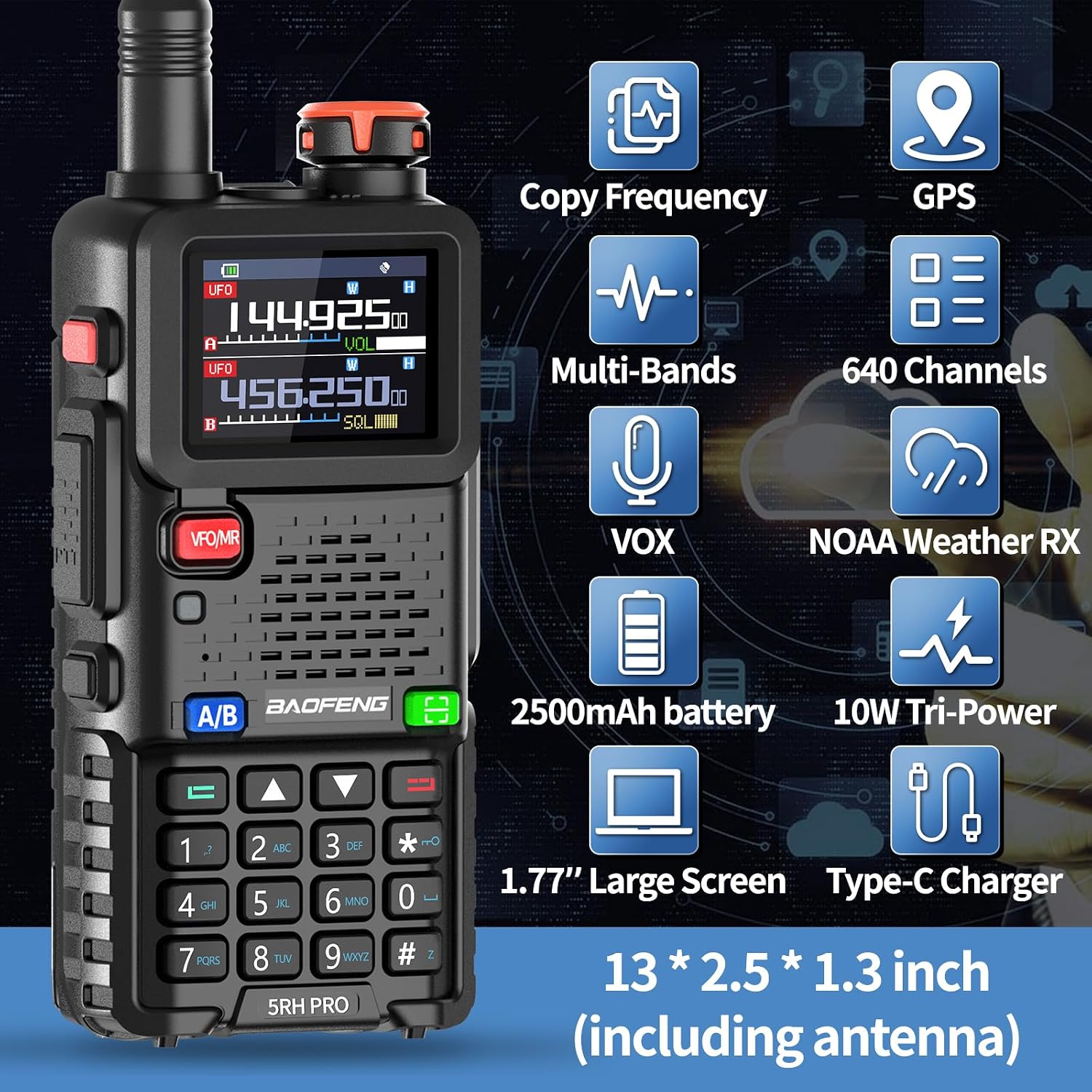
Image: Diagram highlighting key features of the BAOFENG 5RH GPS radio, including Copy Frequency, GPS, Multi-Bands, 640 Channels, VOX, NOAA Weather RX, 2500mAh battery, 10W Tri-Power, 1.7" Large Screen, and Type-C Charger.
Key Components:
- Antenna: For transmitting and receiving signals.
- Power/Volume Knob: Turns the radio on/off and adjusts volume.
- LCD Display: Shows channel, frequency, battery status, and other indicators.
- PTT (Push-to-Talk) Button: Press to transmit, release to receive.
- VFO/MR Button: Switches between Frequency Mode (VFO) and Channel Mode (MR).
- A/B Button: Switches between upper and lower display frequencies.
- Keypad: For direct frequency input, menu navigation, and function activation.
- Speaker/Microphone: For audio output and input.
- Type-C Charging Port: For direct battery charging.
Setup
1. Battery Installation and Charging
The radio comes with a rechargeable 2500mAh Li-ion battery. Ensure the battery is fully charged before first use.
- Installation: Align the battery with the grooves on the back of the radio and slide it upwards until it clicks into place. To remove, press the battery release latch and slide the battery downwards.
- Charging Methods:
- Base Charger: Place the radio (with battery installed) or the battery alone into the charging cradle. The indicator light will show charging status (usually red for charging, green for fully charged).
- Type-C USB Charging: Connect the provided Type-C USB cable to the port on the side of the radio and plug the other end into a compatible USB power source (e.g., wall adapter, power bank, car charger, computer USB port). This allows for convenient charging on the go.
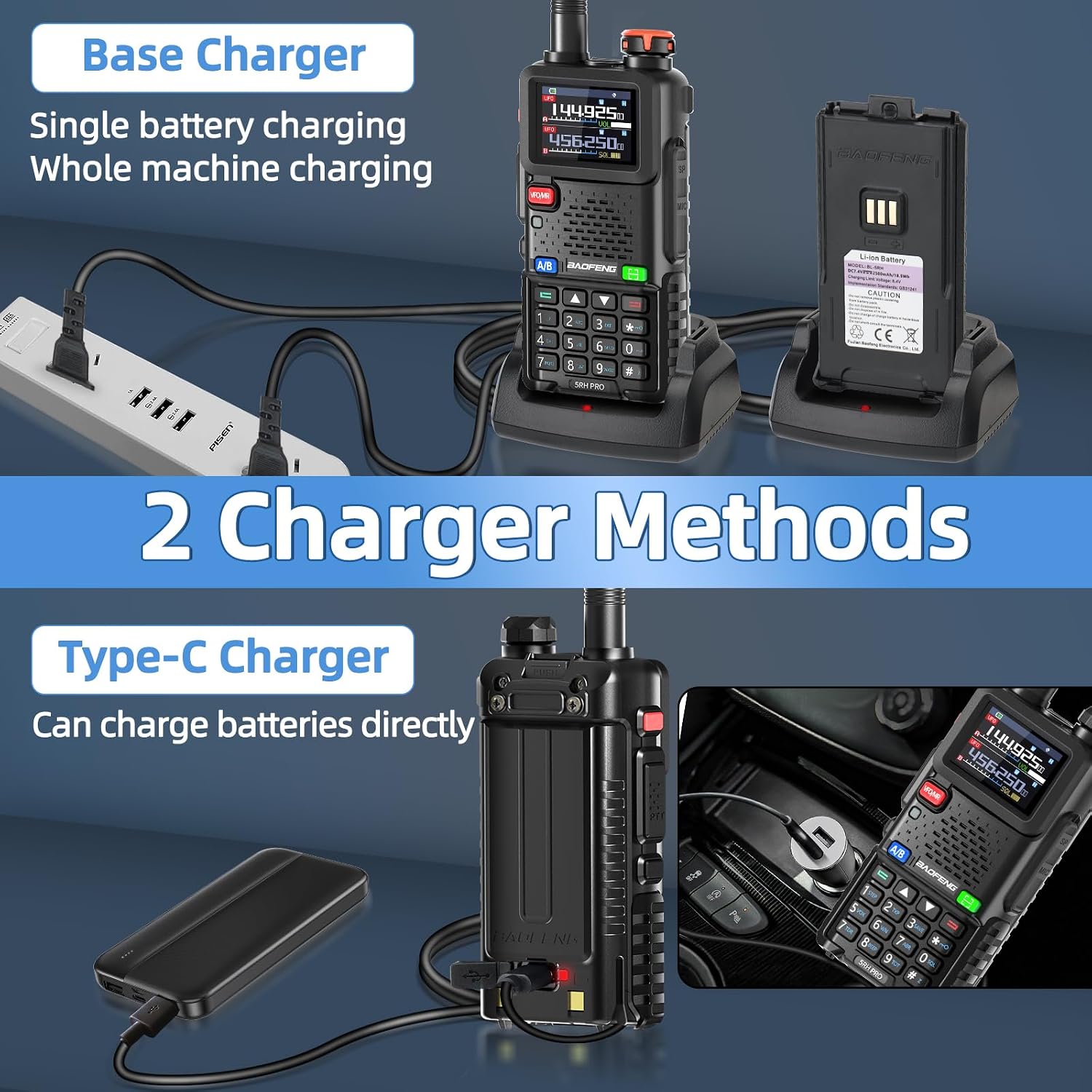
Image: Illustration of the two charging methods: using the base charger for the radio or battery, and direct charging via the Type-C USB port on the radio.
2. Antenna Installation
Screw the desired antenna clockwise onto the antenna connector on top of the radio until it is finger-tight. Do not overtighten.
3. Belt Clip Installation
Attach the belt clip to the designated slot on the back of the radio using the provided screws. This allows for convenient carrying.
Operating Instructions
1. Power On/Off and Volume Control
Rotate the Power/Volume knob clockwise to turn the radio on. Continue rotating clockwise to increase the volume. Rotate counter-clockwise to decrease volume and turn the radio off.
2. Channel Selection and Frequency Mode
- Channel Mode (MR): Press the VFO/MR button to enter Channel Mode. Use the Up/Down arrow keys or the keypad to select a stored channel.
- Frequency Mode (VFO): Press the VFO/MR button to enter Frequency Mode. Directly input the desired frequency using the keypad.
- A/B Switch: Press the A/B button to switch between the upper (A) and lower (B) display frequencies, allowing you to monitor two frequencies simultaneously.
3. Transmitting and Receiving (PTT)
To transmit, press and hold the PTT button on the side of the radio and speak clearly into the microphone. Release the PTT button to receive.

Image: The 1.7-inch large screen of the BAOFENG 5RH GPS radio displaying frequency information, and a menu showing options for Transmit Power (Low, Middle, High).
4. Wireless Copy Frequency Function
This feature allows the radio to quickly detect and copy the frequency of another radio for immediate communication without computer programming.
- Press the [Green Button] (often labeled with a copy icon) to activate the Copy Frequency function.
- Place the radio near the target radio. The 5RH GPS will attempt to decipher its frequency.
- Once the frequency is copied, you can press the [#] key to switch bands if needed.

Image: Visual guide demonstrating the "2 Seconds Copy Frequency" feature, showing the radio's screen and the green button to activate the function.
5. GPS Function
The integrated GPS allows you to obtain your real-time position and share it with teammates, enhancing safety and coordination during outdoor activities.
- Press the [Green Button] to enter the main menu.
- Navigate to GNSS and then Information.
- Long press the [Green Button] to check your current location (Longitude and Latitude).
- The GPS function also supports features like "My Position," "Share Position," and "Request Position" for team coordination.

Image: Screenshot of the BAOFENG 5RH GPS radio's display showing GPS information, including longitude and latitude, and options for My Position, Share Position, and Request Position.
6. VOX Function (Voice Operated Transmit)
VOX allows hands-free operation. When activated, the radio will automatically transmit when it detects your voice, eliminating the need to press the PTT button.
- Access the menu and navigate to the VOX setting.
- Adjust the VOX sensitivity level as needed. A higher sensitivity means the radio will transmit with softer voice input.
7. FM Radio Function
Your radio can also receive standard FM radio broadcasts for entertainment during downtime.
- Press the FM button (if available, or navigate through the menu) to enter FM radio mode.
- Use the Up/Down arrow keys to scan for stations or directly input a frequency.
8. NOAA Weather Receive
The radio can receive NOAA weather broadcasts, providing critical weather alerts and information.
- Access the menu and select the NOAA Weather function.
- The radio supports 10 NOAA weather channels.

Image: The BAOFENG 5RH GPS radio displaying "NOAA Weather Receive 10 Channels" with icons representing various weather and disaster scenarios.
9. Multi-Band Operation
The BAOFENG 5RH GPS supports a wide range of frequencies, including AM and FM bands.
- AM: 108-136MHz (Aviation Band)
- FM: 68-108MHz (Broadcast FM)
- VHF: 136-174MHz, 220-260MHz
- UHF: 350-390MHz, 400-520MHz

Image: Diagram illustrating the various frequency bands supported by the BAOFENG 5RH GPS radio, including AM, FM, VHF, and UHF ranges.
10. Programming
While the radio supports wireless frequency copying, for extensive channel management and advanced settings, programming via computer software is recommended. The included programming cable is for this purpose.
- Software: The radio may require specific programming software (CPS) from BAOFENG or compatible third-party software. Note that some older software versions or generic programming tools like CHIRP may not fully support this model without updated drivers or firmware.
- Firmware Updates: It is advisable to check the manufacturer's official website or authorized distributors for the latest firmware and programming software to ensure full functionality and compatibility.
Maintenance
- Cleaning: Use a soft, damp cloth to clean the radio's surface. Do not use harsh chemicals or abrasive cleaners.
- Battery Care:
- Avoid overcharging or completely draining the battery.
- If storing the radio for an extended period, remove the battery and store it in a cool, dry place with approximately 50% charge.
- Storage: Store the radio in a dry, dust-free environment away from direct sunlight and extreme temperatures.
Troubleshooting
| Problem | Possible Cause | Solution |
|---|---|---|
| Radio does not power on. | Battery is low or not installed correctly. | Charge the battery or re-install it securely. |
| Cannot transmit or receive. | Incorrect frequency/channel, antenna loose, or out of range. | Verify frequency/channel, check antenna connection, move closer to other radios. |
| Poor audio quality. | Low battery, weak signal, or incorrect squelch setting. | Charge battery, move to a better signal area, adjust squelch level. |
| Programming software not connecting. | Incorrect drivers, incompatible software version, or faulty cable. | Install correct drivers, use updated software from BAOFENG, try a different programming cable. |
| GPS not acquiring signal. | Indoors, obstructed view of sky, or outdated firmware. | Move to an open outdoor area, ensure clear view of sky, check for firmware updates. |
Specifications
| Feature | Detail |
|---|---|
| Model Number | 5RH GPS |
| Brand | BAOFENG |
| Frequency Range | VHF, UHF (AM: 108-136MHz, FM: 68-108MHz, VHF: 136-174MHz, 220-260MHz, UHF: 350-390MHz, 400-520MHz) |
| Number of Channels | 640 |
| Talking Range (Maximum) | 5 Miles (approx. 3-5 miles depending on terrain) |
| Battery Capacity | 2500mAh |
| Special Features | Emergency Alarm, Long Range, GPS Function, Wireless Copy Frequency, VOX, NOAA Weather Receive, Type-C Charging |
| Display | 1.7" Large Screen |
| FCC ID | 2AJGM-5RH |
| Item Weight | 2.92 pounds (package weight) |
| Package Dimensions | 9.06 x 8.23 x 4.33 inches |
Warranty and Support
Warranty: The manufacturer states that there is no explicit warranty provided with this product. Please refer to your retailer's return policy for any initial defects or issues upon receipt.
Customer Support: For technical assistance, troubleshooting beyond this manual, or inquiries regarding firmware updates and programming software, please contact BAOFENG customer support or visit their official website. Ensure you have your product model number (5RH GPS) and FCC ID (2AJGM-5RH) ready when seeking support.
Documents and downloads
Ask a question about this manual
Ask about setup, troubleshooting, compatibility, parts, safety, or missing instructions. Manuals+ will review the question and use this page’s manual context to help answer it.