
1. Introduction
This manual provides instructions for the assembly, usage, and maintenance of your ChooChoo Narrow Storage Cabinet, Model SC2406-WH. This tall, slim cabinet is designed to maximize storage in small spaces, featuring adjustable shelves, two doors, and one drawer. Its modern design and moisture-resistant construction make it suitable for various rooms, including bathrooms, living rooms, and laundry rooms.
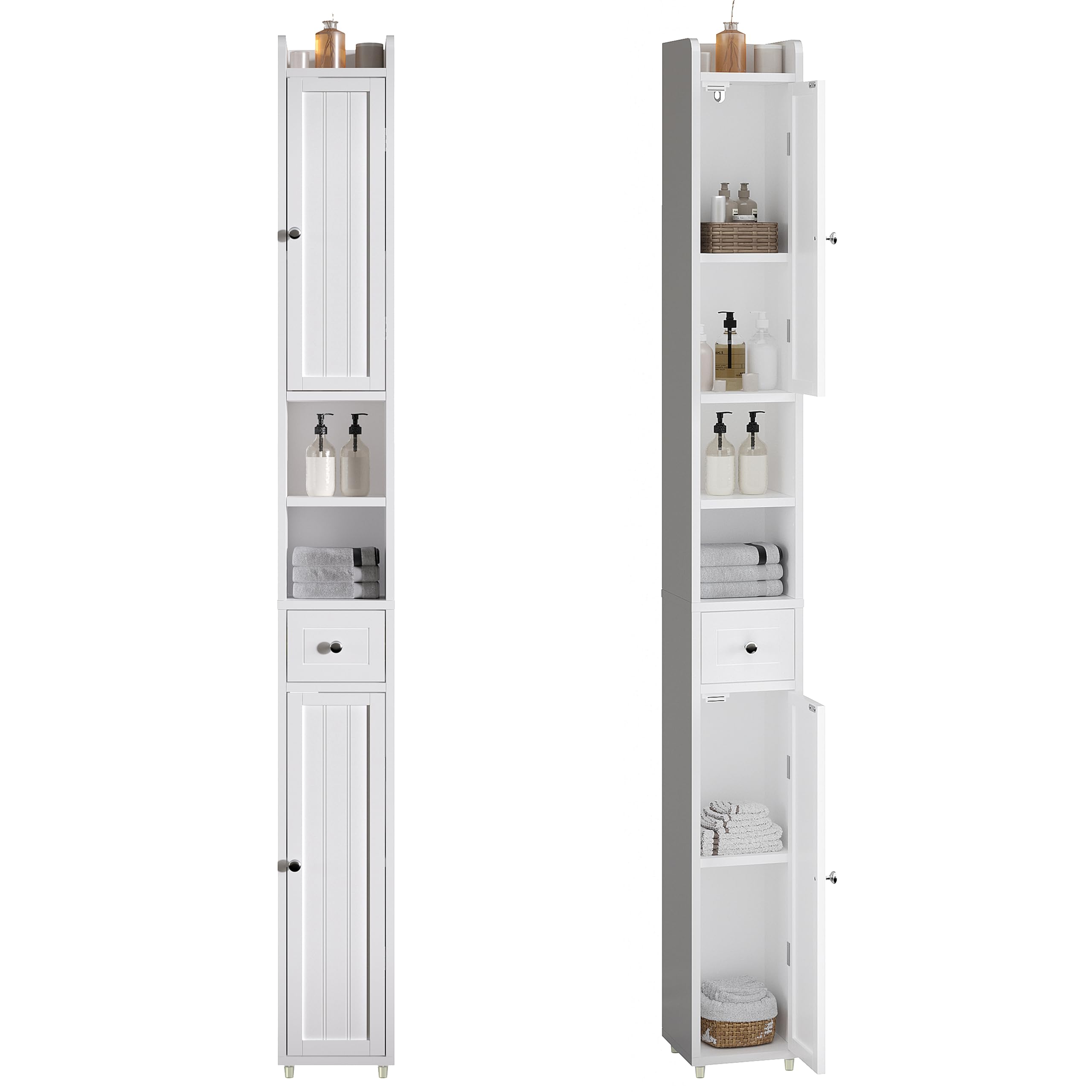
Figure 1: ChooChoo Narrow Storage Cabinet in a bathroom environment.
2. Safety Information
- Anti-Tip Kit: Always assemble and secure the cabinet to a wall using the provided anti-tip kit to prevent tipping. This is crucial for safety, especially in households with children or pets.
- Weight Distribution: Do not overload the cabinet. Distribute items evenly across shelves and within drawers to maintain stability.
- Placement: Ensure the cabinet is placed on a flat, stable surface.
- Moisture: While the cabinet is moisture-resistant, avoid prolonged exposure to excessive water or humidity. Wipe up spills immediately.
3. Parts List
Before beginning assembly, verify that all parts listed below are present and undamaged. Refer to the included step-by-step instructions for detailed part identification and quantities.
- Cabinet Panels (Top, Bottom, Sides, Back)
- Doors (2)
- Drawer Components (Front, Back, Sides, Bottom)
- Adjustable Shelves (3)
- Hardware Pack (Screws, Dowels, Hinges, Drawer Slides, Handles, Anti-tip Kit)
4. Assembly Instructions
Assembly of the ChooChoo Narrow Storage Cabinet is designed to be straightforward. All parts are labeled, and step-by-step instructions are included in the packaging. Please follow these instructions carefully.
- Unpack and Identify: Carefully unpack all components and lay them out. Identify each part using the provided labels and the parts list.
- Assemble Frame: Begin by assembling the main frame of the cabinet according to the diagrams in your instruction manual.
- Install Shelves: Insert the adjustable shelf pins into the desired positions and place the shelves.
- Assemble Drawer: Construct the drawer and install the drawer slides onto both the drawer and the cabinet frame.
- Attach Doors: Mount the two doors using the provided hinges. Ensure magnetic door catches are installed for secure closure.
- Install Handles: Attach the metal handles to the doors and drawer.
- Secure to Wall: For safety and stability, always use the anti-tip kit to anchor the cabinet to a wall.

Figure 2: Product dimensions for planning placement.
5. Usage and Features
The ChooChoo Narrow Storage Cabinet is designed for versatile storage in various small spaces. Its features include:
- Adjustable Shelves: The multiple storage compartments are fitted with adjustable shelves, allowing you to customize the space to accommodate items of different sizes, from toiletries to towels.
- Two Doors and One Drawer: Provides both concealed and easily accessible storage options. The magnetic doors ensure secure closure.
- Elevated Bottom Design: The raised bottom helps prevent moisture buildup, extending the cabinet's lifespan, especially in humid environments like bathrooms.
- Versatile Placement: Ideal for bathrooms, laundry rooms, living rooms, or any area requiring efficient vertical storage.

Figure 3: Cabinet interior with items.

Figure 4: Detail of adjustable shelf mechanism.

Figure 5: Detail of the cabinet's drawer.

Figure 6: Elevated base for moisture protection.
Product Videos:
Video 1: Overview of the ChooChoo Narrow Bathroom Storage Cabinet, demonstrating its features and fit in a laundry room.
Video 2: Demonstrating the versatility of the ChooChoo Cabinet for use beyond bathrooms, specifically in a kitchen setting.
6. Maintenance
- Cleaning: Wipe the cabinet surfaces with a soft, damp cloth. Avoid abrasive cleaners or harsh chemicals that could damage the finish.
- Moisture Protection: The cabinet is made from high-quality MDF material, which is moisture-resistant. However, to ensure longevity, promptly wipe away any standing water or spills.
- Hardware Check: Periodically check all screws and fittings to ensure they are tight. Retighten if necessary.
7. Troubleshooting
- Cabinet Wobbles: Ensure the cabinet is on a level surface. If wobbling persists, check that all assembly screws are tightened. Verify the anti-tip kit is securely installed.
- Doors Do Not Close Properly: Check the alignment of the hinges and magnetic catches. Adjust as needed. Ensure no items inside are obstructing the door closure.
- Drawer Sticks: Inspect the drawer slides for any obstructions or misalignment. Lubricate slides if necessary.
- Missing Parts: If any parts are missing upon unboxing, please contact customer support immediately.
8. Specifications
| Feature | Detail |
|---|---|
| Brand | ChooChoo |
| Model Number | SC2406-WH |
| Color | White |
| Material | Engineered Wood (MDF) |
| Product Dimensions (D x W x H) | 7.87"D x 7.87"W x 70.87"H |
| Item Weight | 11.8 Kilograms |
| Number of Doors | 2 |
| Number of Drawers | 1 |
| Number of Adjustable Shelves | 3 |
| Installation Type | Freestanding |
| Required Assembly | Yes |
| Mounting Type | Floor Mount (with wall anchor option) |
| Recommended Uses | Bathroom Storage and Organization, Living Room, Laundry Room |
9. Warranty and Support
For any questions, concerns, or assistance with your ChooChoo Narrow Storage Cabinet, please contact our customer support team. Our excellent after-sales team is available to help you with assembly, missing parts, or any product-related inquiries.
Please refer to your purchase documentation for specific warranty details.