
ChooChoo SC2406-BK
ChooChoo Narrow Bathroom Storage Cabinet
Instruction Manual - Model SC2406-BK
1. Introduction
Thank you for choosing the ChooChoo Narrow Bathroom Storage Cabinet. This tall, slim cabinet is designed to maximize storage in small spaces, such as bathrooms, laundry rooms, or kitchens. Featuring adjustable shelves, two doors, and a drawer, it offers versatile storage solutions for various items. This manual provides essential information for safe assembly, proper usage, and maintenance of your new cabinet.
2. Safety Information
WARNING: To prevent serious injury, always assemble and secure the cabinet to a wall using the provided anti-tip kit. Do not overload the cabinet, as this may cause it to tip over.
- Ensure all parts are present and undamaged before assembly.
- Assemble on a soft, clean surface to prevent scratches.
- Keep small parts away from children during assembly.
- Periodically check all connections and fasteners to ensure they remain tight.
3. Package Contents
Please verify that all components listed below are included in your package. If any parts are missing or damaged, please contact customer support.
- Cabinet Panels (labeled A, B, C, etc.)
- Hardware Pack (screws, dowels, hinges, handles, anti-tip kit, etc.)
- Adjustable Shelves
- Drawer Components
- Instruction Manual
4. Assembly Instructions
Assembly is designed to be straightforward with step-by-step instructions and labeled parts. A screwdriver is typically included, but additional tools may be helpful.
- Unpack and Identify Parts: Carefully unpack all components and lay them out. Match each part to the corresponding label in the instruction diagram.
- Assemble the Frame: Follow the diagrams to connect the main side panels and base using the designated hardware. Ensure all connections are secure.
- Install Shelves: Insert the adjustable shelf pins into the desired holes. Place the shelves onto the pins.
- Assemble the Drawer: Construct the drawer according to the instructions, then install it into its designated slot.
- Attach Doors: Secure the hinges to the doors and then to the cabinet frame. Ensure doors open and close smoothly.
- Install Handles: Attach the metal handles to the doors and drawer.
- Attach Anti-Tip Kit: For safety, securely attach the anti-tip kit to the top rear of the cabinet and then to a wall stud.

Figure 4.1: Fully assembled ChooChoo Narrow Bathroom Storage Cabinet.

Figure 4.2: Overview of the cabinet's storage compartments.
5. Operating Instructions (Usage)
This cabinet offers flexible storage options to suit your needs.
- Adjustable Shelves: The internal shelves can be repositioned to accommodate items of varying heights. Simply remove the shelf pins, adjust the shelf to the desired height, and reinsert the pins to secure it.
- Drawer: The smooth-gliding drawer provides concealed storage for smaller items.
- Doors: The two doors feature magnetic closures to ensure they stay securely shut, keeping contents out of sight and protected.

Figure 5.1: Adjustable shelves and magnetic door closure for flexible and secure storage.

Figure 5.2: Detail of the metal handle and the elevated base, designed to prevent moisture accumulation.
6. Maintenance
To ensure the longevity and appearance of your ChooChoo storage cabinet, follow these maintenance guidelines:
- Cleaning: Wipe the cabinet surfaces with a soft, damp cloth. Avoid using harsh chemicals or abrasive cleaners, as these can damage the finish.
- Moisture Protection: The cabinet is constructed from high-quality MDF material and features an elevated bottom design to prevent moisture buildup. However, it is recommended to wipe away any standing water immediately to maintain its moisture-resistant properties.
- Regular Checks: Periodically inspect all hardware, including screws and hinges, and tighten them if necessary to maintain stability.
7. Troubleshooting
If you encounter any issues with your cabinet, please refer to the following common solutions:
- Cabinet feels unstable: Ensure the anti-tip kit is properly installed and secured to a wall stud. Verify all assembly screws are tightened. Avoid placing excessively heavy items on upper shelves.
- Doors do not close properly: Check that the hinges are correctly aligned and tightened. Adjust the magnetic catches if needed.
- Drawer sticks or is difficult to open/close: Ensure the drawer slides are correctly installed and free of obstructions. Check for any loose screws on the drawer or its runners.
- Unusual odor: New furniture may have a slight odor from manufacturing. Ensure the room is well-ventilated for a few days to allow the odor to dissipate.
- Missing parts: If any parts were missing upon arrival, please contact ChooChoo customer support immediately for assistance.
8. Specifications
| Feature | Detail |
|---|---|
| Brand | ChooChoo |
| Model Name | Storage Cabinets (SC2406-BK) |
| Color | Black |
| Product Dimensions | 7.87"D x 7.87"W x 70.87"H |
| Special Feature | Adjustable Shelf |
| Mounting Type | Floor Mount |
| Room Type | Bathroom, Living Room |
| Door Style | Shutter |
| Finish Type | Black |
| Number of Shelves | 2 (adjustable) |
| Item Weight | 23.3 Pounds |
| Base Type | Furniture base (Elevated) |
| Installation Type | Freestanding |
| Top Material Type | Engineered Wood |
| Assembly Required | Yes |
| Frame Material | Engineered Wood |
| Number of Compartments | 3 (2 closed, 1 drawer, open shelves) |
| Number of Levels | 3 |
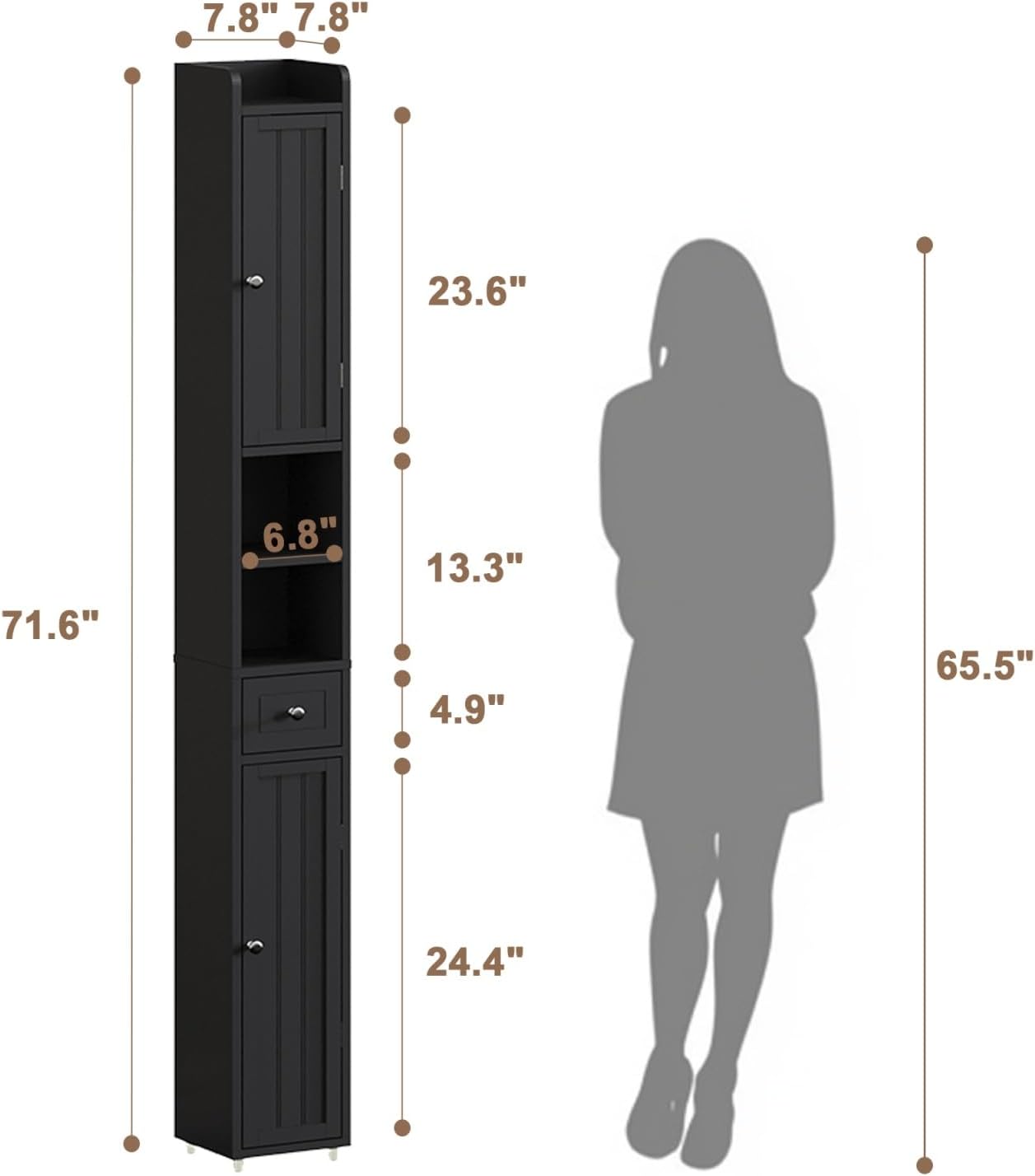
Figure 8.1: Detailed dimensions of the cabinet.
9. Warranty and Support
ChooChoo is committed to providing quality products and excellent customer service. While specific warranty details are not provided in this manual, please retain your proof of purchase.
For any questions, concerns, missing parts, or warranty inquiries, please contact our dedicated after-sales team. Refer to the contact information provided with your purchase or on the official ChooChoo website.
Ask a question about this manual
Ask about setup, troubleshooting, compatibility, parts, safety, or missing instructions. Manuals+ will review the question and use this page’s manual context to help answer it.