
Introduction
The S.M.S.L PA200 is a high-resolution power amplifier designed to deliver exceptional audio performance. Featuring advanced components like Infineon's gallium nitride power transistors and TI's PGA2311 volume chip, it offers precise control and powerful output for driving high-power speakers in both stereo and mono configurations.
Key Features
- High-Efficiency Gallium Nitride Power Transistor: Utilizes Infineon's latest GaN FETs for switching frequencies up to 1MHz, enhancing full-band sound quality.
- Accurate Volume Control: Equipped with TI's PGA2311 chip for precise volume adjustment and ultra-low distortion.
- Stereo Direct Mode: Supports pure post-stage direct mode for a more direct and pure sound when paired with a decoding pre-stage like the SMSL D200.
- Powerful Mono Mode Output: XLR input in mono mode allows combining two PA200 units for 4x power gain, suitable for high-power speakers.
- Fever-Level Audio Components: Incorporates high-quality audio components, gold-plated input/output terminals, and comprehensive protection circuits for durability and safety.
What's in the Box
Upon unpacking your S.M.S.L PA200, please ensure all items are present:
- S.M.S.L PA200 Power Amplifier
- Remote control
- Instruction Manual (this document)
- Power Cable
Product Overview
Familiarize yourself with the front and rear panels of the S.M.S.L PA200 amplifier.

Figure 1: S.M.S.L PA200 Front and Rear Panel Layout.
This image displays the front and rear panels of the PA200 amplifier with numbered labels indicating various controls and connectors. The front panel includes the Function knob (1), Remote window (2), Power LED (3), and Display screen (4). The rear panel features Line inputs (RCA) (5), MONO input (XLR) (6), Mono mode speaker+ (7), Mono mode speaker- (8), AC power IN (9), Speaker Right output (10), and Speaker Left output (11).
- Function knob (1): Used for volume control and menu navigation.
- Remote window (2): Infrared receiver for the remote control.
- Power LED (3): Indicates power status.
- Display screen (4): Shows current settings and status.
- Line inputs (RCA) (5): Stereo RCA inputs for connecting audio sources.
- MONO input (XLR) (6): Balanced XLR input for mono mode operation.
- Mono mode speaker+ (7): Positive speaker terminal for mono mode.
- Mono mode speaker- (8): Negative speaker terminal for mono mode.
- AC power IN (9): Power input connector.
- Speaker Right output (10): Right channel speaker output.
- Speaker Left output (11): Left channel speaker output.
Setup
Follow these steps to set up your S.M.S.L PA200 Power Amplifier.
1. Connecting Audio Sources
The PA200 supports both RCA (Line In) and XLR (Mono In) inputs.
- For Stereo Operation (RCA): Connect your audio source (e.g., DAC, pre-amplifier) to the "LINE IN" RCA jacks (5) on the rear panel. Ensure left and right channels are correctly matched.
- For Mono Operation (XLR): If using two PA200 units for mono amplification, connect the balanced XLR output from your pre-amplifier to the "MONO IN" XLR jack (6) on each PA200 unit.
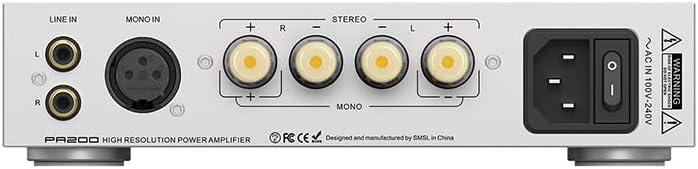
Figure 2: Rear panel of the S.M.S.L PA200 showing RCA, XLR, and speaker connections.
This image provides a clear view of the rear panel of the PA200, highlighting the "LINE IN" RCA inputs, "MONO IN" XLR input, and the speaker output terminals for both stereo and mono configurations, along with the AC power input.
2. Connecting Speakers
Connect your speakers to the appropriate output terminals.
- For Stereo Operation: Connect the right speaker to the "Speaker Right output" (10) and the left speaker to the "Speaker Left output" (11). Ensure positive (+) and negative (-) terminals are correctly matched.
- For Mono Operation: When using two PA200 units in mono mode, connect one speaker to the "Mono mode speaker+" (7) and "Mono mode speaker-" (8) terminals of one PA200 unit. Repeat for the second speaker and the second PA200 unit.

Figure 3: Diagram illustrating speaker connections for Mono Mode and Stereo Mode.
This image visually explains how to connect speakers for both mono and stereo configurations. In mono mode, a single speaker connects to dedicated mono terminals. In stereo mode, two speakers connect to the left and right stereo terminals.
3. Power Connection
Connect the supplied power cable to the "AC power IN" (9) on the rear panel and then to a suitable wall outlet.
Video: Connecting S.M.S.L D200 and PA200
Video 1: Demonstrating the connection of S.M.S.L D200 DAC with the S.M.S.L PA200 amplifier.
This video shows a practical demonstration of how to connect the S.M.S.L D200 DAC to the S.M.S.L PA200 amplifier, illustrating the cable routing and proper input/output connections for a complete audio system setup.
Video: S.M.S.L PL200T, D200, and PA200 System Integration
Video 2: Illustrating the setup of S.M.S.L PL200T, D200, and PA200 components.
This video demonstrates the physical arrangement and interconnections of the S.M.S.L PL200T CD player, D200 DAC, and PA200 amplifier, showcasing a complete high-fidelity audio stack.
Operating Instructions
Power On/Off
Press the power button on the front panel or use the remote control to turn the unit on or off. The Power LED (3) will indicate the power status.
Volume Control
Rotate the Function knob (1) on the front panel clockwise to increase volume and counter-clockwise to decrease volume. Volume can also be adjusted using the remote control.
Input Selection
The PA200 automatically detects the input mode based on the connection. For stereo RCA input, it operates in stereo mode. For XLR input, it operates in mono mode. The display screen (4) will show the active input and volume level.
Mono Mode Operation
When using two PA200 units for mono amplification, each unit will amplify a single channel (left or right) for increased power output. Ensure your pre-amplifier provides separate left and right channel outputs to each PA200's XLR input.
Video 3: Overview of the S.M.S.L PA200's features and operational modes.
This video provides a general introduction to the S.M.S.L PA200, highlighting its key features such as high power output, precise volume control, and various input/output options, including the mono mode capability.
Maintenance
- Cleaning: Use a soft, dry cloth to clean the exterior of the amplifier. Avoid using abrasive cleaners or solvents.
- Ventilation: Ensure adequate ventilation around the unit to prevent overheating. Do not block the ventilation openings.
- Power Off: Always power off and unplug the unit before cleaning or making any connections.
Troubleshooting
| Problem | Possible Cause | Solution |
|---|---|---|
| No sound output |
|
|
| Distorted sound |
|
|
| Unit does not power on |
|
|
Specifications
| Feature | Detail |
|---|---|
| Brand | S.M.S.L |
| Model | PA200 |
| Number of Channels | 2 |
| Output Power | 35 Watts (per channel, stereo) |
| Input Options | RCA (Line In), XLR (Mono In) |
| Volume Control Chip | TI PGA2311 |
| Power Transistor | Infineon Gallium Nitride (GaN) FET |
| Item Weight | 1.88 Kilograms |
| Dimensions (Approx.) | 220mm (W) x 45mm (H) x 175mm (D) (Refer to Figure 1) |

Figure 4: High Power Output at 8Ω in BTL Mode.
This graph illustrates the power output characteristics of the PA200 when operating in Bridge-Tied Load (BTL) mode with an 8-ohm speaker load, demonstrating its capability to deliver high power.

Figure 5: Total Harmonic Distortion + Noise (THD+N) performance.
This graph displays the amplifier's Total Harmonic Distortion plus Noise (THD+N) across various measured levels, indicating its low distortion characteristics for high-fidelity audio reproduction.

Figure 6: Signal-to-Noise Ratio (SNR) and Dynamic Range performance.
These bar graphs illustrate the amplifier's Signal-to-Noise Ratio (SNR) and Dynamic Range for both channels, demonstrating its ability to produce clear audio with a wide range between the quietest and loudest sounds.
Warranty and Support
The S.M.S.L PA200 Power Amplifier comes with a 1-year warranty as per manufacturer specifications. For technical support, warranty claims, or service inquiries, please contact your retailer or the official S.M.S.L support channels.
For additional information and product updates, please visit the official S.M.S.L website or refer to the contact information provided with your purchase.


