
Anrain 00C30-123D-03 ERC112D
Contents
Anrain ERC112D Temperature Controller Kit Instruction Manual
Model: 00C30-123D-03 ERC112D

1. Introduction
The Anrain ERC112D Temperature Controller Kit is a universal replacement solution designed for various Beverage Air refrigerator models. It offers precise temperature control and features a dedicated frost output point, distinguishing it from the ERC112C model. This manual provides detailed instructions for the proper installation, operation, and maintenance of your ERC112D temperature controller to ensure optimal performance and longevity.

Image: Anrain ERC112D Temperature Controller Kit, designed for refrigerator systems.
2. What's in the Box
Your Anrain ERC112D Temperature Controller Kit includes the following components:
- Controller (1 unit)
- Belt Cover (1 unit)
- Fasteners (2 units)
- Sensors (2 units)
- Instruction Manual (this document)
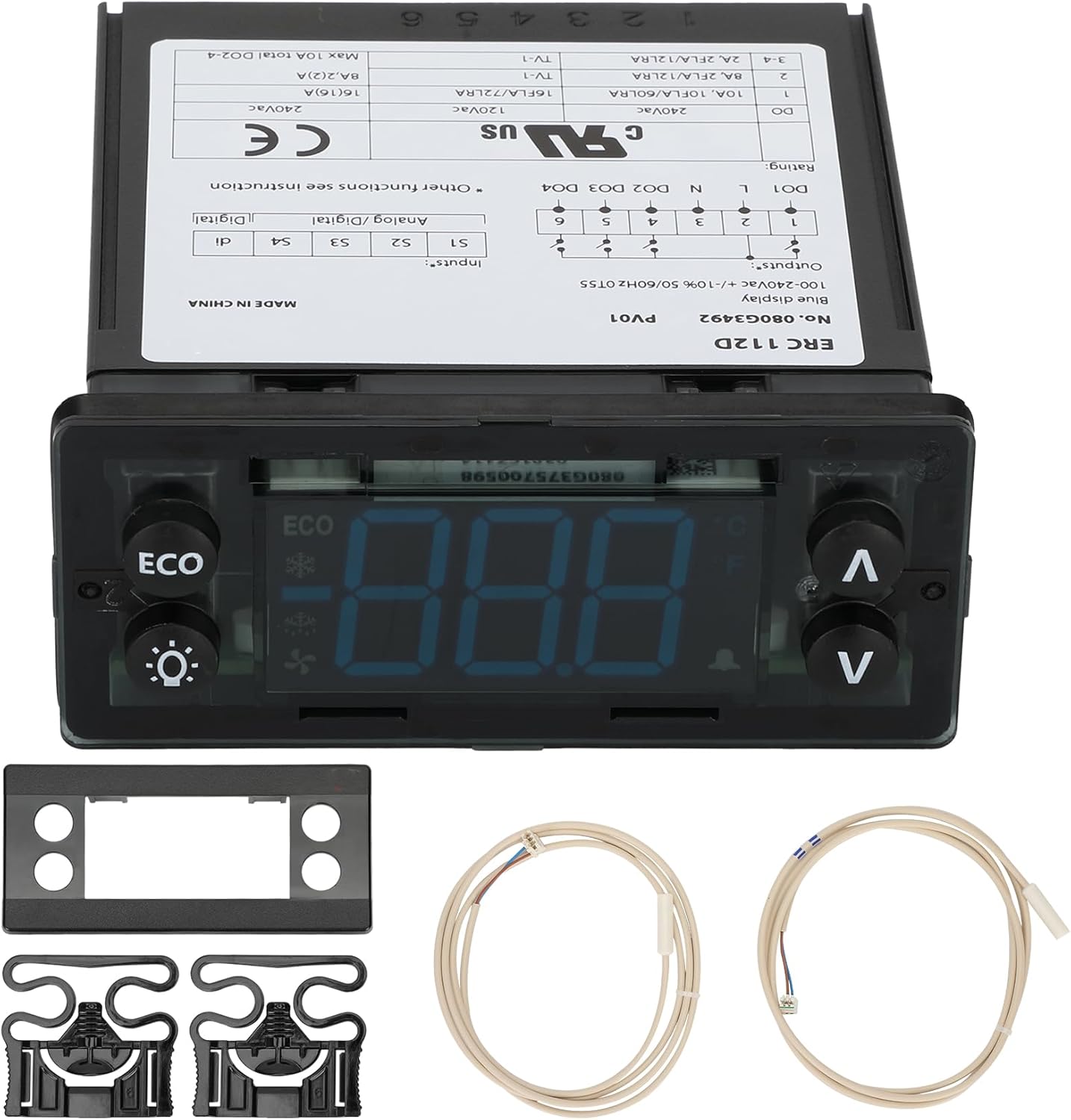
Image: All components included in the ERC112D Temperature Controller Kit.
3. Product Features and Functions
The ERC112D Temperature Controller is engineered for high quality and performance, serving as an integral part of your refrigeration system. Key features include:
- Perfect Compatibility: A universal replacement kit compatible with various Beverage Air part numbers, including 502-431D-01, 502-452D-01, 502-504D-01, 502-512D-01, 502-452D-11, 502-504D-08, 502-512D-03, 502-513D, 502-504D-05, 502-452D-12, 502-513D-01, 00C30-123D-01, and 00C31-123D-01.
- Frost Output Point: Unlike the ERC112C, the ERC112D features a dedicated frost output point, offering enhanced functionality for specific equipment needs.
- Dual NTC Probe Input: Equipped with two NTC sensor probes for accurate temperature measurement.
- Comprehensive Control: Capable of controlling refrigerator temperature, managing defrost cycles, and regulating the refrigerator fan.
- Programmable Digital Inputs: Offers flexible programming options for various operational parameters.

Image: Visual representation of the ERC112D's core functions.
4. Setup and Installation
The ERC112D temperature controller is designed for easy installation. Please follow these steps carefully:
- Power Off: Before beginning any installation, ensure all power to the refrigeration unit is turned off. This is crucial for safety.
- Moisture Protection: Do not expose the ERC112D thermostat directly to moisture. Ensure the installation environment is dry.
- Connect Sensors: Connect the two NTC sensor probes to the appropriate ports on the controller.
- Secure Installation: Use the provided belt cover and fasteners to securely mount the controller in its designated location.
- Wiring: Connect the power and output wires according to the wiring diagram provided on the controller's label and in the detailed manual. Ensure all connections are secure.
- Power On: Once all connections are verified and secure, restore power to the refrigeration unit. The controller will power on and be ready for operation.
Video: This video demonstrates the components of the ERC112D Temperature Controller Kit and shows the process of connecting the sensors and securing the unit, highlighting its ease of installation.

Image: Demonstrating the simple connection of sensors to the ERC112D controller.
5. Operating Instructions
The ERC112D controller can be configured and operated in various ways. Refer to the detailed manual page for comprehensive instructions.
5.1. Manual Operation with Buttons (Direct Access)
- ECO Button: Press to enable direct function, e.g., "ECO/Night" mode.
- Light Button: Press to turn ON/OFF the light.
- Up/Down Buttons: Press to adjust set point. After 3 seconds, the display automatically reverts to showing the current temperature.
5.2. Changing a Parameter
To change parameters, press and hold the "Set" button for 5 seconds to access the menu. Use the Up/Down buttons to navigate and adjust values. Confirm changes by pressing "Set" again.
5.3. Acknowledging Alarms
When an alarm is triggered, the display will flash. Press any button to acknowledge the alarm.
5.4. Password Protection
The controller features password protection with three levels: 1. User, 2. Service (technicians), 3. OEM (programming). Consult the full manual for default passwords and access levels.
5.5. Sensor Types
The controller supports various sensor types for different applications:
- S1: Temperature sensor for cabinet.
- S2: Temperature sensor for defrost.
- S3: Temperature sensor for condenser, light sensor, or motion sensor.
- S4: Temperature sensor Pt.1000ohm/PC or Door signal.
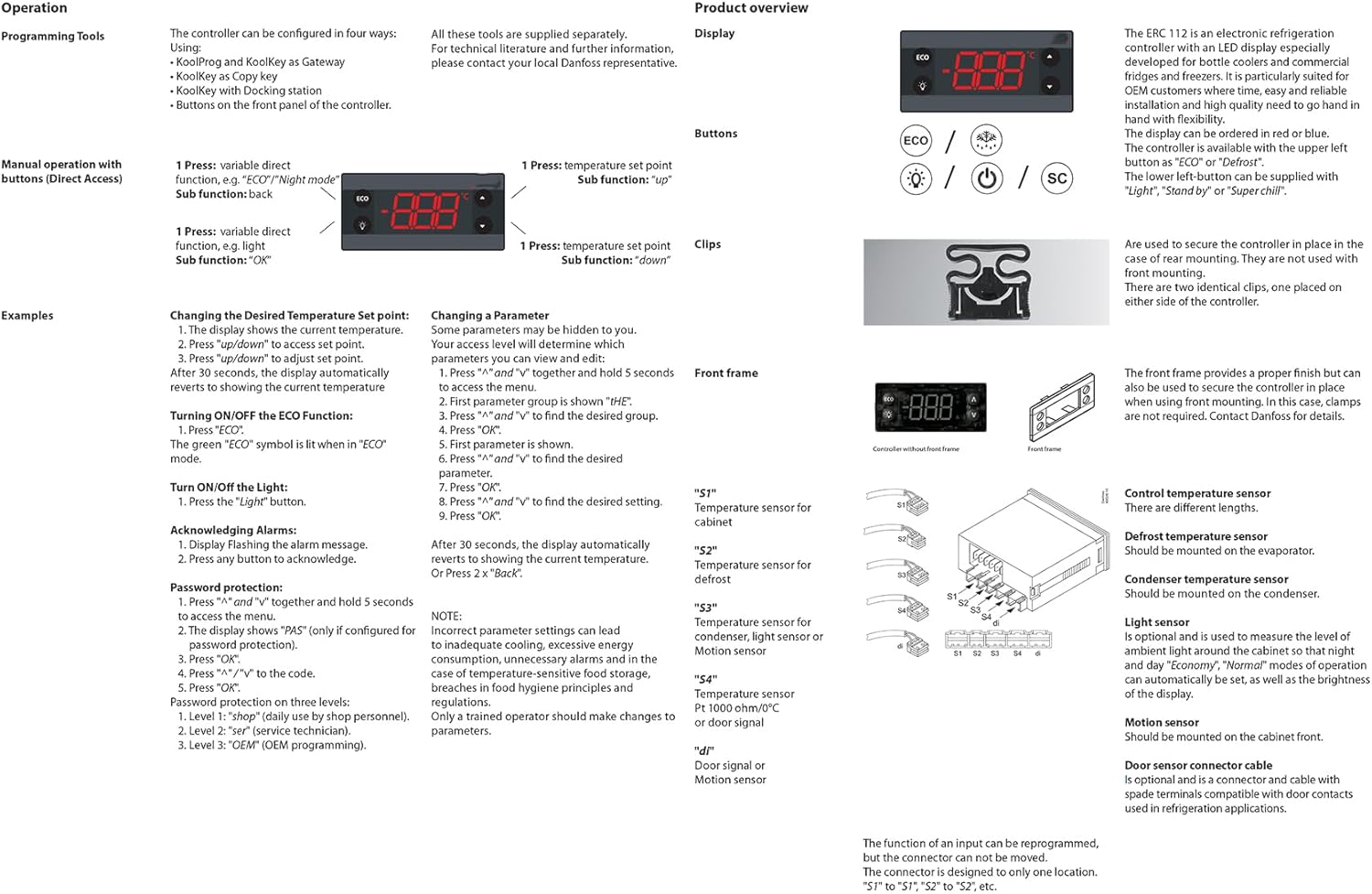
Image: Excerpt from the detailed operating manual, illustrating various functions and settings.
6. Maintenance
The Anrain ERC112D Temperature Controller is designed for reliable, long-term operation with minimal maintenance. To ensure its continued performance:
- Keep Dry: Always ensure the controller is not exposed to direct moisture or excessive humidity.
- Regular Inspection: Periodically check all wiring connections to ensure they remain secure and free from damage.
- Cleanliness: Keep the display and buttons clean using a soft, dry cloth. Avoid abrasive cleaners or solvents.
No specific routine maintenance beyond these general guidelines is typically required for the controller itself.
7. Troubleshooting
If you encounter issues with your ERC112D Temperature Controller, consider the following common problems and solutions:
- Display Not On:
- Check power supply to the unit.
- Verify all wiring connections are correct and secure.
- Incorrect Temperature Reading:
- Ensure sensors are properly connected and not damaged.
- Check sensor placement within the refrigerator.
- Verify parameter settings for sensor type are correct.
- Unit Not Cooling/Heating Properly:
- Review the set temperature point.
- Check if the ECO function is active if not desired.
- Ensure output relays are functioning (listen for clicks or check wiring).
- Incorrect parameter settings can lead to inadequate cooling. Refer to the operating section for parameter adjustment.
- Alarm Activation:
- Acknowledge the alarm by pressing any button.
- Identify the alarm code on the display and consult the full manual for its meaning and corrective actions.
For persistent issues or problems not covered here, please refer to the comprehensive manual or contact Anrain customer support.
8. Specifications
| Attribute | Value |
|---|---|
| Product Dimensions | 5 x 5 x 5 inches |
| Item Weight | 1 pounds |
| Manufacturer | Anrain |
| ASIN | B0DQWTK3HW |
| Item Model Number | 00C30-123D-03 ERC112D |
| Batteries Required | No |
| Included Components | Temperature Controller Kit |
| Color | Black |
| Display Type | LCD or LED |
9. Warranty Information
The Anrain ERC112D Temperature Controller Kit comes with a 1-year warranty from the date of purchase. This warranty covers defects in materials and workmanship under normal use. Please retain your proof of purchase for warranty claims.
10. Customer Support
Anrain is committed to providing 100% satisfied customer service. If you have any questions, concerns, or encounter any problems while using your ERC112D temperature controller, please do not hesitate to contact us. We are dedicated to replying to your messages and providing a satisfactory solution in a timely manner.
For support, please refer to the contact information provided with your purchase or visit the official Anrain website.
Ask a question about this manual
Ask about setup, troubleshooting, compatibility, parts, safety, or missing instructions. Manuals+ will review the question and use this page’s manual context to help answer it.