
Product Overview
The Midea 14,000 BTU ASHRAE (10,000 BTU SACC) Portable Air Conditioner is a versatile 3-in-1 unit designed to cool, dehumidify, and circulate air in spaces up to 450 sq. ft. It features smart control options, allowing operation via a remote, the SmartHome app, or voice commands through Amazon Alexa and Google Assistant. This unit is engineered for efficient and quiet operation, providing a comfortable environment in various settings.

Image: The Midea portable air conditioner, showcasing its sleek design alongside its remote control and a smartphone displaying the SmartHome app icon.
Key features include effortless digital controls with an LED display, a compact remote control, and an easy installation process with an included window kit. The unit also has a removable and reusable air filter with an indicator light for cleaning, ensuring good air quality.
Setup and Installation
Follow these steps for proper setup and installation of your Midea Portable Air Conditioner to ensure optimal performance.
- Unpack the Unit: Carefully remove the air conditioner and all accessories from the packaging. Verify all components listed in the "What's in the Box" section are present.

Image: A visual representation of all items included in the product packaging, such as the main unit, exhaust hose, window panel kit, and remote control.
- Assemble the Exhaust Hose: Connect the adapters to the exhaust hose. Ensure a secure fit to prevent air leakage.

Image: A six-step visual guide demonstrating the assembly of the exhaust hose and its connection to the window sealing board and the AC unit.
- Install the Window Kit: Adjust the window sealing board to fit your window opening (suitable for windows 19.4-62.2 inches wide or tall). Secure the board in place.

Image: Illustrations demonstrating how to install the window kit for both horizontally and vertically opening windows, with dimensions for proper fit.
- Connect Exhaust Hose to Window Kit: Attach the assembled exhaust hose to the port on the window sealing board.
- Position the Unit: Place the portable air conditioner on a flat, stable surface near the window. Ensure there is adequate space around the unit for proper airflow.
- Plug In: Connect the power cord to a grounded electrical outlet.
Operating Instructions
Your Midea Portable Air Conditioner offers multiple modes and control options for personalized comfort.
Control Panel and Remote Control
The unit features an easy-to-read LED display and intuitive buttons on the top panel. A compact remote control is also included for convenient operation from a distance.
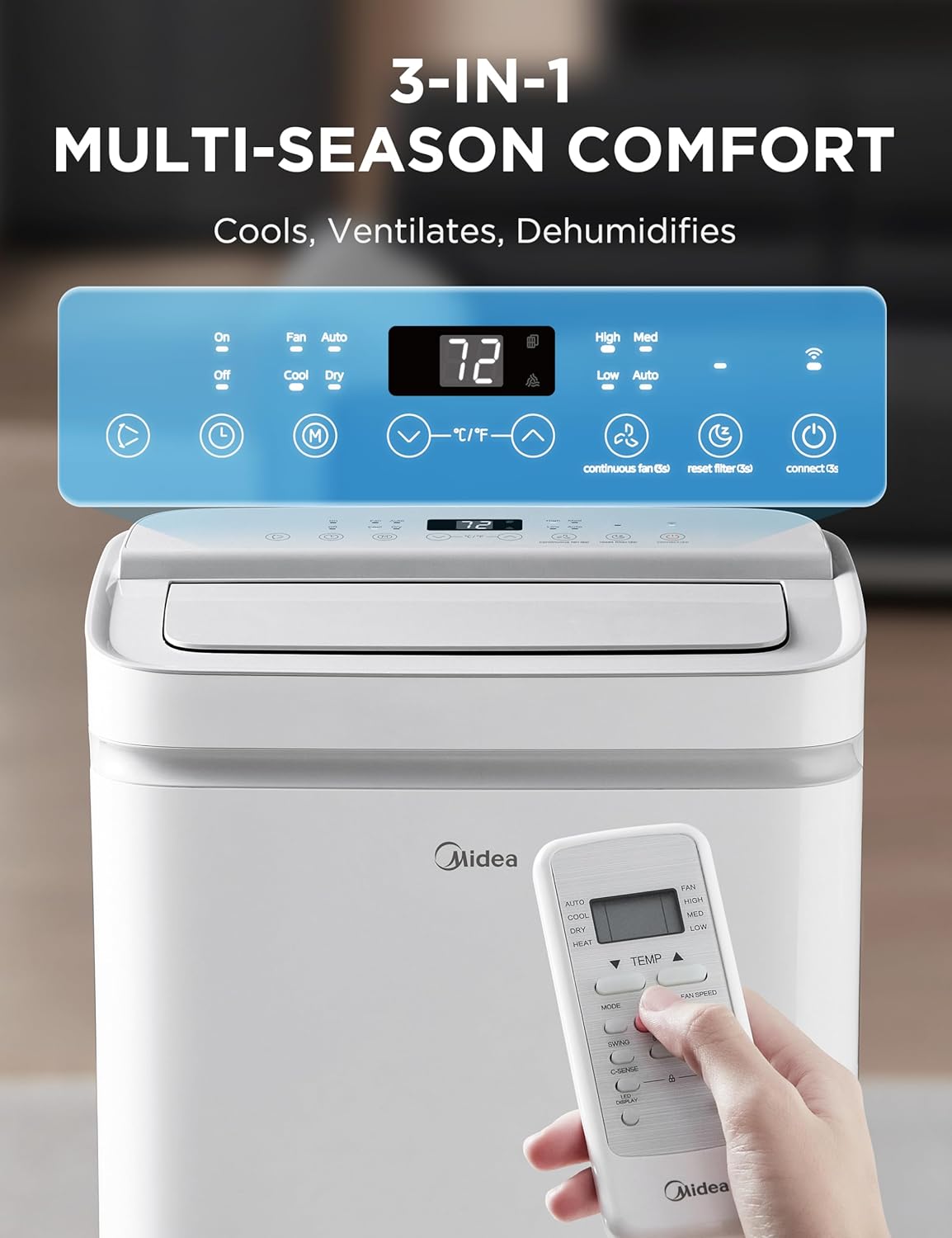
Image: A detailed view of the air conditioner's top control panel with various function buttons and the accompanying remote control.
Operating Modes
- Cool Mode: Provides powerful cooling for your space. Set your desired temperature between 62 and 90 degrees Fahrenheit.
- Dehumidifier Mode: Reduces humidity in the air, ideal for damp environments.
- Fan Mode: Circulates air without cooling, offering three fan speeds (Low, Medium, High).

Image: Depicts the three fan speed settings (Low, Medium, High) and their corresponding air circulation patterns in different room scenarios.
Smart Control Features
Control your portable AC from anywhere using the SmartHome app for iOS and Android. You can switch modes, set schedules, and monitor the unit remotely. For hands-free operation, pair your AC unit with Amazon Alexa or Google Assistant devices for voice control options.

Image: Shows the various smart control capabilities, including control via the SmartHome app on a smartphone, an Apple Watch, and the physical remote control.

Image: Illustrates the air conditioner's compatibility with various smart home platforms, including SmartHome, Matter, Alexa, Google Home, and IFTTT.
Maintenance
Regular maintenance ensures the longevity and efficient operation of your Midea Portable Air Conditioner.
- Air Filter Cleaning: The unit is equipped with a removable and reusable air filter. An indicator light will illuminate when it's time to clean the filter.
To clean, gently remove the filter and wash it with warm, soapy water. Rinse thoroughly and allow it to air dry completely before reinserting. Regular cleaning helps maintain air quality and cooling efficiency.
- Water Drainage: This unit features an auto-evaporation system, which typically handles most of the condensed water. However, in high humidity conditions, the internal water tank may fill up.
If the unit stops operating and displays a "Full Tank" error, you will need to drain the water. Refer to the full user manual for detailed instructions on how to access and drain the water tank.
Troubleshooting
If you encounter any issues with your Midea Portable Air Conditioner, refer to the following common troubleshooting tips:
| Problem | Possible Cause | Solution |
|---|---|---|
| Unit does not turn on. | No power, power outage, full water tank. | Check power connection, restore power, drain water tank. |
| Insufficient cooling. | Dirty air filter, blocked air intake/exhaust, room too large, open windows/doors. | Clean air filter, clear obstructions, ensure proper room size, close windows/doors. |
| Unit is noisy. | Unit not level, fan obstruction. | Place on a flat surface, check for and remove obstructions. |
| Water leakage. | Drain plug not secured, unit tilted. | Ensure drain plug is tight, place unit on a level surface. |
For more detailed troubleshooting, please refer to the complete user manual.
Technical Specifications
| Specification | Value |
|---|---|
| Product Dimensions | 13.74 x 17.44 x 28.66 inches |
| Item Weight | 69.7 pounds |
| Item Model Number | MAP10S1XWT-A |
| Cooling Power | 14,000 BTU ASHRAE (10,000 BTU SACC) |
| Coverage Area | Up to 450 sq. ft. |
| Voltage | 115 Volts |
| Noise Level | 51.5 dB |
| Special Features | Remote Controlled, WiFi Enabled |
| BEE Star Rating | 4 Star |
| Seasonal Energy Efficiency Ratio (SEER) | 7.9 |
| Included Components | Installation kits |

Image: The U.S. Government EnergyGuide label for the Midea Portable Air Conditioner, indicating an estimated yearly energy cost of $123 and a Combined Energy Efficiency Ratio of 7.9.
Warranty and Support
Warranty: This Midea Portable Air Conditioner comes with a One Limited Year Warranty from the original purchase date. Please retain your proof of purchase for warranty claims.
User Manual: For detailed information, safety guidelines, and comprehensive instructions, please refer to the official User Manual PDF:
Customer Support: For further assistance or technical support, please contact Midea customer service. Contact details can be found in your full user manual or on the official Midea website.


