
ExpertPower CLBX48VK3S
ExpertPower 20KWH 6480W 51.2V Solar Power System Kit User Manual
Model: CLBX48VK3S
Brand: ExpertPower
1. Introduction
This manual provides essential information for the safe and efficient installation, operation, and maintenance of your ExpertPower 20KWH 6480W 51.2V Solar Power System Kit. This comprehensive off-grid solution includes LiFePO4 51.2V 400Ah Batteries, 6480W Solar Panels, 13KW Hybrid Solar Inverters, and 120A MPPT Controllers, designed for reliable home backup and off-grid energy independence.
Please read this manual thoroughly before proceeding with installation or operation. Retain this manual for future reference.

Figure 1.1: ExpertPower 20KWH 6480W 51.2V Solar Power System Kit.
2. System Components
Your ExpertPower Solar Power System Kit includes the following primary components:
- Four (4) 51.2V 100Ah LiFePO4 Batteries
- Twelve (12) 540W Solar Panels
- Two (2) 6500W Hybrid Solar Inverters, each with a 120A MPPT Solar Charge Controller
Note: Wiring cables, fuses, breakers, connectors, and panel mounting brackets are NOT included and must be sourced separately.
3. Safety Information
Working with high-voltage electrical systems requires extreme caution. Always adhere to local electrical codes and safety regulations. Installation should only be performed by qualified and licensed professionals.
- Ensure all power sources are disconnected before installation or maintenance.
- Wear appropriate personal protective equipment (PPE), including insulated gloves and eye protection.
- Do not attempt to open or modify any components of the system.
- Keep children and unauthorized personnel away from the installation area.
- The LiFePO4 batteries utilize semi-solid technology for enhanced safety, passing rigorous tests for fire, puncture, and explosion resistance. However, proper handling is still essential.

Figure 3.1: Semi-solid state LiFePO4 cells are designed for enhanced safety and longevity.
4. Setup and Installation
The ExpertPower Solar Power System is designed for off-grid applications, home backup, and can integrate with grid power or generators. Professional installation is highly recommended.
4.1 System Overview and Connection Diagram
The system integrates solar panels, batteries, and hybrid inverters to provide continuous power. The inverter manages power flow, charging batteries from solar or grid/generator, and supplying power to your home.

Figure 4.1: Complete System Connection Diagram. This illustration demonstrates the typical flow of power within the system.
4.2 Inverter Features and Scalability
The hybrid solar inverters are versatile, supporting various battery types and offering flexible grid connection options. They can be scaled for increased power output.
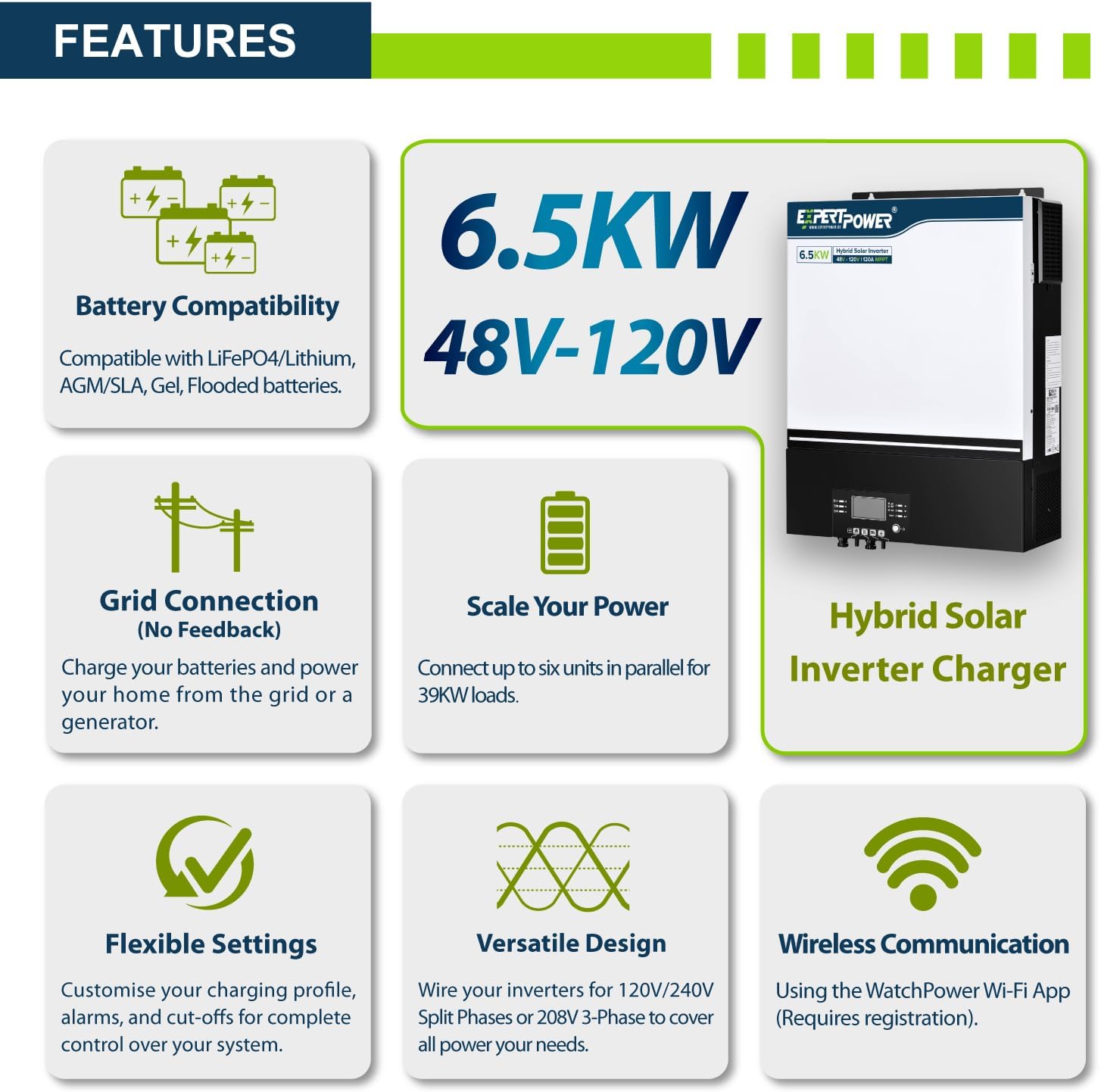
Figure 4.2: Hybrid Solar Inverter Features. The inverter supports various configurations and monitoring.
Key features of the inverter include:
- Battery Compatibility: Compatible with LiFePO4/Lithium, AGM/SLA, Gel, Flooded batteries.
- Grid Connection: Charges batteries and powers your home from the grid or a generator.
- Scalability: Connect up to six units in parallel for up to 39KW loads.
- Flexible Settings: Customize charging profiles, alarms, and cut-offs.
- Versatile Design: Wire for 120V/240V Split Phase or 208V 3-Phase (additional inverters required for 3-Phase).
- Wireless Communication: Via WatchPower Wi-Fi App (registration required).
4.3 Parallel Connection for Batteries and Inverters
For increased capacity and power output, multiple batteries and inverters can be connected in parallel. The system supports up to 10 batteries in parallel for 48V 1000Ah and up to 6 inverters for a maximum 39KW power delivery in 120V residential systems.

Figure 4.3: Battery and Inverter Parallel Connection configurations.
4.4 Bifacial Solar Panels
The included solar panels are bifacial, meaning they can capture sunlight from both sides, potentially providing up to 30% more energy compared to traditional single-face panels. This enhances overall system efficiency.
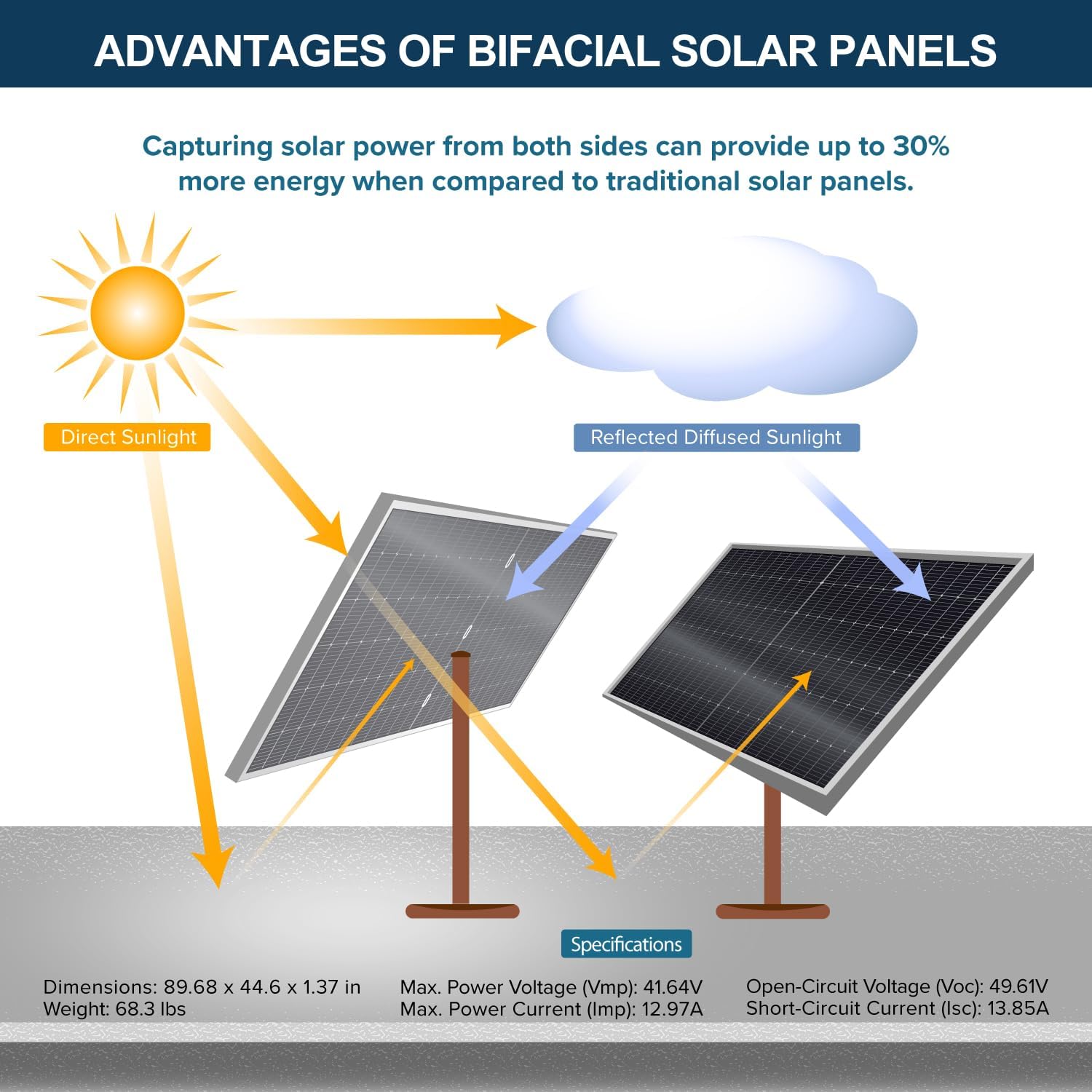
Figure 4.4: Advantages of Bifacial Solar Panels.
5. Operation
5.1 Inverter Preferences
The hybrid inverter allows you to configure charging and load priorities to optimize energy usage based on your needs and available power sources.

Figure 5.1: Inverter Charging and Load Priority Settings.
Charging Priority: Control how the battery bank gets charged.
- Solar Priority: Inverter prioritizes solar power for charging. AC input charges only when solar is unavailable.
- Solar and AC Input: Inverter charges the battery bank from both solar and AC power simultaneously.
- Solar Only: Inverter charges only from available solar power.
Load Priority: Control how your appliances are powered.
- Solar Priority: Inverter uses solar power first. If insufficient, it compensates with AC input.
- AC Priority: Inverter redirects AC input to power all loads and uses DC inputs only when AC input is unavailable.
- DC Priority: Inverter prioritizes inverting from solar first. If solar is not enough, it inverts from battery power and only uses AC input once battery warning triggers.
5.2 Battery and Inverter Monitoring
The system features a convenient LCD display on the battery for monitoring various parameters such as cell health, temperature, and current flow. Additionally, built-in Wi-Fi transmitters allow for remote monitoring of your hybrid inverter via the WatchPower Wi-Fi App (registration required).

Figure 5.2: Battery Monitoring Display and Inverter Wi-Fi Monitoring App.
The advanced Battery Management System (BMS) in the LiFePO4 batteries safeguards against overcharging, deep discharges, overloads, overheating, short circuits, and low-temperature cut-off, while maintaining a low self-discharge rate.
6. Maintenance
Regular maintenance ensures the longevity and optimal performance of your solar power system. Always disconnect power before performing any maintenance.
- Solar Panels: Periodically clean solar panels to remove dust, dirt, and debris that can reduce efficiency. Use soft cloth and water.
- Connections: Annually inspect all electrical connections for tightness and signs of corrosion.
- Batteries: Monitor battery health via the display or app. Ensure proper ventilation around battery cabinets.
- Inverter: Keep the inverter's ventilation openings clear of obstructions.
7. Troubleshooting
If you encounter issues with your ExpertPower Solar Power System, consider the following basic troubleshooting steps:
- No Power Output: Check all circuit breakers and fuses. Verify battery charge level and solar panel output.
- Inverter Error Codes: Refer to the inverter's specific manual (not included here) for detailed explanations of error codes displayed on its screen or app.
- Reduced Performance: Ensure solar panels are clean and free of shading. Check for loose connections.
For complex issues or if troubleshooting steps do not resolve the problem, contact ExpertPower customer support.
8. Specifications
| Attribute | Detail |
|---|---|
| Manufacturer | ExpertPower |
| Part Number | CLBX48VK3S |
| Item Weight | 1400 pounds |
| Product Dimensions | 19 x 19 x 7 inches (System Cabinet) |
| Item Model Number | CLBX48VK3S |
| Color | White |
| Style | 20KWH + 6480W |
| Included Components | Four 51.2V 100Ah LiFePO4 batteries, twelve 540W Solar Panels, and two 6500W Hybrid Solar Inverters. |
| Batteries Required? | No (Batteries are included) |
| ASIN | B0DQWQ23X3 |
| Date First Available | December 19, 2024 |
| Connector Type | MC4 |
| UPC | 840140951677 |
9. Warranty and Support
For information regarding product warranty, please refer to the documentation provided with your purchase or visit the official ExpertPower website. ExpertPower offers customer support for their products.
If you require assistance, have questions about installation, operation, or troubleshooting, please contact ExpertPower Customer Support. Details for contacting support are typically found on the product packaging, the ExpertPower website, or through your point of purchase.
This product is from a small business brand. Support small businesses.
Related documentsCLBX48VK3S


Ask a question about this manual
Ask about setup, troubleshooting, compatibility, parts, safety, or missing instructions. Manuals+ will review the question and use this page’s manual context to help answer it.