Introduction
This manual provides essential information for the safe and effective use of your Braun Series 5 BT5520 Electric Beard Trimmer. Please read all instructions carefully before using the device and retain this manual for future reference.
The Braun Series 5 BT5520 is designed for precise beard trimming and styling, featuring an ultra-sharp blade, 40 length settings, and a waterproof design for versatile use.
Safety Information
Important Safety Instructions:
- The device is suitable for use in the shower or bath. For safety reasons, the device can only be used wirelessly.
- Disconnect the device from the mains before using it with water.
- Your device is equipped with a charging cable with an integrated power supply for safety low voltage. No parts must be replaced or altered, otherwise there is a risk of electric shock.
- Use only with the included 463-XXXX charging cable.
- Never use the device with damaged or defective accessories such as trimmers, comb attachments, or charging cables.
- The device must not be disassembled or opened.
- The rechargeable battery of the device may only be replaced by an authorized Braun customer service.
- This device can be used by children aged 8 and over and by persons with reduced physical, sensory or mental abilities or lack of experience and/or knowledge if they have been supervised or instructed on the safe use of the device and have understood the resulting hazards.
- If the device is equipped with a hair cutting attachment, it can be used by children over 3 years under supervision for hair cutting.
- Children must not play with the device. Cleaning and user maintenance must not be performed by children unless supervised.
- For domestic use only.
Product Overview
The Braun Series 5 BT5520 Electric Beard Trimmer is designed for precise control and an even trim. It features an ultra-sharp ProBlade blade, a PrecisionWheel with 40 length settings, and a waterproof design.
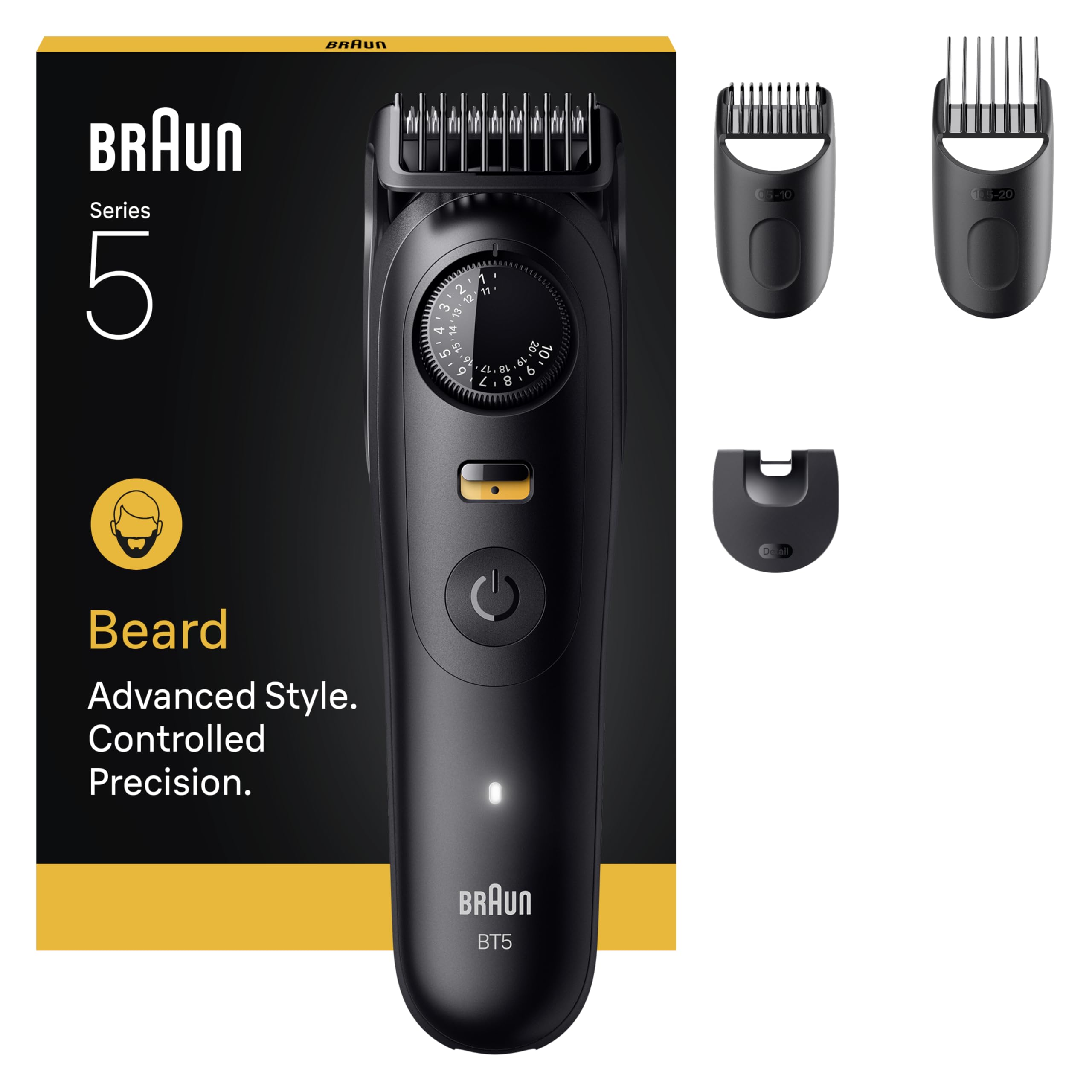
Image: Braun Series 5 BT5520 Electric Beard Trimmer showcasing its design and key features like 40 length settings, PrecisionLock, ultra-sharp blade, 120 min battery life, and waterproof capability.
Components:
- Trimmer Unit: The main body of the device with the motor and blade.
- PrecisionWheel: For adjusting trimming length settings.
- PrecisionLock Button: Secures the chosen length setting.
- Ultra-Sharp ProBlade: For efficient and precise trimming.
- Comb Attachments:
- Short beard comb (0.5 - 10 mm)
- Long beard comb (10.5 - 20 mm)
- Detail trimmer attachment
- Cleaning Brush: For maintenance.
- Charging Cable: For recharging the device.

Image: The Braun Series 5 BT5520 trimmer unit displayed alongside its three comb attachments (short beard, long beard, and detail trimmer) and a cleaning brush.
Setup
1. Initial Charging
Before first use, fully charge your trimmer. Connect the charging cable to the trimmer and plug it into a power outlet. The charging indicator light will show the charging status. A full charge provides up to 120 minutes of cordless trimming.
Note: Use only the original Braun charging cable (463-XXXX) provided with your device.
2. Attaching Comb Attachments
Select the desired comb attachment based on your preferred beard length. Align the attachment with the trimmer head and push it firmly until it clicks into place. To remove, gently pull the attachment away from the trimmer head.
Operating the Trimmer
1. Selecting Trimming Length
With a comb attachment in place, use the PrecisionWheel to select your desired trimming length. The trimmer offers 40 length settings in 0.5 mm increments, ranging from 0.5 mm to 20 mm. Once the desired length is set, press the PrecisionLock button to secure the setting and prevent accidental changes during use.
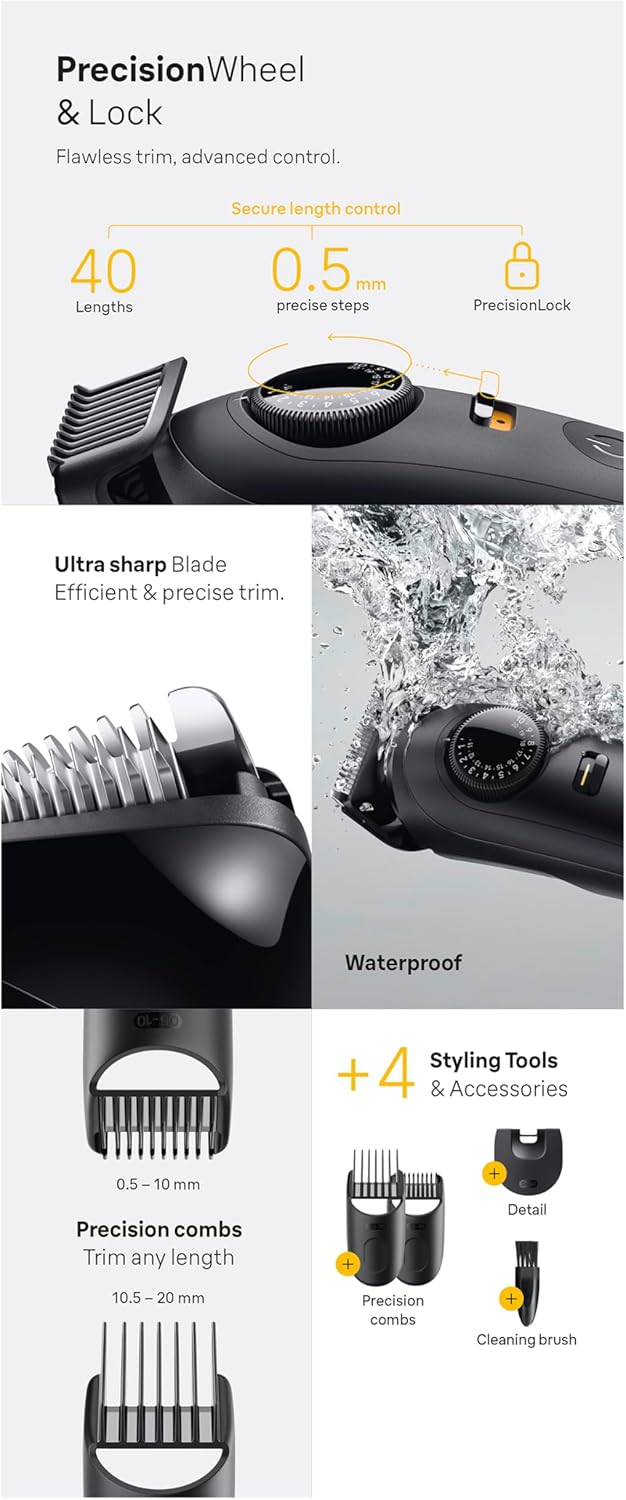
Image: Detailed view of the PrecisionWheel and PrecisionLock mechanism for length control, the ultra-sharp blade, the trimmer's waterproof capability, and the included styling tools and accessories.
2. Trimming Your Beard
- Turn on the trimmer by pressing the power button.
- For an even trim, move the trimmer against the direction of hair growth.
- Ensure the flat part of the comb attachment is in full contact with your skin.
- Use slow, controlled movements.
- For detailing and creating sharp lines, remove the comb attachment and use the bare blade.
The ultra-sharp blade ensures an efficient and precise trim with every pass.
Cleaning and Maintenance
Regular cleaning ensures optimal performance and hygiene of your trimmer.
- After Each Use: Turn off the trimmer. Remove the comb attachment. You can rinse the trimmer head and comb attachments under running water as the device is 100% waterproof.
- Drying: Shake off excess water and allow all parts to air dry completely before reattaching or storing.
- Cleaning Brush: Use the provided cleaning brush to remove any stubborn hair clippings from the blade and trimmer body.
- Lubrication: Periodically, apply a drop of light machine oil (not included) to the trimmer blades to maintain cutting performance.
Caution: Always disconnect the trimmer from the power outlet before cleaning with water.
Charging and Battery
Your Braun Series 5 BT5520 is equipped with a powerful Li-ion battery, providing up to 120 minutes of cordless operation on a single charge.
- Charging: Connect the charging cable to the trimmer and a power outlet. The charging indicator will illuminate.
- Battery Life: A full charge typically takes approximately 1 hour.
- Cordless Use: The trimmer is designed for cordless operation only, especially when used in wet conditions.
- Battery Replacement: The internal rechargeable battery should only be replaced by an authorized Braun customer service center. Do not attempt to replace it yourself.
Troubleshooting
If you encounter issues with your trimmer, please refer to the following common solutions:
| Problem | Possible Cause | Solution |
|---|---|---|
| Trimmer does not turn on. | Battery is discharged. | Charge the trimmer fully. |
| Trimmer performance is poor or pulls hair. | Blades are dirty or dull. | Clean the blades and trimmer head thoroughly. Apply a drop of oil to the blades. If problem persists, blades may need replacement (contact customer service). |
| Trimmer does not charge. | Charging cable or outlet issue. | Ensure the charging cable is correctly connected to both the trimmer and a working power outlet. Check if the charging cable is damaged. |
| Comb attachment does not stay on. | Attachment not properly secured or damaged. | Ensure the attachment clicks firmly into place. Inspect the attachment for any damage. |
If the problem persists after trying these solutions, please contact Braun customer service.
Specifications
| Model Number | BT5520 |
| Brand | Braun |
| Power Source | Battery Powered (Li-ion) |
| Battery Life | Up to 120 minutes cordless |
| Charging Time | Approx. 1 hour for full charge |
| Length Settings | 40 (in 0.5 mm increments) |
| Blade Material | Stainless Steel (Ultra-sharp ProBlade) |
| Waterproof | Yes, 100% waterproof |
| Color | Black-blue |
| Product Dimensions (L x W x H) | 10.5 x 6 x 25.2 cm |
| Item Weight | 224 Grams |
| Manufacturer | PROCTER & GAMBLE FRANCE |
| Country of Origin | Germany |
Warranty and Support
Braun products are manufactured to meet high quality standards. In the unlikely event of a defect, your product is covered by a warranty.
- Warranty Information: For detailed warranty terms and conditions, please refer to the official Braun website or the documentation included with your product.
- Extended Warranty: You may be eligible to register your product for an extended warranty. Scan the QR code below or visit the provided link for more information.
- Customer Service: For assistance with product issues, repairs, or battery replacement, please contact an authorized Braun customer service center.

Image: QR code for registering your Braun product for an extended warranty. Scan this code with your smartphone to access the registration page.
For additional product information and support, including a global booklet, visit: Braun Global Booklet


