
Introduction
Welcome to the AILE Blood Pressure Monitor X5 user manual. This device is designed for accurate and convenient measurement of blood pressure and pulse rate at home. Please read this manual thoroughly before use to ensure proper operation and to obtain accurate readings.
Important Safety Information
- This device is intended for adult use only.
- Consult your physician for interpretation of blood pressure measurements. Self-diagnosis and treatment based on measurement results can be dangerous.
- Do not adjust medication based on measurements from this device without consulting a healthcare professional.
- Avoid taking measurements in stressful situations or immediately after exercise, bathing, or consuming alcohol/caffeine.
- Ensure the cuff is correctly positioned and not too tight or too loose.
- Keep the device out of reach of children.
Product Components
The AILE Blood Pressure Monitor X5 package includes:
- AILE Blood Pressure Monitor Unit (X5)
- Adjustable Arm Cuff (8.7" - 16.5" / 22 cm - 42 cm)
- USB Cable (for power, batteries not included)
- Instruction Manual
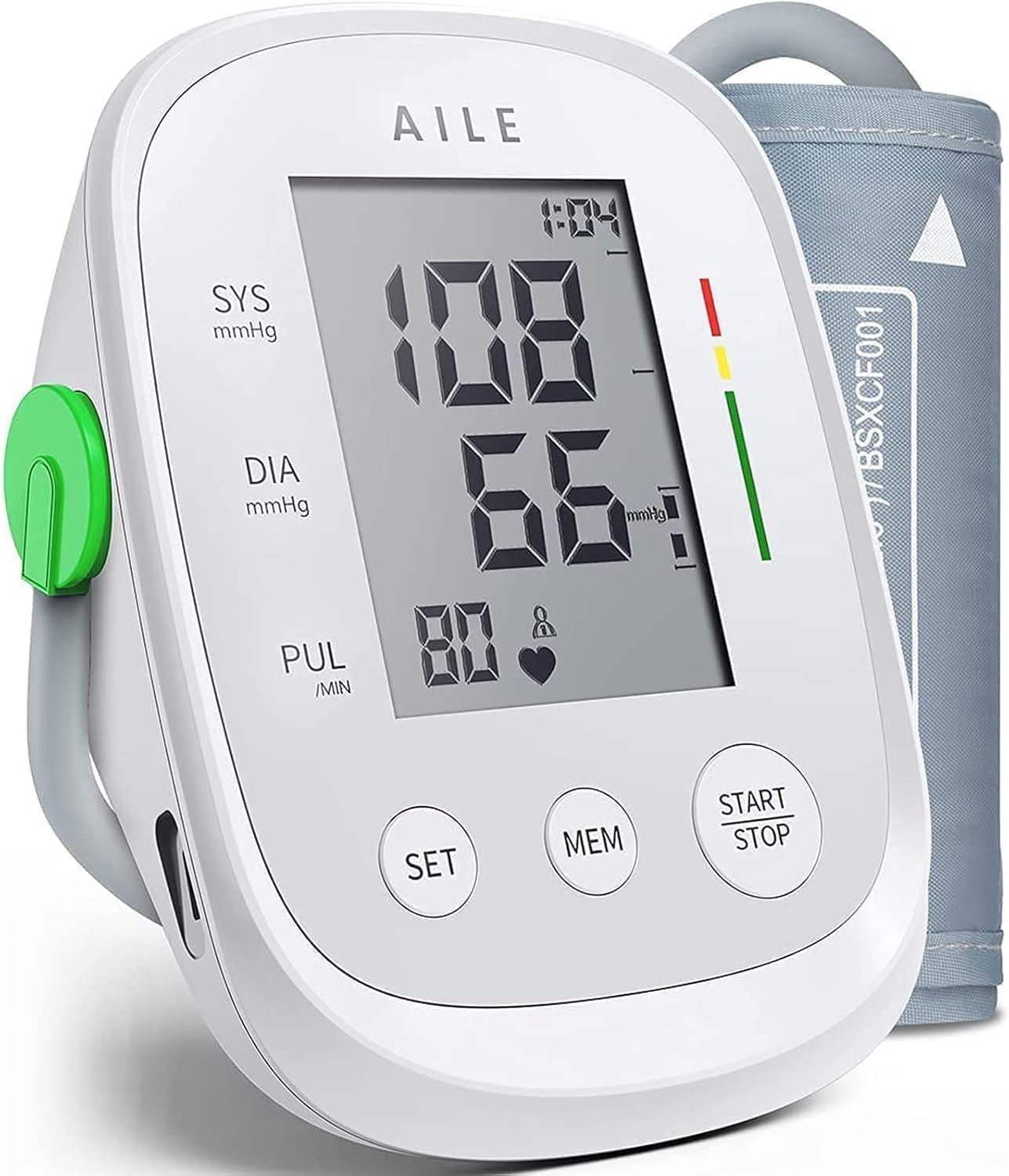
Image: The AILE Blood Pressure Monitor X5 unit with its large LCD display, control buttons (SET, MEM, START/STOP), and the grey adjustable arm cuff.

Image: Contents of the AILE Blood Pressure Monitor X5 package, including the main unit, arm cuff, USB cable, and instruction manual.
Setup
Power Supply
The AILE Blood Pressure Monitor X5 can be powered by either 4 AAA batteries (not included) or via the included USB cable.
Battery Installation
- Open the battery compartment cover on the back of the device.
- Insert 4 AAA batteries, ensuring correct polarity (+/-).
- Close the battery compartment cover.
USB Power
Connect the small end of the USB cable to the device's USB port and the other end to a compatible USB power adapter (not included) or a computer USB port.

Image: Illustration showing the battery compartment for 4 AAA batteries and the Micro USB port for external power on the AILE Blood Pressure Monitor X5.
Setting Date and Time
Before first use, it is recommended to set the correct date and time for accurate record-keeping. Refer to the detailed instructions in the printed manual for this procedure.
Operating Instructions
Preparing for Measurement
- Sit comfortably with your back supported and feet flat on the floor.
- Rest your arm on a table so the cuff is at heart level.
- Avoid talking or moving during the measurement.
- Ensure you have rested for at least 5 minutes before taking a measurement.
Attaching the Arm Cuff
- Slide the cuff onto your left upper arm. The air tube should run down the inside of your arm towards your forearm.
- Position the bottom edge of the cuff approximately 2-3 cm (0.8-1.2 inches) above your elbow joint.
- Wrap the cuff snugly around your arm, ensuring it is not too tight or too loose. You should be able to insert two fingers between the cuff and your arm.
- The indicator on the cuff should align with the center of your inner arm.

Image: Diagram illustrating the correct placement of the arm cuff, showing it positioned 2-3 cm above the elbow and at heart level.
Taking a Measurement
- Press the "START/STOP" button to turn on the device.
- The cuff will automatically inflate, and the measurement will begin.
- Remain still and silent during the measurement.
- Once the measurement is complete, the systolic pressure (SYS), diastolic pressure (DIA), and pulse rate (PUL) will be displayed on the screen.
- The device will automatically store the reading in the selected user's memory.
- Press "START/STOP" again to turn off the device, or it will automatically shut off after a period of inactivity.

Image: Close-up of the AILE Blood Pressure Monitor X5 display showing a finger pressing the START/STOP button to initiate a measurement.
User Modes and Memory Function
The device supports two users (User 1 and User 2), each with 99 memory slots.
Switching Users
Press the "SET" button to toggle between User 1 and User 2 before taking a measurement.
Viewing Stored Readings
Press the "MEM" button to view previous measurements. Repeatedly press "MEM" to scroll through the stored readings for the current user.

Image: Illustration showing two users (User 1 and User 2) with their respective blood pressure readings displayed on separate monitor screens, indicating the two-user memory function.
Maintenance
Cleaning
- Clean the device and cuff with a soft, dry cloth.
- Do not use abrasive cleaners or immerse the device in water.
Storage
- Store the device in a cool, dry place, away from direct sunlight and extreme temperatures.
- If not in use for an extended period, remove the batteries to prevent leakage.
Troubleshooting
| Problem | Possible Cause | Solution |
|---|---|---|
| No display/Device won't turn on | Batteries are low or incorrectly inserted; USB cable not connected. | Replace batteries or check polarity; ensure USB cable is securely connected. |
| Error message (e.g., "E1") | Cuff not properly attached; excessive movement during measurement; irregular pulse detected. | Re-attach cuff correctly; remain still; consult a physician if irregular pulse persists. |
| Inaccurate readings | Cuff size incorrect; cuff positioned incorrectly; measurement taken under stress. | Ensure correct cuff size and placement; relax before measurement; take multiple readings. |
Specifications
- Model: X5
- Brand: AILE
- Cuff Size: 22 cm - 42 cm (8.7" - 16.5")
- Display Type: LCD
- Power Source: 4 x AAA batteries or USB cable
- Memory: 2 users, 99 readings each
- Dimensions: 13.97 x 9.65 x 6.86 cm
- Weight: 399.5 grams
- Manufacturer: Jiangxi AICARE Medical Technology Co., Ltd.
Warranty and Support
AILE products are manufactured with precision and quality. For warranty information and customer support, please refer to the contact details provided in your product packaging or visit the official AILE website.
The product is stated to have a 5-year warranty.

Image: AILE brand logo with text highlighting a 5-year warranty and global medical equipment sales.


