
Introduction
This manual provides essential information for the proper setup, operation, maintenance, and troubleshooting of your Skullcandy Stomp XXL Bluetooth Speaker. Please read this manual thoroughly before using the product to ensure optimal performance and safety.
Safety Information
- Do not expose the speaker to extreme temperatures or direct sunlight for extended periods.
- Avoid dropping or subjecting the speaker to severe impacts.
- Keep the speaker away from water sources, despite its IPX5 rating, to prevent damage to internal components.
- Do not attempt to disassemble or modify the speaker. This will void the warranty and may cause damage.
- Use only the specified charging cables and adapters.
- Ensure proper ventilation when charging and operating the speaker.
Package Contents
Verify that all items are present in the package:
- Skullcandy Stomp XXL Bluetooth Speaker
- Microphone
- USB-C Charging Cable (typically included)
- User Manual (this document)
Product Overview
The Skullcandy Stomp XXL is a portable Bluetooth speaker designed for robust audio performance and easy transport. It features an IPX5 splashproof rating, LED light modes, and a multi-link function for connecting multiple speakers.
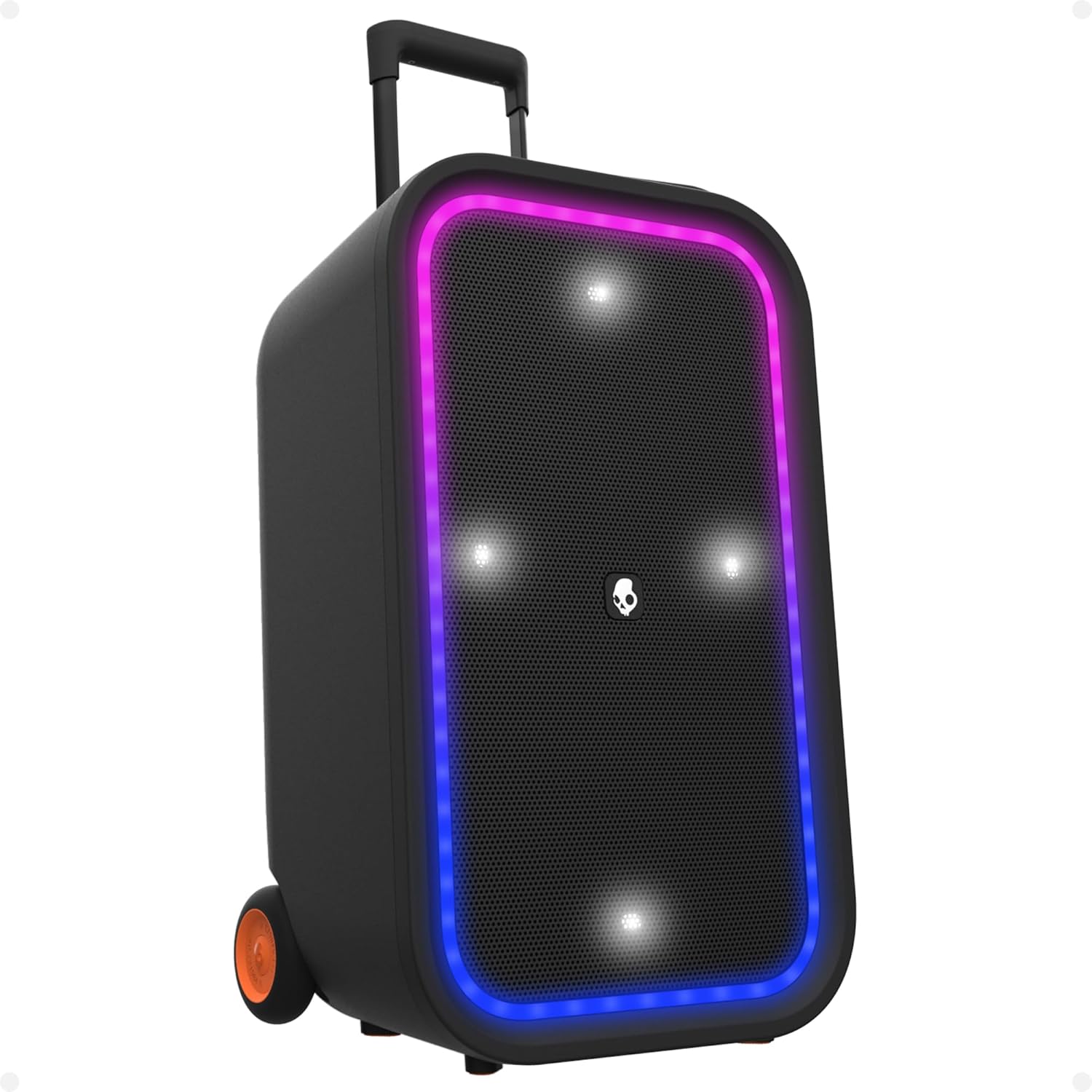
Image: Front view of the Skullcandy Stomp XXL speaker, showcasing its black finish and vibrant LED light strips around the grille. The speaker is positioned at an angle, highlighting its wheels and retractable handle.

Image: Infographic detailing key features of the Stomp XXL speaker, including 12 hours of battery life, Bluetooth 5.3 connectivity, IPX5 water resistance, LED light show, included microphone, and SKDY Multi-Link™ capability (pair up to 99 speakers).

Image: Close-up view of the retractable pop-up handle of the Skullcandy Stomp XXL speaker, showing the sturdy design and the orange Skullcandy branded grip.

Image: Detailed view of the durable orange wheels on the Skullcandy Stomp XXL speaker, designed for easy portability and transport.
Setup
1. Charging the Speaker
Before first use, fully charge the Skullcandy Stomp XXL speaker. Connect the provided USB-C charging cable to the speaker's charging port and the other end to a compatible USB power adapter (not included) or a computer's USB port.
- The charging indicator light will illuminate during charging.
- Charging time may vary. A full charge provides up to 12 hours of playtime.

Image: Graphic illustrating the USB Charge Out feature of the Skullcandy Stomp XXL, showing a smartphone connected to the speaker's USB-A port for charging while music plays.
2. Power On/Off
To power on the speaker, press and hold the Power button located on the control panel until you hear an audible cue and the LED lights activate. To power off, press and hold the Power button again until the speaker shuts down.
3. Bluetooth Pairing
- Ensure the speaker is powered on and in pairing mode (indicated by a flashing Bluetooth LED).
- On your device (smartphone, tablet, etc.), enable Bluetooth and search for available devices.
- Select "Skullcandy Stomp XXL" from the list of devices.
- Once connected, the Bluetooth LED on the speaker will become solid, and you will hear a confirmation tone.
Operating Instructions
Basic Controls
| Button/Control | Function |
|---|---|
| Power Button | Press and hold to Power On/Off. |
| Volume Up (+) | Press to increase volume. |
| Volume Down (-) | Press to decrease volume. |
| Play/Pause | Press to play or pause audio. |
| Track Skip (Forward) | Double-press Play/Pause button. |
| Track Skip (Backward) | Triple-press Play/Pause button. |
| LED Mode Button | Press to cycle through LED light modes. |
| Multi-Link Button | Press to initiate Multi-Link pairing. |
LED Light Modes
The Stomp XXL features multiple LED light modes that sync with your music. Press the dedicated LED Mode button to cycle through the available light patterns and colors. You can also turn off the lights if preferred.
Multi-Link Feature
The Multi-Link feature allows you to connect up to 99 Skullcandy Bluetooth speakers for a synchronized audio experience. This is ideal for larger gatherings or multi-room setups.
- Ensure all speakers are powered on and not currently paired to a device.
- On the primary speaker (the one connected to your device), press the Multi-Link button.
- On the secondary speakers, press their respective Multi-Link buttons.
- The speakers will automatically connect, and audio will play simultaneously across all linked units.

Image: Graphic demonstrating the Multi-Link™ feature, showing two Skullcandy Stomp speakers wirelessly connected, with green dots indicating the synchronized audio flow between them.
Microphone Usage
The Skullcandy Stomp XXL includes a microphone for vocal amplification or karaoke. Connect the microphone to the designated microphone input port on the speaker. Adjust the microphone volume using the dedicated control if available, or through the main volume control.
USB Charge Out
The speaker features USB-C and USB-A output ports, allowing you to charge your mobile devices (smartphones, tablets) directly from the speaker's battery. Simply connect your device's charging cable to the appropriate USB output port on the Stomp XXL.
Maintenance
Cleaning
Wipe the speaker with a soft, damp cloth. Do not use abrasive cleaners, alcohol, or chemical solvents, as these may damage the surface or internal components.
Storage
Store the speaker in a cool, dry place away from direct sunlight and extreme temperatures. If storing for an extended period, ensure the battery is partially charged (around 50%) to maintain battery health.
Water Resistance (IPX5)
The Skullcandy Stomp XXL is rated IPX5 splashproof, meaning it can withstand splashes of water from any direction. It is not designed to be submerged in water. Ensure all port covers are securely closed before exposing the speaker to moisture.

Image: A Skullcandy Stomp speaker being splashed with water, illustrating its IPX5 water-resistant capability. The LED lights are active, and the background suggests an outdoor, rainy environment.
Troubleshooting
| Problem | Possible Solution |
|---|---|
| Speaker does not power on. | Ensure the battery is charged. Connect the speaker to a power source and try again. |
| Cannot pair via Bluetooth. | Make sure the speaker is in pairing mode. Disable and re-enable Bluetooth on your device. Move the speaker closer to your device. Forget the speaker from your device's Bluetooth list and try pairing again. |
| No sound or low volume. | Increase the volume on both the speaker and your connected device. Ensure the speaker is properly paired. Check if the audio source is playing. |
| Multi-Link not connecting. | Ensure all speakers are Skullcandy Bluetooth speakers compatible with Multi-Link. Make sure no speakers are currently paired to a device before initiating Multi-Link. Follow the Multi-Link pairing steps carefully. |
| Microphone not working. | Ensure the microphone is securely plugged into the correct input. Check microphone volume settings. |
Specifications
| Feature | Detail |
|---|---|
| Model Name | 2SKSK1852B0L2 |
| Speaker Type | Outdoor |
| Connectivity Technology | Bluetooth |
| Wireless Communication Technology | Bluetooth |
| Bluetooth Version | 5.3 (from image) |
| Water Resistance Rating | IPX5 |
| Battery Life | Up to 12 Hours |
| Included Components | Microphone |
| Product Dimensions (D x W x H) | 14.37"D x 16.65"W x 27.4"H |
| Item Weight | 31.1 pounds |
| Speaker Maximum Output Power | 140 Watts |
| Power Source | Battery Powered |
| Control Method | Touch |
| UPC | 812350262683 |
Warranty Information
Skullcandy products are covered by a limited warranty. For detailed information regarding warranty terms, conditions, and registration, please refer to the official Skullcandy website or contact customer support. Keep your proof of purchase for warranty claims.
Customer Support
For further assistance, technical support, or inquiries about your Skullcandy Stomp XXL speaker, please visit the official Skullcandy support page or contact their customer service team. Contact details can typically be found on the Skullcandy website.
Official Skullcandy Website: www.skullcandy.com
Official Product Videos
No official product videos with "Seller" as creator type were found in the provided product data. Please refer to the Skullcandy official website or authorized channels for any available video content.