
Ohniyou GLX098
Ohniyou 42'' Flush Mount Ceiling Fan User Manual
Brand: Ohniyou
Model: GLX098
1. Safety Information
Please read and understand this entire manual before attempting to assemble, operate, or install the product. Failure to do so could lead to electric shock, fire, or serious injury.
- Ensure the power is turned off at the circuit breaker before installation or maintenance.
- All electrical connections must be in accordance with local codes, ordinances, and the National Electrical Code (NEC).
- Consult a qualified electrician if you are unfamiliar with electrical wiring.
- The mounting structure must be capable of supporting the weight of the fan (approximately 9.15 pounds).
- Do not operate the fan with damaged blades or housing.
- Keep hands, clothing, and other objects clear of the fan blades when the fan is in operation.
- This fan is suitable for indoor and covered outdoor use.
2. Package Contents
Verify that all components listed below are included in your package. If any parts are missing or damaged, please contact customer support.
Image: Overview of the Ohniyou 42-inch flush mount ceiling fan package contents, including the instruction manual, remote control, receiver, screws, light cover, hanging plate, motor body, S hooks, and three fan blades.
| Component | Quantity |
|---|---|
| Instruction Manual | 1 |
| Remote Control | 1 |
| Receiver | 1 |
| Screws (various sizes) | 1 set |
| Light Cover | 1 |
| Hanging Plate | 1 |
| Motor Body | 1 |
| S Hooks | 1 |
| Fan Blades | 3 |
3. Specifications
Detailed specifications for the Ohniyou 42'' Flush Mount Ceiling Fan.
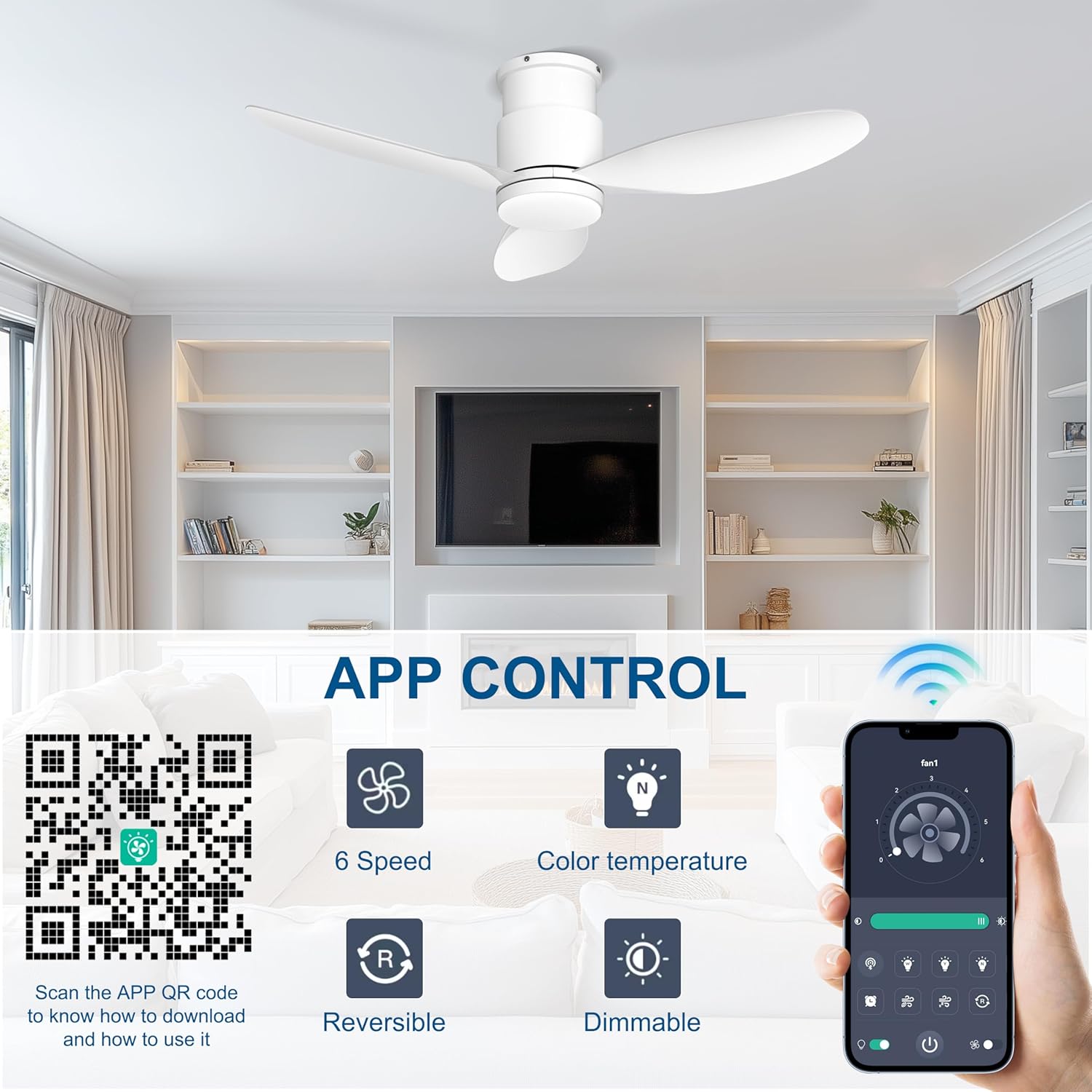
Image: Visual representation of the ceiling fan's dimensions and key specifications.
| Specification | Value |
|---|---|
| Size | 42 Inch |
| Motor Type | DC Motor |
| LED Max Wattage | 24W |
| Motor Power | 35W |
| F/R (Forward/Reverse) | Yes |
| Speeds | 1-6 Wind Speeds |
| Airflow Volume | 3586 CFM |
| Fan Blade Quantity | 3 |
| Installation Type | Flush Mount |
| Recommended Room Size | 10x10ft to 15x15ft |
| Control Method | App, Remote |
| Light Source Type | LED |
| Voltage | 120 Volts (AC) |
| Item Weight | 9.15 pounds |
| Product Dimensions | 42 x 42 x 8.7 inches |
4. Setup and Installation
Follow these steps carefully for proper installation. It is recommended to watch the installation video for visual guidance.
Video: Official Ohniyou 42-inch flush mount ceiling fan installation guide. This video provides step-by-step visual instructions for assembling and mounting the fan.
Installation Steps:
- Prepare the Motor Body:
- Loosen the screws and remove the hanging plate from the motor body.
- Loosen the screws of the motor body to prepare for mounting plate installation.
- Pass the wires through the mounting plate.
- Install the mounting plate onto the motor body using the screws.
- Prepare the Light Panel:
- Unplug the wire connector clip and carefully remove the LED light plate.
- Use a screwdriver to loosen the screws holding the light panel.
- Install Fan Blades:
- Install the fan blades onto the motor using the provided screws. Ensure they are securely fastened.
- Reconnect Light Panel:
- Reconnect the LED beads to the light panel by plugging in the wire connector clip.
- Ceiling Mounting:
- Install the mounting plate to the ceiling using appropriate screws. Ensure it is firmly secured to a junction box or structural support.
- Use the provided S hook to temporarily hang the fan while making electrical connections.
- Connect the live wire and neutral wire from the fan to your ceiling wiring. Ensure all connections are secure and insulated.
- Remove the S hook once wiring is complete.
- Final Assembly:
- Align the screw on the side of the hanging plate with the corresponding slot on the fan body.
- Tighten with screws from the side of the hanging plate to secure the fan body.
- Turn the light cover to the right to lock it into place.
5. Operating Instructions
Remote Control Operation:

Image: Detailed layout of the multifunctional remote control for the Ohniyou ceiling fan, showing buttons for fan speed, light control, timer, and more.
- Fan/Light ALL ON/OFF: Turns both fan and light on or off.
- Light ON/OFF: Controls only the light.
- F/R (Forward/Reverse): Changes the direction of fan rotation for summer (downward airflow) or winter (upward airflow) modes.
- Turn Off The Beep: Mutes the audible feedback from the fan.
- 6 Speed Button (1-6): Adjusts fan speed from low (1) to high (6).
- Pairing & Fan Off: Used for pairing the remote and turning the fan off.
- Natural Light / Yellow Light / White Light: Cycles through 3 color temperatures (3000K Warm Light, 4500K Natural Light, 6000K Cool Light).
- Dimmable +/-: Adjusts light brightness from 100% to 10%.
- Timer Setting (1H/4H/8H): Sets the fan to turn off automatically after 1, 4, or 8 hours.
App Control Operation:

Image: Screenshots of the FanLamp Pro app interface, showing controls for fan speed, color temperature, dimming, and reversible motor function.
The Ohniyou ceiling fan can also be controlled via a smart app. Scan the QR code provided in the product images or search for "FanLamp Pro" in your app store.
- Download and install the "FanLamp Pro" app.
- Turn on your phone's Bluetooth.
- Turn off the power to the fan, wait 3-5 seconds, then turn the power back on.
- Within the app, connect to the fan and hit the pair button 1-2 times to establish the connection.
- The app allows control over 6 fan speeds, color temperature, dimming, and reversible motor function.
Light Memory Function:

Image: Visual explanation of the light memory function, showing how the fan retains the last light setting after being turned off and on.
The fan remembers your preferred LED light color and brightness settings. To activate the memory function, after adjusting the desired color and brightness with the remote control or app, keep the light on for at least 10 seconds before turning it off. When you turn the fan back on, it will automatically reset to your last used lighting configuration. Note that the fan's speed settings are not remembered.
6. Maintenance
Regular maintenance helps ensure the longevity and optimal performance of your ceiling fan.
- Cleaning: To avoid damage to the finish, clean the fan only with a soft, damp cloth. Do not use harsh chemicals or abrasive cleaners.
- Blade Cleaning: Dust the fan blades regularly to prevent dust buildup, which can affect airflow and balance.
- Tightening Screws: Periodically check all screws on the fan and mounting hardware to ensure they are tight. Loose connections can cause noise or wobbling.
- Light Source: The LED light source is integrated and designed for long life. Do not attempt to replace the LED beads yourself.
7. Troubleshooting
If you experience issues with your Ohniyou ceiling fan, refer to the table below for common problems and solutions.
| Problem | Possible Cause | Solution |
|---|---|---|
| Fan does not start | No power to the fan; Loose wire connections; Remote control battery low/dead; Remote not paired. | Check circuit breaker and wall switch; Ensure all wire connections are secure; Replace remote control batteries (2x AAA, not included); Re-pair the remote control with the fan (refer to operating instructions). |
| Light does not work | Loose wire connection to LED panel; LED panel faulty; Remote control issue. | Check LED panel wire connection; Contact customer support if LED panel is faulty; Ensure remote batteries are good and light button is pressed. |
| Fan wobbles | Loose fan blades; Loose mounting screws; Unbalanced blades. | Ensure all blade screws are tight; Tighten mounting plate screws; Check if blades are bent or damaged, replace if necessary. |
| Noisy operation | Loose screws; Motor issue; Obstruction. | Check and tighten all screws; Ensure no wires are rubbing against the fan housing; Contact customer support if motor noise persists. |
| Remote control not responding | Low/dead batteries; Remote not paired; Interference. | Replace batteries; Re-pair the remote; Ensure no strong interference sources nearby. |
8. Warranty and Support
Ohniyou is committed to providing high-quality products and excellent customer service.
For any questions, technical assistance, or support regarding your Ohniyou 42'' Flush Mount Ceiling Fan, please contact our 24-hour customer service team. We are dedicated to ensuring your satisfaction and providing full support and assistance during the usage process.
Please refer to your purchase documentation or the Ohniyou official website for specific warranty details and contact information.
You can also visit the Ohniyou Store on Amazon for more product information and support resources.
Related documentsGLX098


Ask a question about this manual
Ask about setup, troubleshooting, compatibility, parts, safety, or missing instructions. Manuals+ will review the question and use this page’s manual context to help answer it.