
Introduction
The KOSCHEAL L7BPro+AI is a 3-axis cell phone stabilizer designed to enhance your mobile videography and photography. It features an intelligent AI tracking module, an adjustable fill light, and multiple shooting modes to ensure stable, high-quality content creation. This manual provides essential information for setting up, operating, maintaining, and troubleshooting your device.
Key Features:
- AI Tracking and Fill Light: The stabilizer includes an intelligent facial tracking module and an adjustable fill light with 3 modes. Control facial tracking and light easily via gestures or buttons for intuitive operation, perfect for Vlogs and videos.
- Smart Follow & Gesture Control: Activate SmartFollow 3.0 with a single touch to keep yourself in focus. Control recording with simple gestures for uninterrupted enjoyment, enhancing your VLOG/YouTube/TikTok videos with diverse shots.
- 'Gimbal Pro' App Integration: Control your device via the iOS/Android 'Gimbal Pro' application. Access advanced modes like Dreamstealer, Hitchcock, slow-motion recording, beauty retouching, 360° panorama, and face/object tracking.
- 4 Professional Modes: Features 4 distinct modes (AF/HF/LF/FPV) and a vertical function for easy mounting direction changes, allowing for varied and professional video effects in both horizontal and vertical orientations.
- Exceptional Stability and Battery Life: With a 30% superior rotation axis, this stabilizer ensures stability during outdoor activities, from skateboarding to intense jumps. Equipped with a 3000 mAh rechargeable battery, it provides up to 6 hours of continuous operation.
Setup
Unboxing and Initial Inspection:
Carefully remove all components from the packaging. Verify that all items listed in the 'Contents of the Box' section are present and undamaged. If any items are missing or damaged, please contact customer support.
Charging the Stabilizer:
Before first use, fully charge the stabilizer using the provided USB-C cable. Connect the cable to the charging port on the device and a compatible USB power adapter (not included). The indicator lights will show charging status.
Mounting Your Smartphone:
- Unfold the stabilizer.
- Extend the phone clamp and securely place your smartphone in the clamp. Ensure the phone is balanced as much as possible to optimize gimbal performance.
- The magnetic AI module can be attached to the top of your phone for enhanced tracking capabilities.

Image: The KOSCHEAL L7BPro+AI stabilizer shown in its portable, folded state and unfolded with a smartphone mounted, ready for use.
App Installation:
Download the 'Gimbal Pro' application from your smartphone's app store (iOS or Android). This app unlocks advanced features and control options for your stabilizer.

Image: A smartphone displaying the 'Gimbal Pro' app interface, highlighting various intelligent creation templates and modes.
Operating Instructions
Power On/Off:
Press and hold the power button for a few seconds to turn the stabilizer on or off. The indicator lights will illuminate upon power-on.
Mode Selection:
The stabilizer offers 4 professional modes:
- AF (All Follow): All axes follow your movement.
- HF (Half Follow): Pan and tilt axes follow, roll axis is locked.
- LF (Lock Full): All axes are locked, maintaining a fixed direction.
- FPV (First Person View): All axes follow your movement, providing an immersive perspective.
Use the mode button on the handle to cycle through these modes.

Image: A close-up of the stabilizer's control panel, illustrating the various mode buttons and indicators.
AI Tracking and Gesture Control:
The integrated AI module allows for intelligent facial, humanoid, and object tracking without needing the app. Use simple hand gestures to control key functions:
- Activate Facial Tracking: Make a 'V' gesture.
- Deactivate Facial Tracking: Make an open palm gesture.
- Turn Fill Light On/Off: Make a 'thumbs up' gesture.
- Adjust Fill Light Mode/Brightness: Make a 'thumbs down' gesture.

Image: A person demonstrating gesture control with the KOSCHEAL stabilizer, showing hand signals for activating/deactivating facial tracking and controlling the fill light.

Image: Two children running outdoors, with green boxes indicating active AI facial tracking by the KOSCHEAL stabilizer.
Fill Light Operation:
The magnetic fill light offers 9 brightness modes. It supports both front and rear illumination. Control it via gestures or dedicated buttons on the stabilizer.
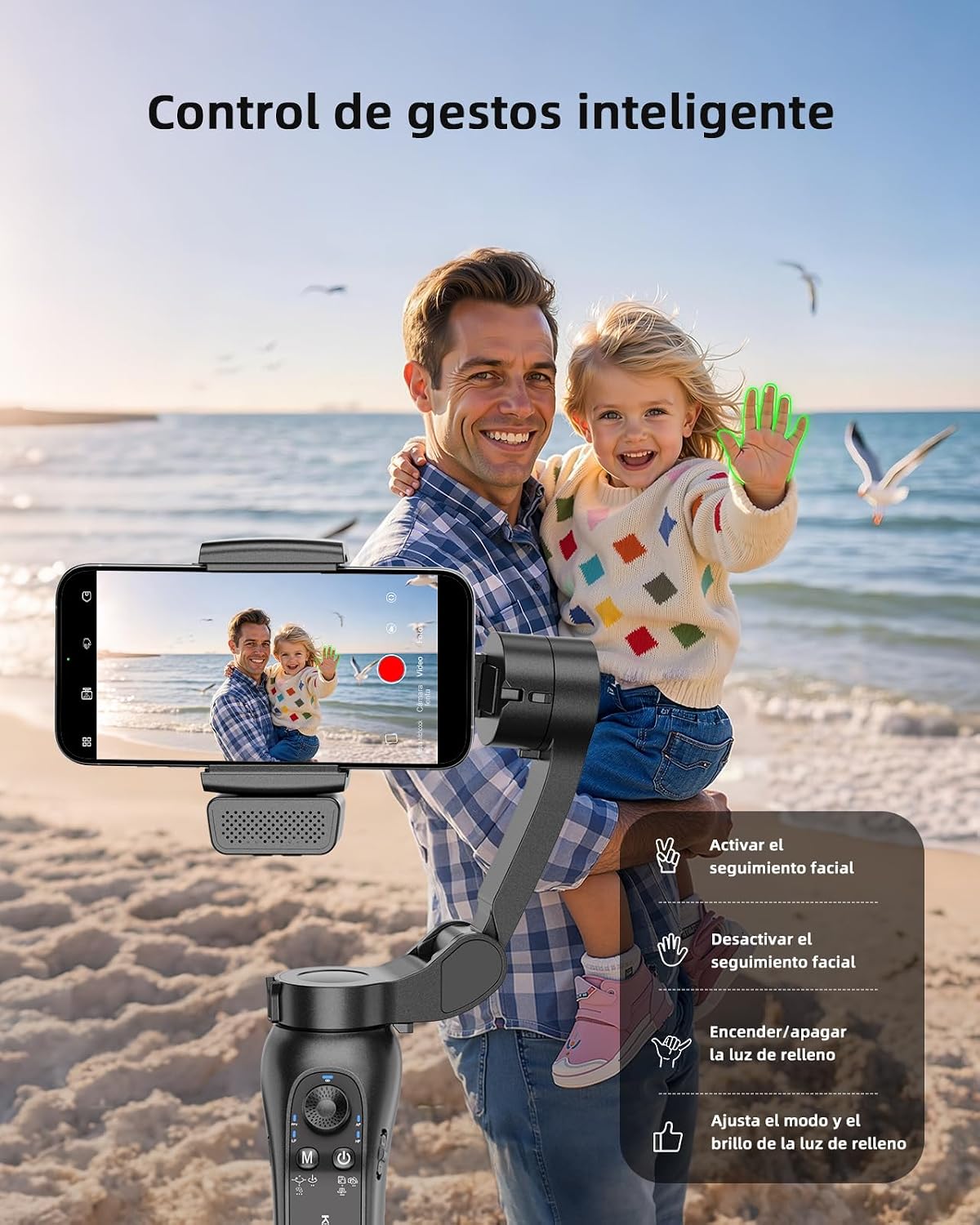
Image: Demonstrates the innovative magnetic fill light, highlighting its front/rear support and 9 brightness modes, with examples of different lighting effects on a person's face.
Advanced Shooting Features (via Gimbal Pro App):
- Zoom Control: The app allows for precise zoom control, enabling cinematic shots.
- Low-Angle Shooting: Capture unique perspectives by positioning the stabilizer for low-angle shots.
- Panoramic Shots: Create stunning wide-angle panoramas of landscapes.
- Dolly Zoom (Hitchcock Effect): Achieve a dramatic effect where the background appears to zoom while the subject remains the same size.
- Timelapse: Condense hours of footage into captivating short videos.
- Trajectory Capture: Record the movement of celestial bodies or other long-exposure effects.
- Inception Mode: Create a spinning camera effect for dynamic video.

Image: A smartphone screen displaying the zoom control interface within the Gimbal Pro app, with a skateboarder in the background.

Image: A dynamic low-angle shot of a skateboarder in action, demonstrating the stabilizer's capability for creative perspectives.

Image: A wide panoramic landscape photo of mountains and a river, illustrating the panoramic shooting capability.

Image: A woman standing in a field, demonstrating the Dolly Zoom effect where the background appears to stretch.

Image: A stunning timelapse shot of city traffic at night, with light trails from vehicles, showcasing the timelapse feature.

Image: A beautiful night sky with star trails over a lake and mountains, illustrating the trajectory capture feature.

Image: An architectural shot of a building interior with a rotating perspective, demonstrating the Inception mode.
Maintenance
Cleaning:
Wipe the stabilizer with a soft, dry cloth. Do not use liquid cleaners or solvents, as they may damage the device. Ensure no dust or debris accumulates in the gimbal joints.
Storage:
Store the stabilizer in a cool, dry place away from direct sunlight and extreme temperatures. When not in use for extended periods, ensure the battery is charged to approximately 50% to prolong its lifespan.
Troubleshooting
Stabilizer Not Powering On:
- Ensure the battery is fully charged.
- Press and hold the power button for at least 3 seconds.
Unstable Footage:
- Ensure your smartphone is properly balanced in the clamp.
- Recalibrate the gimbal through the 'Gimbal Pro' app if available.
- Check for any obstructions in the gimbal's movement.
App Connectivity Issues:
- Ensure Bluetooth is enabled on your smartphone.
- Restart both the stabilizer and the 'Gimbal Pro' app.
- Try reinstalling the app.
AI Tracking Not Working:
- Ensure the AI module is correctly attached and facing the subject.
- Verify sufficient lighting conditions for optimal tracking.
- Ensure no obstructions are blocking the subject.
Specifications
| Brand | KOSCHEAL |
| Model | L7BPro+AI |
| Color | Rust Color |
| Compatible Devices | Mobile Phone |
| Product Dimensions (D x W x H) | 7.1 x 8.4 x 32 centimeters |
| Folded Size | 15.5 x 11 x 4.6 cm |
| Max Recommended Weight | 280 Grams |
| Average Battery Life | 6 Hours |
| Timer Function | Yes |
| Audio Recording | No |
| Manufacturer Part Number | KOS-L7BPro AI |
| Country of Origin | China |
Warranty and Support
Warranty Information:
This KOSCHEAL product comes with a 180-day warranty for free replacement. Please note that returns are not applicable under this warranty policy.
Customer Support:
For any questions, technical assistance, or warranty claims, please contact KOSCHEAL customer support through the retailer where you purchased the product or visit the official KOSCHEAL website for contact information.
