
Kinhank Super Console X Pro
Contents
Kinhank Super Console X Pro User Manual
Model: Super Console X Pro
Introduction
Welcome to the user manual for your Kinhank Super Console X Pro. This guide provides essential information for setting up, operating, maintaining, and troubleshooting your retro video game console. The Super Console X Pro is designed to deliver a comprehensive gaming experience with a vast library of pre-installed classic games and support for 4K TV output.

Image: Overview of the Kinhank Super Console X Pro package contents, including the console, wireless controllers, remote, and a 256GB TF card.
Package Contents
Before you begin, please ensure all items listed below are present in your package:
- Kinhank Super Console X Pro Game Console
- 2 x Wireless Controllers
- Power Adapter
- HDMI Cable
- User Manual (this document)
Setup Guide
Follow these steps to set up your Super Console X Pro for the first time.
- Connect to TV: Connect the console to your 4K TV using the provided HDMI cable. Insert one end into the HDMI port on the console and the other end into an available HDMI input on your TV. The console supports HD/AV output (1080P/720P).
- Power Connection: Connect the power adapter to the DC IN port on the console and plug it into a power outlet.
- Insert TF Card: Ensure the pre-installed TF card (256GB) is securely inserted into the TF card slot on the console. This card contains over 65,000 classic games.
- Connect Wireless Controllers: The console comes with 2.4GHz wireless controllers. Ensure the USB receiver for the controllers is plugged into one of the USB ports on the console. The controllers should automatically pair.
- Network Connection (Optional): For online features and TV functionality, you can connect the console to the internet.
- Wired Connection: Connect an Ethernet cable from your router to the LAN jack on the console.
- Wi-Fi Connection: Navigate to the network settings on the console's interface to connect to your wireless network.

Image: Connectivity options of the Super Console X Pro, including LAN, Wi-Fi, TF card slot, and USB ports.
Operating Instructions
Learn how to navigate and enjoy the features of your Super Console X Pro.
Gaming Mode (Emuelec System)
The console comes pre-loaded with over 65,000 classic games across various emulators.
- Starting a Game: Power on the console. It will typically boot into the Emuelec system. Use the wireless controllers to navigate through the game library. Select a game and press the appropriate button to start.
- Emulator Compatibility: The console is compatible with a wide range of emulators, including MAME, NAOMI, MD, PS1, PSP, and DC.
- Adding More Games: The TF card supports expansion, allowing you to add more games. Refer to online resources or the manufacturer's website for detailed instructions on adding game ROMs.
- Multiplayer: The Super Console X Pro supports up to 5 players simultaneously. Connect additional USB, 2.4G, or Bluetooth controllers as needed.

Image: Demonstrates the gaming experience with two players using wireless controllers.

Image: Illustrates the multiplayer capability of the console, supporting up to 5 players.
TV Box Mode (Android 7.1 System)
In addition to gaming, the Super Console X Pro functions as an Android TV box, allowing you to watch TV online and install applications.
- Switching Modes: The console supports dual systems (Emuelec for gaming and Android 7.1 for TV). Refer to the on-screen prompts or the included quick start guide for instructions on switching between these modes.
- Online Streaming: With a Wi-Fi or LAN connection, you can access online streaming services and watch TV.
- App Installation: The Android 7.1 system allows for the installation of various applications, expanding the console's functionality.

Image: Visual representation of the console's dual system, supporting both Emuelec for gaming and Android 7.1 for TV and app functions.

Image: Depicts the console's use as a TV box for family entertainment.
Maintenance
Proper care and maintenance will ensure the longevity and optimal performance of your Super Console X Pro.
- Cleaning: Use a soft, dry cloth to clean the exterior of the console and controllers. Avoid using liquid cleaners or abrasive materials.
- Ventilation: Ensure the console is placed in a well-ventilated area to allow for proper heat dissipation. Do not block the ventilation openings. The console features a super heat dissipation function for smooth operation.
- Storage: When not in use for extended periods, store the console and accessories in a cool, dry place away from direct sunlight and extreme temperatures.
- Power Off: Always power off the console correctly before unplugging it to prevent data corruption.

Image: Internal view highlighting the heat dissipation mechanism for smooth gaming.
Troubleshooting
If you encounter issues with your Super Console X Pro, refer to the following common solutions.
| Problem | Possible Cause / Solution |
|---|---|
| Console does not power on. |
|
| No display on TV. |
|
| Wireless controllers are not responding. |
|
| Some games are not working or crashing. |
|
| Cannot connect to Wi-Fi. |
|
If the issue persists after trying these solutions, please contact customer support.
Specifications
Detailed technical specifications for the Kinhank Super Console X Pro.
| Feature | Detail |
|---|---|
| Model | Super Console X Pro |
| Brand | Kinhank |
| CPU | 64 Bit 4-core S905X Chip |
| Graphics | 5-core Mali-450 Graphics |
| Operating System | Dual System: Emuelec 3.9 (Gaming) & Android 7.1 (TV) |
| Memory Storage Capacity | 256 GB (TF Card) |
| Pre-installed Games | 65,000+ Classic Games |
| Output | 4K TV HD/AV Output (1080P/720P) |
| Hardware Interface | HDMI, USB, TF Card Slot, LAN Jack, AV Port |
| Connectivity | Wi-Fi, LAN (Ethernet) |
| Controller Type | Wireless (2.4GHz), supports USB/2.4G/Bluetooth controllers |
| Max Players Supported | Up to 5 players |
| Product Dimensions | 9 x 7 x 2.5 inches |
| Item Weight | 1.5 Pounds |
| Material | Plastic |
| UPC | 777192027824 |
| Manufacturer Recommended Age | 3 years and up |

Image: Physical dimensions and port layout of the console.
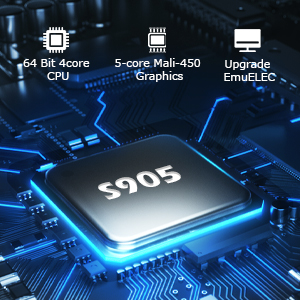
Image: Depiction of the S905X processor, indicating its 64-bit 4-core CPU and 5-core Mali-450 GPU.
Warranty and Support
Kinhank is committed to providing excellent customer service.
- Customer Service: If you have any questions, require assistance, or encounter any issues not covered in this manual, please do not hesitate to contact Kinhank customer support.
- Product Updates: Check the official Kinhank website for any software updates or additional resources for your Super Console X Pro.
Ask a question about this manual
Ask about setup, troubleshooting, compatibility, parts, safety, or missing instructions. Manuals+ will review the question and use this page’s manual context to help answer it.