
1. Product Overview
The Bmax B4 Turbo Mini PC N150 is a compact and powerful desktop computer designed for a variety of applications, from home entertainment to office productivity. Featuring a 13th Generation Intel N150 processor, ample memory, and fast storage, it delivers reliable performance in a small form factor.

Figure 1: Front and side view of the Bmax B4 Turbo Mini PC, showcasing its compact design and sleek finish.
2. Key Features
- Processor: 13th Generation Intel N150 Processor (Alder Lake N150) with 4 Cores, 4 Threads, 6MB L3 Cache, and a turbo frequency of up to 3.60GHz.
- Memory & Storage: Equipped with 16GB DDR4 RAM and a 512GB SSD for efficient multitasking and fast data access.
- Connectivity: Supports Wi-Fi 5, Bluetooth 5.0, and a 1Gbps LAN port for high-speed network connections.
- Display Output: Capable of triple screen display with 2x HDMI 2.1 ports and 1x full-featured Type-C port, supporting 4K@60Hz resolution.
- Ports: Comprehensive port selection including 2x USB 2.0, 2x USB 3.0, 1x RJ45, 1x DC12V/2A, 1x Type-C, and a 3.5mm Stereo Headset Jack. Includes a Clear CMOS Button.
- Cooling: Features a silent built-in fan (approximately 40dB) with a fantastic cooling system, heat sink, and hard drive cooler to maintain optimal performance.
- Design: Ultra-light and portable, making it suitable for various environments.

Figure 2: Detailed view of the Intel 13th Generation N150 Processor, highlighting its core specifications and performance improvements.

Figure 3: Internal layout of the Mini PC, illustrating the 16GB DDR4 RAM and 512GB SSD components.
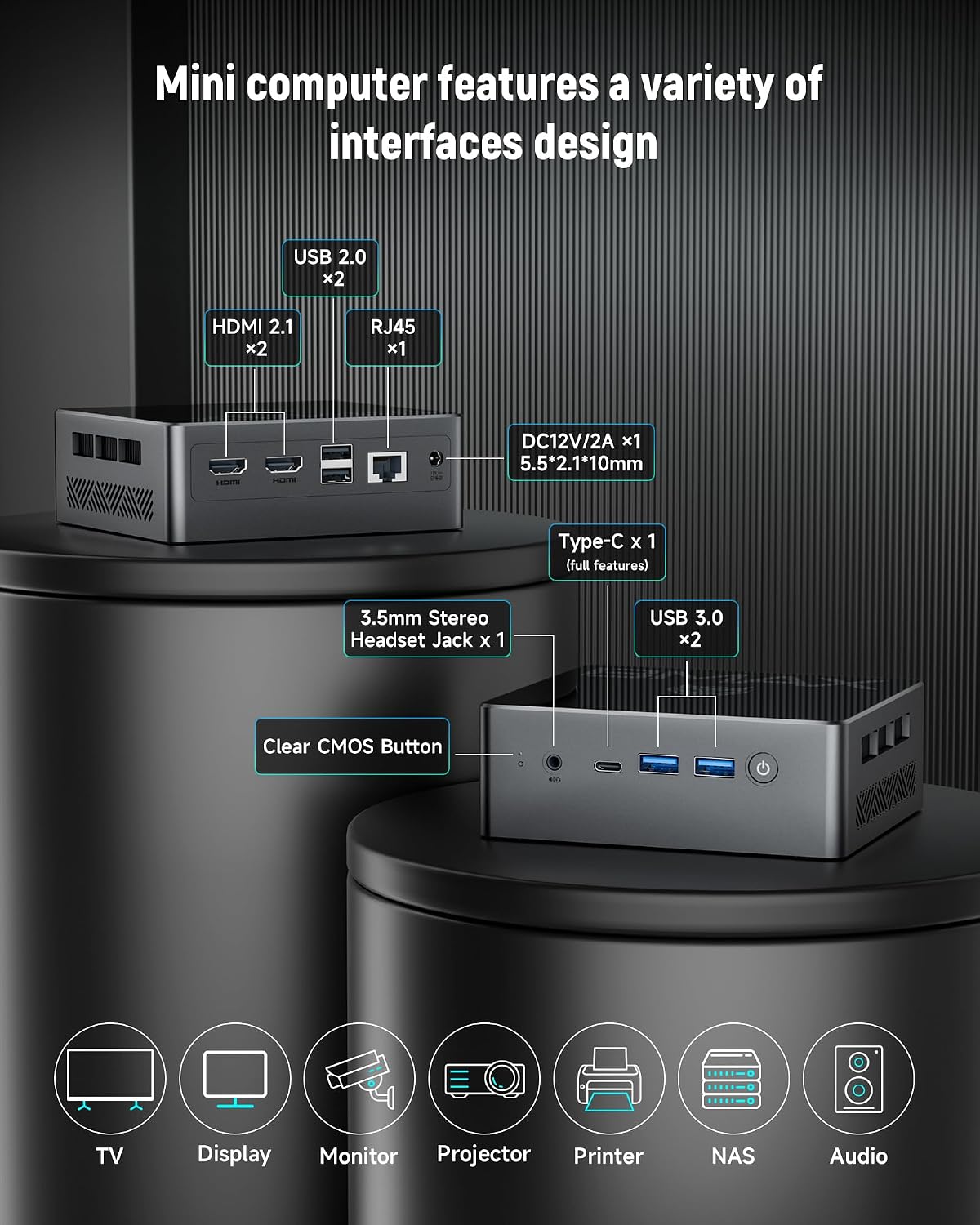
Figure 4: Overview of the various input/output ports available on the Bmax B4 Turbo Mini PC, including USB, HDMI, and Type-C.
3. Setup Guide
3.1 Unpacking and Initial Inspection
Carefully remove the Mini PC and all accessories from the packaging. Inspect for any signs of damage during transit. Retain the packaging for future transport or storage.
3.2 Connecting Peripherals
- Connect your monitor(s) to the HDMI 2.1 ports or the Type-C port. The Mini PC supports up to three displays simultaneously.
- Plug in your keyboard and mouse to the available USB 2.0 or USB 3.0 ports.
- For wired network access, connect an Ethernet cable to the RJ45 LAN port.
- If using external audio devices, connect them to the 3.5mm headset jack.
- Connect the power adapter to the DC12V/2A port on the Mini PC, then plug the adapter into a power outlet.
Video 1: An official product video demonstrating the Bmax N150 Mini PC, including its features and various application scenarios. This video provides a visual guide to the product's capabilities and connectivity options.
4. Operating Instructions
4.1 Powering On/Off
- To power on the Mini PC, press the power button located on the front panel.
- To power off, click the Start menu in Windows, then select Power > Shut down. Alternatively, press and hold the power button for 5 seconds to force a shutdown (not recommended for regular use).
4.2 Initial Boot and Windows Setup
Upon first power-on, the system will guide you through the Windows 11 Pro setup process. Follow the on-screen prompts to configure language, region, network, and user accounts.
4.3 Connecting to Wi-Fi
Once Windows is set up, click the Wi-Fi icon in the taskbar, select your desired network, enter the password, and click Connect.
4.4 Using Multiple Displays
To configure multiple displays, right-click on the desktop, select "Display settings," and arrange your monitors as desired. You can extend, duplicate, or show only one display.

Figure 5: The Mini PC connected to multiple displays, demonstrating its capability for extended desktop environments, ideal for productivity and entertainment.
5. Maintenance and Care
- Cleaning: Use a soft, dry cloth to clean the exterior of the Mini PC. Avoid liquid cleaners or abrasive materials. For vents, use compressed air to remove dust buildup.
- Ventilation: Ensure the Mini PC is placed in a well-ventilated area. Do not block the ventilation holes.
- Temperature: Operate the device within recommended temperature ranges (typically 0°C to 35°C). Avoid direct sunlight or extreme heat sources.
- Software Updates: Regularly update your Windows operating system and drivers to ensure optimal performance and security.
- Storage: When not in use for extended periods, store the Mini PC in a cool, dry place, ideally in its original packaging.

Figure 6: Illustration of the Mini PC's internal cooling system, including the silent fan and heat sink, designed for efficient heat dissipation.
6. Troubleshooting
| Problem | Possible Cause | Solution |
|---|---|---|
| No power | Power adapter not connected; power outlet issue. | Ensure power adapter is securely connected to both the Mini PC and a working power outlet. Try a different outlet. |
| No display | Monitor not connected; incorrect input source; faulty cable. | Check monitor cable connections. Ensure monitor input source is set correctly. Try a different cable or monitor. |
| Slow performance | Too many applications running; insufficient free storage; overheating. | Close unnecessary applications. Free up disk space. Ensure proper ventilation and clean vents. |
| Wi-Fi connection issues | Incorrect password; router issues; driver problems. | Verify Wi-Fi password. Restart your router. Update Wi-Fi drivers. |
If problems persist after attempting these solutions, please contact Bmax customer support.
7. Product Specifications
| Feature | Detail |
|---|---|
| Brand | Bmax |
| Model Number | B4 Turbo |
| Processor | Intel 13th Gen N150 (4 Cores, 4 Threads, up to 3.6GHz) |
| RAM | 16GB DDR4 SDRAM |
| Storage | 512GB SSD (Serial ATA Interface) |
| Graphics | Intel UHD Graphics (24EU, up to 1GHz) |
| Operating System | Windows 11 Pro |
| Connectivity | Wi-Fi 5, Bluetooth 5.0, 1Gbps LAN |
| Ports | 2x HDMI 2.1, 2x USB 2.0, 2x USB 3.0, 1x RJ45, 1x DC12V/2A, 1x Type-C (full features), 1x 3.5mm Headset Jack |
| Dimensions (LxWxH) | 4.92 x 4.41 x 1.73 inches |
| Item Weight | 1.59 pounds |
8. Warranty and Support
For warranty information and technical support, please refer to the documentation included with your product or visit the official Bmax website. You can also contact Bmax customer service through the details provided on their Amazon store page: Bmax Official Store.
Please have your product model number (B4 Turbo) and purchase details ready when contacting support.


