
SODI B077T
Contents
SODI Foldable Keyboard User Manual
Model: B077T | Brand: SODI
Introduction
This manual provides comprehensive instructions for the SODI Foldable Keyboard with Sensitive Touchpad, Model B077T. Designed for portability and functionality, this wireless keyboard features a tri-fold design, an integrated touchpad/numeric pad, and multi-device connectivity. Please read this manual thoroughly to ensure proper use and maintenance of your device.

Image: The SODI Foldable Keyboard in both its unfolded, ready-to-use state and its compact, folded state, highlighting its portability.
What's in the Box
Verify that all items are present in your package:
- 1 x Foldable Wireless Keyboard
- 1 x USB Cable
- 1 x User Manual
- 1 x Stand Holder
- 1 x Storage Bag

Image: All components included in the SODI Foldable Keyboard package: the keyboard, USB-C cable, user manual, stand holder, and storage bag.
Setup and Pairing
Follow these steps to set up and pair your SODI Foldable Keyboard with your device. The process is demonstrated in the video below.
- Unfold the Keyboard: Gently unfold the keyboard until it lies flat. The power switch is located on the right side.
- Power On: Turn on the power switch. The blue light will flash for 3 seconds, indicating it's powered on.
- Enter Pairing Mode: Hold "Fn + C" for 3 seconds. The LED will start flashing blue, indicating the keyboard is in pairing mode.
- Enable Bluetooth on Your Device: On your computer, tablet, or smartphone, go to Bluetooth settings and turn on Bluetooth.
- Connect: Select "SODI Foldable Keyboard" from the list of available devices to connect.
- Select System (Optional): For optimal performance, press "Fn + Q" for iOS, "Fn + W" for Mac, or "Fn + E" for Windows/Android to select the appropriate system layout.

Image: The SODI Foldable Keyboard seamlessly connected to an iMac, iPad, and iPhone, demonstrating its wide compatibility.
Multi-Device Pairing
The keyboard supports simultaneous pairing with up to 3 devices. To switch between paired devices, press "Fn + A (BT1)", "Fn + S (BT2)", or "Fn + D (BT3)".

Image: Visual guide showing how to switch between three paired devices (BT1, BT2, BT3) using Fn key combinations on the keyboard.
Operating Instructions
Touchpad and Numeric Keypad
The right section of the keyboard functions as both a sensitive touchpad and a numeric keypad. To switch between these modes, press "Fn + Spacebar".

Image: A visual representation of the keyboard's 2-in-1 numeric pad and sensitive touchpad, illustrating how it combines both functions.
Touchpad Gestures (Mac System Example):
- Single-finger click: Tab, mouse left click.
- Two-finger upward and downward slides: Mouse wheel scrolling (page scrolling).
- Single-finger movement: Cursor sliding.
- Three-finger right swipe: Activate right window.
- Three-finger upward swipe: Open/hide the bottom application bar.
- Three-finger left swipe: Activate left window.
- Four-finger click: Quick screenshot.

Image: Detailed descriptions and visual examples of various touchpad gestures for the Mac operating system.
Multimedia Shortcut Keys
The keyboard features 12 multimedia shortcut keys. To activate these functions (F1-F12), press "Fn + ESC". Press "Fn + ESC" again to toggle off the Fn functions.
Charging the Keyboard
The keyboard is equipped with a built-in rechargeable battery. To charge, connect the provided USB-C cable to the keyboard's charging port and the other end to a USB power source (e.g., computer, wall adapter). The charging indicator light will illuminate during charging and turn off when fully charged. A full charge typically lasts for 48 hours of continuous use after 2-3 hours of charging.

Image: The SODI Foldable Keyboard connected to a USB-C charging cable, showing the charging port location.
Product Overview Video
For a visual guide on setup, operation, and features of the SODI Foldable Keyboard, please watch the official product video below.
Video: An official product video demonstrating the SODI Foldable Bluetooth Keyboard with Touchpad/Numericpad, including unboxing, setup, pairing, touchpad functions, multi-device switching, and charging.
Maintenance
To ensure the longevity and optimal performance of your SODI Foldable Keyboard, follow these maintenance guidelines:
- Cleaning: Use a soft, dry, lint-free cloth to clean the keyboard surface. For stubborn dirt, slightly dampen the cloth with water or a mild, non-abrasive cleaner. Avoid excessive moisture.
- Storage: When not in use, fold the keyboard to protect the keys and touchpad. Store it in the provided storage bag to prevent scratches and dust accumulation.
- Avoid Liquids: Keep the keyboard away from liquids to prevent damage to internal components.
- Temperature: Avoid exposing the keyboard to extreme temperatures (hot or cold) or high humidity.
- Handle with Care: While durable, avoid dropping the keyboard or applying excessive force to the keys or hinges.

Image: A detailed view of the keyboard's folding mechanism, emphasizing its robust design for repeated use.
Troubleshooting
If you encounter issues with your SODI Foldable Keyboard, refer to the following common problems and solutions:
| Problem | Solution |
|---|---|
| Keyboard does not power on. | Ensure the power switch is in the ON position. Charge the keyboard using the provided USB-C cable. |
| Unable to pair with device. | Ensure the keyboard is in pairing mode (Fn + C, blue LED flashing). Make sure Bluetooth is enabled on your device and it's within range. Forget the device in your Bluetooth settings and try pairing again. |
| Touchpad or numeric pad not responding. | Press "Fn + Spacebar" to toggle between touchpad and numeric pad modes. Ensure the correct system (iOS/Mac/Windows) is selected using Fn + Q/W/E. |
| Unreliable connection or frequent disconnections. | Ensure no other strong wireless signals are interfering. Try moving closer to your device. Re-pair the keyboard. Ensure the keyboard is fully charged. |
| Keys are not responding or typing incorrectly. | Check if the correct system mode (Fn + Q/W/E) is selected. Restart the keyboard and your device. Ensure the keyboard is fully charged. |
Specifications
| Feature | Detail |
|---|---|
| Brand | SODI |
| Model Number | B077T |
| Connectivity Technology | Bluetooth |
| Compatible Devices | Mac/iOS System notebook (also compatible with Windows/Android) |
| Keyboard Description | Flexible, Foldable with Touchpad/Numericpad |
| Item Weight | 1.19 pounds (approx. 0.54 kg) |
| Package Dimensions | 12.4 x 4.69 x 0.94 inches (approx. 31.5 x 11.9 x 2.4 cm) |
| Batteries | 1 Lithium Ion battery required (included) |
| Number of Keys | 64 |
| Keyboard Backlighting | Single Color (LED indicators) |
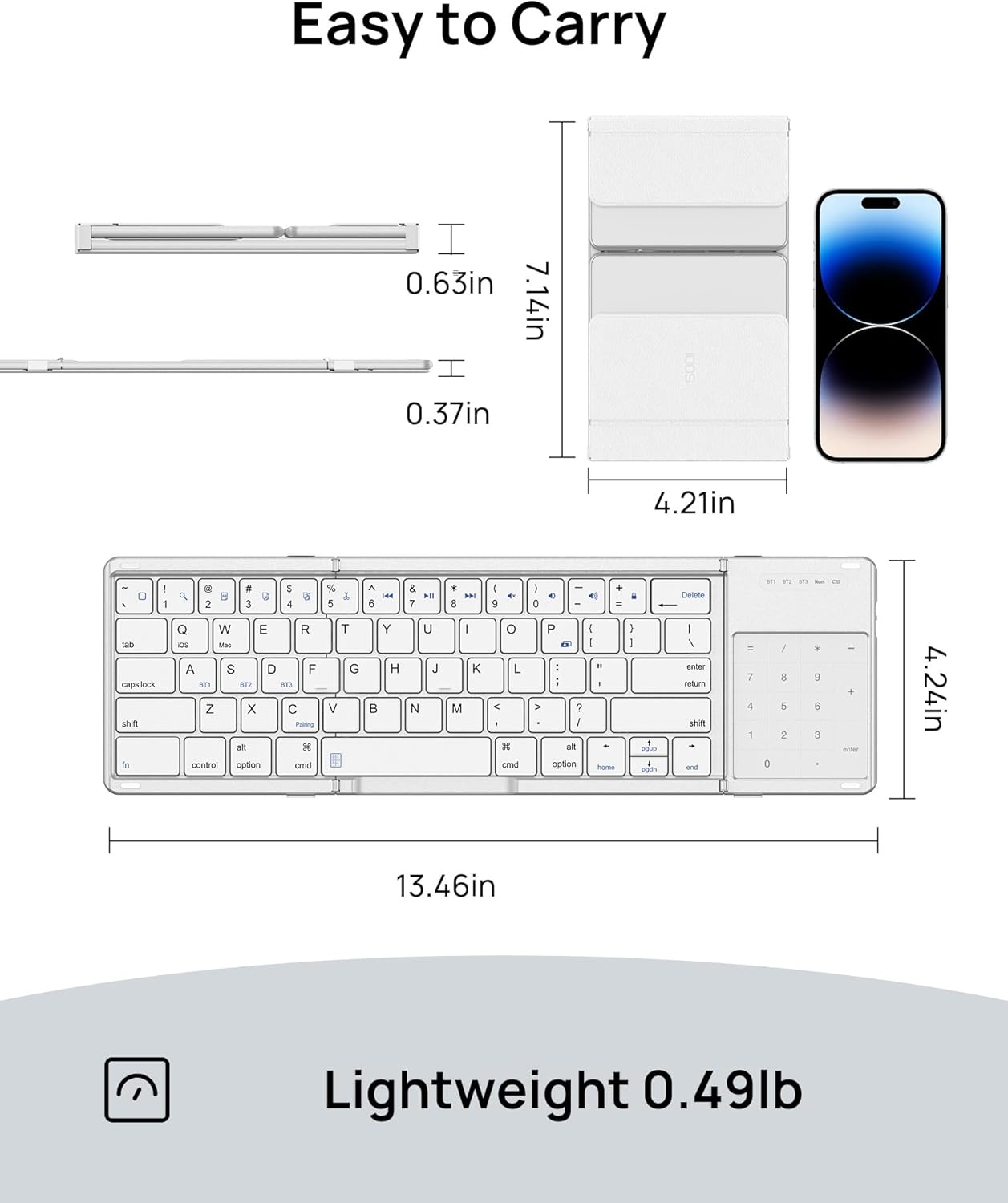
Image: A diagram illustrating the compact dimensions and lightweight nature of the SODI Foldable Keyboard.
Warranty and Support
Specific warranty details are not provided within the product data. For information regarding warranty coverage, technical support, or customer service, please contact the manufacturer, SODI, directly through their official website or the seller on the platform where the product was purchased. Please retain your proof of purchase for any warranty claims.
Ask a question about this manual
Ask about setup, troubleshooting, compatibility, parts, safety, or missing instructions. Manuals+ will review the question and use this page’s manual context to help answer it.