
Athlon Optics 214076
Athlon Optics Argos BTR GEN3 Riflescope User Manual
Model: APLR11 FFP IR MOA, 8-34x56 (SKU: 214076)
1. Introduction
Thank you for choosing the Athlon Optics Argos BTR GEN3 Riflescope. This manual provides detailed instructions for the proper setup, operation, and maintenance of your new riflescope to ensure optimal performance and longevity.
Key Features:
- Superior Performance: Features a true precision Zero Stop for repeatable return to zero and a capped windage turret.
- Updated Design: Redesigned turrets and an improved magnification adjustment ring for precise control.
- Parallax Adjustment: Adjustable from 10 yards to infinity for accurate long-range shooting.
- Rugged Construction: XPL protective coating shields exterior lenses from dirt, oil, and scratches.
- Brighter Images: Advanced Fully Multicoated optics reduce reflected light and increase light transmission.

Figure 1.1: The Athlon Optics Argos BTR GEN3 Riflescope, showcasing its sleek design and robust construction.
2. Setup Guide
2.1 Mounting the Riflescope
Ensure your riflescope is securely mounted to your firearm using appropriate rings and bases. Follow the manufacturer's instructions for your specific mounting system. Proper alignment is crucial for accuracy.
2.2 Adjusting Eye Relief
Eye relief is the distance between your eye and the ocular lens for a full field of view. Adjust the riflescope's position in the rings until you achieve optimal eye relief, typically 3.3 inches for this model, to prevent scope bite during recoil.
2.3 Focusing the Reticle (Diopter Adjustment)
- Point the riflescope at a plain, bright background (like a wall or clear sky).
- Look through the scope and quickly glance away.
- Look back through the scope and immediately check if the reticle is sharp and clear.
- If not, adjust the diopter ring (located on the ocular lens) until the reticle appears perfectly sharp before your eye can compensate.

Figure 2.1: Key components of the riflescope, including the ocular lens, magnification adjustment, parallax side focus, elevation adjustment, windage adjustment, and objective lens.
3. Operation
3.1 Magnification Adjustment
The magnification adjustment ring allows you to change the zoom level of the riflescope, from 8x to 34x. Rotate the ring to your desired magnification. As a First Focal Plane (FFP) reticle, the reticle size will change proportionally with the magnification.
3.2 Parallax Adjustment
Parallax is the apparent movement of the reticle relative to the target when you move your head. The side focus knob adjusts parallax from 10 yards to infinity. Rotate the knob until the target and reticle appear to be in the same focal plane, eliminating parallax error.
3.3 Windage and Elevation Turrets
The riflescope features exposed elevation and capped windage turrets for precise adjustments. Each click represents 0.25 MOA. Rotate the turrets to adjust your point of impact. The elevation turret includes a Zero Stop feature.
3.4 Using the Precision Zero Stop
The Precision Zero Stop system allows you to lock down your zero position and dial back to it with a sharp and precise stop. This ensures a repeatable return to your initial zero, even in low light conditions. Refer to the detailed instructions provided with your riflescope for setting the zero stop.
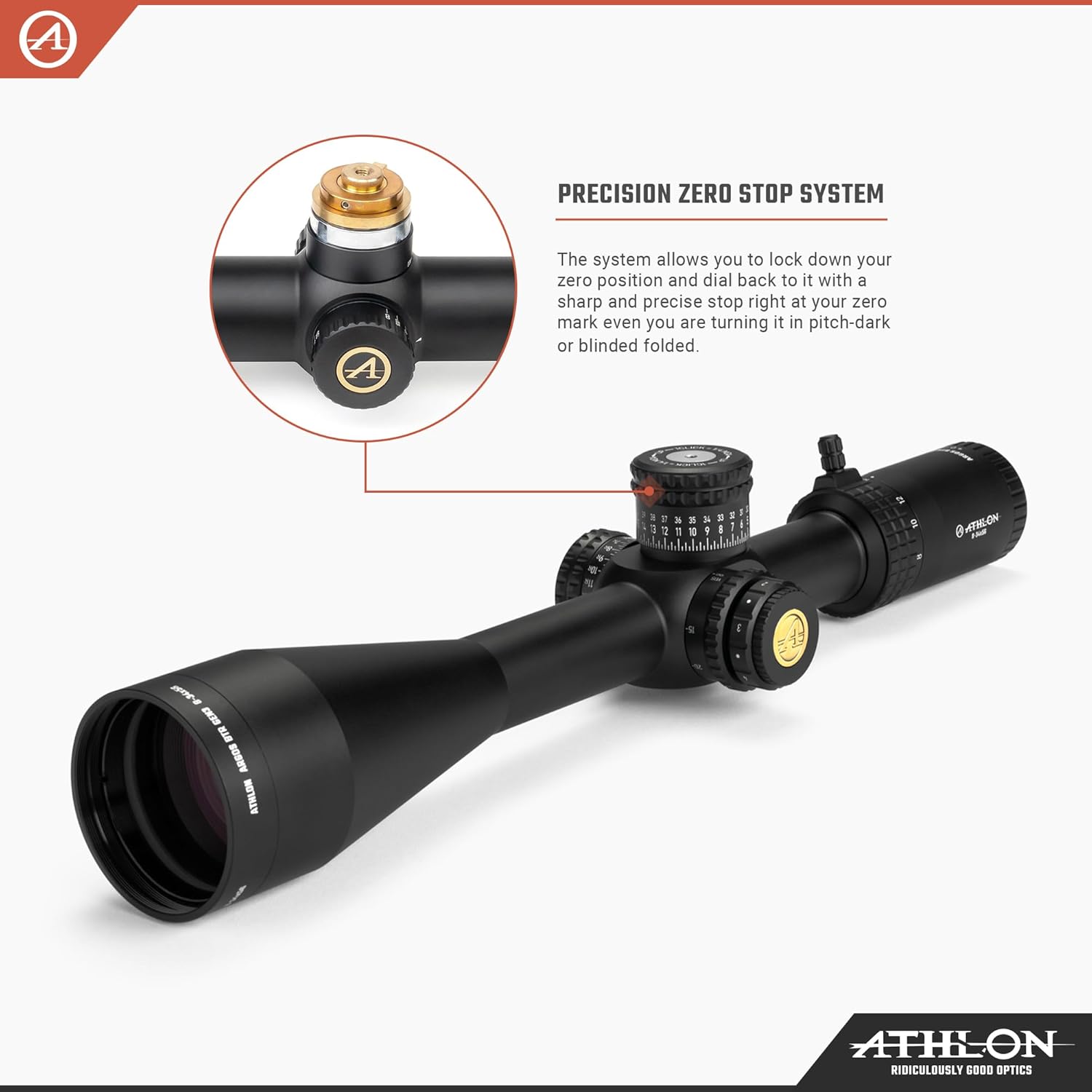
Figure 3.1: Close-up view of the Precision Zero Stop System, designed for reliable return to zero.
Video 3.1: An official product video showcasing the key features of the Argos BTR GEN3 Riflescope, including advanced fully multi-coated lenses, argon purging, waterproofing, etched glass reticle, aircraft-grade aluminum construction, precision zero stop, and detailed specifications.
4. Care and Maintenance
4.1 Cleaning Lenses
To clean the lenses, first use a soft brush or compressed air to remove any loose dust or debris. Then, use a clean microfiber cloth specifically designed for optics and a small amount of lens cleaning solution. Gently wipe the lenses in a circular motion. Avoid using harsh chemicals or abrasive materials.
4.2 Storage
Store your riflescope in a cool, dry place, away from direct sunlight and extreme temperatures. Use the included lens caps and sunshade to protect the lenses when not in use. If storing for extended periods, consider using a desiccant packet to absorb moisture.

Figure 4.1: The included lens caps and sunshade provide essential protection for your riflescope's optics.
5. Troubleshooting
If you encounter issues with your riflescope, refer to the common problems and solutions below:
- Blurry Image: Ensure the reticle is properly focused (Section 2.3) and adjust the parallax (Section 3.2) for the target distance.
- Reticle Not Clear: Re-adjust the diopter for your eye. If the issue persists, check for debris on the ocular lens.
- Adjustments Not Responding: Ensure turrets are not locked. If the scope has been dropped or subjected to severe impact, internal damage may have occurred, requiring professional service.
- Fogging Inside Lenses: While the riflescope is argon purged for fog resistance, extreme temperature changes can sometimes cause temporary external condensation. If internal fogging occurs, contact customer support.
6. Technical Specifications
| Specification | Value |
|---|---|
| Product Dimensions | 15.5 x 2.5 x 2.5 inches |
| Item Weight | 1.89 pounds |
| Manufacturer | Athlon Optics |
| ASIN | B0DQQGYZ2X |
| Item Model Number | 214076 |
| Magnification | 8-34x |
| Objective Lens Diameter | 56 mm |
| Tube Diameter | 30 mm |
| Eye Relief | 3.3 inches |
| Field of View @ 100 Yds | 12.5 - 3 ft |
| Parallax Adjustment | Side Focus 10 yds - Infinity |

Figure 6.1: Detailed product specifications for the Argos BTR GEN3 Riflescope.

Figure 6.2: Illustration of Advanced Fully Multi-Coated Lenses for brighter images and Argon Purging for fog resistance.
7. Warranty and Support
Athlon Optics stands behind its products with a comprehensive Lifetime Warranty. This warranty is transferable, requires no receipt, and no registration is required. Athlon Optics is committed to providing excellent support for their products.
This product is from a small business brand. Your support is appreciated.
Ask a question about this manual
Ask about setup, troubleshooting, compatibility, parts, safety, or missing instructions. Manuals+ will review the question and use this page’s manual context to help answer it.