Wireless Bluetooth Karaoke Microphone
Instruction Manual
Brand: MetFut | Model: MF-Y11S
1. Introduction
Thank you for choosing the MetFut Wireless Bluetooth Karaoke Microphone. This portable device combines a microphone and a powerful speaker, offering a versatile solution for karaoke, public speaking, and entertainment. With features like duet mode, reverb adjustment, and long battery life, it's designed to provide an immersive audio experience wherever you go.
2. Package Contents
Please verify that all items listed below are included in your package:
- Y11S Karaoke Microphone
- PU Storage Case
- Audio Cable
- Charging Cable
- Foam Cover
- User Manual & Warranty Card

Figure 2.1: All items included in the MetFut Karaoke Microphone package.
3. Product Overview
The MetFut Karaoke Microphone is designed for ease of use and portability. Familiarize yourself with its main components and controls:
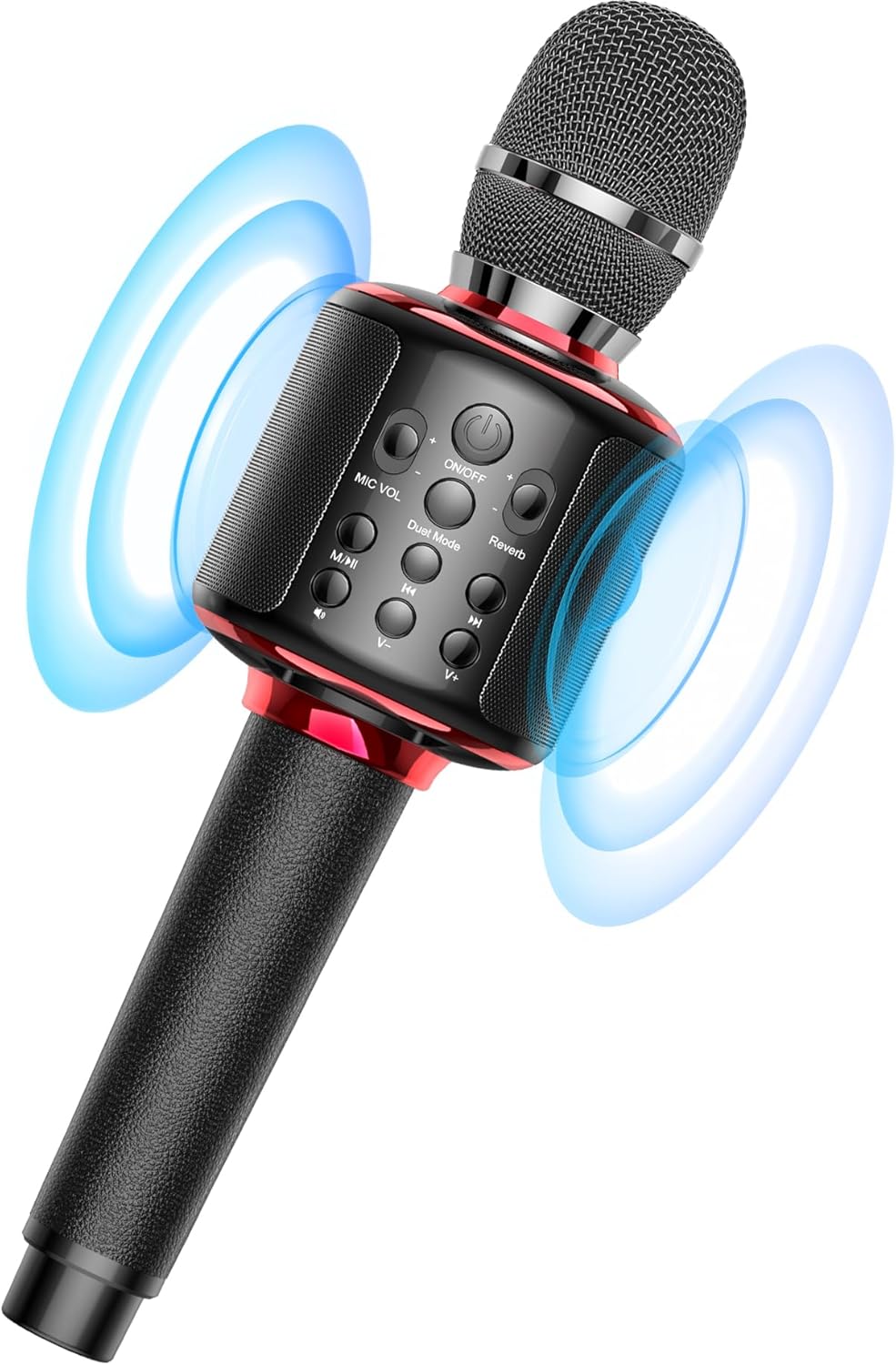
Figure 3.1: Front view of the MetFut Karaoke Microphone.

Figure 3.2: Integrated loud speakers for immersive sound.

Figure 3.3: Premium leather handle for comfortable use.
Control Panel Layout:
- ON/OFF Button: Press and hold to power on or off.
- MIC VOL: Adjusts microphone volume.
- Reverb: Adjusts the echo effect.
- Duet Mode: Activates or deactivates duet pairing.
- M/M (Mode/Music): Switches between modes (e.g., Bluetooth, TF Card).
- Vocal Remove: Removes vocals from music tracks.
- Previous/Next Track: Navigates through music tracks.
- Volume +/-: Adjusts music playback volume.
4. Setup
4.1 Charging the Microphone
Before first use, fully charge the microphone. The built-in 3000mAh rechargeable battery supports up to 10 hours of continuous playback or karaoke time.
- Connect the provided charging cable to the microphone's charging port.
- Connect the other end of the charging cable to a USB power adapter (not included) or a computer's USB port.
- The indicator light will show charging status (refer to LED indicator section in full manual for details).

Figure 4.1: Battery and speaker highlights.
4.2 Bluetooth Pairing
The microphone connects wirelessly to your smartphone or tablet via Bluetooth to play music.
- Power on the microphone by pressing and holding the ON/OFF button.
- Enable Bluetooth on your device (smartphone, tablet, etc.).
- Search for "MetFut MF-Y11S" (or similar name) in your device's Bluetooth settings and select it to pair.
- Once connected, you can play accompaniment music from your device through the microphone's speaker.

Figure 4.2: Easy Bluetooth connection process.
4.3 Duet Mode Setup
For a shared singing experience, two MetFut microphones can be synchronized for duet mode.
- Ensure both microphones are powered on and not connected to any other Bluetooth device.
- On one microphone, press the 'Duet Mode' button. It will enter pairing mode.
- On the second microphone, also press the 'Duet Mode' button. The two microphones will automatically connect to each other.
- Once paired, connect your device via Bluetooth to one of the microphones. Both microphones will now play music and amplify voices simultaneously.

Figure 4.3: Duet Mode in action.
5. Operating Instructions
5.1 Adjusting Volume and Reverb
- Microphone Volume (MIC VOL): Use the dedicated MIC VOL buttons on the control panel to increase or decrease your voice amplification.
- Music Volume (V+/-): Use the V+ and V- buttons to adjust the volume of the background music playing from your connected device or TF card.
- Reverb: Use the Reverb buttons to add or reduce the echo effect to your voice. This enhances the karaoke experience.
5.2 Singing Modes: Output Options
The microphone offers two primary output modes:
- Singing Out (Speaker ON): Use the built-in loud speaker to project your voice and music, sharing the experience with others.
- Earbuds Monitoring (Speaker OFF): Connect 3.5mm wired earbuds to the microphone's audio jack to monitor your voice and music privately, without disturbing others. This is ideal for singing practice.

Figure 5.1: Singing Out vs. Earbuds Monitoring.
5.3 TF Card Playback
Insert a TF (MicroSD) card loaded with your favorite music into the designated slot on the microphone. The microphone will automatically detect and play the audio files.
5.4 Vocal Remove Function
Press the 'Vocal Remove' button to minimize or eliminate the lead vocals from a music track, allowing you to sing along more effectively to instrumental versions.
6. Features
- All-in-one Portable System: Start singing whenever you want with the microphone's built-in loud speaker, eliminating the need for complex setups or additional accessories.
- Dual Output Modes: Choose between projecting sound through the integrated speaker for shared enjoyment or using 3.5mm wired earbuds for private monitoring and practice.
- High-Quality Construction: Features a premium leather handle for a soft, anti-slip, and dirt-resistant grip.
- Extended Playback: Equipped with a 3000mAh rechargeable battery, providing up to 10 hours of continuous use.
- Duet Mode: Easily synchronize two microphones to enable two people to sing together, perfect for duets with family and friends.
- Multifunctional Design: Offers a range of functions including reverb adjustment, volume control, recording capability, vocal removal, and TF card playback.
- Portable Design for Various Scenes: The compact design and durable PU storage case make it easy to carry and use in diverse environments, from home parties to car journeys and outdoor activities.

Figure 6.1: Versatile use of the portable microphone.

Figure 6.2: Compact design with durable storage case.
7. Maintenance
To ensure the longevity and optimal performance of your MetFut Karaoke Microphone, follow these maintenance guidelines:
- Cleaning: Use a soft, dry cloth to wipe the microphone's surface. Avoid using abrasive cleaners or solvents.
- Storage: When not in use, store the microphone in its provided PU storage case to protect it from dust, moisture, and physical damage.
- Battery Care: Avoid fully discharging the battery frequently. Charge the microphone regularly, even if not in use, to maintain battery health.
- Handle with Care: While durable, avoid dropping the microphone or subjecting it to strong impacts.
8. Troubleshooting
If you encounter any issues with your microphone, please refer to the following common troubleshooting steps:
| Problem | Possible Cause | Solution |
|---|---|---|
| Microphone does not power on. | Low battery. | Charge the microphone fully. |
| No sound from speaker. | Volume too low; not connected via Bluetooth; earbuds connected. | Increase music/mic volume; ensure proper Bluetooth connection; disconnect earbuds if using speaker. |
| Cannot connect via Bluetooth. | Microphone not in pairing mode; device Bluetooth off; interference. | Ensure microphone is on and in pairing mode; turn device Bluetooth off/on; move closer to microphone. |
| Duet mode not working. | Microphones not paired correctly; one microphone already connected to a device. | Ensure both microphones are disconnected from other devices before initiating duet pairing. Follow duet mode setup steps carefully. |
If the problem persists after trying these solutions, please contact customer support.
9. Specifications
| Specification | Value |
|---|---|
| Model Name | MF-Y11S |
| Item Weight | 1.54 pounds (0.7 Kilograms) |
| Product Dimensions | 3.1 x 3.1 x 11.3 inches |
| Material | Plastic & Leather |
| Power Source | Battery Powered |
| Battery Type | Lithium Ion (1 C battery included) |
| Connectivity Technology | Bluetooth |
| Connector Type | 3.5 mm Jack |
| Impedance | 4 Ohm |
| Signal-to-Noise Ratio | 90 dB |
| Microphone Form Factor | Handheld |
| Polar Pattern | Omnidirectional |
| Number of Channels | 2 |
| Color | Black & Red |
10. Warranty and Support
The MetFut Wireless Bluetooth Karaoke Microphone comes with a manufacturer's warranty. Please refer to the warranty card included in your package for specific terms and conditions.
For technical support, troubleshooting assistance, or warranty claims, please contact MetFut customer service through the contact information provided on the product packaging or the official MetFut website. Please have your model number (MF-Y11S) and purchase details ready when contacting support.


