
1. Introduction
Thank you for choosing the PHORUS 52" Waterproof Outdoor Palm Leaf Ceiling Fan. This fan is designed for both indoor and outdoor use, featuring a tropical style with palm leaf blades, integrated LED lighting, and convenient control via remote or smartphone application. This manual provides detailed instructions for safe installation, operation, and maintenance of your new ceiling fan.

Image 1.1: PHORUS 52" Waterproof Outdoor Palm Leaf Ceiling Fan.
2. Safety Information
WARNING: To reduce the risk of fire, electric shock, or personal injury, always turn off the main power at the circuit breaker before installation or servicing.
- Read all instructions carefully before beginning installation.
- Ensure all electrical connections comply with local codes and ordinances, and national electrical codes. If you are unfamiliar with electrical wiring, consult a qualified electrician.
- Mounting must be done to a structurally sound ceiling capable of supporting the fan's weight (approximately 20 pounds).
- Do not bend the blade holders during installation, balancing, or cleaning.
- Keep hands clear of the fan blades when the fan is operating.
- This fan is wet-rated (IP44) for outdoor use in damp environments like patios and porches, but avoid direct water spray.
3. Package Contents
Verify that all components are present before beginning installation. If any parts are missing or damaged, contact customer support.
- Fan Motor Assembly
- Palm Leaf Blades (5)
- Light Kit with LED Module
- Remote Control
- Downrods (3.94" and 7.87")
- Mounting Bracket
- Hardware Pack (screws, washers, wire nuts)
- User Manual
4. Specifications
| Feature | Specification |
|---|---|
| Brand | PHORUS |
| Model Number | 8245 |
| Size | 52 inches |
| Color | Brown Waterproof |
| Material | Iron, Plastic, Acrylic |
| Motor Type | 50W High-efficiency DC Motor |
| Voltage | 90-265 volts (Suits 120V) |
| Wattage | 80 watts |
| Light Source | Integrated LED (3640 lm, 18W LED 2340LM) |
| Color Temperature | 3000K (Warm), 4500K (Natural), 6000K (White) |
| Control Method | Remote Control, APP Control |
| Indoor/Outdoor Usage | Indoor, Outdoor (Wet-Rated IP44) |
| Mounting Type | Downrod Mount (compatible with sloped ceilings up to 15°) |
| Item Weight | 20 pounds |
5. Setup and Installation
Before installation, ensure the power is disconnected at the circuit breaker. Follow these steps carefully or consult a qualified electrician.
5.1 Pre-Installation Checks
- Ensure the mounting location can support the fan's weight.
- Confirm that the electrical box is securely mounted and rated for ceiling fan support.
- Prepare necessary tools: screwdriver, wire strippers, electrical tape, ladder.
5.2 Mounting Options
Your fan comes with two downrods (3.94" and 7.87") to accommodate different ceiling heights. It can be installed on flat ceilings or sloped ceilings up to 15 degrees.
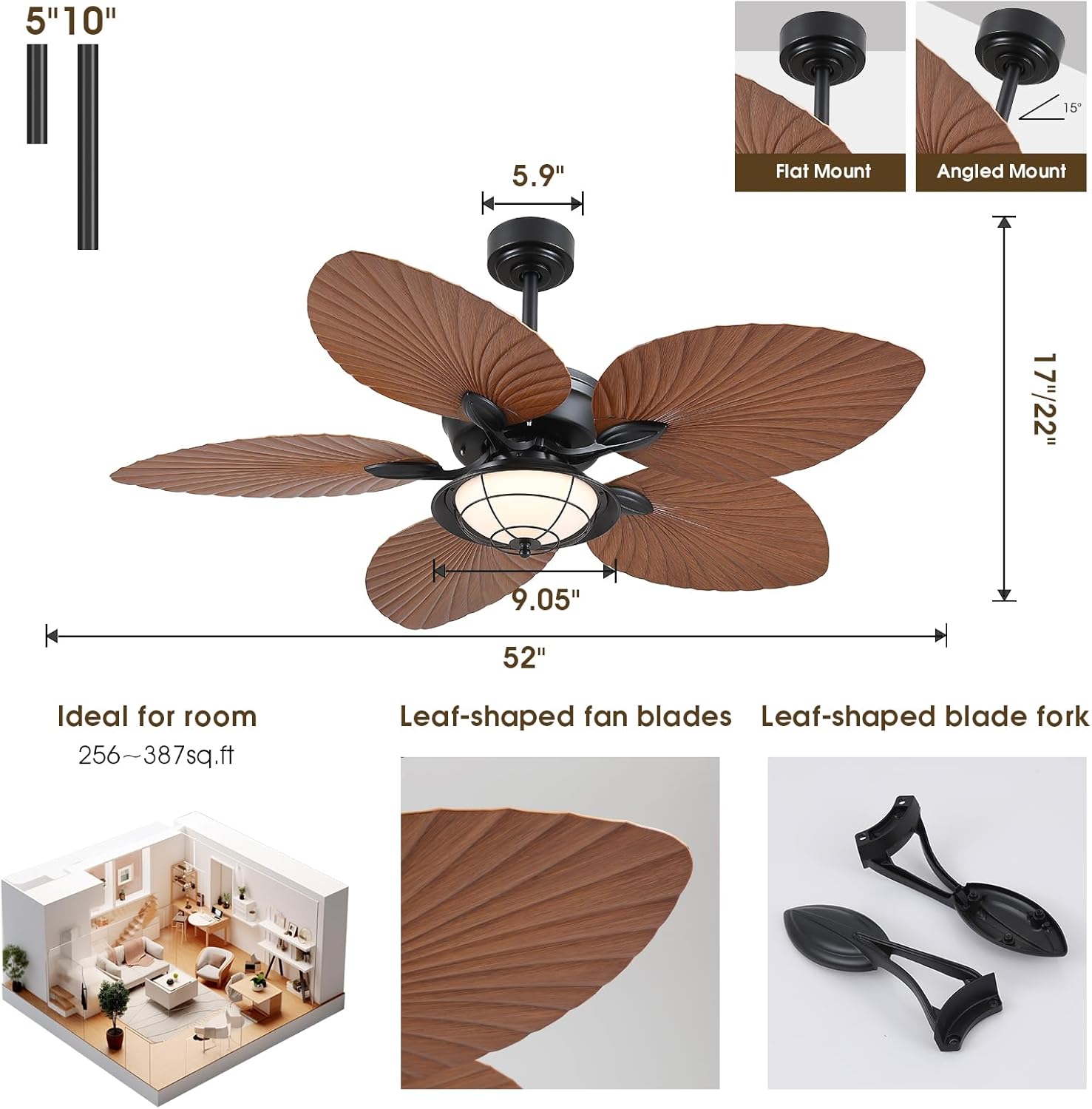
Image 5.1: Product dimensions and mounting types (Flat Mount, Angled Mount).
5.3 Installation Video Guide
For a detailed visual guide, please refer to the official installation video:
Video 5.1: Official installation guide for the PHORUS 52" Waterproof Palm Leaf Ceiling Fan.
The video demonstrates the step-by-step process for assembling and mounting the fan, including wiring connections and blade attachment.
6. Operating Instructions
Your PHORUS ceiling fan can be controlled using the included remote control or a dedicated smartphone application.
6.1 Remote Control and APP Functions
- Power On/Off: Turns the fan and light on or off.
- Fan Speed: Adjusts between 6 fan speeds.
- Light Control:
- Color Temperature: Cycle through 3000K (Warm Light), 4500K (Natural Light), and 6000K (White Light).
- Dimming: Stepless dimming to adjust brightness from dim to bright.
- Memory Function: The fan remembers your last light setting.
- Reverse Function: Changes the direction of blade rotation for summer (downdraft) or winter (updraft) modes.
- Timer: Set the fan to turn off after 2 hours.

Image 6.1: Adjustable light color temperatures (3000K, 4500K, 6000K).

Image 6.2: Detail of the waterproof lampshade and high-brightness LED module.
6.2 Fan Modes and Speeds
The fan features a reversible DC motor with 6 speed settings to optimize airflow for different seasons and comfort levels.
- Summer Mode (Downdraft): Blades rotate counter-clockwise, pushing air downwards to create a cooling effect.
- Winter Mode (Updraft): Blades rotate clockwise, drawing air upwards to circulate warm air evenly.
- Speed Settings:
- 1-2 Speeds: Comfortable wind, suitable for sleep.
- 3-4 Speeds: Natural wind, suitable for daily life.
- 5-6 Speeds: Strong wind, suitable for hot summer.

Image 6.3: Illustration of downdraft (summer) and updraft (winter) modes, and fan speed recommendations.
6.3 APP Control
Scan the QR code provided in the product packaging to download the control application. The app offers the same functionalities as the remote control, providing an alternative control method.
7. Maintenance
Regular maintenance ensures optimal performance and longevity of your ceiling fan.
- Cleaning: Use a soft, damp cloth to clean the fan blades and motor housing. Do not use abrasive cleaners or solvents. Ensure the fan is off and power is disconnected before cleaning.
- Blade Care: The palm leaf blades are designed for durability. Avoid bending or applying excessive force to them.
- Tighten Fasteners: Periodically check and tighten all screws and fasteners on the fan assembly to prevent wobbling or noise.
- Light Kit: The LED light module is integrated and not user-replaceable. If the light fails, contact customer support.
8. Troubleshooting
If you encounter issues with your fan, refer to the following common problems and solutions:
| Problem | Possible Cause | Solution |
|---|---|---|
| Fan does not start |
|
|
| Light does not work |
|
|
| Fan wobbles |
|
|
| Remote control not responding |
|
|
9. Warranty and Support
PHORUS provides a one-year quality warranty for this product. We offer free replacement service for any damage or quality problems within this period.
- Warranty Period: 1 year from the date of purchase.
- Coverage: Manufacturing defects and quality-related issues.
- Exclusions: Damage due to improper installation, misuse, accidents, or unauthorized repairs.
For any questions, concerns, or warranty claims, please contact PHORUS customer support. We aim to provide a satisfactory response within 24 hours.
Contact Information:
- Refer to your purchase documentation or the PHORUS official website for specific contact details.
Optional Protection Plans
Additional protection plans may be available for purchase to extend coverage beyond the manufacturer's warranty:
- 3-Year Protection Plan
- 4-Year Protection Plan
- Complete Protect (monthly subscription covering multiple eligible purchases)
These plans are offered by third-party providers and details can be found at the point of purchase.