
1. Introduction
Thank you for purchasing the Godox V860III-C Camera Flash. This professional speedlite is designed for Canon cameras, offering advanced features such as a powerful Li-ion battery, 2.4G wireless X system, High-Speed Sync (HSS), and an integrated LED modeling lamp. This manual provides detailed instructions for safe and effective use of your flash unit.
2. Safety Information
Please read these safety precautions carefully before using the product to ensure safe operation and prevent damage to the product or injury to yourself and others.
- Do not disassemble or modify the flash unit. High voltage components inside can cause electric shock.
- Keep the unit dry. Do not expose to rain, moisture, or high humidity.
- Do not touch the flash tube after firing, as it can be extremely hot.
- Avoid direct eye exposure to the flash, especially at close range, as it can impair vision.
- Keep out of reach of children.
- Use only the specified battery and charger. Improper use can lead to fire or explosion.
- Store the flash in a cool, dry place when not in use.
3. What's in the Box
Upon opening your Godox V860III-C package, please verify that all the following items are included:
- Godox V860III-C Camera Flash Unit
- 7.2V/2600mAh Li-ion Battery (VB26A)
- Battery Charger
- USB Cable
- Mini Stand
- Protection Case
- Diffuser (Softbox)
- Cleaning Cloth

Image: The Godox V860III-C flash unit displayed alongside its standard accessories, including the battery, charger, mini stand, diffuser, and protective case.
4. Setup
4.1 Battery Installation
- Open the battery compartment cover on the side of the flash unit.
- Insert the Li-ion battery (VB26A) into the compartment, ensuring the contacts align correctly.
- Close the battery compartment cover securely.
4.2 Charging the Battery
Use the provided charger and USB cable to charge the battery. A full charge typically takes approximately 3.5 hours. The charger's indicator light will change color to indicate charging status (e.g., red for charging, green for fully charged).
4.3 Mounting on Camera
- Slide the flash unit's hot shoe into your camera's hot shoe mount.
- Rotate the quick-release lock clockwise until it clicks into place, securing the flash to the camera.

Image: Close-up view of the upgraded hot shoe lock mechanism, designed for quick and secure attachment and detachment from the camera.
4.4 Powering On/Off
Press the power button to turn the flash unit on or off. The LCD screen will illuminate upon power-on.
5. Operating Instructions
5.1 Flash Modes
The V860III-C supports three main flash modes: TTL Autoflash, Manual Flash (M), and Multi Flash (Stroboscopic).
- TTL Autoflash Mode: The flash output is automatically adjusted to achieve correct exposure.
- Manual Flash Mode (M): Allows you to manually set the flash output power from 1/1 to 1/256 in 1/3 stop increments.
- Multi Flash Mode: Fires a series of rapid flashes to capture multiple images of a moving subject in a single photograph.

Image: The flash head demonstrating its multi-angle rotation capabilities, alongside a close-up of the one-touch TTL/M switching button for quick mode changes.
5.2 External LED Modeling Lamp
The V860III-C features an external LED modeling lamp to help you preview the light effect before shooting. It has 10 levels of dimmable brightness.
- Press the dedicated modeling lamp button to turn it on/off.
- Use the dial to adjust the brightness level from 1 to 10.
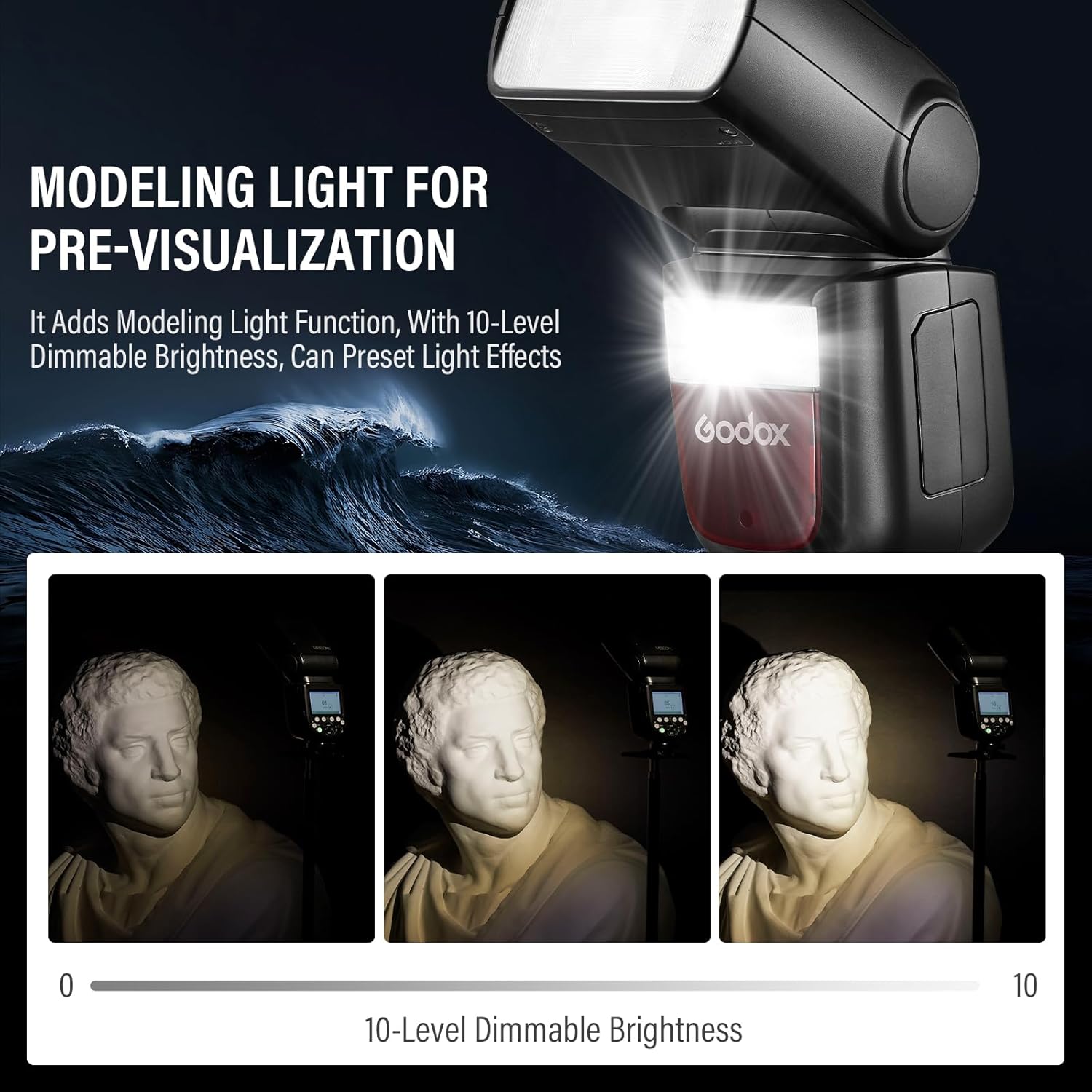
Image: Illustration of the modeling light feature, showing how its 10-level dimmable brightness can be used for pre-visualization of lighting effects on a subject.
5.3 Zoom Function
The flash head's focal length can be adjusted from 20mm to 200mm, either automatically or manually, to match the lens's focal length and provide optimal light coverage.

Image: Visual representation of the flash's adjustable zoom range from 20mm to 200mm, demonstrating how the light spread changes with different focal lengths.
5.4 High-Speed Sync (HSS)
The V860III-C supports High-Speed Sync up to 1/8000s, allowing you to use the flash with fast shutter speeds, which is ideal for freezing action or overpowering ambient light.
5.5 Wireless 2.4G Transmission
The built-in Godox 2.4G wireless X system allows the V860III-C to function as both a master and slave unit, enabling seamless integration with other Godox flashes for complex lighting setups.

Image: Diagram illustrating the Godox 2.4G wireless transmission system, showing the V860III as a master unit controlling various slave units like AD600, AD360II, and other V860II/III flashes.
6. Features Overview
- External LED Modeling Lamp: A modeling light with 10-level dimmable brightness for pre-visualization and fine-tuning of lighting effects.
- Optimal Battery Performance: Upgraded Li-ion battery provides a fast 1.5s recycling time and up to 480 full-power flashes. The battery is interchangeable with the Godox V1 series.
- TTL Flash: Supports TTL, Manual, and Multi flash modes, along with HSS (up to 1/8000s), FEC, FEB, and rear curtain sync for versatile shooting.
- Flexible Shooting Angle: Flash head swivels from 0° to 330° horizontally and from -7° to 120° vertically, allowing for direct flash, bounce flash, and other creative lighting techniques.
- One-Touch Switching of TTL/M: Quickly switch between TTL automatic mode and Manual mode for efficient workflow.
- Upgraded Hot Shoe Lock: Features a quick-release hot shoe lock for fast and secure mounting and dismounting.

Image: Visual highlighting the optimal battery performance, showing a 1.5-second recycling time and 480 full-power flashes, with an emphasis on the interchangeable battery with V1 series.
7. Compatibility
The Godox V860III-C flash is specifically designed for Canon cameras. Below is a detailed compatibility table for various Canon camera models and their supported flash modes.

Image: A comprehensive table detailing compatibility of Godox flashes (including V860III-C) with various Canon camera models, indicating support for TTL Flash (Front-curtain Sync, Rear-curtain Sync, HSS), M Flash (Front-curtain Sync, Rear-curtain Sync, HSS), and Multi Flash modes.
Compatible Canon camera models include, but are not limited to: 1DX, 5D Mark III, 5D Mark II, 6D, 7D, 60D, 50D, 40D, 30D, 650D, 600D, 550D, 500D, 450D, 400D Digital, 1100D, 1000D, 5D Mark IV, 7D Mark II, 6D Mark II, 760D, 750D, 70D, 80D, 800D, 77D, M5, M3, M50, EOS R, 1500D, 3000D, 5D II, 5D III, RP, 90D.
8. Maintenance
Proper maintenance will extend the life of your flash unit.
- Cleaning: Use a soft, dry cloth to clean the flash unit. For stubborn dirt, use a cloth lightly dampened with water or a neutral detergent. Do not use strong solvents like thinner or benzene.
- Storage: If the flash will not be used for an extended period, remove the battery to prevent leakage. Store the unit in a cool, dry place, away from direct sunlight and extreme temperatures.
- Battery Care: Recharge the battery regularly, even if not in use, to maintain its health. Avoid fully discharging the battery frequently.
9. Troubleshooting
If you encounter issues with your Godox V860III-C, refer to the following common problems and solutions:
| Problem | Possible Cause | Solution |
|---|---|---|
| Flash does not fire. | Low battery; Flash not securely mounted; Incorrect mode; Camera settings. | Charge battery; Re-mount flash; Check flash mode (TTL/M); Adjust camera shutter speed/aperture. |
| Flash output is too weak/strong. | Incorrect flash power setting (M mode); FEC adjustment (TTL mode); Subject distance. | Adjust flash power; Adjust FEC; Move closer/further from subject. |
| Flash recycling time is slow. | Low battery; High power output. | Recharge battery; Use lower power settings if possible. |
| Wireless trigger not working. | Incorrect channel/ID; Distance too far; Obstructions. | Ensure master and slave units are on same channel/ID; Reduce distance; Remove obstructions. |
If the problem persists after trying these solutions, please contact Godox customer support.
10. Specifications
| Feature | Specification |
|---|---|
| Model Number | V860III-C |
| Brand | GODOX |
| Compatible Mountings | Shoe Mount (for Canon) |
| Flash Sync Speed | Up to 1/8000s (HSS) |
| Battery Type | 7.2V/2600mAh Li-ion Battery (VB26A) |
| Recycle Time | Approx. 1.5s (full power) |
| Full Power Flashes | Approx. 480 |
| LED Modeling Lamp | 10 Levels Dimmable |
| Wireless System | Godox 2.4G Wireless X System |
| Item Weight | 2.2 pounds |
| Package Dimensions | 8.94 x 8.35 x 3.9 inches |
| Date First Available | December 17, 2024 |
11. Warranty and Support
Godox products are designed for reliability and performance. For warranty information and technical support, please refer to the warranty card included with your product or visit the official Godox website. Keep your purchase receipt as proof of purchase for warranty claims.
For further assistance, you may contact the seller directly or Godox customer service through their official channels.