
1. Introduction
This manual provides essential instructions for the safe and efficient use of your INIU P71 MagSafe Portable Charger. Please read this manual thoroughly before operating the device and retain it for future reference.
2. Package Contents
Verify that all items are present in the package:
- 1 x INIU P71 Qi2 15W Magnetic Portable Charger
- 1 x 0.4ft/12cm Lanyard USB-C GoCord
- 1 x User Manual
3. Product Overview
The INIU P71 is an ultra-slim 5000mAh magnetic power bank designed for portable charging. It features Qi2 certified 15W wireless charging and 20W wired fast charging. The device includes a built-in foldable stand and an integrated USB-C lanyard cable for convenience.

Figure 1: INIU P71 MagSafe Portable Charger with an iPhone, showcasing its slim profile and integrated stand.
3.1 Key Features
- Ultra-Slim Design: Measures 3.9 x 2.58 x 0.36 inches, making it highly portable.
- 5000mAh Battery Capacity: Provides reliable power for on-the-go charging.
- Qi2 Certified 15W Wireless Charging: Offers fast wireless charging for compatible devices (iPhone 12-17 series).
- PD 20W Wired Fast Charging: Delivers rapid charging via USB-C port.
- Integrated Lanyard USB-C GoCord: A convenient, built-in USB-C cable for wired charging.
- Foldable Stand: Allows for vertical or horizontal viewing while charging.
- Paw Print Battery Indicator: LED lights indicate the remaining battery level.
- Temp°Guard 3.0: Real-time temperature monitoring for enhanced safety.
- Airline Approved: Suitable for air travel.

Figure 2: The ultra-slim design of the INIU P71, comparable to a few playing cards, highlighting its portability.
3.2 Ports and Indicators
- USB-C Port (Input/Output): Used for charging the power bank and wired charging of devices.
- Power Button: Activates the device and checks battery status.
- Paw Print LED Indicator: Displays battery level (each paw represents 20% charge).
- Built-in USB-C Lanyard Cable: For convenient wired charging.

Figure 3: Close-up of the paw print LED indicator on the INIU P71, showing battery charge status.
4. Setup
4.1 Initial Charging of the Power Bank
Before first use, fully charge your INIU P71 power bank. Connect the included USB-C GoCord or another compatible USB-C cable to the power bank's USB-C port and a power adapter (not included). The paw print LED indicators will illuminate to show charging progress. All five paws will light up when fully charged.
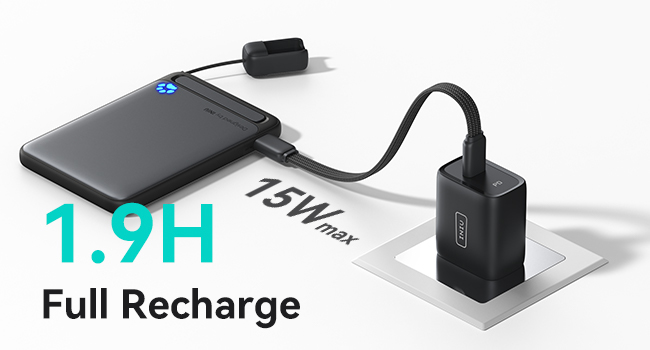
Figure 4: The INIU P71 being recharged, indicating a full recharge time of approximately 1.9 hours with a 15W max input.
5. Operating Instructions
5.1 Wireless Charging (MagSafe Compatible)
Align the INIU P71 with the back of your MagSafe-compatible iPhone (iPhone 12-17 series). The magnetic connection will secure the power bank in place, and wireless charging will begin automatically. Press the power button once to activate wireless charging if it doesn't start immediately.

Figure 5: The INIU P71 magnetically attached to an iPhone, demonstrating Qi2 15W wireless fast charging.
5.2 Wired Charging (PD 20W)
For wired charging, use the integrated USB-C GoCord or a separate USB-C cable. Connect one end to the power bank's USB-C port and the other end to your device. The power bank supports PD 20W fast charging.

Figure 6: The INIU P71 utilizing its integrated USB-C lanyard cable for PD 20W wired fast charging of an iPhone.
5.3 Using the Foldable Stand
Gently pull out the kickstand located on the back of the power bank. This allows you to prop up your iPhone vertically or horizontally for hands-free viewing while charging.

Figure 7: An iPhone supported by the INIU P71's foldable stand in horizontal orientation, ideal for media consumption.
5.4 Checking Battery Level
Press the power button once to view the current battery level indicated by the paw print LEDs. Each illuminated paw represents approximately 20% of the battery capacity.
5.5 Flashlight Function
Double-press the power button to turn the integrated flashlight on or off.
6. Safety Information
Your INIU P71 is equipped with Temp°Guard 3.0 technology for real-time temperature monitoring to optimize power allocation and ensure safe charging. Observe the following safety guidelines:
- Do not expose the device to extreme temperatures, direct sunlight, or water.
- Avoid dropping or subjecting the device to strong impacts.
- Do not attempt to disassemble, repair, or modify the device.
- Use only certified charging cables and adapters.
- Keep out of reach of children.
7. Specifications
| Feature | Detail |
|---|---|
| Model Number | P71 |
| Product Dimensions | 3.9 x 2.58 x 0.36 inches |
| Item Weight | 5.3 ounces |
| Battery Capacity | 5000 Milliamp Hours |
| Wireless Charging | Qi2 15W Fast Charging |
| Wired Charging | PD 20W Fast Charging |
| Connector Type | Output: USB Type C * 1 |
| Manufacturer | Shenzhen Topstar Industry Co.,Ltd. |
| Color | Black |
8. Troubleshooting
- Device not charging: Ensure the power bank is charged. Check cable connections and try a different cable or power adapter.
- Wireless charging not starting: Ensure your phone is MagSafe compatible and properly aligned. Press the power button once to activate wireless charging.
- Slow charging: Verify that your cable and adapter support fast charging protocols (PD for wired, Qi2 for wireless). Charging multiple devices simultaneously may reduce individual charging speeds.
- Overheating: The device has built-in temperature monitoring. If it feels excessively hot, disconnect it immediately and allow it to cool down.
9. Maintenance
- Clean the device with a soft, dry cloth. Do not use harsh chemicals or abrasive materials.
- Store the power bank in a cool, dry place away from direct sunlight and extreme temperatures.
- For optimal battery life, fully charge the power bank at least once every three months if not in regular use.
10. Warranty and Support
INIU provides an industry-leading 3-year care warranty for this product. For any quality issues or technical assistance, please contact INIU customer support. Lifetime technical support is available.
Contact information can typically be found on the INIU official website or through your purchase platform.