
1. Introduction
Thank you for choosing the Fengind Smart Saltwater Chlorinator System 6Rc. This system is designed to provide efficient and convenient chlorine generation for your above-ground pool, ensuring clean and clear water with smart Wi-Fi and app remote control capabilities. Please read this manual thoroughly before installation and operation to ensure proper use and optimal performance.

Image: Comparison of pool water before and after using the Fengind Smart Saltwater Chlorinator System, illustrating improved water clarity and cleanliness.
2. Safety Information
Always observe basic safety precautions when installing and operating this electrical equipment. Failure to do so may result in serious injury or property damage.
- Ensure the power supply is disconnected before any installation or maintenance.
- Do not operate the system if any part is damaged.
- Keep children away from the chlorinator system during operation.
- Follow all local electrical and plumbing codes.
- Maintain proper salt levels as specified in this manual to prevent damage to the unit and ensure safe operation.
3. Product Overview and Features
The Fengind Smart Saltwater Chlorinator System 6Rc integrates advanced technology for effortless pool maintenance. Key features include:
- Wi-Fi & App Remote Control: Manage chlorine intensity, running time, and automatic cleaning schedules directly from your smartphone.
- Smart Digital Panel: Provides real-time status updates and alerts.
- Low Salt Alarm: Alerts you when salt levels are insufficient for optimal performance.
- Self-Cleaning Titanium Plates: Reduces maintenance by preventing mineral buildup.
- Water Quality Monitoring: Check water temperature, salt concentration, and water flow via the app.

Image: The Fengind Smart Saltwater Chlorinator System, showcasing its compact design and integrated digital display.
4. Specifications
| Specification | Value |
|---|---|
| Model Number | 6Rc |
| Brand | Fengind |
| Product Dimensions | 25.4 x 5.08 x 7.62 cm |
| Item Weight | 1.98 Kilograms |
| Pool Capacity | Up to 8,000 Gallons |
5. Setup and Installation
Proper installation is crucial for the chlorinator's performance. Follow these steps carefully:
5.1 Verify Pipe Size
The chlorinator supports two interface sizes for connection:
- Internal Water Pipes: 48.3mm and 50mm (1.5" inner diameter)
- External Water Pipes: 32mm (1.25") or 38mm (1.5")

Image: An overhead view of an above-ground pool with the chlorinator system integrated into the filtration plumbing.
5.2 Connecting to Pool Plumbing
- Verify Pipe Size: Before installation, confirm your pool's plumbing pipe size matches the chlorinator's interfaces.
- Connect the Chlorinator: Integrate the chlorinator system into your pool's existing plumbing. Refer to the diagrams below for typical configurations.
- Pipe Cutting (if necessary): If you need to cut existing D50mm PVC pipe, the required length of the cut must be 230 mm.
- Additional Pipe (Type A): When using a Type A pipe, add a 50cm pipe (not supplied) to the filter outlet. Consider installing a valve after the chlorinator for easier maintenance.

Image: Detailed diagrams illustrating the connection of the chlorinator to internal (1.5" inner diameter) and external (1.25" or 1.5") water pipes, including a measurement for cutting D50mm PVC pipe.
5.3 Initial Salt Addition
After plumbing installation, fill the pool with water and add the appropriate amount of salt. Consult your pool's salt requirements and the chlorinator's specifications for the recommended salt concentration. Allow time for the salt to dissolve completely before operating the system.
6. Operating Instructions
The Fengind Smart Saltwater Chlorinator System offers convenient control via its digital panel and a dedicated smartphone app.
6.1 Wi-Fi App Remote Control
Connect the chlorinator to your smartphone via Wi-Fi to access advanced control features. The app allows you to:
- Set chlorine intensity levels.
- Adjust running time.
- Schedule automatic cleaning cycles.
- Receive reminder alerts for maintenance or abnormal conditions.
- Monitor water temperature, salt concentration, and water flow.

Image: A smartphone displaying the control app for the chlorinator, highlighting features such as chlorine intensity, run time, automatic cleaning, water temperature detection, salt concentration, water flow, and salt dosage control.
6.2 Digital Panel Indicators and Alerts
The chlorinator's digital panel provides important status information and alerts. Familiarize yourself with these indicators:
- F6: High Salt (>5000ppm): Indicates excessively high salt levels. To resolve, add fresh water to the pool or hold the Salt Button for 3 seconds to reset.
- F2: Low Flow (<2m³/h): Indicates insufficient water flow through the chlorinator. Check your pool's circulation system for blockages or pump issues.
- F5: Low Salt (<2500ppm): Indicates low salt levels. Add salt to the pool and hold the Salt Button for 3 seconds to reset the alert.
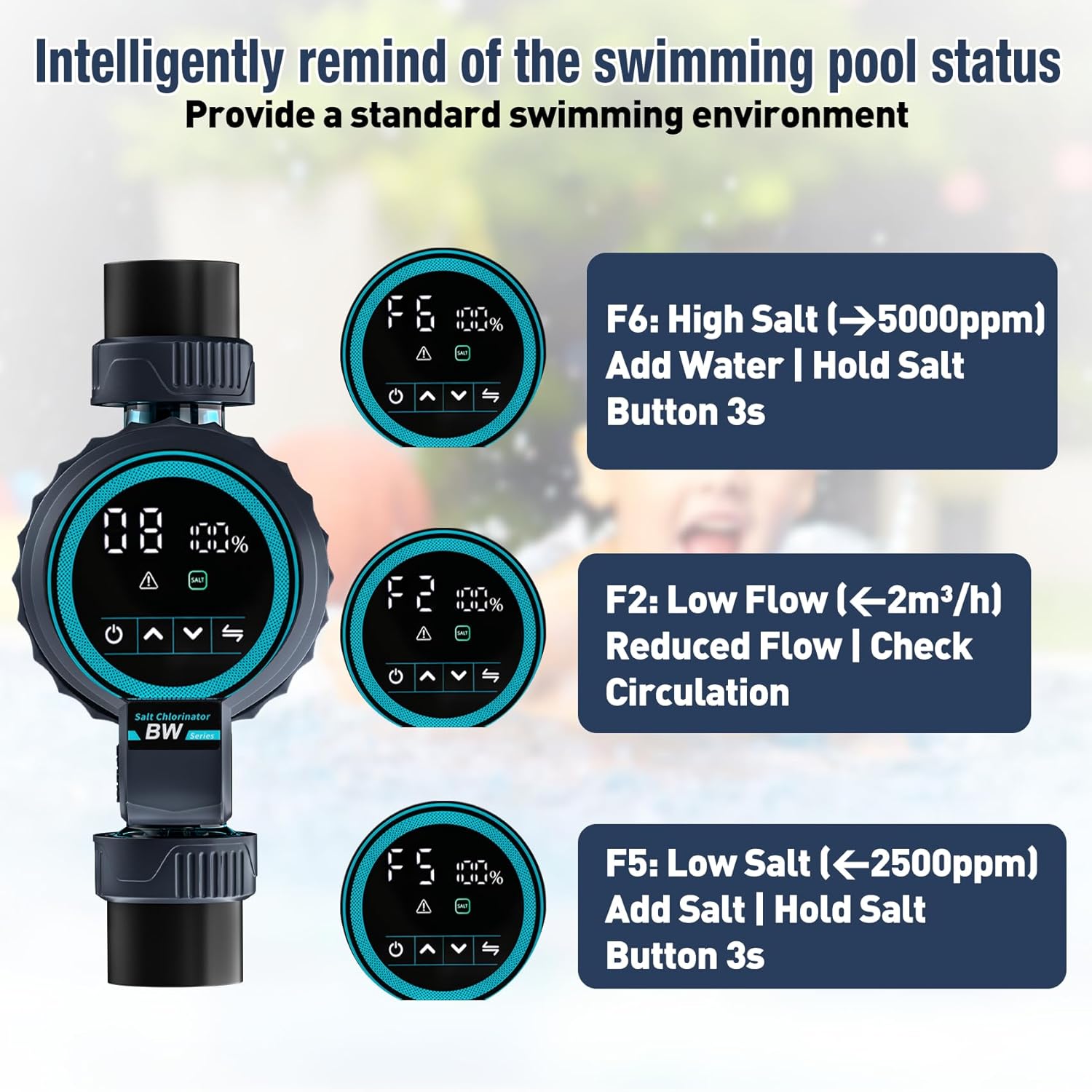
Image: The chlorinator's digital display showing various status and error codes, including F6 for high salt, F2 for low flow, and F5 for low salt, along with suggested actions.
7. Maintenance
Regular maintenance ensures the longevity and efficiency of your chlorinator system.
- Salt Level Monitoring: Regularly check salt levels using the app or a separate salt test kit. Add salt as needed to maintain optimal concentration (typically 2500-5000ppm).
- Self-Cleaning Plates: The system features self-cleaning titanium plates. Ensure these automatic cleaning cycles are enabled and functioning to prevent mineral accumulation.
- System Inspection: Periodically inspect the chlorinator and plumbing for any signs of leaks, damage, or blockages.
8. Troubleshooting
This section addresses common issues you might encounter with your chlorinator system.
8.1 Low Salt Alarm (F5)
If the system displays a 'Low Salt' alarm (F5) or the app indicates low salinity:
- Action: Add the appropriate amount of pool salt to your pool water. Allow time for the salt to dissolve.
- Reset: After adding salt, hold the Salt Button on the digital panel for 3 seconds to clear the alarm.
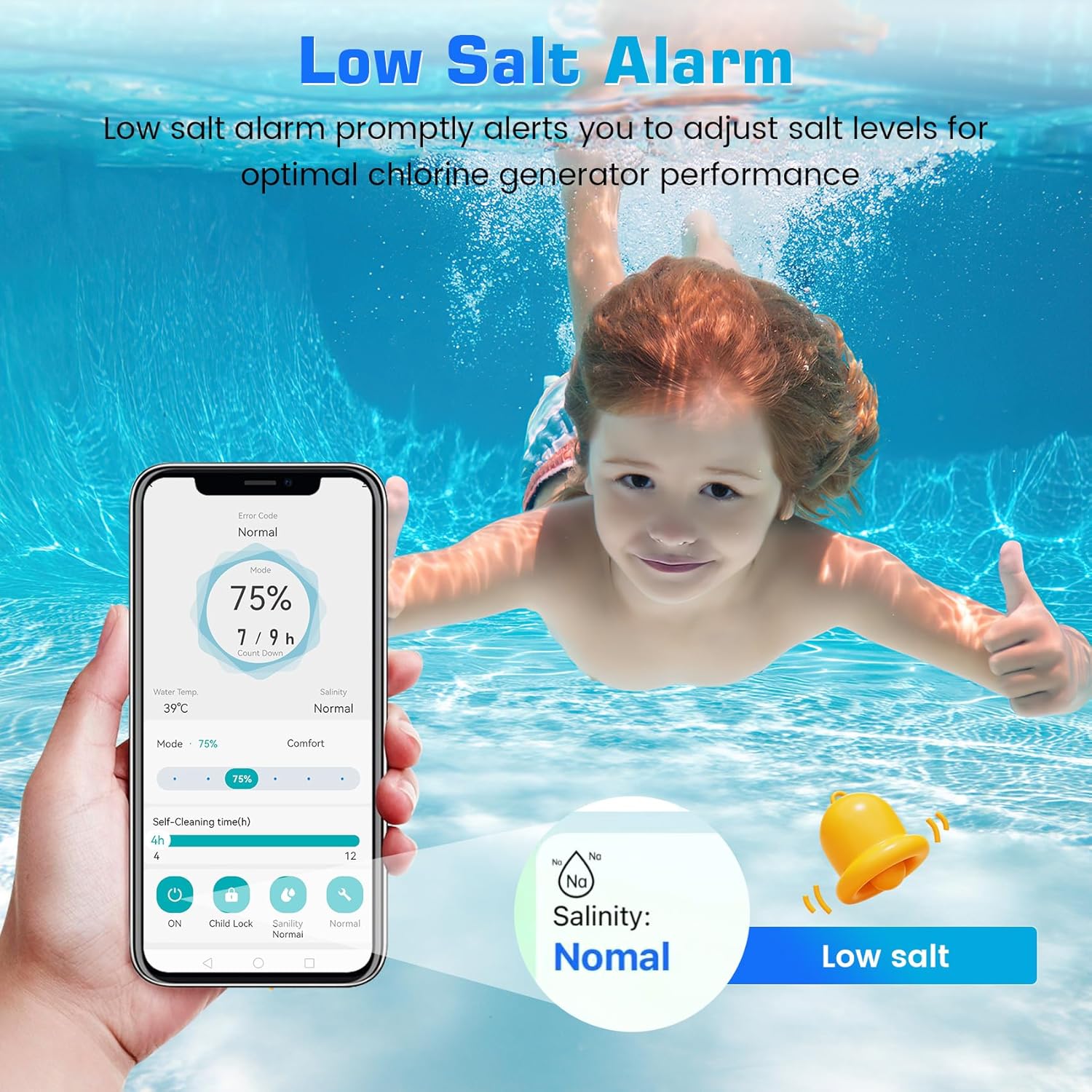
Image: A smartphone screen displaying a 'Low Salt' alarm notification from the chlorinator app, prompting the user to add salt.
8.2 High Salt Alarm (F6)
If the system displays a 'High Salt' alarm (F6):
- Action: Partially drain some pool water and refill with fresh water to dilute the salt concentration.
- Reset: Hold the Salt Button on the digital panel for 3 seconds after adjusting water levels.
8.3 Low Flow Alarm (F2)
If the system displays a 'Low Flow' alarm (F2):
- Action: Check your pool pump and filter for proper operation. Ensure there are no blockages in the plumbing lines leading to or from the chlorinator. Clean the filter if necessary.
9. Warranty and Support
Fengind is committed to providing reliable products and excellent customer service.
- Service Period: This product comes with a 3-year service period.
- Customer Support: Expect a 12-hour fast professional response for any inquiries or issues.
- User Manual: A detailed user manual is available for comprehensive guidance.

Image: Customer service team members ready to assist, highlighting the 12-hour professional response and 3-year service period.