
Introduction
Thank you for choosing the SICOTAS Rattan Nightstand. This manual provides essential information for the safe assembly, operation, and maintenance of your new nightstand. Designed for versatility and convenience, this nightstand features three spacious drawers and an integrated charging station to keep your devices powered and your essentials organized. Please read these instructions carefully before beginning assembly and retain them for future reference.
Safety Information
- Always follow the assembly instructions carefully to avoid injury.
- Keep the charging ports away from liquids to prevent electrical hazards.
- Do not overload the drawers to maintain the stability of the nightstand.
- Always supervise children when they are near the nightstand to prevent accidents.
- Ensure the nightstand is placed on a flat, stable surface.
- Do not stand or climb on the nightstand.
Product Features
- Spacious Storage: Features three generously sized drawers with rattan mesh fronts, ideal for books, electronics, clothing, and personal items.
- Integrated Charging Station: Equipped with 1 Type-C port, 2 AC outlets, and 1 USB port for convenient and efficient charging of multiple devices.
- Enhanced Safety: Charging ports are integrated into a baffle with a raised edge to protect devices from potential spills.
- Durable Construction: Built from high-quality, thick engineered wood with a light oak finish, complemented by elegant golden handles and sturdy spike feet.
- Versatile Design: Its classic design with rattan accents blends seamlessly with various decor styles, suitable for bedrooms, living rooms, or studies.
- Easy Assembly: Designed for straightforward assembly with clear instructions and numbered parts.
Package Contents
Please ensure all parts are present before beginning assembly. If any parts are missing or damaged, please contact customer support.
- Nightstand Panels (Top, Side, Bottom, Back)
- Drawer Components (Fronts with Rattan, Sides, Backs, Bottoms)
- Golden Handles
- Sturdy Spike Feet
- Charging Station Unit (1 Type-C, 2 AC, 1 USB Port)
- Assembly Hardware (Screws, Dowels, Cam Locks, etc.)
- Installation Tool (Hex Key/Screwdriver)
- Assembly Guide
Setup and Assembly Instructions
Assembly is designed to be straightforward. Follow the numbered steps in the included Assembly Guide. It is recommended to have a clear, spacious area for assembly.
- Unpack and Identify: Carefully unpack all components and compare them with the parts list in the Assembly Guide. Ensure all hardware is present.
- Assemble the Frame: Attach the side panels to the bottom panel using the provided hardware. Secure the back panel to complete the main frame.
- Install Drawer Slides: Attach the drawer slides to the inner side panels of the nightstand frame according to the guide.
- Assemble Drawers: Construct each of the three drawers by attaching the sides, back, and bottom to the rattan front panel. Install the golden handles.
- Insert Drawers: Carefully slide the assembled drawers into the installed drawer slides on the nightstand frame.
- Install Charging Station: Place the charging station unit into the designated cutout on the top panel. Secure it with the provided screws.
- Attach Feet: Screw the sturdy spike feet to the bottom of the nightstand.
- Final Placement: Position the nightstand in your desired location, ensuring it is stable and level. Plug the charging station's power cord into a wall outlet.

Figure 1: Various views of the assembled nightstand.

Figure 2: Illustrative image of nightstand components.
Operating Instructions
The integrated charging station provides convenient power access for your electronic devices.
- Power Connection: Ensure the nightstand's power cord is securely plugged into a functional wall outlet.
- Using AC Outlets: Plug standard electrical devices (e.g., lamps, alarm clocks) into the two AC outlets.
- Using USB Ports: Connect your devices (e.g., smartphones, tablets) to the USB-A or Type-C ports using appropriate charging cables.
- Safety Precaution: The raised edge around the charging ports helps protect against minor spills. However, always exercise caution and keep liquids away from the electrical components.

Figure 3: Detailed view of the integrated charging station.

Figure 4: Charging station in use, highlighting the safety baffle.
Maintenance
- Cleaning: Wipe the nightstand surfaces with a damp cloth. Avoid harsh chemicals or abrasive cleaners that could damage the finish.
- Dusting: Regularly dust the surfaces to prevent buildup.
- Drawer Care: Periodically check drawer slides for smooth operation. If drawers become stiff, a small amount of silicone lubricant can be applied to the slides.
- Electrical Safety: Ensure the power cord is not pinched or damaged. Unplug the nightstand from the wall outlet before cleaning the charging station area.
Troubleshooting
- Charging Station Not Working:
- Check if the nightstand's main power cord is securely plugged into a live wall outlet.
- Ensure the device's charging cable is properly connected to both the device and the charging port.
- Test with a different device or cable to rule out device/cable issues.
- Drawers Sticking or Not Sliding Smoothly:
- Verify that the drawer slides are correctly aligned and free from obstructions.
- Ensure the drawer is not overloaded, which can cause misalignment.
- Apply a small amount of silicone lubricant to the drawer slides if needed.
- Nightstand Wobbles:
- Ensure all assembly hardware is tightened securely.
- Check that the nightstand is placed on a level surface. Adjust the feet if necessary.
Specifications
| Feature | Detail |
|---|---|
| Brand | SICOTAS |
| Model Number | Rattan Nightstand |
| Product Dimensions (D x W x H) | 15.4" x 24.8" x 26.5" |
| Frame Material | Engineered Wood |
| Color | Reclaimed Light Oak |
| Number of Drawers | 3 |
| Charging Station | 1 Type-C port, 2 AC outlets, 1 USB port |
| Handle Material | Metal (Gold Finish) |
| Assembly Required | Yes |
| Recommended People for Assembly | 1 |
| Product Care | Wipe with Damp Cloth |
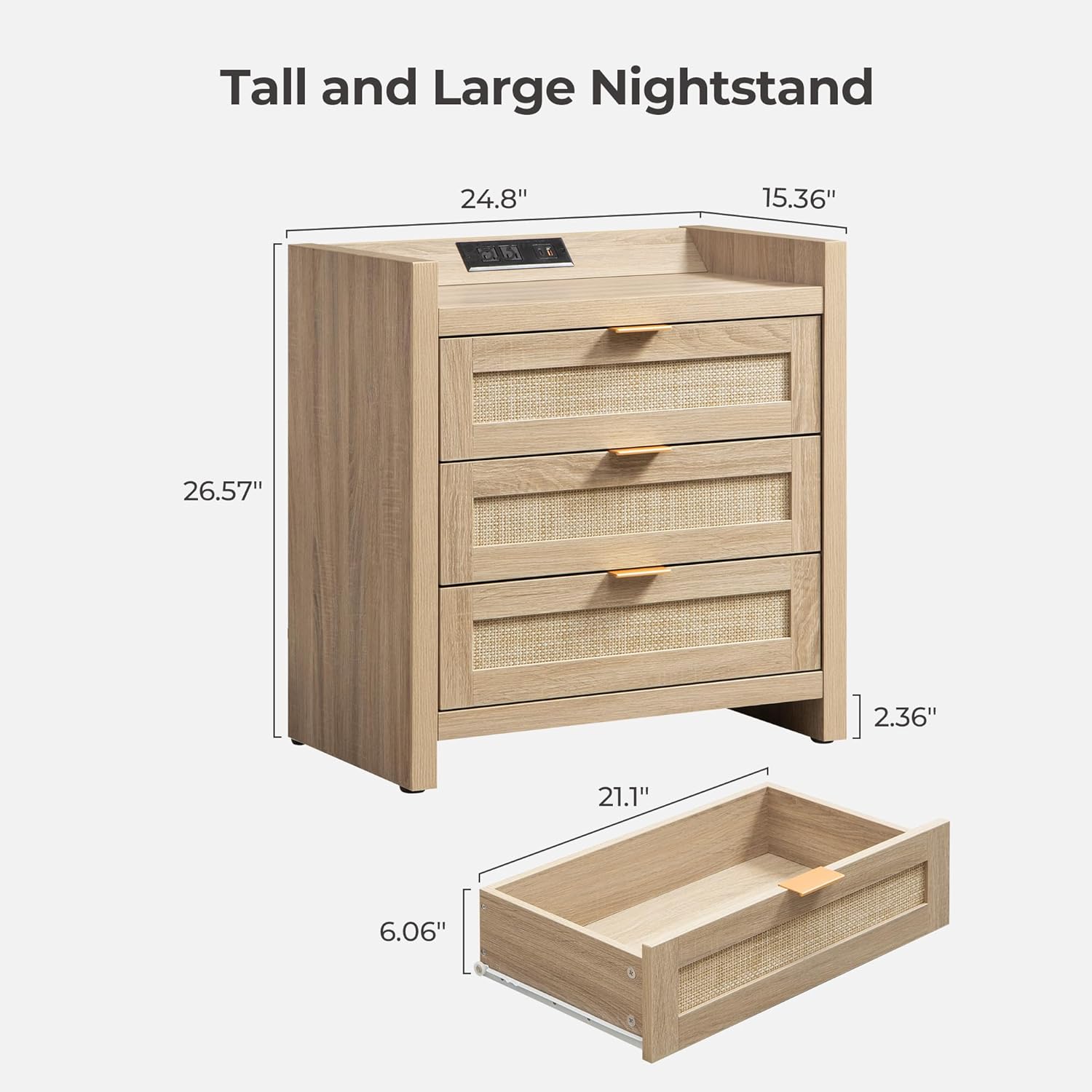
Figure 5: Product dimensions for the nightstand.
Warranty & Support
The SICOTAS Rattan Nightstand comes with a Lifetime Warranty, ensuring peace of mind regarding its quality and durability.
For any questions, missing parts, or assistance with assembly or operation, please contact SICOTAS Customer Support through the retailer's platform or visit our official website for contact information. Our team is dedicated to providing prompt and helpful service.
Visual Guide
Product Images

Figure 6: The SICOTAS Rattan Nightstand, showcasing its design and features.

Figure 7: The versatile design of the nightstand with drawers partially open.

Figure 8: A large storage drawer with its rattan mesh front.

Figure 9: Examples of the nightstand's versatile use in different rooms.

Figure 10: The nightstand serving as a side table in a study.
Official Product Videos
Video 1: Official product overview of the SICOTAS Rattan Nightstand with 3 Drawers, demonstrating its features and design.
Video 2: Another official video from SICOTAS showcasing the Nightstand with 3 Drawers, highlighting its aesthetic and functionality.
