
AstroPet ACLB-004
AstroPet 72L Self-Cleaning Cat Litter Tray
Model: ACLB-004
Introduction
The AstroPet 72L Self-Cleaning Cat Litter Tray offers an advanced solution for pet owners seeking convenience and hygiene. This intelligent litter tray features automatic cleaning, app control, and UV sterilization, designed to provide a clean and comfortable environment for your cat while simplifying maintenance for you.

Figure 1: The AstroPet 72L Self-Cleaning Cat Litter Tray, showcasing its modern design, a cat comfortably inside, and the accompanying mobile application for smart control.
Safety Information
Your cat's safety is paramount. The AstroPet litter tray is equipped with a multi-layer safety system to prevent accidents and ensure secure operation.
- Rear Waste Bin Design: Eliminates the risk of your cat getting trapped or injured during operation.
- Infrared Sensors: Located at the entrance, these sensors detect your cat's presence and pause cleaning cycles immediately.
- Weight Sensors: Integrated into the base, these sensors provide additional protection by detecting your cat's weight and stopping the unit if a cat is inside during a cleaning cycle.

Figure 2: Illustration of the safety sensors in action, showing a cat approaching the entrance and the detection area.
Setup Guide
1. Unboxing and Assembly
Carefully remove all components from the packaging. The AstroPet litter tray is designed for easy assembly and disassembly for cleaning.
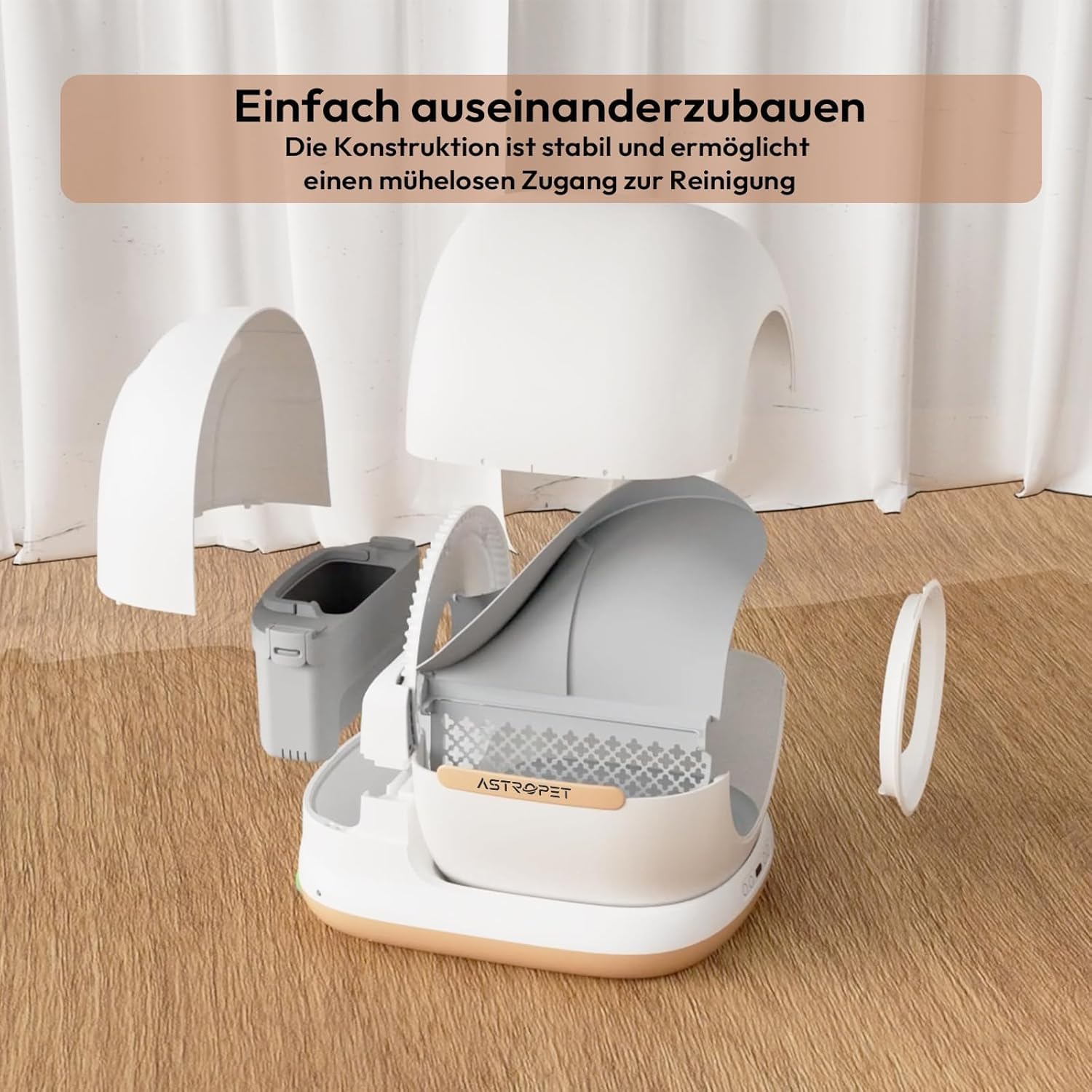
Figure 3: The modular design of the litter tray, illustrating how easily it can be taken apart for assembly or thorough cleaning.
2. Placement
Place the litter tray on a flat, stable surface. For optimal app control and connectivity, ensure the unit is within a reasonable range of your Wi-Fi router. While the unit can operate without constant Wi-Fi, app-based features require a stable connection.
3. Filling with Litter
The AstroPet Neptune range is compatible with almost all types of clumping cat litter. Fill the inner drum with your preferred cat litter up to the indicated fill line. Ensure the litter is evenly distributed.
4. Power Connection
Connect the power adapter to the litter tray and plug it into a standard electrical outlet. The unit will power on and perform an initial self-check.
Operating Instructions
1. Initial Use
After setup, your cat can begin using the litter tray. The unit will automatically detect when your cat has used it and initiate a cleaning cycle after a set delay (configurable via the app).
2. Intelligent App Control
Download the AstroPet app from your smartphone's app store. Follow the in-app instructions to connect your litter tray. The app provides comprehensive control and monitoring features:
- Real-time Insights: Monitor your cat's usage behavior, including frequency and duration.
- Notifications: Receive alerts when the waste bin is full or for other important status updates.
- Automatic Cleaning Settings: Adjust the delay before cleaning cycles begin.
- Scheduled Sterilization: Set specific times for the UV sterilization to activate.
- Manual Control: Initiate cleaning or sterilization cycles directly from the app.

Figure 4: The AstroPet mobile application interface, demonstrating its intuitive design for managing the litter tray's functions.
3. Manual Button Control
In addition to app control, the unit features physical buttons for basic operations:
- Clean Button: Press to initiate a manual cleaning cycle.
- Smooth Litter Button: Use this button after refilling litter to ensure proper distribution and weight calibration.
- Sterilization Button: Activate UV sterilization manually.
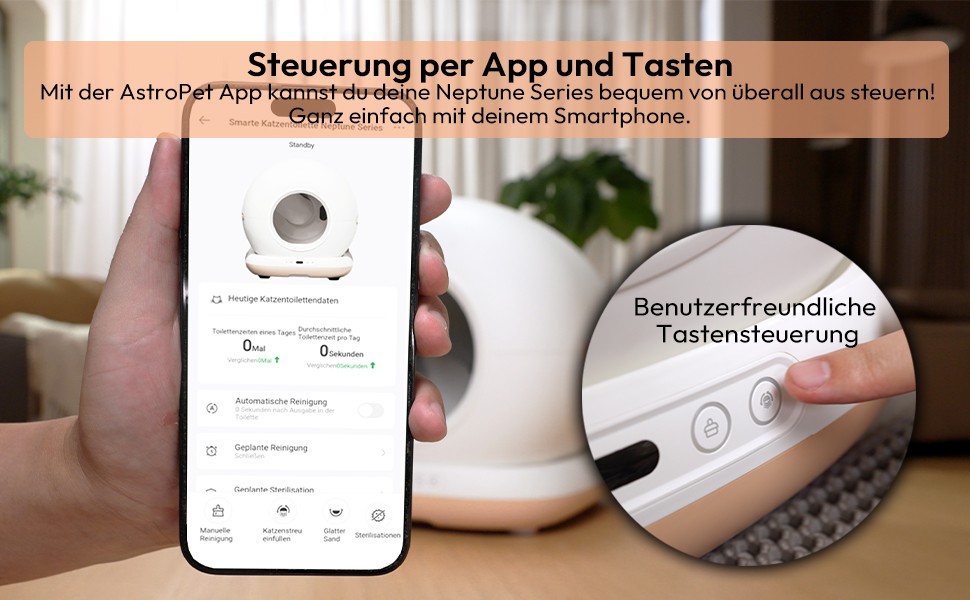
Figure 5: The physical control buttons on the unit, offering an alternative to app control for essential functions.
4. UV Sterilization
The built-in UV sterilizer helps maintain a hygienic environment by reducing bacteria and odors. This feature can be activated manually or scheduled via the app.

Figure 6: Visual representation of the odor neutralization and UV sterilization technology in operation.
Maintenance
1. Emptying the Waste Bin
The 7-liter waste bin can hold a single cat's waste for up to 7 days. The app will notify you when the bin is full. To empty, simply remove the waste bin from the unit, dispose of the contents, and reinsert it.
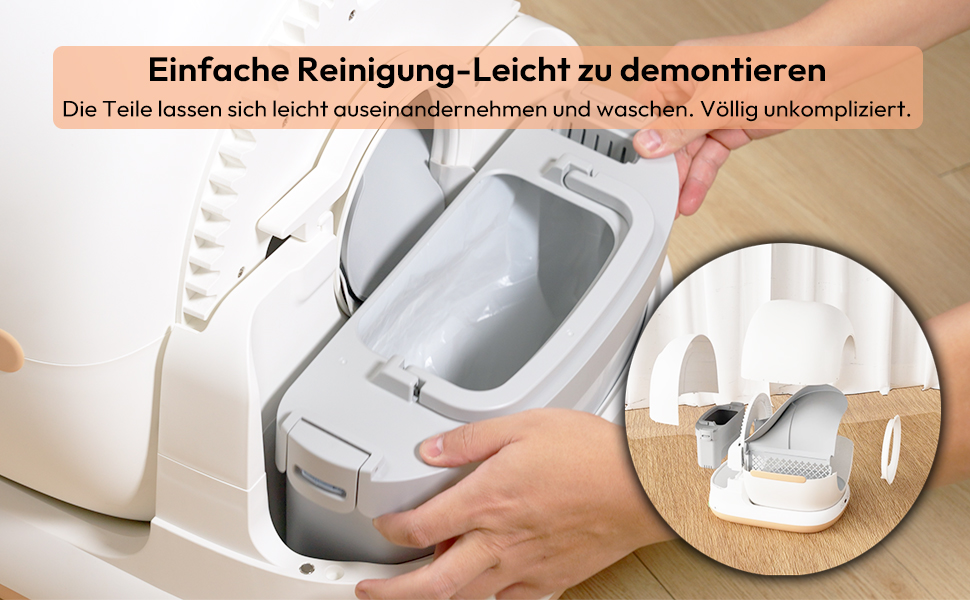
Figure 7: Demonstrating the simple process of removing the waste bin for emptying.
2. Deep Cleaning
For thorough cleaning, the unit can be easily disassembled. Refer to Figure 3 in the Setup Guide for a visual representation of the components. Clean all parts with mild soap and water, then dry thoroughly before reassembly. Do not immerse the main electronic unit in water.
3. Litter Refill
Regularly check the litter level and refill as needed. After refilling, it is recommended to use the "Smooth Litter" function (via app or physical button) to ensure proper weight calibration and optimal performance.
Troubleshooting
| Problem | Possible Cause | Solution |
|---|---|---|
| Wi-Fi Connectivity Issues | Unit is too far from the router; weak signal. | Move the unit closer to the Wi-Fi router or consider a Wi-Fi extender. Ensure your router is on a 2.4GHz network, as some smart devices do not support 5GHz. |
| Inaccurate Weight Measurement | Improper litter distribution; unit not calibrated after litter refill. | Ensure litter is filled according to instructions. After refilling, press the "Smooth Litter" button (or use the app function) to recalibrate the weight sensors. |
| Persistent Odor | Waste bin full; insufficient cleaning; type of litter used; waste sticking to drum. | Empty the waste bin regularly. Ensure the UV sterilization is active. Perform a deep clean of the unit. Consider trying a different type of clumping litter. Ensure waste is not sticking to the drum; if so, clean immediately. |
| Cleaning Cycle Not Starting | Cat still inside; safety sensors activated; power issue. | Ensure no cat is inside or near the entrance. Check power connection. If issues persist, consult the app for error codes or contact support. |
Specifications
| Brand | AstroPet |
| Model Number | ACLB-004 |
| Product Dimensions | 59.5 x 53 x 57.3 cm (L x W x H) |
| Item Weight | 8 kg |
| Inner Drum Capacity | 72 Liters |
| Waste Container Capacity | 7 Liters |
| Recommended Cat Weight | 1-8 kg (recommended for cats older than 6 months) |
| Special Features | UV Sterilization, App Control, Extra Large Capacity, Multiple Safety Protection |
| Litter Compatibility | Compatible with almost all types of clumping cat litter |
Warranty and Support
Specific warranty information for the AstroPet 72L Self-Cleaning Cat Litter Tray is not available in this manual. Please refer to the product packaging, the manufacturer's official website, or your point of purchase for detailed warranty terms and conditions.
For technical support, troubleshooting assistance beyond this guide, or to inquire about replacement parts, please contact AstroPet customer service through their official channels. Contact information is typically found on the product packaging or the manufacturer's website.
Official Product Videos
No official product videos from the seller were provided in the product data. Please check the product listing page or the manufacturer's website for any available video demonstrations or guides.
Related documentsACLB-004

Ask a question about this manual
Ask about setup, troubleshooting, compatibility, parts, safety, or missing instructions. Manuals+ will review the question and use this page’s manual context to help answer it.