1. Introduction
The FirstPower Pro 10X3 is a 3-bank, 30A (10A per bank) smart marine battery charger designed for charging and maintaining 12-volt lead-acid and lithium-ion batteries. This includes flooded, gel, AGM, lithium (LiFePO4), calcium, and deep-cycle batteries. Each bank provides up to 10 amps of charging power and functions as a battery maintainer and desulfator. This manual provides essential information for the safe and effective operation of your charger.

Image: The FirstPower Pro 10X3 Marine Charger, a compact and rugged unit with three independent charging banks.
2. Important Safety Information
Read all instructions and safety warnings before using this product. Failure to follow these instructions may result in electric shock, fire, or serious injury.
- Electrical Safety: Always connect the charger to a grounded outlet. Do not expose the charger to rain or wet conditions. Do not operate the charger if it has received a sharp blow, been dropped, or otherwise damaged.
- Battery Safety: Batteries can generate explosive gases. Ensure adequate ventilation when charging. Avoid open flames or sparks near batteries. Wear eye protection and protective clothing when working with batteries.
- Connection: Ensure correct polarity when connecting to batteries. Connect the positive (+) charger clamp to the positive (+) battery terminal and the negative (-) charger clamp to the negative (-) battery terminal.
- Children: Keep the charger and batteries out of reach of children.
- Maintenance: Do not attempt to disassemble or repair the charger. Refer all servicing to qualified personnel.
3. Package Contents
Verify that all items listed below are included in your package:
- 1x FirstPower Pro 10X3 30A (10A/Bank) IP68 Waterproof Onboard Marine Battery Charger (120-240VAC)
- 3x Battery clips
- 3x Battery connectors
- 3x Spare fuses
- 4x Screws
- 1x Portable Bag
- 1x User Manual

Image: A visual representation of the FirstPower Pro 10X3 charger and its included accessories, such as battery clips, connectors, fuses, screws, and a portable bag.
4. Product Features
The FirstPower Pro 10X3 charger offers advanced features for reliable battery charging and maintenance:
- 3-Bank, 10A Per Bank: Charges and maintains up to three 12V batteries simultaneously.
- Multi-Battery Compatibility: Supports SLA/AGM, Lithium (LiFePO4), and Calcium 12V batteries.
- IP68 Waterproof: Fully-sealed design for use in marine and harsh environments, rated to withstand hours underwater.
- Force Mode: Allows manual initiation of charging for batteries with voltage below 1V.
- Auto Repair Mode: Automatically detects and repairs old, idle, damaged, stratified, or sulfated 12V batteries.
- Advanced Diagnostics: Provides indicators for Over Voltage, Bad Battery, Over Temperature, and Reverse Connection.
- Precision Charging: Integrated thermal sensor adjusts charging based on ambient temperature to prevent over-charging or under-charging.
- 5-Grid Power Display: Indicates charge level at 20%, 40%, 60%, 80%, and 100%.

Image: An overview of the FirstPower Pro 10X3 charger highlighting its 3-bank, 10A per bank capability, and its ability to charge and maintain three 12V batteries simultaneously in all-season, all-weather conditions without overcharging.
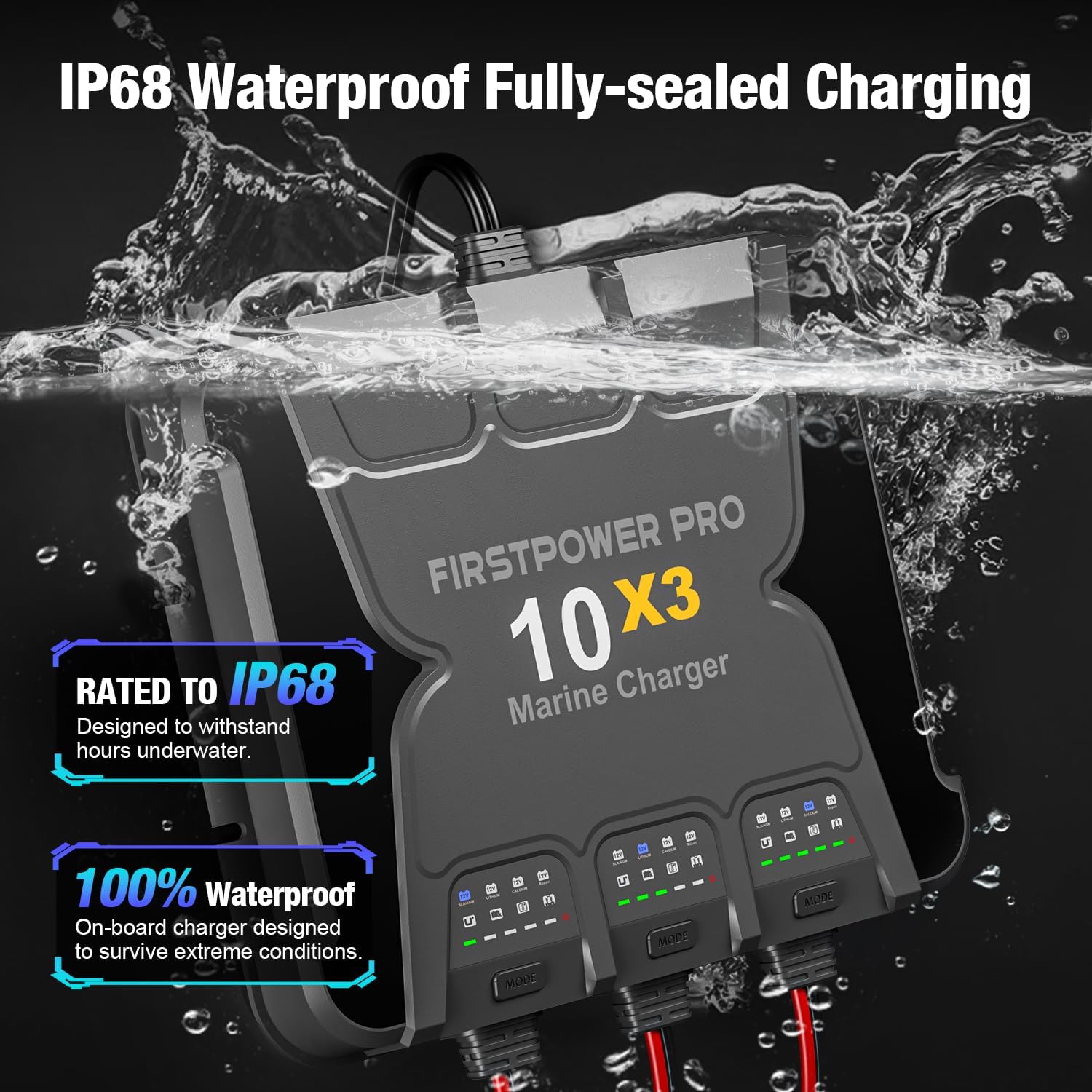
Image: The FirstPower Pro 10X3 charger submerged in water, illustrating its IP68 waterproof rating, designed to withstand hours underwater and survive extreme conditions.
5. Setup and Installation
The FirstPower Pro 10X3 is an onboard charger designed for permanent installation. Ensure the mounting location is secure, well-ventilated, and allows for cable routing.
- Mounting: Use the provided screws to securely mount the charger in a suitable location on your boat or vehicle.
- Battery Connection: Connect the output cables from each bank to its respective 12V battery. Ensure correct polarity: red to positive (+), black to negative (-). You can use the provided battery clips or permanent battery connectors.
- AC Power Connection: Plug the charger's input cable into a standard 120-240VAC grounded electrical outlet.

Image: The FirstPower Pro 10X3 charger installed in a boat, demonstrating its suitability for humid, high-salt environments and its ability to charge 12V boat and vehicle batteries (30-300Ah) while stored.
6. Operating Instructions
Once properly installed and connected, the charger will begin its operation. Each bank operates independently.
6.1. Selecting Charging Modes
The charger supports three distinct charging modes. Each bank can independently select its mode.
- 12V SLA/AGM: For 12V wet cell, gel, enhanced flooded, maintenance-free, and AGM batteries.
- 12V LITHIUM: For 12V lithium-ion (LiFePO4) batteries.
- 12V CALCIUM: For 12V calcium batteries.
To select a mode for a specific bank, press the "MODE" button located below that bank's indicator lights. The charger will automatically return to the last selected mode for each bank upon subsequent power-ups.

Image: The FirstPower Pro 10X3 charger displaying its three charging modes: 12V SLA/AGM, 12V LITHIUM, and 12V CALCIUM. Each mode is selected via a dedicated 'MODE' button for each bank.
6.2. Force Mode (Charging Dead Batteries)
If a battery's voltage is extremely low (below 1V), the charger may not automatically detect it. To manually initiate charging for such a battery:
- Connect the charger to the dead battery.
- Press and hold the "MODE" button for the corresponding bank for 5 seconds. This will force the charger to begin charging.

Image: The FirstPower Pro 10X3 charger demonstrating its 'Force Mode' feature, which allows users to manually initiate charging for batteries detected down to 0-Volt by pressing and holding the 'MODE' button.
6.3. Auto Repair Mode
The charger features an automatic repair function for 12V batteries that are old, idle, damaged, stratified, or sulfated. When the "12V Repair" light is illuminated, the charger is automatically performing a repair cycle. No manual operation is required for this mode.

Image: The FirstPower Pro 10X3 charger illustrating its 'Auto Repair Mode' for 12V SLA/AGM, Lithium, and Calcium batteries, indicated by a green 'Repair' light.
6.4. Power Display
The charger features a 5-grid power display for each bank, indicating the approximate charge level of the connected battery:
- One light: 0-20%
- Two lights: 20-40%
- Three lights: 40-60%
- Four lights: 60-80%
- Five lights: 80-100% (Fully Charged)
7. Maintenance
Proper maintenance ensures the longevity and optimal performance of your charger.
- Cleaning: Disconnect the charger from AC power and batteries before cleaning. Use a dry cloth to wipe the exterior. Do not use harsh chemicals or abrasives.
- Inspection: Regularly inspect the charger, cables, and connectors for any signs of damage, wear, or corrosion. Replace damaged components immediately.
- Storage: When not in use, store the charger in a cool, dry place.
8. Troubleshooting and Advanced Diagnostics
The FirstPower Pro 10X3 includes advanced diagnostic indicators to help identify potential issues:
- Over Voltage: If the Over Voltage indicator illuminates, check if the battery is 12V and if the correct charging mode is selected.
- Bad Battery: If the Bad Battery indicator illuminates, the battery may be shorted or not charging. Have the battery checked by a professional.
- Over Temperature: The charger will stop charging if its internal temperature reaches 100°C. Charging will automatically restart once the unit cools down naturally.
- Reverse Connection: If the Reverse Connection indicator illuminates, the positive and negative polarity of the battery clip are reversed. Correct the connection: Red (+) to positive, Black (-) to negative.
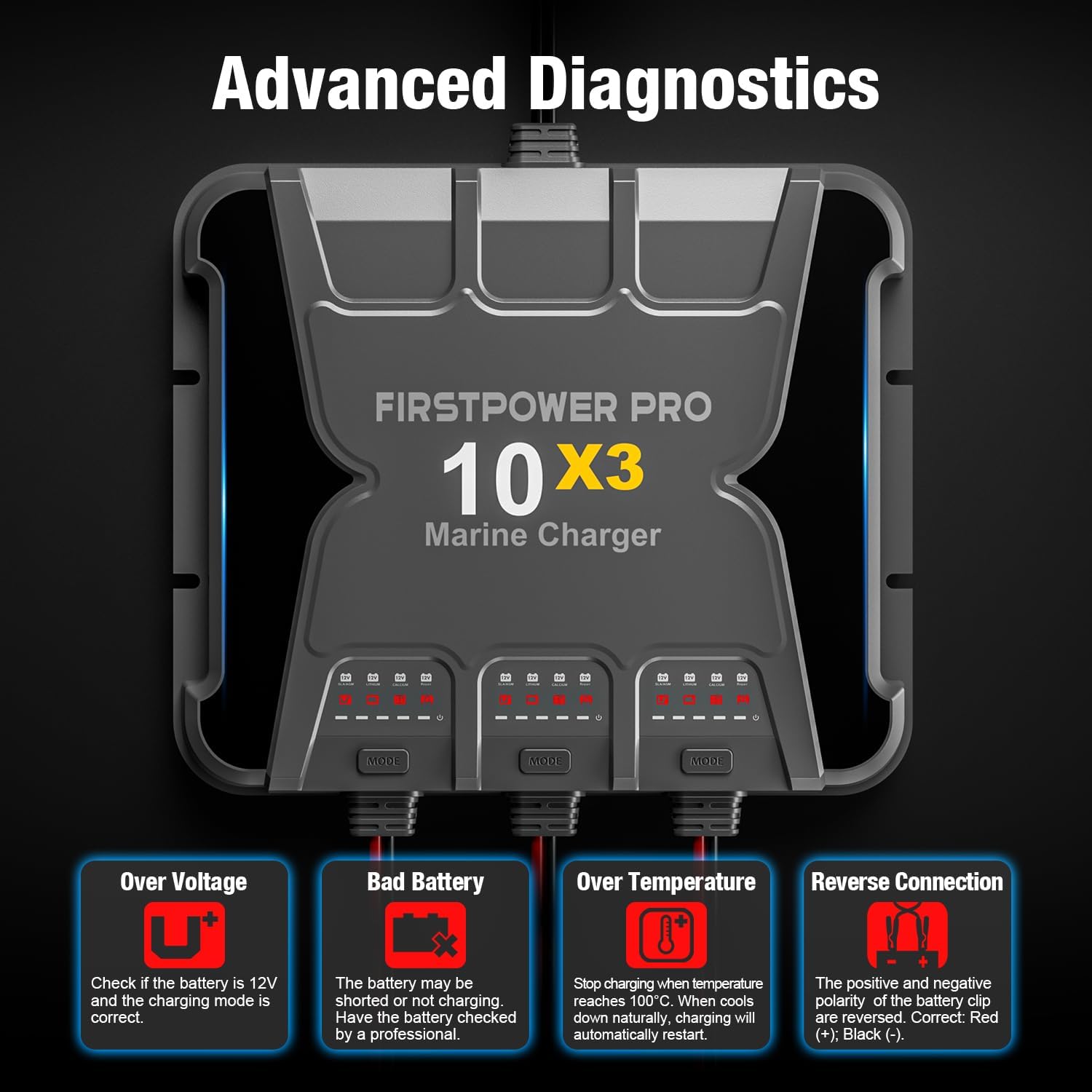
Image: The FirstPower Pro 10X3 charger's display showing indicators for Advanced Diagnostics, including Over Voltage, Bad Battery, Over Temperature, and Reverse Connection, with explanations for each.
9. Specifications
| Brand | FirstPower Pro |
| Model Number | 10X3 30A |
| Input Voltage | 120-240 Volts (AC) |
| Output Voltage | 12 Volts |
| Current Rating | 30 Amps (10A per bank) |
| Product Dimensions | 37.59 x 32.26 x 14.73 cm |
| Weight | 5.24 kg |
| Waterproof Rating | IP68 |
| Supported Battery Types | SLA/AGM, Lithium (LiFePO4), Calcium |
10. Warranty and Support
The FirstPower Pro 10X3 Marine Battery Charger comes with a 3-year warranty from the date of purchase. This warranty covers defects in materials and workmanship under normal use.
For warranty claims, technical support, or any questions regarding your product, please refer to the contact information provided with your purchase documentation or visit the official FirstPower Pro website.


