
HETP HX160Q2
HETP Wireless Power Bank User Manual
Model: HX160Q2
Introduction
Thank you for choosing the HETP Wireless Power Bank. This 40800mAh portable charger is designed to provide versatile and efficient power for your electronic devices. Featuring 7-in-1 charging capabilities, including built-in cables, multiple output ports, and wireless charging, it ensures your devices remain powered on the go. Please read this manual carefully before use to ensure proper operation and maintenance.

Image: Front view of the HETP Wireless Power Bank, displaying its LCD screen with 100% charge and the wireless charging pad. The side shows the built-in cables.
Product Features
- High Capacity: 40800mAh premium Li-polymer battery for multiple device charges.
- 7-in-1 Charging: Simultaneously charge up to 7 devices.
- Built-in Cables: Includes iOS, USB-C, and Micro USB cables for convenience.
- Multiple Output Ports: Two USB-A ports and one USB-C port.
- Wireless Charging: 15W wireless charging compatible with all wireless-enabled devices.
- Fast Charging: 25W PD 3.0 and QC 4.0 fast charging technology.
- LCD Display: Clear digital display showing battery percentage.
- Safety Features: Multi-security protection for safe charging.

Image: Diagram illustrating the wide compatibility of the power bank with various electronic devices, including smartphones, tablets, smartwatches, and earbuds.
Package Contents
- 1 x HETP Wireless Portable Charger Power Bank (40800mAh)
- 1 x Product Instruction Manual (this document)
Safety Precautions
- Do not expose the power bank to extreme temperatures (hot or cold), direct sunlight, or fire.
- Do not disassemble, modify, or repair the device yourself.
- Keep away from water and other liquids.
- Avoid dropping or subjecting the power bank to strong impacts.
- Store in a cool, dry place when not in use.
- Keep out of reach of children.
Setup and Initial Use
Charging the Power Bank
Before first use, fully charge the power bank. The LCD display will show the charging progress and battery percentage.
- Using the Built-in USB-C Cable: Connect the built-in USB-C cable from the power bank to a USB wall adapter (not included).
- Using the USB-C Input Port: Connect a USB-C cable (not included) from a USB wall adapter to the USB-C input port on the power bank.
The LCD screen will illuminate and display the charging percentage. Once it reaches 100%, the power bank is fully charged.

Image: Illustration demonstrating two methods to recharge the power bank: via its integrated USB-C cable or by connecting an external USB-C cable to the dedicated input port.
Operating Instructions
Charging Devices
The HETP Wireless Power Bank offers multiple ways to charge your devices simultaneously.
1. Wired Charging (Using Built-in Cables)
- Pull out the appropriate built-in cable (iOS, USB-C, or Micro USB) from its slot.
- Connect the cable to your device's charging port.
- The power bank will automatically begin charging your device. The LCD display will show "OUT" indicating output.
2. Wired Charging (Using Output Ports)
- Use your device's original charging cable or a compatible cable.
- Connect one end of the cable to one of the power bank's output ports (USB-A1, USB-A2, or USB-C).
- Connect the other end to your device.
- Charging will commence automatically.
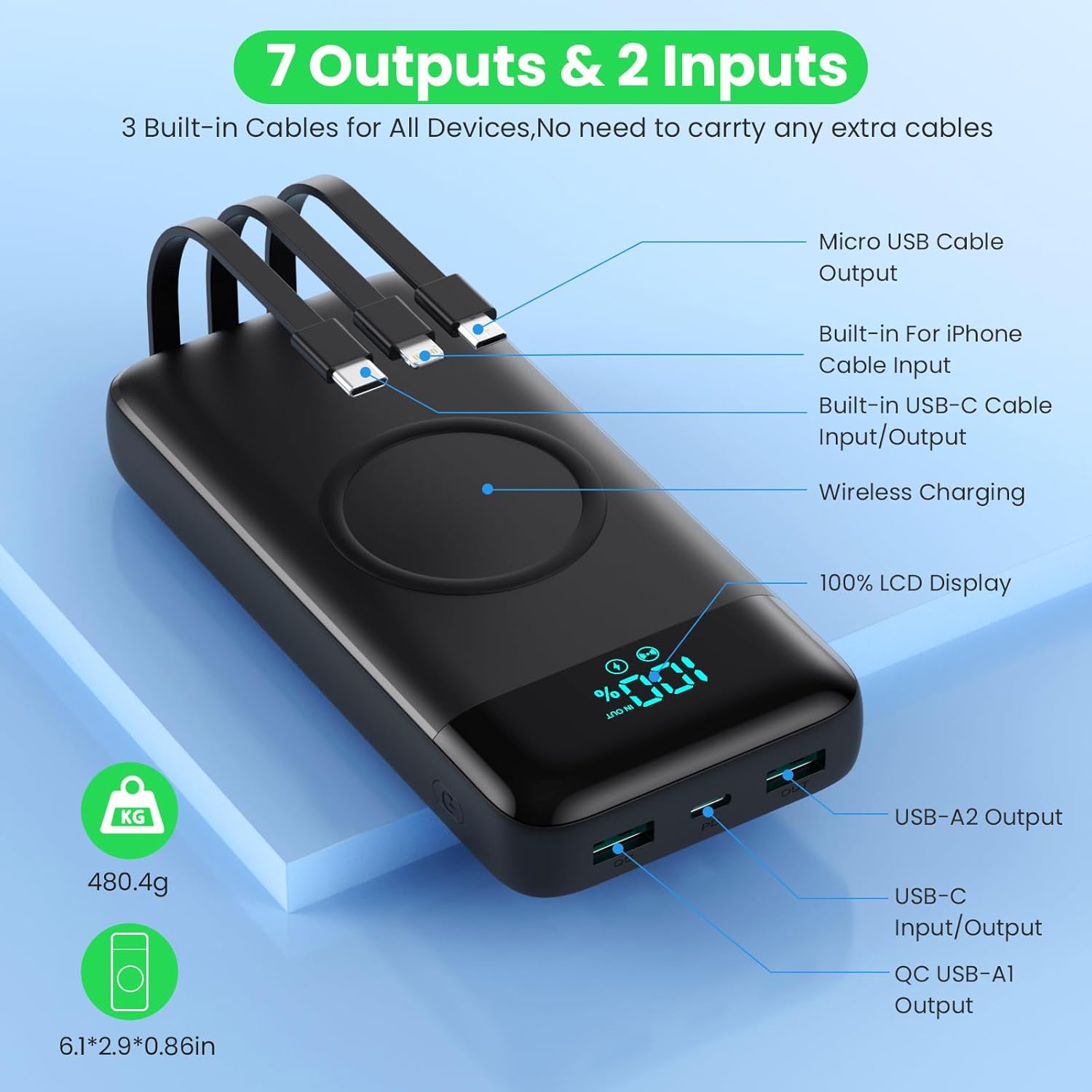
Image: Detailed diagram highlighting all 7 output options (3 built-in cables, 3 USB ports, 1 wireless) and 2 input options (built-in USB-C cable, USB-C port) on the power bank, along with the LCD display.
3. Wireless Charging
- Ensure your device supports wireless charging.
- Place your wireless-enabled device directly onto the wireless charging pad located on the top surface of the power bank.
- Align the device centrally on the pad for optimal charging.
- The power bank will automatically detect and begin wireless charging.

Image: A smartphone being wirelessly charged on the power bank, illustrating the fast wireless charging feature and supported wattages.
Simultaneous Charging
The HETP Wireless Power Bank is designed to charge multiple devices concurrently using a combination of its built-in cables, output ports, and wireless charging pad.

Image: An overhead view showing the power bank simultaneously charging a tablet, multiple smartphones, and a smartwatch using its various charging methods.
Maintenance
- Cleaning: Use a soft, dry cloth to clean the surface of the power bank. Do not use abrasive cleaners or solvents.
- Storage: If storing for an extended period, charge the power bank to approximately 50-70% capacity. Recharge every 3-6 months to maintain battery health.
- Cable Care: When retracting built-in cables, do so gently to avoid damage.
Troubleshooting
| Problem | Possible Cause | Solution |
|---|---|---|
| Power bank not charging | Charging cable or adapter faulty; power bank fully discharged; input port issue. | Try a different charging cable and wall adapter. Ensure the power bank is connected correctly. Allow a few minutes for the LCD to activate if fully discharged. |
| Device not charging from power bank | Power bank low on charge; device cable faulty; device not compatible; incorrect port used; wireless charging misalignment. | Check power bank's charge level. Try a different cable. Ensure device is compatible. For wireless charging, reposition device on the pad. |
| Slow charging | Cable not supporting fast charging; device not supporting fast charging; multiple devices charging simultaneously. | Use a fast-charging compatible cable. Ensure your device supports fast charging. Charging multiple devices may reduce individual charging speeds. |
| LCD display not working | Power bank off; internal issue. | Press the power button to activate the display. If problem persists, contact customer support. |
Specifications
| Feature | Detail |
|---|---|
| Model Number | HX160Q2 |
| Battery Capacity | 40800mAh |
| Battery Type | Li-polymer |
| Product Dimensions | 10.58 x 6.78 x 1.31 cm |
| Item Weight | 100 g |
| Input (USB-C) | 25W PD Fast Charging |
| Output (USB-C) | 25W PD Fast Charging |
| Output (USB-A) | QC 4.0 Fast Charging |
| Wireless Output | 15W (5W, 7.5W, 10W, 15W compatible) |
| Built-in Cables | iOS, USB-C, Micro USB |
| Display | LCD Digital Display |
| Color | Black |
Warranty and Support
Each HETP product is safety certified. If you encounter any problems or have questions regarding your Wireless Power Bank, please do not hesitate to contact our customer support team. We are committed to providing professional after-sales service and satisfactory solutions within 12 hours.
Please refer to your purchase documentation for specific warranty terms and contact information.
Related documentsHX160Q2

Ask a question about this manual
Ask about setup, troubleshooting, compatibility, parts, safety, or missing instructions. Manuals+ will review the question and use this page’s manual context to help answer it.