
1. Introduction
Thank you for choosing the AMZCHEF Coffee Grinder Electric. This manual provides essential information for the safe and efficient operation, maintenance, and troubleshooting of your new coffee grinder. Please read this manual thoroughly before first use and retain it for future reference.
2. Important Safety Information
To reduce the risk of fire, electric shock, or injury, basic safety precautions should always be followed, including:
- Read all instructions before operating the appliance.
- Do not immerse the motor base in water or other liquids.
- Unplug from outlet when not in use, before putting on or taking off parts, and before cleaning.
- Avoid contact with moving parts.
- Do not operate any appliance with a damaged cord or plug, or after the appliance malfunctions or has been dropped or damaged in any manner.
- The use of attachments not recommended or sold by the manufacturer may cause fire, electric shock, or injury.
- Do not use outdoors.
- Do not let cord hang over edge of table or counter, or touch hot surfaces.
- Do not place on or near a hot gas or electric burner, or in a heated oven.
- Always attach plug to appliance first, then plug cord into the wall outlet. To disconnect, turn any control to 'off', then remove plug from wall outlet.
- This appliance is for household use only.
- Ensure the bean hopper lid and grounds container are properly in place before operating.
3. Product Overview
The AMZCHEF BG709S Electric Coffee Grinder is designed for precise and consistent coffee grinding, featuring a conical burr system and digital controls.

This image displays the complete AMZCHEF BG709S Electric Coffee Grinder, showcasing its main components: the transparent bean hopper at the top, the digital control panel, the grounds container below, and an attached portafilter holder for direct grinding.
Components:
- Bean Hopper (300g capacity)
- Bean Hopper Lid
- Upper Burr
- Grind Setting Dial
- Digital Display
- Control Buttons (SET, +, -, Start/Stop)
- Grinds Outlet
- Grounds Container
- Portafilter Holder (removable)
- Cleaning Brush
4. Setup and Assembly
Before first use, ensure all packaging materials are removed and clean all removable parts according to the cleaning instructions.
- Place the grinder on a stable, flat, and dry surface.
- Ensure the upper burr is correctly seated in the grinding chamber.
- Place the bean hopper onto the grinder base, aligning the arrows, and twist clockwise until it locks into place.
- Insert the grounds container into its designated slot beneath the grinds outlet. Alternatively, attach the portafilter holder if grinding directly into a portafilter.
- Plug the power cord into a standard 120V electrical outlet.
5. Operating Instructions
5.1. Grind Settings
The grinder offers 30 precise grind settings, allowing you to customize the coarseness for various brewing methods. Rotate the bean hopper to adjust the grind setting.

This image illustrates the 30 precise grind settings available on the AMZCHEF BG709S coffee grinder. A dial indicates settings ranging from 'COARSE' (30) to 'FINE' (1), with examples of ground coffee textures suitable for French Press (coarse), Drip Coffee (medium), and Espresso (fine) shown below.
- Fine (Settings 1-10): Ideal for Espresso machines.
- Medium (Settings 11-20): Suitable for Drip Coffee makers and Pour Over.
- Coarse (Settings 21-30): Best for French Press and Cold Brew.
5.2. Digital Display and Controls
The digital display and four-button interface provide intuitive control over grinding time or quantity.
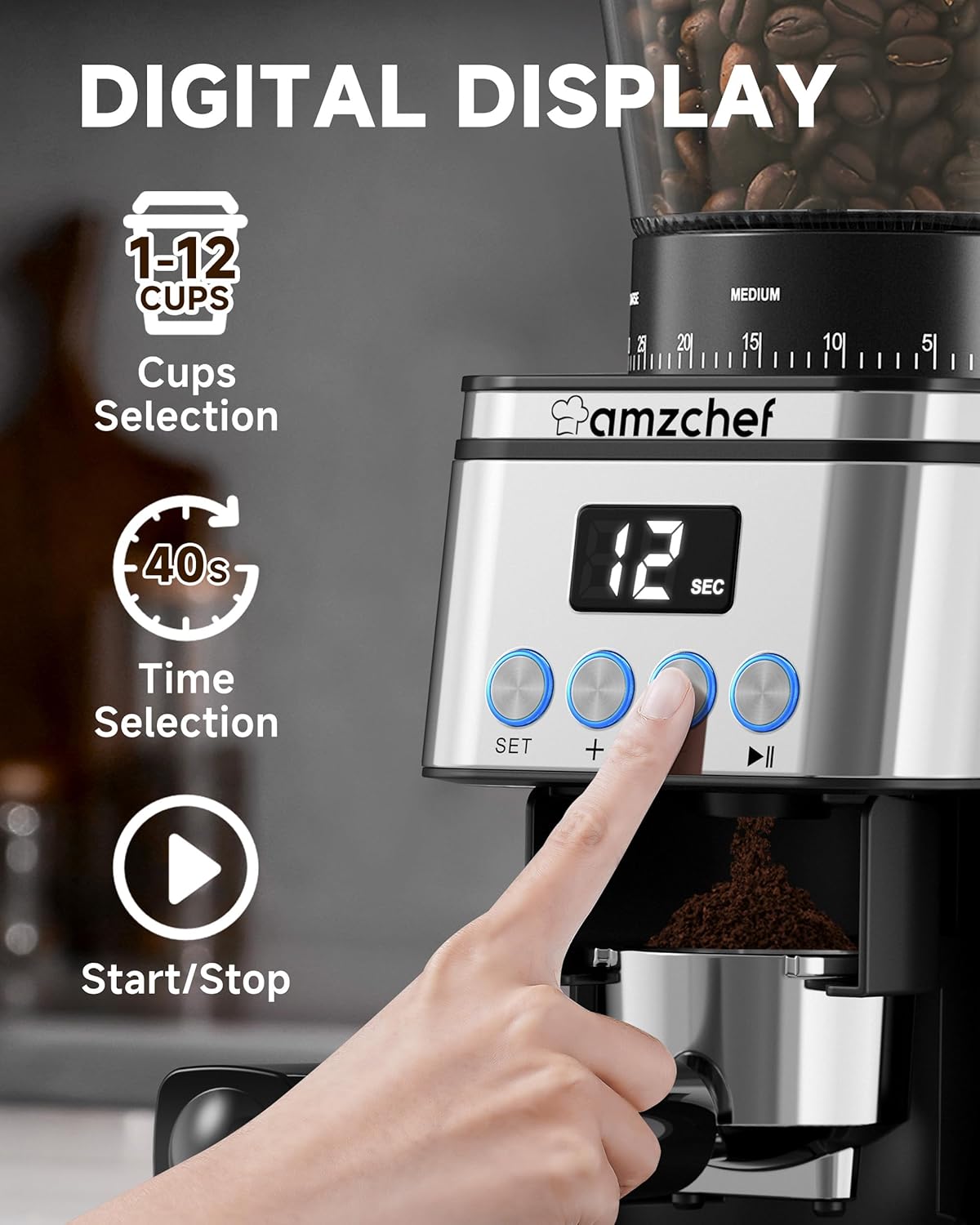
A detailed view of the grinder's digital display and control interface. The display shows '12 SEC', indicating a time setting. Below the display are four buttons: 'SET' for mode selection (cups/time), '+' and '-' for adjustment, and a play/pause icon for Start/Stop. Icons for '1-12 Cups Selection' and '40s Time Selection' are also visible, illustrating the dual control options.
- SET Button: Press to toggle between grinding by Cups (1-12) or by Time (up to 40 seconds).
- + / - Buttons: Use to increase or decrease the selected number of cups or grinding time.
- Start/Stop Button (Play/Pause icon): Press to start or stop the grinding process.
5.3. Grinding Coffee
- Fill the bean hopper with whole coffee beans. Ensure the lid is securely placed.
- Select your desired grind setting by rotating the bean hopper.
- Place the grounds container under the grinds outlet, or position your portafilter using the holder.
- Press the SET button to choose between grinding by Cups or Time.
- Use the + and - buttons to adjust the desired number of cups (1-12) or grinding time (up to 40 seconds).
- Press the Start/Stop button to begin grinding. The grinder will automatically stop once the selected quantity or time is reached.
- Remove the grounds container or portafilter.
6. Maintenance and Cleaning
Regular cleaning ensures optimal performance and extends the lifespan of your coffee grinder.
6.1. Anti-Static Technology
The AMZCHEF grinder features anti-static technology to minimize static cling of coffee grounds, ensuring a cleaner grinding experience and less mess on your countertop.

This visual comparison highlights the effectiveness of the anti-static technology. On the left, the AMZCHEF grinder's grounds chamber shows clean, contained coffee grounds, labeled 'AMZCHEF'. On the right, a 'VS' indicates a comparison with 'OTHERS', showing coffee grounds scattered and clinging to the container walls due to static, demonstrating the mess-free benefit of the anti-static feature.
6.2. Cleaning Procedure
Always unplug the grinder before cleaning.

This image demonstrates the easy-to-clean design of the AMZCHEF BG709S coffee grinder. It shows the included specialized cleaning brush, along with the removable upper burr, grounds chamber, and bean hopper, all designed for simple disassembly and cleaning.
- Remove the bean hopper by twisting it counter-clockwise and lifting it off. Empty any remaining beans.
- Remove the upper burr by lifting it out.
- Use the provided cleaning brush to remove any coffee grounds from the upper burr, lower burr, and grinding chamber.
- Wash the bean hopper, bean hopper lid, grounds container, and upper burr with warm, soapy water. Rinse thoroughly and dry completely before reassembling. Do not wash the main motor unit.
- Wipe the exterior of the grinder with a damp cloth. Do not use abrasive cleaners or scouring pads.
- Reassemble all parts once they are completely dry.
7. Troubleshooting
If you encounter issues with your grinder, refer to the table below for common problems and solutions.
| Problem | Possible Cause | Solution |
|---|---|---|
| Grinder does not start. | Not plugged in; Hopper or grounds container not properly installed; Overheating. | Ensure power cord is securely plugged in. Check if hopper and grounds container are correctly locked in place. Unplug and let cool for 30 minutes before restarting. |
| Grinding is inconsistent. | Burrs are dirty or clogged; Incorrect grind setting for bean type. | Clean the burrs and grinding chamber thoroughly. Adjust grind setting to a finer or coarser level as needed. |
| Coffee grounds are static and messy. | Humidity levels; Very dry beans. | While the grinder has anti-static technology, extreme conditions can still cause some static. Ensure beans are fresh. |
| Grinder stops during operation. | Overload protection activated; Hopper empty. | Reduce the amount of beans if overloading. Refill hopper. Unplug and allow to cool if motor protection activated. |
| Beans are not feeding into the burrs. | Hopper outlet clogged; Beans are too oily. | Carefully clear any blockages in the hopper outlet. Use less oily beans if possible. |
8. Technical Specifications
| Feature | Specification |
|---|---|
| Model Number | BG709S |
| Brand | AMZCHEF |
| Material | Stainless Steel |
| Colour | Stainless Steel |
| Capacity | 300g (approx. 11 oz) |
| Power/Wattage | 160 Watts |
| Voltage | 120 Volts |
| Grind Settings | 30 Precise Settings |
| Control Type | Digital Display with Buttons |
| Special Features | Anti-Static Technology, Conical Burr, Adjustable Cups/Time |
| Item Weight | 2.67 kg |
| Parcel Dimensions | 37.9 x 23.2 x 16.4 cm |
9. Warranty and Customer Support
AMZCHEF stands behind the quality of its products. The AMZCHEF Coffee Grinder Electric comes with a 1-year warranty on the motor and a 1-year warranty for normal accessory exchange.
If you have any issues with your coffee grinder or require technical assistance, please contact AMZCHEF customer service. Provide your model number (BG709S) and purchase details when contacting support for faster service.
For further assistance, please visit the official AMZCHEF store or contact their customer service channels as provided at the point of purchase.


